当前位置:网站首页>在Vs Code中搭建JSP开发环境
在Vs Code中搭建JSP开发环境
2022-06-22 05:03:00 【m0_54850467】
如何在Visual Studio Code中搭建JSP网页的开发环境
准备:
- Visual Studio Code
- jdk
- Maven
- Tomcat
VsCode和Java开发环境
VsCode的安装不再赘述
首先需要在vscode中搭建好Java的开发环境,安装java环境的扩展插件
下载jdk,建议使用jdk11,若有梯子可以上官网下载,没有的话建议去清华大学的镜像站下载
下载好之后将JDK的环境变量配置好,配置JDK的环境变量网上已经有大量资料,不再赘述。特别提醒系统变量中必须要有一个叫JAVA_HOME的变量,否则后面使用Maven新建项目会失败
下载并配置Maven
从Maven官网上下载任意版本
这里我们选择最新的3.8.2,并且下载解压版,下载完成之后解压
之前在vscode中安装好了Java开发环境之后,Maven for Java这个扩展应该也装好了,但不能直接使用,按ctrl+shift+p搜索Maven的设置,把的Maven的配置文件目录的路径设置好
至此Maven已经配置好
Tomcat的下载与配置
从Tomcat的官网上下载任意版本,这里我们选用较为稳定的8.5.71版本
下载完成后解压
在VsCode中安装Tomcat for Java插件
与前面设置maven类似,在vscode的设置中搜索tomcat,并设置tomcat的工作目录
配置Maven和Tomcat的环境变量
因为是类似的步骤,所以放在一起了
使用
重启vscode,可以看到文件目录里多了tomcat的服务器选项,点击加号添加
选择tomcat的根目录即可添加tomcat服务器
之后按Ctrl+Shift+P,输入Maven,点击创建一个Maven项目
再搜索webapp,来创建webapp项目,选择版本,输入项目名,选择项目目录之后即可开始创建
开始后如果报错可以检查有没有添加JAVA_HOME这个环境变量
耐心等待Maven创建项目,直到命令行提升要输入版本号(任意填写,相当于填你这个项目的信息),根据命令行的提示输入对应内容之后,项目即创建成功,由于我这里之前已经创建过其他项目,而使用Maven创建过第一次项目之后就不用再输入上述内容,所以这里没有截到图。
总之创建完的项目结构是这个样子的
此时已经可以开始编码了,可以看到默认的jsp页面中的内容如下
想要查看页面效果,在webapp文件夹上右键,选择Run On Tomcat Server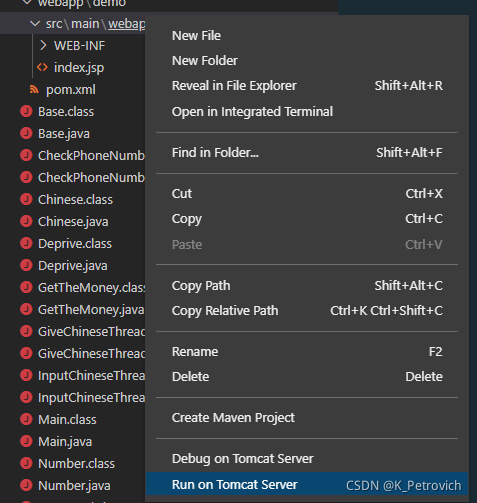
可以看到之前创建的tomcat服务器已经变成了绿色,看到命令行输出Server startup in xxx ms即代表服务器启动成功
通过命令行的提示可知道服务器启动在8080端口,在浏览器中输入127.0.0.1:8080/webapp/即可看到JSP页面部署后的样子
注意,如果网页报错则可能是服务器默认端口被占用,可以尝试去tomcat根目录中的conf文件夹中找到server.xml文件,搜索当前端口,并改为其他端口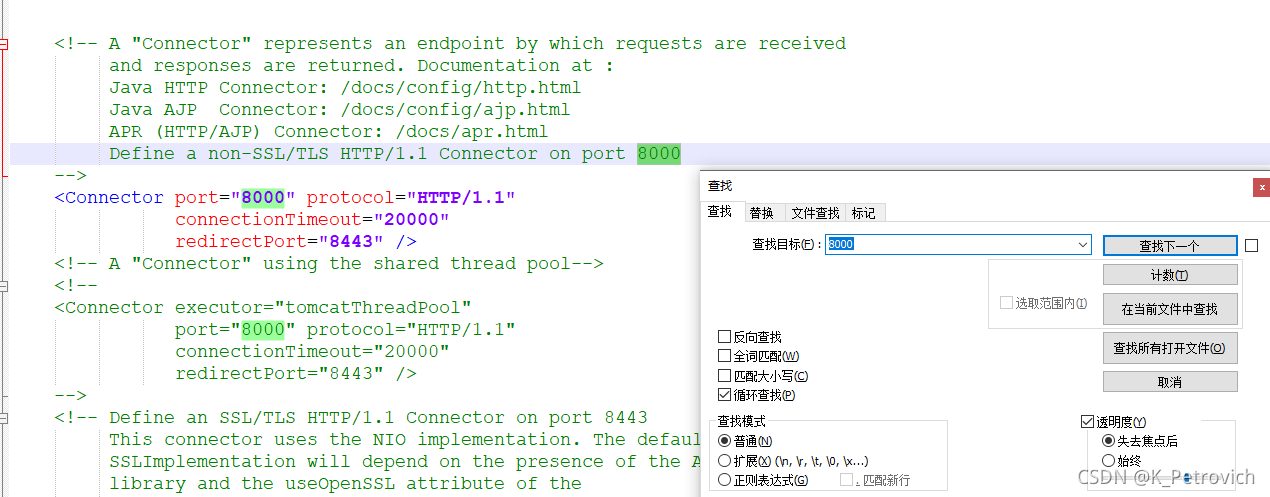
可以看出我这里把端口号改为了8000
边栏推荐
- 获取DPI函数返回值永远是96 | 获取DPI函数返回值不正确 | GetDpiForMonitor/GetDeviceCaps返回值不正确的原因
- MySQL day03 class notes
- Data backup and recovery
- 花式优化器整理
- go学习(二、内建容器)
- Monorepo Sliding methodology: Reference module Hot Update
- Restframework read and non read sequence processing
- Network Interview eight part essay of daily knowledge points (TCP, startling group phenomenon, collaborative process)
- 7. Gateway global filter
- Disturbed when programmers are programming? Daily anecdotes
猜你喜欢

Qt保存QTextEdit内存至.txt文件中

The application of RPC technology and its framework sekiro in crawler reverse, encrypting data is a shuttle!

Cloud native enthusiast weekly: Chaos mesh upgraded to CNCF incubation project

Software architecture and pattern: structure, component and relationship

【chrome】 谷歌小技巧 谷歌浏览器 自带 滚动截图(全屏截图)

slurm 使用教程

VirtualBox 6.1.34 发布

A domestic developer opened the "programmer's Guide to cooking" and became popular!
![[scientific research notes] focal loss](/img/ca/4a30fd925b87ed2baa2523d8dbf59d.png)
[scientific research notes] focal loss

Concurrent programming - thread pool
随机推荐
Detailed explanation of deep learning technology for building an image search engine that can find similar images
MySQL notes
Data backup and recovery
Disturbed when programmers are programming? Daily anecdotes
zipimport. ZipImportError:
Redis master-slave replication
[chrome] Google tips Google browser comes with scrolling screenshot (full screen shot)
mysql day02课堂笔记
Network Interview eight part essay of daily knowledge points (TCP, startling group phenomenon, collaborative process)
Monorepo silk slide methodology: reference module hot update
Hash type of redis
php正则怎么去掉括号内容
Chapter 6 infinite series_ Fourier series
图扑软件2D与2.5D案例合集|智慧园区、数据中心、SMT 生产线...
@Conditional use
Exness: ECB president Christine Lagarde reiterated her plan to raise interest rates at the July meeting
In 2022, the super intern plans to make a breakthrough in the offer of it famous enterprises, and the nine high salary skills help the dream of famous enterprises
What is cloud hosting and what are its advantages?
不允许方法被重写的方式包括哪些?
7. Gateway global filter