当前位置:网站首页>设置默认收货地址【项目 商城】
设置默认收货地址【项目 商城】
2022-06-11 10:58:00 【日星月云】
设置默认收货地址【项目 商城】
设置默认收货地址
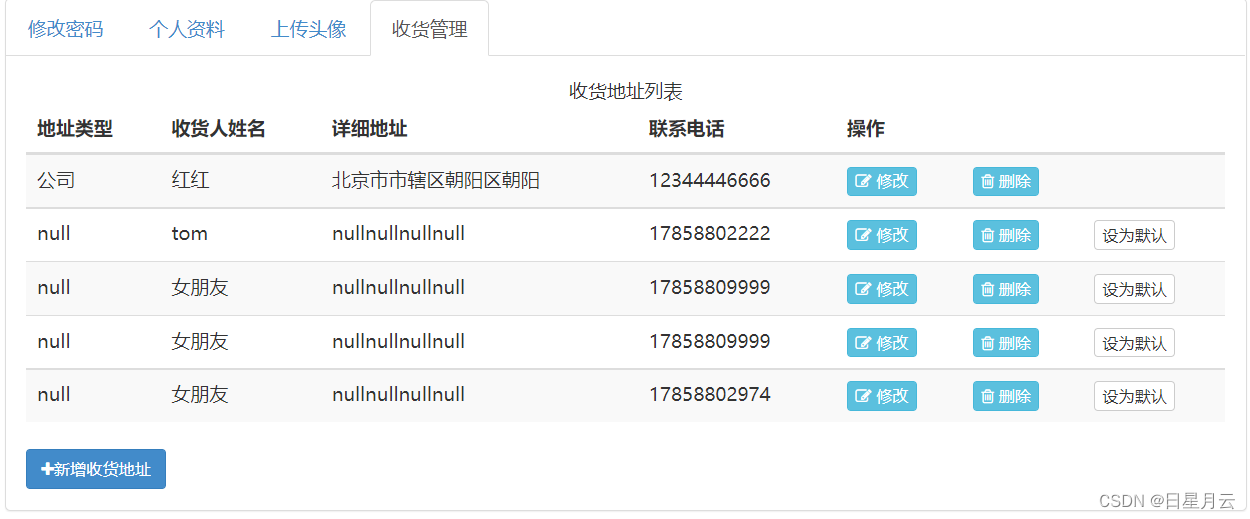
1. 持久层
1.1 规划SQL语句
修改 AddressService | getByUid
			//address.setAid(null);
            //address.setUid(null);
AddressService–Aid&Uid
1.检测当前用户想设置为默认地址的这条数据是否存在。
select * from t_address aid=?
2.在修改用户的收货默认地址之前,先将所有的收货地址设置为非默认。
update t_address set is_default=0 where uid=?
3.将用户当前选中的这条记录设置为默认收货地址。
update t_address set is_default=1 modified_user=?,modified_time=? where aid=?
1.2 设计抽象方法
在AddressMapper接口中来进行定义和声明。
 /** * 根据aid的查询收货地址数据 * @param aid 收货地址id * @return 收货地址数据,如果没有返回null */
    Address findByAid(Integer aid);

    /** * 根据用户的uid值来修改用户的收货地址设置为非默认 * @param uid 用户id * @return 受影响的行数 */
    Integer updateNonDefault(Integer uid);


    Integer updateDefaultByAid(@Param("aid") Integer aid,
                               @Param("modifiedUser") String modifiedUser,
                               @Param("modifiedTime") Date modifiedTime);
1.3 配置SQL映射
AddressMapper.xml文件中进行配置。
	<update id="updateNonDefault">
        UPDATE t_address
        SEt is_default=0
        WHERE uid=#{uid}
    </update>

    <update id="updateDefaultByAid">
        UPDATE t_address
        SET is_default=1,
        modified_user=#{modifiedUser},
        modified_time=#{modifiedTime}
        WHERE aid=#{aid}
    </update>

    <select id="findByAid" resultMap="AddressEntityMap">
        SELECT  * FROM t_address WHERE aid=#{aid}
    </select>
AddressMapper–findByAid
测试
在单元测试方法中进行测试。
 @Test
    public void findByAid(){

        Address address = addressMapper.findByAid(5);
        System.out.println(address);
    }

    @Test
    public void updateNonDefault(){

        Integer rows = addressMapper.updateNonDefault(8);
        System.out.println(rows);
    }

    @Test
    public void updateDefaultByAid(){

        Integer rows = addressMapper.updateDefaultByAid(5,"管理员",new Date());
        System.out.println(rows);
    }
AddressMapperTests–updateDefaultByAid
2.业务层
2.1 异常规划
1.在执行更新时产生未知的UpdateException异常。已经创建无需重复创建。
2.访问的数据不是当前登录用户的收货地址数据,非法访问:AccessDeniedException异常。
3.收货地址有可能不存在:AddressNotFoundException异常。
默认收货地址–ex
2.2 抽象方法
在接口IAddressService中编写抽象方法的定义。
/** * 修改某个用户的某条数据为默认收货地址 * @param aid 收货地址的id * @param uid 用户的id * @param username 表示修改执行的人 */
    void setDefault(Integer aid,Integer uid,String username);
2.3 实现抽象方法
在AddressServiceImpl类中进行开发和业务设计。
	@Override
    public void setDefault(Integer aid, Integer uid, String username) {

        // 根据参数aid,调用addressMapper中的findByAid()查询收货地址数据
        Address result = addressMapper.findByAid(aid);
        // 判断查询结果是否为null
        if (result == null) {

            // 是:抛出AddressNotFoundException
            throw new AddressNotFoundException("尝试访问的收货地址数据不存在");
        }

        // 判断查询结果中的uid与参数uid是否不一致(使用equals()判断)
        if (!result.getUid().equals(uid)) {

            // 是:抛出AccessDeniedException
            throw new AccessDeniedException("非法访问的异常");
        }

        // 调用addressMapper的updateNonDefaultByUid()将该用户的所有收货地址全部设置为非默认,并获取返回受影响的行数
        Integer rows = addressMapper.updateNonDefault(uid);
        // 判断受影响的行数是否小于1(不大于0)
        if (rows < 1) {

            // 是:抛出UpdateException
            throw new UpdateException("设置默认收货地址时出现未知错误[1]");
        }

        // 调用addressMapper的updateDefaultByAid()将指定aid的收货地址设置为默认,并获取返回的受影响的行数
        rows = addressMapper.updateDefaultByAid(aid, username, new Date());
        // 判断受影响的行数是否不为1
        if (rows != 1) {

            // 是:抛出UpdateException
            throw new UpdateException("设置默认收货地址时出现未知错误[2]");
        }
    }
AddressService–setDefault
测试
在单元测试类中进行测试。
  	@Test
    public void setDefault(){

        addressService.setDefault(4,8,"管理员");
    }
AddressServiceTests–setDefault
3 控制层
3.1 处理异常
在BaseController中处理异常。
		else if (e instanceof AccessDeniedException){

            result.setState(4005);
            result.setMessage("收货地址数据非法访问的异常");
        }else if (e instanceof InsertException){

            result.setState(5000);
            result.setMessage("插入数据时产生未知的异常");
        }
BaseController–ex–setDefault
3.2 设计请求
/address/{aid}/set_default
@PathVariable("aid") Integer aid,HttpSession session
GET
JsonResult<Void>
3.3 完成请求方法
在AddressController类中编写请求处理方法。
	//RestFul风格的请求编写
    @RequestMapping("{aid}/set_default")
    public JsonResult<Void> setDefault(@PathVariable("aid") Integer aid,HttpSession session){

        addressService.setDefault(
                aid,
                getuidFromSession(session),
                getUsernameFromSession(session));
        return new JsonResult<>(OK);
    }
AddressController–setDefault
测试
打开浏览器登录在去访问请求路径/address/{aid}/set_default
http://localhost:8080/address/5/set_default
4. 前端页面
address.html页面点击“设置默认”按钮,来发送ajax请求。
1.给设置默认收货按钮添加一个onclick属性,指向一个方法的调用,在这个方法中来完成ajax请求的方法。
address.html | showAddressList方法中修改
+ '<td><a οnclick="setDefault(#{aid})" class="btn btn-xs add-def btn-default">设为默认</a></td>'
完成setDefault方法的定义
		// <!--setDefault-->
			function setDefault(aid) {

				$.ajax({

					url: "/address/" + aid + "/set_default",
					type: "POST",
					dataType: "JSON",
					success: function(json) {

						if (json.state == 200) {

							showAddressList();
						} else {

							alert("设置默认收货地址失败!" + json.message);
						}
					},
					error: function(xhr) {

						alert("您的登录信息已经过期,请重新登录!HTTP响应码:" + xhr.status);
						location.href = "login.html";
					}
				});
			}
			// <!--setDefault-->
address.html–setDefault
测试
先登录再访问addAddress.html页面进行测试。
修改路径address–>addresses
README–设置默认收货地址
边栏推荐
- 数据库系统概论 ---- 第二章 -- 关系数据库(2.1~2.3)(重要知识点)
- 杰理之获取 BLE 查看代码异常复位等异常情况原因【篇】
- Implementation of competition scoring system based on C language
- 使用Yolov3训练自己制作数据集,快速上手
- Leetcode (Sword finger offer) - 10- ii Frog jumping on steps
- 封装组件系列-(一)-插槽及动态组件
- Using ribbon to realize client load balancing
- Digital collection app applet official account source code
- How programmers do sidelines
- 2022 Health Expo, Beijing Great Health Industry Exhibition, moxibustion health exhibition, Beijing Health Service Exhibition
猜你喜欢

Store management skills: how to manage chain stores efficiently?

After 95, programmers in big factories were sentenced for deleting databases! Dissatisfied with the leaders because the project was taken over

云画质助手iApp源码

Introduction to database system -- Chapter 2 -- relational database (2.4 relational algebra)

装饰模式--小美的生日蛋糕
![Jerry's acquisition of ble OTA dual backup upgrade (can only be used for chips above 4mbits) [article]](/img/25/e90d23f5c3d2aa6790538b289137bf.png)
Jerry's acquisition of ble OTA dual backup upgrade (can only be used for chips above 4mbits) [article]

企业微信小程序避坑指南,欢迎补充。。。

Exploration of kangaroo cloud data stack on spark SQL optimization based on CBO
![Electron desktop development (development of an alarm clock [End])](/img/2b/dd59ebc8d11bedfc53020d69f1aa69.png)
Electron desktop development (development of an alarm clock [End])
袋鼠云数栈基于CBO在Spark SQL优化上的探索
随机推荐
数字藏品系统源码搭建
Vscode——vscode 多窗口名字配置成项目名字
找到自己的优势,才能干活不累,事半功倍!
MySQL下载安装使用-完整详细步骤
Installing redis in CentOS 7 environment
Distance measurement - Euclidean distance
使用Yolov5训练好模型调用电脑自带摄像头时出现问题:TypeError: argument of type “int‘ is not iterable的解决方法
MWC 2022 lights up the future, and everything serves
杰理之BLE SPP 开启 pin_code 功能【篇】
Cube 技术解读 | Cube 渲染设计的前世今生
Application of volatile in single chip microcomputer
What is the best annuity insurance product in 2022?
Surrounddepth: self supervised multi camera look around depth estimation
MySQL (IX)
Unity font spacing
985 University doctors became popular because of their thanks in classical Chinese! The tutor commented that he not only wrote well in sci
使用Yolov5训练自己制作的数据集,快速上手
2022北京国际营养健康产业博览会,第九届中国大健康产业展会
适配器模式--能不能好好说话?
MySQL download, installation and use - complete and detailed steps