当前位置:网站首页>Record a PG master-slave setup and data synchronization performance test process
Record a PG master-slave setup and data synchronization performance test process
2022-07-27 08:03:00 【Shenzhi Kalan Temple】
Catalog
background
With the development of relational databases in the financial field ORACLE turn , More and more customer sites begin to use domestic cloud databases or open source databases . Domestic databases include OceanBase, Reach a dream , And our eternal LightDB( Super easy to use , Extreme push ), They all have strong performance and customer-oriented operation and maintenance , There will be no more talk here . The open source used in our products RDBMS At present MySQL Mainly , Its advantages are many , Small volume 、 Fast 、 Low total cost of ownership 、 Open source code and so on , This is also the product most used by customers . however MySQL One drawback is that master-slave synchronization is extremely slow under large transactions , A certain site in Beijing is synchronizing some extra large data tables , Such as fund evaluation data ( Tens of millions ) It will cause master-slave synchronization stagnation , It has seriously affected the use of the product . Of course, the subsequent process is emptied instead of deleted , Reducing the amount of each submission is also a reasonable and effective solution to this problem . Because the back will go up PG edition , To prevent this from happening again during data synchronization , The leader asked me to start testing PG Master slave synchronization , It's time to record , It is a little reference for subsequent field applications and new library testing .

PG install
Default environment Linux centos7 Distribution version
- Create directory
# mkdir -p /opt/database/
- Download decompression
It is recommended to download the installation package on the official website : After selecting the version ( Here 12.2), choice tar.gz Format https://www.postgresql.org/ftp/source/ https://www.postgresql.org/ftp/source/
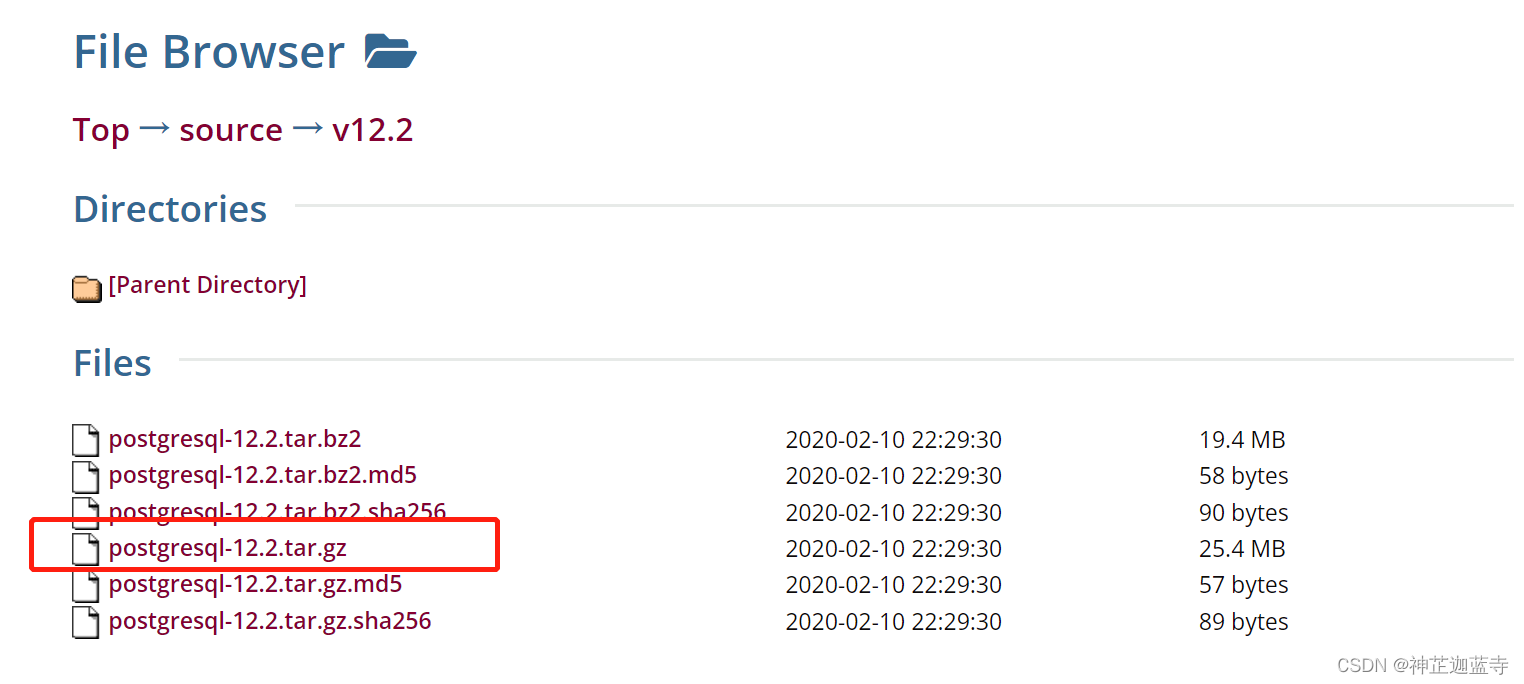
Put the installation package in /opt/database/ Under the table of contents
# tar -zxvf postgresql-12.2.tar.gz
- Installation dependency
# yum install -y bison
# yum install -y flex
# yum install -y readline-devel
# yum install -y zlib-devel
- Compilation and installation
# ./configure --prefix=/opt/database/postgresql-12.2
# make
# make install
- Create user
# groupadd postgres
# useradd -g postgres postgres
# chown -R postgres:postgres /opt/database/postgresql-12.2
# mkdir -p /opt/database/postgresql-12.2/data
- Installation initialization
# su postgres
$ /opt/database/postgresql-12.2/bin/initdb -D /opt/database/postgresql-12.2/data/$ /opt/database/postgresql-12.2/bin/pg_ctl -D /opt/database/postgresql-12.2/data/ -l logfile start -- Start database
$ /opt/database/postgresql-12.2/bin/pg_ctl -D /opt/database/postgresql-12.2/data/ stop -- Stop database
$ /opt/database/postgresql-12.2/bin/pg_ctl restart -D /opt/database/postgresql-12.2/data/ -m fast -- Restart the database
- environment variable
$ su root
# cd /home/postgres
# vim .bash_profileadd to :
export PGHOME=/opt/database/postgresql-12.2
export PGDATA=/opt/database/postgresql-12.2/data
PATH=$PATH:$HOME/bin:$PGHOME/bin# source .bash_profile
- Boot from boot
# cp /opt/database/postgresql-12.2/contrib/start-scripts/linux /etc/init.d/postgresql
# chmod a+x /etc/init.d/postgresql
# vim /etc/init.d/postgresqlchange prefix and PGDATA , See the above for the changes
# chkconfig --add postgresql ( Add boot entry )
# chkconfig ( Check whether the addition is accurate )
- Set the password
PostgreSQL A database user will be automatically created after installation , be known as postgres
$ service postgresql start
$ psql -U postgres
postgres=#   ALTER USER postgres with encrypted password '${PASSWD}'; ( Password is freely set )postgres=#   \q ( You can quit )
notes : The above steps should be implemented once for both the main database server and the standby database server , That is, install them all PG database
Master slave configuration
Through the above installation configuration , The master and slave servers have been installed PostgreSQL database
Main library configuration
- Create a copy permission account
CREATE ROLE replica login replication encrypted password '${PASSWD}';- Modify role authorization
# vim /opt/database/postgresql-12.2/date/pg_hba.conf
Add all IP You can visit :host all all 0.0.0.0/0 trust
Add copy from library : host replication replica From the machine IP/24 md5

- Modify the configuration file
# vim /opt/database/postgresql-12.2/date/postgresql.conf
#  Add or modify the following attribute settings
#  To monitor all IP
listen_addresses = '*'
#  Open archive
archive_mode = on
# Filing order pg Database data Folder
archive_command = 'test ! -f /opt/database/postgresql-12.2/data/pg_archive/%f && cp %p /opt/database/postgresql-12.2/data/pg_archive/%f'
# Hot standby mode
wal_level = replica
# At most 2 Stream replication connection
max_wal_senders = 2
wal_keep_segments = 16
# Stream copy timeout
wal_sender_timeout = 60s
# maximum connection , The slave needs to be greater than or equal to this value
max_connections = 100- Restart the database
$ pg_ctl -D /opt/database/postgresql-12.2/data -l /opt/database/postgresql-12.2/data/logfile restart
Configuration from library
The configuration of slave database is simpler than that of master database
1. Out of Service
$ pg_ctl -D /opt/database/postgresql-12.2/data -l /opt/database/postgresql-12.2/data/logfile stop2. Empty files
$ rm -rf /opt/database/postgresql-12.2/data/*3.copy Data on the master server
$ pg_basebackup -h Master node IP -p 5432 -U replica -Fp -Xs -Pv -R -D /opt/database/postgresql-12.2/data/4. edit data It will appear in the directory standby.signal file , Join in standby_mode = 'on'
$ vim /opt/database/postgresql-12.2/data/standby.signal5. edit postgresql.conf file , See below for details
$ vim /opt/database/postgresql-12.2/data/postgresql.conf
# Slave information and connected users
primary_conninfo = 'host= Master node IP port=5432 user=replica password=replica User's password '
# Description: restore to the latest state
recovery_target_timeline = latest
# Greater than the primary node , The formal environment should reconsider the size of this value
max_connections = 120
# It shows that this machine is not only used for data archiving , It can also be used for data query
hot_standby = on
# Maximum latency of streaming backup
max_standby_streaming_delay = 30s
# The interval between reporting local status to the host
wal_receiver_status_interval = 10s
#r An error occurred copying , Feedback to the host
hot_standby_feedback = on
Finally, start the database service
$ pg_ctl -D /opt/database/postgresql-12.2/data -l /opt/database/postgresql-12.2/data/logfile start
Verify master-slave setup
Connect the main library to run sql
select client_addr,sync_state from pg_stat_replication;Return the following values to indicate success , You can also create tables in the main database , Insert , Check whether the slave library is synchronized by operations such as emptying

Data synchronization
Now perform data synchronization verification , Look at the configuration of master-slave PG Whether the synchronization of a large amount of data in the database can run quickly , Will there be any other problems ?
What we use here is kettle This ETL Tools to write text data , Data synchronization , Data calculation and other operations

Verified by a large amount of data , The test results are as follows :
- truncate these DDL The operation can be master-slave synchronization , Seconds to complete
- In the process of batch writing , Master slave synchronization always maintains data consistency
- The batch write rate is too slow ,320w Data time 960 second (3333r/s)
- There is a problem with the process cleaning mechanism , After each run failure , You need to delete the sql process , Otherwise, it will stop running again ( Lock table )
- It's a strong type of , When fields are compared with each other or assigned values, they must be of the same type
- update use update table1 from table2 Is the fastest performance
- Refer to other synchronization tools such as datax, It is found that the increase rate is nothing more than removing the index , Read / write separation , Close and archive these operations that the bank will not do on site ,PG There's nothing like MySQL Of rewriteBatchedStatements Force batch submission
边栏推荐
- 这次龙蜥展区玩的新花样,看看是谁的 DNA 动了?
- Translation character '/b' in C #
- Shell awk related exercises
- Promise details
- Kalibr calibration realsensed435i -- multi camera calibration
- 2020国际机器翻译大赛:火山翻译力夺五项冠军
- MySQL table name area in Linux is not case sensitive
- 增强:BTE流程简介
- OpenGL shader learning notes: varying variables
- 如何获取广告服务流量变现数据,助力广告效果分析?
猜你喜欢

Comprehensive analysis of ADC noise-01-types of ADC noise and ADC characteristics

RPC remote procedure call

Lu Xun: I don't remember saying it, or you can check it yourself!

剑指 Offer 58 - I. 翻转单词顺序

Lua iterator

一文速览EMNLP 2020中的Transformer量化论文
Lua迭代器

linux能不能安装sqlserver

Things come to conform, the future is not welcome, at that time is not miscellaneous, neither love

Enhancement: BTE process introduction
随机推荐
抽象工厂模式
shell脚本学习day01
Prevent cookies from modifying ID to cheat login
linux能不能安装sqlserver
综合案例、
Day111. Shangyitong: integrate nuxt framework, front page data, hospital details page
Day111.尚医通:集成NUXT框架、前台页面首页数据、医院详情页
【小程序】uniapp发行微信小程序上传失败Error: Error: {'errCode':-10008,'errMsg':'invalid ip...
3D激光SLAM:LeGO-LOAM论文解读---摘要
API version control [eolink translation]
Modification case of Ruixin micro rk3399-i2c4 mounting EEPROM
Lua迭代器
Translation character '/b' in C #
I can't figure out why MySQL uses b+ trees for indexing?
C commissioned use cases
【飞控开发基础教程4】疯壳·开源编队无人机-串口(光流数据获取)
C language: random number + Hill sort
Dormitory access control system made by imitating the boss (III)
SQL labs SQL injection platform - level 1 less-1 get - error based - Single Quotes - string (get single quote character injection based on errors)
Harbor can't log in with the correct password