当前位置:网站首页>二、用户登录和注册
二、用户登录和注册
2022-06-11 07:03:00 【beyond谚语】
一、页面设计
一共四个页面
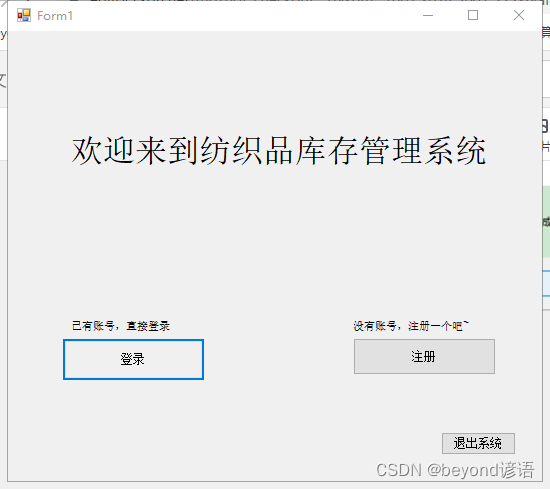
主页面Form1,登录页面login,注册页面resister,主菜单页面main_page
系统运行进入Form1,单击登录按钮跳转到login,数据库中得存在数据信息且输入正确才可登录成功,跳转到main_page
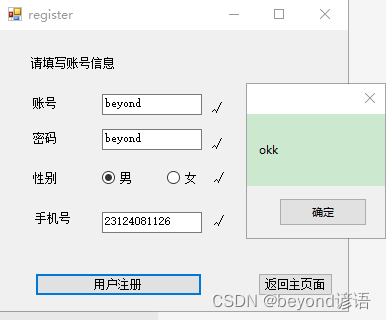
单击注册按钮跳转到register,用户需要注册账号、密码、性别、手机号信息
Form1
login
register
main_page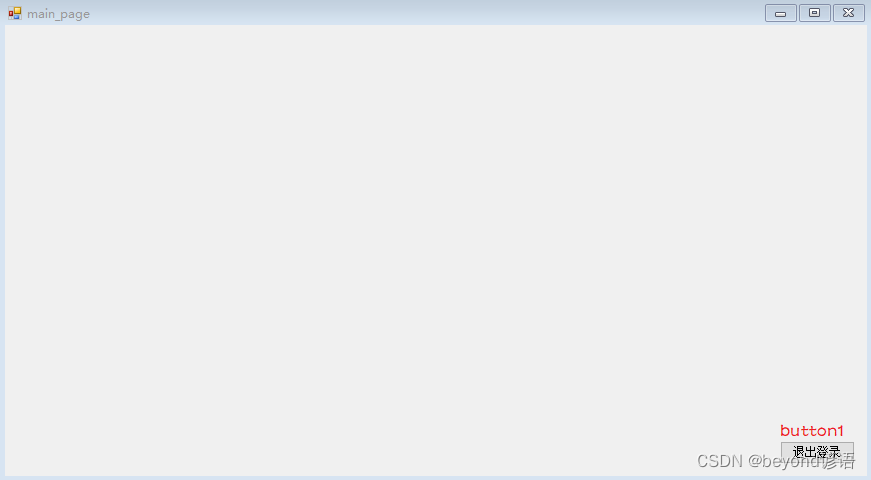
四个页面如下
二、数据库的创建
创建fiber_yy数据库,在其下创建yy_user表,其中id为主键自增
整体结构如下
三、相关代码
Form1代码
using System;
using System.Collections.Generic;
using System.ComponentModel;
using System.Data;
using System.Drawing;
using System.Linq;
using System.Text;
using System.Threading.Tasks;
using System.Windows.Forms;
using System.Data.Sql;
using System.Data.SqlClient;


namespace fiber_yy
{

    public partial class Form1 : Form
    {


        public Form1()
        {

            InitializeComponent();
        }

        private void label2_Click(object sender, EventArgs e)
        {


        }

        private void button1_Click(object sender, EventArgs e)
        {

            this.Hide();
            new login().Show();

        }

        private void button3_Click(object sender, EventArgs e)
        {

            MessageBox.Show("see you again~");
            Application.Exit();  //退出进程
        }

        private void button2_Click(object sender, EventArgs e)
        {

            this.Hide();
            new register().Show();
        }
    }
}
login代码
using System;
using System.Collections.Generic;
using System.ComponentModel;
using System.Data;
using System.Data.OleDb;
using System.Drawing;
using System.Linq;
using System.Text;
using System.Threading.Tasks;
using System.Windows.Forms;
using System.Data.Sql;
using System.Data.SqlClient;

namespace fiber_yy
{


    public partial class login : Form
    {

        public static string str_conn = "server=CY-20190824RMES;Initial Catalog=fiber_yy;User ID=sa;pwd=beyond";
        SqlConnection conn = new SqlConnection(str_conn);
        public string identification = null;

        public login()
        {

            InitializeComponent();
            conn.Open();
        }


        private void button1_Click(object sender, EventArgs e)//登录
        {

            string username = textBox1.Text;
            string password = textBox2.Text;
            string identify = textBox3.Text;

            if (username.Equals("") || password.Equals("") || identify.Equals(""))
            {

                MessageBox.Show("提示:请输入用户名、密码、验证码!", "警告");
            }

            else
            {

                string sqlSel = "select count(*) from yy_user where username = '" + username + "' and password = '" + password + "'";
                SqlCommand cmd = new SqlCommand(sqlSel, conn);
                if (Convert.ToInt32(cmd.ExecuteScalar()) > 0 )
                {

                    if(identify==identification)
                    {

                        this.Close();
                        MessageBox.Show("用户登录成功");
                        new main_page().Show();
                    }
                    else
                    {

                        MessageBox.Show("验证码输入错误");
                    }

                }
                else
                {

                    MessageBox.Show("账号或密码错误");
                }
            }

        }

        private void pictureBox1_Click(object sender, EventArgs e)
        {

            Random r = new Random();
            string str = null;
            for (int i = 0; i < 5; i++)
            {

                int n = r.Next(0, 10);
                str += n;//包括字符串在内
            }
            identification = str;
            Bitmap b = new Bitmap(100, 15);
            Graphics g = Graphics.FromImage(b);

            for (int i = 0; i < 5; i++)
            {

                String[] fonts = {
     "宋体", "黑体", "隶书", "仿宋", "微软雅黑" };//字体数组
                Color[] colors = {
     Color.Red, Color.Black, Color.Blue,Color.YellowGreen ,Color.Green };//颜色数组
                Font f = new Font(fonts[r.Next(0, 5)], 25, FontStyle.Bold);
                SolidBrush s = new SolidBrush(colors[r.Next(0, 5)]);//定义一个单独的画笔,使每个字符的颜色随机
                Point p = new Point(i * 20, 0);//每个字符间隔20
                g.DrawString(str[i].ToString(), Font, s, p);
            }

            for (int a = 0; a < 5; a++)
            {

                Point p1 = new Point(r.Next(0, b.Width), r.Next(0, b.Height));
                Point p2 = new Point(r.Next(0, b.Width), r.Next(0, b.Height));//线的两点不能超过图片的长和宽
                Pen pen = new Pen(Brushes.Cyan);//青色线段
                g.DrawLine(pen, p1, p2);
            }

            pictureBox1.Image = b;

        }
    }
}
register代码
using System;
using System.Collections.Generic;
using System.ComponentModel;
using System.Data;
using System.Data.OleDb;
using System.Drawing;
using System.Linq;
using System.Text;
using System.Threading.Tasks;
using System.Windows.Forms;
using System.Data.Sql;
using System.Data.SqlClient;

namespace fiber_yy
{

    public partial class register : Form
    {


        public static string str_conn = "server=CY-20190824RMES;Initial Catalog=fiber_yy;User ID=sa;pwd=beyond";
        SqlConnection conn = new SqlConnection(str_conn);

        public register()
        {

            InitializeComponent();
        }

        private void button1_Click(object sender, EventArgs e)
        {

            string sex="man";
            long phone_number;
            int account_number, password, sum=0;
            account_number = textBox1.Text.Length;
            password = textBox2.Text.Length;
            phone_number = long.Parse(textBox3.Text);

            if (account_number <= 3 || account_number >= 16)
            {

                label6.Text = "账号长度应该在3~16字符之间";
                sum++;
            }
            else
            {

                label6.Text = "校验成功";
            }

            if (password <= 3 || password >= 16)
            {

                label7.Text = "密码长度应该在3~16字符之间";
                sum++;
            }
            else
            {

                label7.Text = "校验成功";
            }


            if (radioButton1.Checked)
            {

                sex = "man";
            }
            else if (radioButton2.Checked)
            {

                sex = "woman";
            }


            if (phone_number < 10000000000 || phone_number > 99999999999)
            {

                label9.Text = "请输入正确的手机号";
                sum++;
            }
            else
            {

                label9.Text = "校验成功";
            }

            if (sum == 0)
            {

                label6.Text = "√";
                label7.Text = "√";
                label8.Text = "√";
                label9.Text = "√";


                try
            {

                string sql = string.Format("select count(*) from yy_user where username='{0}'", textBox1.Text);
                SqlCommand cmd = new SqlCommand(sql, conn);

                conn.Open();
                int a = (int)cmd.ExecuteScalar();//返回一个值,看用户是否存在 1存在 0不存在
                StringBuilder strsql = new StringBuilder();
                //MessageBox.Show(a.ToString());
                if(a==1)
                {

                    MessageBox.Show("用户名已存在");
                }
                else
                {

                    MessageBox.Show("okk");
                    //string INSERT_sql = string.Format("INSERT INTO user_yy VALUES ('{0}','{1}')", textBox1.Text,textBox2.Text);

                    string INSERT_sql = string.Format("INSERT INTO yy_user VALUES ('{0}','{1}','{2}','{3}')", textBox1.Text.Trim(), textBox2.Text.Trim(), sex, textBox3.Text.Trim());
                    SqlCommand INSERT_cmd = new SqlCommand(INSERT_sql, conn);
                    int count = INSERT_cmd.ExecuteNonQuery();
                    if (count > 0)
                    {

                        MessageBox.Show("注册成功!");
                        this.Close();
                        new Form1().Show();
                    }
                    else
                    {

                        MessageBox.Show("GG");
                    }
                }

            }
            catch(Exception ex)
            {

                MessageBox.Show(ex.Message);
            }

            }
        }

        private void button2_Click(object sender, EventArgs e)
        {

            this.Close();
            MessageBox.Show("用户登录成功");
            new main_page().Show();
        }
    }
}
main_page代码
using System;
using System.Collections.Generic;
using System.ComponentModel;
using System.Data;
using System.Drawing;
using System.Linq;
using System.Text;
using System.Threading.Tasks;
using System.Windows.Forms;

namespace fiber_yy
{

    public partial class main_page : Form
    {

        public main_page()
        {

            InitializeComponent();
        }

        private void button1_Click(object sender, EventArgs e)
        {

            MessageBox.Show("退出成功");
            this.Close();
            new Form1().Show();
        }
    }
}
四、效果展示
原始数据集数据信息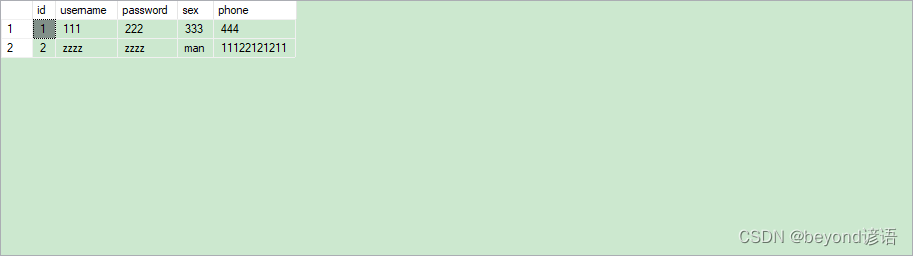
运行程序
注册


右击 yy_user—> 选择前1000行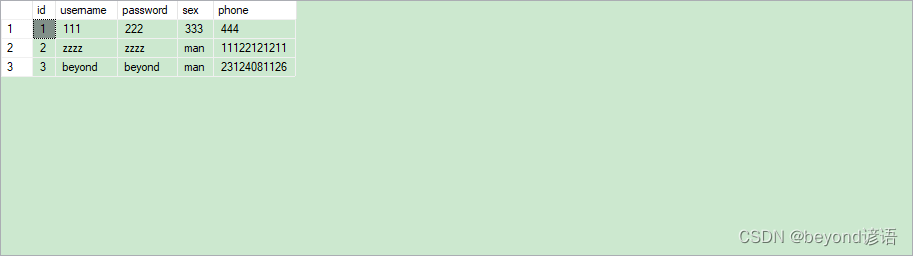
已经注册成功了,接下来开始登录
随便输入一个账号

输入正确的账号,但验证码输入错误

账号密码验证码输入正确

跳转到main_page
退出登录之后会返回到Form1
退出系统,提示see you again~
边栏推荐
- Leetcode-141. Linked List Cycle
- Interview question 17.08 Circus tower
- Promises/a+ standard Chinese Translation
- 337. house raiding III
- Reconstruction and preheating of linked list information management system (2) how to write the basic logic using linear discontinuous structure?
- Graph Attention Tracking
- The meaning and research significance of mathematical methodology
- Web API、DOM
- 顶流编辑器 Atom,将于 12 月 15 日退出历史舞台
- Matplotlib,设置坐标刻度大小,字体/设置图例大小及字体/设置纵横坐标名称及字体及大小
猜你喜欢
![pycharm出现error.DeprecatedEnv: Env FrozenLake-v0 not found (valid versions include [‘FrozenLake-v1‘])](/img/1c/4013479ce1fc5b0ff2ebeb754f05a9.png)
pycharm出现error.DeprecatedEnv: Env FrozenLake-v0 not found (valid versions include [‘FrozenLake-v1‘])

Leetcode-141. Linked List Cycle
常用问题排查工具和分析神器,值得收藏

教育专家王中泽老师一招解决学生问题

Menu double linkage effect in uniapp

News web page display

Leetcode hot topic 100 topic 21-25 solution

Object. Specific implementation and difference between create() and new

About the designer of qtcreator the solution to the problem that qtdesigner can't pull and hold controls normally
![[并发进阶]——线程池总结](/img/69/dc8146dafc30f8a8efa012b67aa05c.png)
[并发进阶]——线程池总结
随机推荐
Matplotlib,设置坐标刻度大小,字体/设置图例大小及字体/设置纵横坐标名称及字体及大小
Menu double linkage effect in uniapp
Promises/a+ standard Chinese Translation
Modular notes
The difference between arrow function and ordinary function
Shangtang technology has actively resumed work and will vigorously invest in the capacity and deployment of the digital sentry
Practice: how to reasonably design functions to solve practical problems in software development (II) -- improving reusability
Method to determine whether it is an array
[MATLAB image fusion] particle swarm optimization adaptive multispectral image fusion [including source code phase 004]
Bat (batch processing) processing special symbols (exclamation point, percent sign), etc
Aircraft battle from scratch (III) flight between player aircraft and enemy aircraft
WPF data binding (IV)
农房一体脚本的心得记录
Difference between byte and bit
1266_ Implementation analysis of FreeRTOS scheduler startup code
Shuttle inside and outside margins
Leetcode-141. Linked List Cycle
1266_FreeRTOS调度器启动代码实现分析
【Matlab WSN通信】A_Star改进LEACH多跳传输协议【含源码 487期】
WPF 数据绑定(四)