当前位置:网站首页>Index +sql exercise optimization
Index +sql exercise optimization
2022-06-27 07:44:00 【Fairy wants carry】
Catalog
Insert 100w How to achieve the fastest data
1. Create a function ( Randomly generate numbers and random names )
The execution of multi field index is shown in the figure
Small conclusion of association query :
The impact of indexes on grouped queries
Sorting and grouping optimization
There is also a very optimized point ( Overlay index ):
Homework (sql practice + Optimize )
Advantages and disadvantages
Improve data retrieval efficiency through indexing , Reduce IO cost , But using indexes will also reduce the efficiency of updating , Each modification will cause the information in our index file to change , And memory consumption up

An index can also be understood as a table , The index fields inside point to entity table records
When to use the index

Frequently used as query criteria 、 Associated query 、 Group sorted 、 The only index
Expain Performance analysis
effect :
Use Explain Keywords can simulate the optimizer ( It's the one before Optimizer Optimizer ) perform SQL Query statement , obtain mysql How to deal with sql Of the statement , Analyze ( View execution plan )
Use :

Analysis field :
id Represents an independent query , One sql The less you lie down, the better 

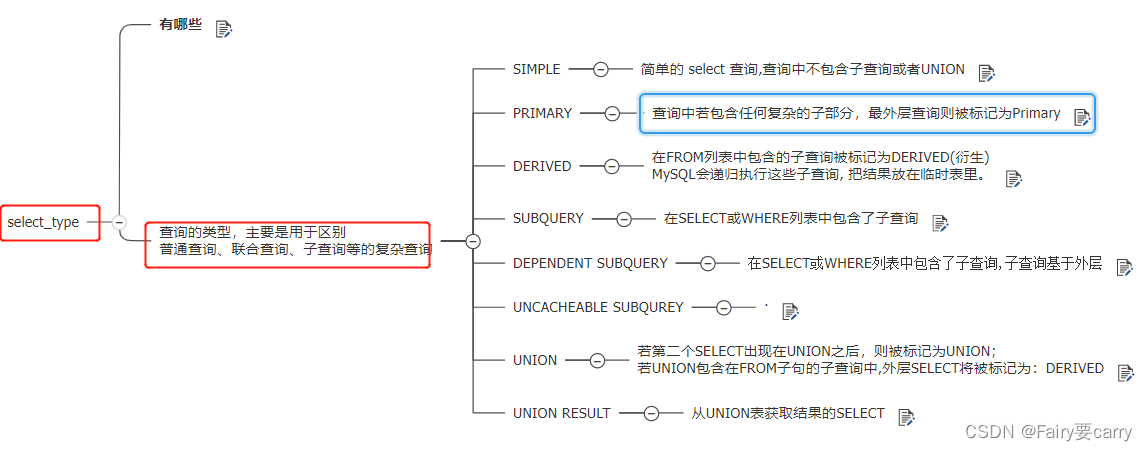
select_type
type
The most important three :range、index、all

key and key_len and rows
key_len How to calculate index length

EXTRA

Purpose : Reduce full table scanning , Increase performance
Subquery (SUBQUERY):
Range queries (DEPENDENT SUBQUERY)
Unavailable cache queries :
sql Not hit ,sql Dissimilarity ——> When a variable appears ,sql It must be different ;
All problem :
All table scan, Traverse the entire table to find the matching rows ;
index Indexes
appear index yes sql Index is used but not filtered by index , Generally, the overlay index is used or the index is used for sorting and grouping ;
Range queries :
group by Sort first and then group
After using the index, it is found that the speed is 100 times optimized (reset cache)
Two tables are associated with , Associated fields should be indexed
where The field after the condition is indexed
Statistical quantity count(*):MyISAM Words , He counted the amount of data in the table ,InnoDB No statistics will really open the table for scanning
EXPLAIN SELECT * FROM t_deptField analytical :
id It refers to the execution sequence ,type It refers to the yellow, red and black warnings ,key_len refer to where Condition field length ( The longer the length , The easier it is to hit ),rows The number of rows for the value ( Number of lines scanned physically , The less the better, the faster ),Extra Additional fields are generally viewed group by,other by, Relational query ;




Insert 100w How to achieve the fastest data
1. We can 100w Insert statements to splice , Turn him into a sentence , It must be faster
2. We can cancel mysql Automatic submission of , because 100w Data submission 100w Times and submissions 1 Time
It must be different ;
3. Using multithreading
mysql Master-slave replication of
The master slave uses a binlog, There are common functions

1. Create a function ( Randomly generate numbers and random names )

2. Create stored procedures and insert data ( Use the above two functions to get the random number and name )
CREATE TABLE `dept` (
 `id` INT(11) NOT NULL AUTO_INCREMENT,
 `deptName` VARCHAR(30) DEFAULT NULL,
 `address` VARCHAR(40) DEFAULT NULL,
 ceo INT NULL ,
 PRIMARY KEY (`id`)
) ENGINE=INNODB AUTO_INCREMENT=1 DEFAULT CHARSET=utf8;


CREATE TABLE `emp` (
 `id` INT(11) NOT NULL AUTO_INCREMENT,
 `empno` INT NOT NULL ,
 `name` VARCHAR(20) DEFAULT NULL,
 `age` INT(3) DEFAULT NULL,
 `deptId` INT(11) DEFAULT NULL,
 PRIMARY KEY (`id`)
 #CONSTRAINT `fk_dept_id` FOREIGN KEY (`deptId`) REFERENCES `t_dept` (`id`)
) ENGINE=INNODB AUTO_INCREMENT=1 DEFAULT CHARSET=utf8;

# Enable the user-defined function configuration
SET GLOBAL log_bin_trust_function_creators=1;


 # Randomly generated string function
DELIMITER $$
CREATE FUNCTION rand_string(n INT) RETURNS VARCHAR(255)
BEGIN
DECLARE chars_str VARCHAR(100) DEFAULT 'abcdefghijklmnopqrstuvwxyzABCDEFJHIJKLMNOPQRSTUVWXYZ';
 DECLARE return_str VARCHAR(255) DEFAULT '';
 DECLARE i INT DEFAULT 0;
 WHILE i < n DO
 SET return_str =CONCAT(return_str,SUBSTRING(chars_str,FLOOR(1+RAND()*52),1));
 SET i = i + 1;
 END WHILE;
 RETURN return_str;
END $$

USE mydb

# Used to randomly generate number to number
DELIMITER $$
CREATE FUNCTION  rand_num (from_num INT ,to_num INT) RETURNS INT(11)
BEGIN
 DECLARE i INT DEFAULT 0;
 SET i = FLOOR(from_num +RAND()*(to_num -from_num+1))   ;
RETURN i;
 END$$

# If you want to delete
#drop function rand_num;


# If you want to delete
#drop function rand_string;


# Insert 500000 pieces of data
DELIMITER $$
CREATE PROCEDURE  insert_emp(  START INT ,  max_num INT )
BEGIN
DECLARE i INT DEFAULT 0;
#set autocommit =0  hold autocommit Set to 0, Turn off auto submit
 SET autocommit = 0;
 REPEAT
 SET i = i + 1;
 INSERT INTO emp (empno, NAME ,age ,deptid ) VALUES ((START+i) ,rand_string(6)   , rand_num(30,50),rand_num(1,10000));
 UNTIL i = max_num
 END REPEAT;
 COMMIT;
 END$$

# Delete
# DELIMITER ;
# drop PROCEDURE insert_emp;


# Execute stored procedures , Go to dept Add random data to table
DELIMITER $$
CREATE PROCEDURE `insert_dept`(  max_num INT )
BEGIN
DECLARE i INT DEFAULT 0;
 SET autocommit = 0;
 REPEAT
 SET i = i + 1;
 INSERT INTO dept ( deptname,address,ceo ) VALUES (rand_string(8),rand_string(10),rand_num(1,500000));
 UNTIL i = max_num
 END REPEAT;
 COMMIT;
 END$$

# Delete
# DELIMITER ;
# drop PROCEDURE insert_dept;


# Insert 1w Data
# Execute stored procedures , Go to dept Table to add 1 Ten thousand data
DELIMITER ;
CALL insert_dept(10000);


# Execute stored procedures , Go to emp Table to add 50 Ten thousand data
DELIMITER ;
CALL insert_emp(100000,500000);

SELECT COUNT(*) FROM emp;
SELECT COUNT(*) FROM dept;

Like so much data , We need an index to query , We're going to do the next sql To delete the current sql The index of
technological process :
need mysql Acknowledge the string you extracted

1. Look at the index in the table
SHOW INDEX FROM t_emp;
2. Our index is also a table , stay information In the database , The name is STATISTICS
Look at the index table , The primary key index cannot be deleted

3. Create index
Single field
Let's check , Find out explain Estimate 49w Multiple lines
EXPLAIN SELECT SQL_NO_CACHE * FROM emp WHERE emp.`age`=30;

CREATE INDEX idx_age ON emp(age);
After index creation , Only 4w All right , Speed up

0.03->0.007
Multiple fields
EXPLAIN SELECT SQL_NO_CACHE * FROM emp WHERE emp.age=30 AND deptid=4 AND emp.name = 'abcd';
CREATE INDEX idx_age_deptid_name ON emp(age,deptid,NAME);

Speed by 0.082-> negligible
The execution of multi field index is shown in the figure
Best left prefix : Execute from left to right in order , Otherwise it will disconnect
 If the system often appears sql as follows :
  EXPLAIN SELECT SQL_NO_CACHE * FROM emp WHERE emp.age=30   AND emp.name = 'abcd'
 perhaps
EXPLAIN SELECT SQL_NO_CACHE * FROM emp WHERE emp.deptid=1   AND emp.name = 'abcd'
  The original idx_age_deptid_name  Whether it can be used normally ?
The second one cannot be executed normally , Not following the order from left to right , Ring hit is required ——> At the same time, it also reflects the full value matching , Fields must correspond to indexes

practice
# Execution deletion
CALL proc_drop_index("mydb","emp");

# Query the specified index in the index table  ( Non primary key )
SELECT index_name FROM information_schema.`STATISTICS` WHERE TABLE_NAME='t_emp'
AND TABLE_SCHEMA='mydb' AND INDEX_NAME <>'PRIMARY' AND SEQ_IN_INDEX=1;


EXPLAIN SELECT SQL_NO_CACHE * FROM emp WHERE emp.`age`=30; #0.03 0.007
EXPLAIN SELECT SQL_NO_CACHE * FROM emp WHERE emp.age=30 AND deptid=4
EXPLAIN SELECT SQL_NO_CACHE * FROM emp WHERE emp.age=30 AND deptid=4 AND emp.name = 'abcd';

# Create index
CREATE INDEX idx_age ON emp(age);
CREATE INDEX idx_age_deptid_name ON emp(age,deptid,NAME);

SHOW INDEX FROM emp;

# Fuzzy query
EXPLAIN SELECT SQL_NO_CACHE * FROM emp WHERE emp.`name` LIKE 'abc%';#0.8->0.016

# This can lead to index invalidation , Don't use functions
EXPLAIN SELECT SQL_NO_CACHE * FROM emp WHERE  LEFT(emp.`name`,3)='abc';#0.8

# Create index
CREATE INDEX idx_name ON emp(NAME);

# Execution deletion
CALL proc_drop_index("mydb","emp");
CALL proc_drop_index("mydb","dept");

# Range queries , The field index on the right side of the range is invalid ( The right side is judged according to the index )
 EXPLAIN SELECT SQL_NO_CACHE * FROM emp #0.5->0.052,type:range
 WHERE emp.age=30 AND emp.deptId>20 AND emp.name = 'abc' ; # Optimal efficiency 0.004

# Create index
CREATE INDEX idx_age_deptid_name ON emp(age,deptid,NAME);
CREATE INDEX idx_age_deptid_name ON emp(age,NAME,deptid);


EXPLAIN SELECT SQL_NO_CACHE * FROM emp WHERE emp.`name` <> 'abc';

# Create index , For the above failure != Can cause indexes to fail
CREATE INDEX idx_name ON emp(NAME);

EXPLAIN SELECT * FROM emp WHERE age IS NULL #0.2->0.001

# This is not It's going to fail
EXPLAIN SELECT * FROM emp WHERE age IS NOT NULL;#0.04->0.009, Index failure ,type by ALL

# Create index
CREATE INDEX idx_age ON emp(age);

# Our index structure of the balanced tree is based on a-z, If the initials are uncertain , The index will fail
EXPLAIN SELECT SQL_NO_CACHE * FROM emp WHERE emp.`name` LIKE '%abc%';#0.329->0.274

# Create index
CREATE INDEX idx_name ON emp(NAME);


# Execution deletion
CALL proc_drop_index("mydb","emp");
CALL proc_drop_index("mydb","dept");


# Type conversion can also cause index invalidation
# If you have several fields, you can index them
How the index finds the data
matters needing attention
Be careful sql To write , Prevent index invalidation

A small summary
1. Remember the best left front rule
2. You can't use functions :abs,max,<>....
3. Out-of-service like Prefix %xxx wildcard
4.is not null no way
5. Nor can type conversion

Some suggestions
1. When selecting a composite index , We can put the fields with good filtering performance in the front of the index fields , Because it is filtered out to the next tree , Maybe there are fewer nodes , Even for 1, More efficient ;
2. When selecting Composite Index , Try to include where More fields after
3. Try to avoid index invalidation
Relational query
scene :
When two tables have no associated fields , And then it makes the association query , Both tables will be scanned globally , So the Cartesian product
How they relate to :
In the associated query scenario , We associate queries -> First, the data in the first row of the drive table will be scanned , Then scan the driven table according to the first row of data , The found data is combined into a row of data ;
Conclusion :
1. The drive table must be scanned globally , Driven tables are not necessarily , So we build the index on the driven table , The drive table must be completely scanned, so it doesn't matter whether the index is built or not ;
2. To improve efficiency , Our relatively small amount of data is best used as the driving table
3. in addition ,inner join and left join Not quite the same. , stay inner join Next mysql Will automatically select the driven table , Rather than their relative position , yes According to the small result set as the driving table ;

Association query instance
 Query the two tables by association  ->extra There are no associated fields between the two tables , Very slow to check , Descartes appears
EXPLAIN SELECT * FROM class LEFT JOIN book ON class.`card`=book.`card`;

# Create index , Here we usually index the driven table
CREATE INDEX Y ON book(card);

# Execution deletion
CALL proc_drop_index("mydb","book");
DROP INDEX Y ON book;
DROP INDEX X ON class;

# Create index
ALTER TABLE class ADD INDEX X (card);

#inner join,mysql Choose which is the driven table ——> Judge according to the index , Whoever has an index is driven


# Small data is the driving table , Short scanning time to improve efficiency

# Please all dept Corresponding CEO name

#1. Here you will find that it is a query ,mysql5.7 An optimization of ,c The table is the driving table , Our driven table is ab Virtual table
# Virtual tables cannot create indexes , So an optimization opportunity will be wasted ,5.7 Where the update is
EXPLAIN SELECT c.`name`,ab.name ceoname FROM t_emp c LEFT JOIN
(SELECT b.`id`,a.`name` FROM t_emp a INNER JOIN t_dept b ON a.`id`=b.`CEO`)ab
ON c.`deptld`=ab.id;


# obtain dept The leader of
SELECT b.`id`,a.`name` FROM t_emp a INNER JOIN t_dept b ON a.`id`=b.`CEO`

#2. First, check the name and CEO
SELECT ab.name,c.`name` ceoname FROM
(SELECT a.`name`,b.`CEO` FROM t_emp a LEFT JOIN t_dept b ON a.`deptld`=b.`id`) ab
LEFT JOIN t_emp c ON ab.ceo=c.`id`;


#3. The fastest , Directly related , You don't need to subquery to connect to the sect leader twice at a time ( Get the user's information for the first time , The second is based on CEO Screening )
EXPLAIN SELECT a.`name`,c.`name` ceoname FROM t_emp a
LEFT JOIN t_dept b ON a.`deptld`=b.`id`
LEFT JOIN t_emp c ON b.`CEO`=c.`id`;
Small conclusion of association query :
1. We need to ensure that the driven table join And indexed
2.left join when , Select the small table as the driver
3.inner join: The small result set is used as the driving table
4. Subqueries should not be placed in the driver table , because 5.7 Pre virtual tables cannot be indexed , Will lead to reduced efficiency
5. If it can be directly related, it can be directly related
Correlation optimization test
There is obviously not The index cannot be used , Optimize -> Use left join Make association query , Then filter according to the conditions
# At least two non leader sects ( The leader number first , Then, according to the leader's number, you can go to t_emp Intermediate investigation )
SELECT * FROM t_emp a WHERE a.id NOT IN
(SELECT b.CEO FROM t_dept b WHERE b.CEO IS NOT NULL);

# Optimize ( Get all the leaders first (left join), Then the bar filter )
SELECT * FROM t_emp a LEFT JOIN t_dept b ON a.id = b.CEO
WHERE b.id IS NULL;
The impact of indexes on grouped queries
summary :
1. Group query order by Whether the field after can use the index -> It depends on whether the filter conditions are followed , If so, the index will take effect
2.order by The following sequence is very important , The order is different, the result is different , So it will not be optimized
3. If the fields are in ascending or descending order, the result will not be affected , If there is any inconsistency, it will affect the occurrence of using filesort
# Execution deletion
CALL proc_drop_index("mydb","emp");
CALL proc_drop_index("mydb","dept");


# Group query
CREATE INDEX idx_age_deptid_name ON emp (age,deptid,NAME)
CREATE INDEX idx_age_deptid_empno ON emp (age,deptid,empno);


# Whether the following indexes can be used , Can you get rid of it? using filesort ,(order by If you want to use the index, you must filter the conditions )
EXPLAIN  SELECT SQL_NO_CACHE * FROM emp ORDER BY age,deptid;

EXPLAIN  SELECT SQL_NO_CACHE * FROM emp ORDER BY age,deptid LIMIT 10;


 # No filtering   No index


EXPLAIN  SELECT * FROM emp WHERE age=45 ORDER BY deptid;

EXPLAIN  SELECT * FROM emp WHERE age=45 ORDER BY   deptid,NAME;

EXPLAIN  SELECT * FROM emp WHERE age=45 ORDER BY  deptid,empno;

#deptid The field needs to be name front , This order is not optimized , Because the result will be affected ,order by The order of the following fields is very important
EXPLAIN  SELECT * FROM emp WHERE age=45 ORDER BY  NAME,deptid;

EXPLAIN SELECT * FROM emp WHERE deptid=45 ORDER BY age;


# Wrong order , No sorting is required , It can be in descending or ascending order , In this case , Changing the order will not affect the result


EXPLAIN SELECT * FROM emp WHERE age=45 ORDER BY  deptid DESC, NAME DESC ;


EXPLAIN SELECT * FROM emp WHERE age=45 ORDER BY  deptid ASC, NAME DESC ;

# In the opposite direction   No sorting is required , One rise and one fall cannot be indexed :Using filesort
Sorting and grouping optimization
mysql The index selection will be optimized , Choose an index that you think is the fastest
If the field is not on the index column ,filesort There are two algorithms
1. Two way sorting : Just scan the disk twice , First, scan everything and put it on the disk , After scanning, sort the contents of the disk ( That is, read the line pointer and order by Column ), Scan the disk twice ,IO Very time consuming
2. One way sorting : Read the index column of the query from disk , And then according to order by The query , He puts the contents of each read into memory , Less IO Loss of

group by And other by The difference is that :
group by You can use indexes without restrictions ,other by No filtering, no indexing
There is also a very optimized point ( Overlay index ):
Fuzzy queries did not appear before like %xx、is not、other by xxx All these will lead to index invalidation , We can restrict the content of the query , No more select * , Instead, fields limit , In this way, the index can be matched according to the field , To improve efficiency ;
CREATE INDEX idx_id_age_deptid ON emp(id,age,deptid);

# The query contents can be indexed
EXPLAIN SELECT SQL_NO_CACHE NAME FROM emp WHERE age IS NOT NULL;

EXPLAIN SELECT * FROM emp WHERE NAME LIKE '%abc';

EXPLAIN SELECT SQL_NO_CACHE id,age,deptid FROM emp WHERE NAME LIKE '%abc';

# Look at the index
SHOW INDEX FROM emp;
Homework (sql practice + Optimize )
Be careful :Group by After setting the field of , front select The field of can only contain Group by Content of and function content , Otherwise, an error will be reported
EXPLAIN SELECT SQL_NO_CACHE * FROM emp WHERE age =30 AND empno <101000 ORDER BY NAME ;#0.729

# Execution deletion
CALL proc_drop_index("mydb","emp");
CALL proc_drop_index("mydb","dept");

# Index , First priority idx_age_empno The index of ,mysql Will choose the best index
CREATE INDEX idx_age_empno ON emp(age,empno);
CREATE INDEX idx_age_name ON emp (age,NAME);
CREATE INDEX idx_age ON emp(age);
CREATE INDEX idx_name ON emp(NAME);
CREATE INDEX idx_id_age_deptid ON emp(id,age,deptid);

# The query contents can be indexed
EXPLAIN SELECT SQL_NO_CACHE NAME FROM emp WHERE age IS NOT NULL;

EXPLAIN SELECT * FROM emp WHERE NAME LIKE '%abc';

EXPLAIN SELECT SQL_NO_CACHE id,age,deptid FROM emp WHERE NAME LIKE '%abc';

# Look at the index
SHOW INDEX FROM emp;


#1. Ask for information that my younger brother is younger than the sect leader
SELECT a.name FROM t_emp a
LEFT JOIN t_dept b ON a.`deptld`=b.id
LEFT JOIN t_emp c ON b.CEO=c.`id`
WHERE c.`age`<a.`age`;

# Optimize
EXPLAIN SELECT SQL_NO_CACHE a.`name`,a.`age`,c.`name`,c.`age` FROM emp a
LEFT JOIN dept b ON a.`deptId`=b.`id`
LEFT JOIN emp c ON b.`ceo`=c.`id`
WHERE c.`age`<a.`age`;


#2. List those who are younger than the average age of the guild ( Get the personnel information of the Department group first )
SELECT  c.`name`,c.`age` FROM t_emp c INNER JOIN
(SELECT a.`deptld`,AVG(a.`age`) avgage FROM t_emp a WHERE a.`deptld` IS NOT NULL
GROUP BY a.`deptld`)aa
ON c.`deptld`=aa.deptld
WHERE c.`age`<aa.avgage;


# Optimize , Use this subquery as the driver table
# Because subquery 5.7 You cannot have an index before the version , So we use it as a driver table , In this way, the non driven table can be indexed
EXPLAIN SELECT SQL_NO_CACHE c.`name`,c.`age`,aa.avgage FROM emp c
INNER JOIN
(SELECT a.deptId,AVG(a.age)avgage FROM emp a WHERE a.deptId IS NOT NULL
GROUP BY a.deptId)aa
ON c.`deptId`=aa.deptId
WHERE c.`age`<aa.avgage;


# Create index
CREATE INDEX idx_deptId ON emp(deptId);
CREATE INDEX idx_deptId_age ON emp(deptId,age);


#3. List at least 2 Age >40 Year old members of the sect  (select Get the quantity , Must be group by 了 )
#( First, group according to the sect  -> Then filter to get >40 Number of employees aged  —> Finally, make a judgment )
SELECT b.`deptName`,b.`id`,COUNT(*) FROM t_emp a
INNER JOIN t_dept b ON a.`deptld`=b.`id`
WHERE a.`age`>40
GROUP BY b.`deptName`,b.`id`
HAVING COUNT(*)>=2;


# Optimize
EXPLAIN SELECT SQL_NO_CACHE b.`deptName`,b.`id`,COUNT(*) FROM dept b
STRAIGHT_JOIN emp a ON a.`deptId`=b.`id`
WHERE a.`age`>40
GROUP BY b.`deptName`,b.`id`
HAVING COUNT(*)>=2;

# Index
CREATE INDEX idx_deptName ON dept(deptName);
CREATE INDEX idx_deptId_age ON emp(deptId,age);


#4. Non leader ( First, check all the gangs with gangs , Then extract CEO, then not in)
SELECT * FROM t_emp a WHERE a.`id` NOT IN
(SELECT b.`CEO` FROM t_dept b WHERE b.`CEO` IS NOT NULL)
;

SELECT * FROM t_emp
SELECT * FROM t_dept

# Optimize :(1. Get the information of non leader sect members , Use left outer Association query , If there is no match in the sect table, you will null, So we need to b.id is null)
SELECT * FROM t_emp a
LEFT JOIN t_dept b ON a.`id`=b.`CEO`
WHERE b.`id` IS NULL;

SELECT c.deptName,c.id,COUNT(*)
FROM t_emp a INNER JOIN t_dept c ON a.`deptld`=c.id
LEFT JOIN t_dept b ON a.`id`=b.`CEO`
WHERE b.`id` IS NULL
GROUP BY c.deptName,c.id
HAVING COUNT(*)>=2
;

#5. Get all the members of the gang -> Get the name of the local gang and id-> In association once , Remove the leader , Leave the information of non leader ( Using the property of left outer )
# To get the quantity , So grouping
EXPLAIN SELECT SQL_NO_CACHE c.`deptName`,c.`id`,COUNT(*) FROM emp a
INNER JOIN dept c ON a.`deptId`=c.`id`
LEFT JOIN dept b ON a.`id`=b.`CEO`
WHERE b.`id` IS NULL
GROUP BY c.`deptName`,c.`id`
HAVING COUNT(*)>=2;


# Create index
CREATE INDEX idx_deptName ON dept(deptName);
CREATE INDEX idx_deptId ON emp(deptId);
CREATE INDEX idx_CEO ON dept(CEO);


#6. List all people , And add a column to indicate whether it is the leader , If it is a remark, it is ——>case when  Judge
# Then we use the left outer property b Of id->is null then xxx Judge
SELECT a.`name`,a.`age`,b.`deptName`,(CASE WHEN b.id IS NULL THEN ' no ' ELSE ' yes ' END)' Is it the leader '
FROM t_emp a
LEFT JOIN t_dept b ON a.`id`=b.`CEO`;


#7. List all sects , And note , Average age >50 Old bird , Otherwise, it will be a rookie
SELECT b.`deptName`,b.`id`,IF(AVG(a.`age`)>50,' veteran ',' rookie ')' veteran or rookie '
FROM t_emp a
INNER JOIN t_dept b ON a.`deptld`=b.`id`
GROUP BY b.`deptName`,b.`id`;


#8. Show the oldest person of each sect (-> First get the maximum age and group according to the sect -> Then we can get the oldest person by associating the character table )
SELECT c.`name`,c.`age`,aa.maxage FROM t_emp c INNER JOIN
(SELECT a.`deptld`,MAX(a.`age`)maxage
FROM t_emp a WHERE a.`deptld` IS NOT NULL
GROUP BY a.`deptld`)aa
ON c.`deptId`=aa.deptld AND c.`age`=aa.maxage;


#9. Ask the third oldest person of each sect (w Write the wrong )
SELECT a.`age`,a.`name`,a.`deptld` FROM t_emp a ORDER BY a.`age` DESC
LEFT JOIN(
SELECT a.`id` FROM t_emp a INNER JOIN t_dept b ON a.`deptld`=b.id
)aa ON a.`deptld`=aa.id;# Here is the wrong grouping , Group the original plan and then limit complete
边栏推荐
- guava 教程收集一些案例慢慢写 google工具类
- Self test in the second week of major 4
- Error in idea connection database
- Win10 how to manage startup items?
- js用while循环计算假如投资多年的利率为5%,试求从1000块增长到5000块,需要花费多少年
- Manim math engine
- JS performance reward and punishment examples
- apifox学习
- 2. QT components used in the project
- win10-如何管理开机启动项?
猜你喜欢

【10. 差分】

【c ++ primer 笔记】第4章 表达式

Gérer 1000 serveurs par personne? Cet outil d'automatisation o & M doit être maîtrisé

JS uses the while cycle to calculate how many years it will take to grow from 1000 yuan to 5000 yuan if the interest rate for many years of investment is 5%

Multi table associated query -- 07 -- hash join

Programming life - what do you think of the 35 year old bottleneck of programmers?
Win10 how to manage startup items?

语音信号处理-概念(二):幅度谱(短时傅里叶变换谱/STFT spectrum)、梅尔谱(Mel spectrum)【语音的深度学习主要用幅度谱、梅尔谱】【用librosa或torchaudio提取】

(resolved) NPM suddenly reports an error cannot find module 'd:\program files\nodejs\node_ modules\npm\bin\npm-cli. js‘
JS to determine whether the result is qualified, the range is 0-100, otherwise re-enter
随机推荐
VNC Viewer方式的远程连接树莓派
[compilation principles] review outline of compilation principles of Shandong University
洛谷刷题心得记录
win命令行中导入、导出数据库相关表
C how to call line and rows when updating the database
第6届蓝桥杯
ggplot2的自定义调色板
js中如何查看程序运行时间(计时器)
Use uview to enable tabbar to display the corresponding number of tabbars according to permissions
磁选机是什么?
JDBC操作Mysql示例
2. QT components used in the project
JDBC transaction commit case
Guava tutorial collect some cases and write Google tool classes slowly
apifox学习
js中判断成绩是否合格,范围在0-100,否则重新输入
L'introduction en bourse de Wild Wind Pharmaceutical a pris fin: Yu pinzeng, qui avait l'intention de lever 540 millions de RMB, a effectué un investissement P2P.
【批处理DOS-CMD命令-汇总和小结】-将文件夹映射成虚拟磁盘——subst
js例题打印1-100之间所有7的倍数的个数及总和
【13. 二进制中1的个数、位运算】