当前位置:网站首页>分布式网络通信框架:本地服务怎么发布成RPC服务
分布式网络通信框架:本地服务怎么发布成RPC服务
2022-07-26 09:50:00 【_索伦】
1. 编写protobuf配置文件确定需求
想把本地服务发布成rpc服务,第一点就是利用protobuf,生成对应得Service服务类。
以登录业务为例:
最下面编写的就是rpc服务类。即约定类型
syntax = "proto3";

package fixbug;

option cc_generic_services = true;

message ResultCode
{

    int32 errcode = 1;
    bytes errmsg = 2;
}

message LoginRequest
{

    bytes name = 1;
    bytes pwd = 2;
}

message LoginResponse
{

    ResultCode result = 1;
    bool success = 2;
}

service UserServiceRpc
{

    rpc Login(LoginRequest) returns(LoginResponse);
}
2. 继承相对应的类并重写虚方法
编写完配置文件,生成C++对应的头文件与源文件,里面就会生成 上面的配置文件约定的类(这里就是 UserServiceRpc),里面有对应的方法。
class UserServiceRpc : public ::PROTOBUF_NAMESPACE_ID::Service {

 protected:
  // This class should be treated as an abstract interface.
  inline UserServiceRpc() {
    };
 public:
  virtual ~UserServiceRpc();

  typedef UserServiceRpc_Stub Stub;

  static const ::PROTOBUF_NAMESPACE_ID::ServiceDescriptor* descriptor();

  virtual void Login(::PROTOBUF_NAMESPACE_ID::RpcController* controller,
                       const ::fixbug::LoginRequest* request,
                       ::fixbug::LoginResponse* response,
                       ::google::protobuf::Closure* done);

  // implements Service ----------------------------------------------
  // 省略。。。
那么在我本地编写业务时,首先要继承该类,并需要重写该类的Login方法
class UserService : public fixbug::UserServiceRpc // 使用在rpc服务发布端
{

public:
    bool Login(std::string name, std::string pwd)
    {

        std::cout << "doing local service: Login " << std::endl;
        std::cout << "name: " << name << "pwd: " << name << std::endl;
        return true;
    }

    // 重写基类UserServiceRpc的虚函数,这些方法都是框架直接调用的
    virtual void Login(::google::protobuf::RpcController* controller,
                       const ::fixbug::LoginRequest* request,
                       ::fixbug::LoginResponse* response,
                       ::google::protobuf::Closure* done)
    {
    }
};
3. 业务实现
首先要了解的是调用过程:
如下图所示,caller调用者把这个方法的请求发送到网络,由muduo库来处理,交给了callee提供者,提供者得知这个请求后,去找到这个方法,这个方法就是我们业务上重写的虚方法。

    virtual void Login(::google::protobuf::RpcController* controller,
                       const ::fixbug::LoginRequest* request,
                       ::fixbug::LoginResponse* response,
                       ::google::protobuf::Closure* done);
那么对于这样一个Login()方法,需要理解这些参数对我们的帮助:
首先controller指针,这里先不用管他的作用
request:框架给业务上报了请求参数LoginRequest,应用可以获取相应数据做本地业务

那么可以很方便的到请求数据:
std::string name = request->name();
std::string pwd = request->pwd();
然后就可以做本地业务,这里就调用本地的Login()方法
 // 做本地业务
bool login_result = Login(name, pwd);
调用的这个::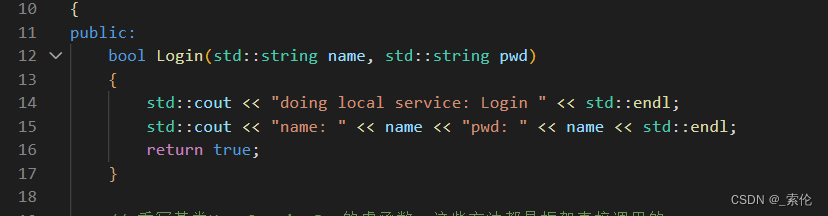
然后把响应消息写入参数response中:
这个LoginResponse和上面的LoginRequest请求也是对应的:

为什么会是在mutable_result()里填写,这个在上一篇文章中【protobuf使用】里有提到。
 // 把响应写入 (错误码,错误消息,返回值)
fixbug::ResultCode* code = response->mutable_result();
code->set_errcode(0);
code->set_errmsg("");
response->set_success(login_result);
最后执行回调操作,执行响应对象数据的序列化和网络发送。
protobuf为我们提供了该参数done,该类型是Closure

// 执行回调操作
done->Run();
完整代码:
#include <iostream>
#include <string>
#include "user.pb.h"

/* UserService原本是一个本地服务,提供两个进程内的本地方法,Login和GetFriendLists */

class UserService : public fixbug::UserServiceRpc // 使用在rpc服务发布端
{

public:
    bool Login(std::string name, std::string pwd)
    {

        std::cout << "doing local service: Login " << std::endl;
        std::cout << "name: " << name << "pwd: " << name << std::endl;
        return true;
    }

    // 重写基类UserServiceRpc的虚函数,这些方法都是框架直接调用的
    // 1. caller ==> Login(LoginRequest) ==> muduo ==> callee
    // 2. callee ==> Login(LoginRequest) ==> 交到重写的这个方法上
    virtual void Login(::google::protobuf::RpcController* controller,
                       const ::fixbug::LoginRequest* request,
                       ::fixbug::LoginResponse* response,
                       ::google::protobuf::Closure* done)
    {

        // 框架给业务上报了请求参数LoginRequest,应用获取相应数据做本地业务
        std::string name = request->name();
        std::string pwd = request->pwd();

        // 做本地业务
        bool login_result = Login(name, pwd);

        // 把响应写入 (错误码,错误消息,返回值)
        fixbug::ResultCode* code = response->mutable_result();
        code->set_errcode(0);
        code->set_errmsg("");
        response->set_success(login_result);

        // 执行回调操作
        done->Run();
    }

};
end
边栏推荐
- [MySQL database] a collection of basic MySQL operations - the basis of seeing (adding, deleting, modifying, and querying)
- Solve proxyerror: CONDA cannot proceed due to an error in your proxy configuration
- SSG framework Gatsby accesses the database and displays it on the page
- 高斯消元的应用
- Azkaban【基础知识 01】核心概念+特点+Web界面+架构+Job类型(一篇即可入门Azkaban工作流调度系统)
- Keeping alive to realize MySQL automatic failover
- Search module use case writing
- 2022 zhongkepan cloud - server internal information acquisition and analysis flag
- JS判断数据类型 Object.prototype.toString.call和typeof
- 学习笔记之常用数组api 改变原数组和不改变原数组的有哪些?
猜你喜欢

MySQL 5.7.25 source code installation record

spolicy请求案例
QT handy notes (III) use qtcharts to draw a line chart in VS

2021年山东省中职组“网络空间安全”B模块windows渗透(解析)

Principle analysis and source code interpretation of service discovery
asp. Net using redis cache
服务发现原理分析与源码解读
Spolicy request case

After attaching to the process, the breakpoint displays "currently will not hit the breakpoint, and no symbols have been loaded for this document"

2022 zhongkepan cloud - server internal information acquisition and analysis flag
随机推荐
Xiaobai makes a wave of deep copy and shallow copy
m进制数str转n进制数
2022年中科磐云——服务器内部信息获取 解析flag
Double authentication of server and client
Gauss elimination
系统安装Serv-U后IIS出错提示:HRESULT:0x80070020
regular expression
MFC handy notes
JS judge the data types object.prototype.tostring.call and typeof
POJ 1012 Joseph
JS 一行代码 获取数组最大值与最小值
AR model in MATLAB for short-term traffic flow prediction
QT随手笔记(六)——更新界面、截图、文件对话框
MQTT X CLI 正式发布:强大易用的 MQTT 5.0 命令行工具
在Blazor 中自定义权限验证
Gauss elimination for solving XOR linear equations
[datawhale] [machine learning] Diabetes genetic risk detection challenge
高斯消元的应用
2022 zhongkepan cloud - server internal information acquisition and analysis flag
新公链Aptos何以拉满市场期待值?