当前位置:网站首页>Notes for the fourth time of first knowing C language
Notes for the fourth time of first knowing C language
2022-07-28 02:35:00 【yanghuagai2311】
C Language notes for the fourth time
One : Common keywords
1:typedef
(1): effect :
use typedef To give the type a new name , Simplify complex types
#include<stdio.h>
//typedef
typedef unsigned int uint;// use typedef To give the type a new name , Simplify complex types
int main()
{

	uint num = 0;
	uint num1 = 1;
	return 0;
}
(2): Applications in structures :
It can be used for structures typedef To define a new data type name , Then use this new data type to directly define the structure variables
#include<stdio.h>
typedef struct student
{

	char ID[16];
	char name[16];
	char sex;
	float score;
}STUDENT;
(3):typedef And define The difference between
typedef Limited to defining symbol names for types ,#define Not only can you define aliases for types , You can also define aliases for numbers , For example, you can define 1 by ONE.
typedef Is interpreted by the compiler ,#define Statements are processed by the precompiler .
2:static
(1): Modify local variables
Before that, let's learn void:
void In English, as a noun, it is interpreted as “ emptiness 、 Space 、 Gap ”, And in the C In language ,void Translated into " No type "
void The role of When a function does not need to return a value , You have to use void limit
#include<stdio.h>
//void In English, as a noun, it is interpreted as " emptiness 、 Space 、 Gap ", And in the C In language ,void Translated into " No type "
//void When the function does not need to return a value , You have to use void limit , This is what we call the first case . for example :void //func(int a,char *b).
// When a function is not allowed to accept arguments , You have to use void limit , This is what we call the second case . for example :int func(void).
void test()
{
int a = 1;
a++;
printf("%d ",a);
}
int main()
{
int i = 0;
while (i < 10)
{
test();//i<10 Enter into test() in , Then go to void test(), Print out a, because void No return value , So the life cycle of local variables is automatically destroyed
i++;
}
return 0;
}
because void No return value , Local variables are automatically destroyed

added static after :
#include<stdio.h>
//void In English, as a noun, it is interpreted as " emptiness 、 Space 、 Gap ", And in the C In language ,void Translated into " No type "
//void When the function does not need to return a value , You have to use void limit , This is what we call the first case . for example :void func(int a,char *b).
// When a function is not allowed to accept arguments , You have to use void limit , This is what we call the second case . for example :int func(void).
void test()
{
static int a = 1;//static Modified a Not destroyed , Instead, continue to the main function , The code in line 8 is meaningless after use
a++;
printf("%d ",a);
}
int main()
{
int i = 0;
while (i < 10)
{
test();//i<10 Enter into test() in , Then go to void test(), Print out a
i++;
}
return 0;
}

Ordinary local variables are placed on the stack of memory , Enter local range , Variable creation , A local range variable is destroyed
static When modifying local variables , Local variables open up space in the static area , Local variables are out of scope , Not destroyed . Essentially ,static When modifying local variables , Changed the storage location of variables , Affects the life cycle of the variable , Make the life cycle longer , Just like the program life cycle , Variables are stored in static areas , Become a static variable .( Changed the storage location , By stack area -> Static zone , Make the life cycle of variables change .)
1.1: Now let's distinguish the stack area Heap area and static area .
Static zone ( Global area ): The storage areas of static variables and global variables are the same , Once the memory of the static area is allocated , The memory in the static area will not be released until the program is completed .
Heap area : Called by programmer malloc() Function to actively apply for , Need to use free() Function to free memory , If heap memory is requested , Then forget to free memory , It's easy to cause memory leaks .
The stack area : Store the local variables in the function , Formal parameters and function return values . After the scope of the data in the stack area has passed , The system will reclaim the memory in the automatic management stack area ( Allocate memory , Reclaiming memory ), There is no need for developers to manually manage .
The inn area is like an inn , There are many rooms in it , Automatically assign rooms when guests arrive , The guests in the room can be changed , It's a dynamic data movement .
(2): Modify global variable :
utilize extern The code connects two different files together
test4.10.1.c
static int a = 10;
test4.10.2.c
#include<stdio.h>
extern int a;
int main()
{

    printf("%d ",a);
    return 0;
}
//err
This program reports an error a No definition , But put static Get rid of , This code is correct
Why is that ?
answer :static When modifying global variables , The external link attribute of this global variable becomes the internal link attribute , Other source files (.c) You can't use this global variable anymore , The life cycle becomes shorter when used
(3): Modify function
In the same way static When decorating functions , The external link attribute of the function itself becomes the internal link attribute , Other source files (.c) You can't use this global variable anymore , The life cycle becomes shorter when used .
So what is a link ?
No matter how simple the code we write , all Must go through 「 compile --> link 」 To generate an executable :
Compilation is to compile the source code we write “ translate ” Into a binary format that can be recognized by the computer , They exist in the form of object files ;
Link is a “ pack ” The process of , It combines all object files and system components into an executable file .
3:register
Storage devices commonly used in computers : register 、 Cache 、 Memory 、 Hard disk
These devices have the following relationship :
| register ( Integrated into the CPU On ) | The higher up, the faster the reading speed |
|---|---|
| Cache | The smaller the space , The higher the cost |
| Memory | The further down, the slower the reading speed |
| Hard disk | The bigger the space , The lower the cost |
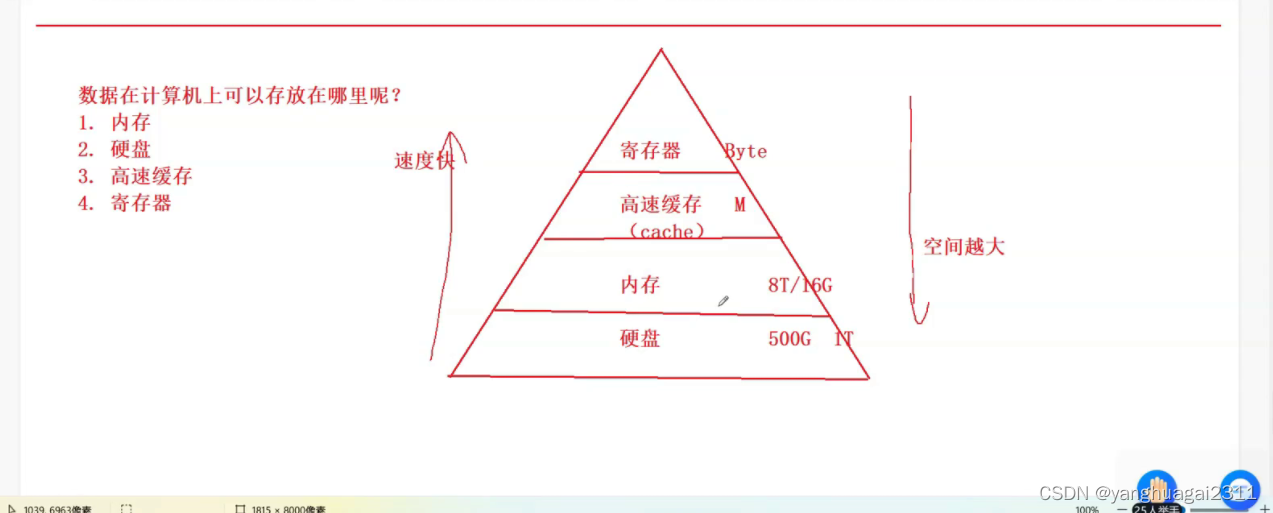
In the development of computer , In the earliest days, there was only the concept of memory , Data is mainly stored in memory , When running the program CPU( a central processor ) You have to read data from memory to run the program .
However, with the development of computer ,CPU The efficiency of processing data is getting higher and higher , However, at this time, the reading and writing speed of memory can not keep up with CPU The processing speed of , Then there are caches and registers , They read and write faster , Can adapt to CPU Use .
It's like a wall , One person folds bricks , A man handed a brick , The man on the wall is getting faster and faster , However, the one who handed the brick didn't speed up . here , The people of the softwall can only stare and wait for the bricks , It greatly reduces the work efficiency .
However, the faster you read and write , The higher the cost of the equipment , The smaller the data capacity can be accommodated . The computer chose this way of operation :
Limited data is stored in registers , Then store it in the cache , Then store it in memory , After the data in the register is used , The cached data will follow into the register , The data in memory will also follow up to the cache , Under such data processing , Most of the data can be obtained in registers , So we keep up CPU Processing speed of .
register The following variable indicates that it is recommended to put it in the register , Just suggest , The real placement requires the allocation of the computer itself . But now our computers are very advanced , You don't write register It also knows which to put in the register .
#include<stdio.h>
int main()
{

// Register variables
    register int num = 3;//3 Put it in the register
    return 0;
}
4:#define Define constants and macros
(1): Define constants
#include<stdio.h>
#define NUM 100// here NUM Indicates a constant value of 100, To distinguish , The constant name is fixed to uppercase
int main()
{

    printf("%d\n", NUM);
	int n = NUM;
	printf("%d\n", n);
	int arr[NUM] = {
     0 };
	return 0;
}

(2): Defining macro
#include<stdio.h>
#define ADD(x,y) ((x)+(y))//ADD Is the macro name ,x,y For macro parameters ,x+y Is a macro .
int Add(int x, int y)// Note that Add Not ADD
{

	return x + y;
}
int main()
{

	int a = 10;
	int b = 20;
	int c = ADD(a, b);//int c =((a)+(b)), take a,b Replace the x,y in
	printf("%d\n",c);
	return 0;
}

Two : The pointer
1: Memory
The program needs memory to run , In order to use memory effectively , You need to divide the memory into small memory units , The size of each unit is one byte .( One byte is more reasonable , This memory unit is too small to , It's not good to be too big ) in order to Be able to use each memory unit effectively , We assigned a number to each unit , This number is called The address of this memory unit .
Like in our lives , For example, you shop online . You must tell the merchant , Your exact location , for instance xx City xx District xx road xx Number ( What building ) What's the dormitory number .) The same is true for the memory address , Like the house number in the building , By numbering , The unit address of the memory is also determined . We can easily find the corresponding address , You don't have to look for them one by one .

2: Address generation
We all have hardware circuits in our computers , The wire used to generate the address is called the address line . When a circuit in the circuit passes , Will produce positive and negative pulses , So as to express 0 And 1. Here we use 32 Take a bit computer as an example , When it generates an address 32 The root address line generates an electrical signal at the same time to indicate 1 or 0, When each address line is combined, there are many different permutations .
00000000000000000000000000000000—— Corresponding 0
00000000000000000000000000000001—— Corresponding 1
…
1111111111111111111111111111111111111—— It may eventually become 32 individual 1
This sort method has a total of 2^32 Inferior species There are so many in memory byte Space .
(1024B=1KB 1024KB=1MB 1024MB=1GB)(1byte=8bit)
But this number is not very intuitive , Let's divide it by 1024 obtain 4194304 individual KB, Rediving 1024 obtain 4096 individual MB, Divided by 1024 obtain 4GB, That is to say, in the early There are... In 32-bit computer memory 4GB Of memory space .
3: Data storage
Variables are created in memory ( Allocate space in memory ), Each unit has an address , So variables also have addresses
utilize &:
&: Take the address operator , Take out whose address .
Print address ,%p Is printed as an address
#include <stdio.h>
int main()
{

    int a = 10;// Apply inward 4 Bytes , Storage 10
    &a;// Take out a The address of ,& To get the address symbol
    // there a share 4 Bytes , Every byte has an address , But what we take out is the address of the first byte ( Smaller address )
    printf("%p\n", &a);// Print address ,%p Is printed as an address
    return 0;
}
When it's printed By debugging F10 Memory The monitoring window gets this picture 
Actually, it's just us 0x010FF808 This address ( The address of the starting position )
0a 00 00 00 One line shows four bytes ( Four columns are set )
a The value of is 10, Expressed in binary, it is :0000 0000 0000 0000 0000 0000 0000 1010( The last bit of a binary number represents 2 Of 0 Power , The penultimate number means 2 Of 1 Power , And so on , Ten is 2 Of 3 Power plus 2 To the power of, that is 1010), At this time, we are in a group of four , You can get the representation of the data :00 00 00 0a( stay 16 In decimal numbers ,a Express 10,b Express 11,c Express 12,d Express 13,e Express 14,f Express 15)
** 0000 0000 0000 0000 0000 0000 0000 1010
0 0 0 0 0 0 0 a**
In fact, the decimal system is stored in this way
0x 00 00 00 0a Save it upside down
4: Pointer to the variable
#include<stdio.h>
int main()
{

    int a = 10;
    int* p = &a;
 // We put a The address of this variable is stored in this variable p in , This p It's called pointer variable , The type is int*
 // Variable p It is the created storage address ( The pointer ) Of .
    return 0;
}
In the memory unit The number is the address And the address is the pointer 


Yes int* p =&a; The understanding of the
1.p representative 0x010FF808 The address of this starting position
2. In the middle of the Express p It's a pointer variable , Note that the pointer variable is p, instead of p
3.int explain p The object is int Type of ( This example illustrates p Pointing to a)
4.p Is a pointer variable , Accept &a The content of ,( That is, the address should be stored in the pointer variable ) That is, the first address of the variable
5: Dereference operator *
*( Dereference operator / Indirect operator ): Find the content pointed to by the address .
*p Represents a pointer variable p Quoting (p Namely p Object referred to ), adopt p Find the address stored in p Object referred to ( Corresponding content )
#include <stdio.h>
int main()
{

    int a = 10;// Apply inward 4 Bytes , Storage 10
    &a;// Take out a The address of ,& To get the address symbol
    // there a share 4 Bytes , Every byte has an address , But what we take out is the address of the first byte ( Smaller address )
    //printf("%p\n", &a);// Print address ,%p Is printed as an address
    int* p = &a;//p Yes a  To accept the &a, I accept a The content of
    //*p adopt p Address stored in , find p Point to space ( object / Variable )
    *p = 20;//p Yes a, Equivalent to a=20
    printf("%d\n",a);
    return 0;
}

6: The size of the pointer variable
%zu Means to print sizeof
#include <stdio.h>
int main()
{

        printf("%zu\n", sizeof(char*));//zu Means to print sizeof
        printf("%zu\n", sizeof(short*));
        printf("%zu\n", sizeof(int*));
        printf("%zu\n",sizeof(float*));
        printf("%zu\n", sizeof(double*));
        return 0;
}
You might think the output is :1 2 4 4 8
But it's actually :4\8 4\8 4\8 4\8 4\8 (4 or 8)
because :
Pointer variables store addresses , In other words, the size of the pointer variable depends on how much space is needed to store an address ,32 The address under the bit platform is 32 individual bit position ( namely 4 Bytes ), and 64 The address under the bit platform is 64 individual bit position ( namely 8 Bytes ), So the size of the pointer variable is 4 or 8.
Conclusion :
32 Bit environment , The sequence of addresses is determined by 32 individual 1/0 A binary sequence of components , To store in , need 4 Bytes .
64 Bit environment , The sequence of addresses is determined by 64 individual 1/0 A binary sequence of components , To store in , need 8 Bytes .
7: How to define several pointer variables at one time ?
int main()
{
int* p1,p2,p3 = &a;
// This definition is incorrect , Only p1 Is a pointer variable and the other two are integer variables
int* p1,*p2,*p3;
// This definition method is correct , Under the first method ,* Use... Only for the first variable
return 0;
}
3、 ... and : Structure
Structure (struct) send C Language has the ability to describe complex types . It can combine single types
For example, describe a student , A student includes : name + Age + Gender + Student number .
We can't describe such a complex object with basic data types , Here we can only use structure to describe .
struct Stu//struct Represents the creation of a structure ,Stu Indicates that this data type is called struct Stu
{

	char name[20];
	int age;
	char sex[10];
	char tele[12];
};
// A complex object is described by a collection of these simple data types through a structure
struct Stu s = {
     "zhangsan",18,"male","2022000415" };
// Define a struct Stu Structure variable of type s
Make an analogy We need drawings to build a house 
The above code is the drawing
struct Stu s Similar to a house s At this time, there is an independent space in the memory
#include<stdio.h>
struct Stu//struct Represents the creation of a structure ,Stu Indicates that this data type is called struct Stu
{

	char name[20];
	int age;
	char sex[10];
	char tele[12];
};
int main()
{

	// A complex object is described by a collection of these simple data types through a structure
	struct Stu s = {
     "zhangsan", 18, "male", "2022000415" };
	// Define a struct Stu Structure variable of type s
	printf("%s %d %s %s\n", s.name, s.age, s.sex, s.tele);//s. Represents the data extracted from the structure , Remember that there is no replaceable order between data
	return 0;
}

**s. Represents the data extracted from the structure , Remember that there is no replaceable order between data , Otherwise the compiler will crash , It's orderly
. The operator Usage in structure ——// Structure object . Internal variable name
There are other printing methods :
#include<stdio.h>
struct Stu//struct Represents the creation of a structure ,Stu Indicates that this data type is called struct Stu
{
char name[20];
int age;
char sex[10];
char tele[12];
};
void print(struct Stu* ps)// Save the address in the pointer variable
{
printf("%s %d %s %s\n", (*ps).name, (*ps).age, (*ps).sex, (*ps).tele);//ps There is... In it s The address of
//(*ps) The structural variables are obtained s, This . Find the variable representation in the inner structure
//. Usage of : Structure object + Internal variable name
//(*ps).name: take ps Dereference to find structure , And find name Variable
printf("%s %d %s %s\n", ps->name, ps->age, ps->sex, ps->tele);
//ps-> It means finding the corresponding variable in the structure pointed to by the pointer
//-> Usage of : Structure pointer variable + Internal variable name
//ps->name: Find the structure in which the pointer variable points name Variable
// The second printing method is generally used The first is too troublesome
}
int main()
{
// A complex object is described by a collection of these simple data types through a structure
struct Stu s1 = {
"zhangsan", 18, "male", "2022000415" };
struct Stu s2 = {
"lisi", 20, "male", "202200618"};
// Define a struct Stu Structure variable of type s
// Input data to s2 in
scanf("%s %d %s %s\n", s2.name, &s2.age, s.sex, s.tele);// There is no need to enter &( Take the address operator )
// Structure object . Internal variable name (. Usage of operators in structures )
printf("%s %d %s %s\n", s.name, s.age, s.sex, s.tele);//s. Represents the data extracted from the structure , Remember that there is no replaceable order between data
print(&s2);//print function , hold s2 Take out the address and give it to the function
return 0;
}
边栏推荐
- 第三章 队列
- Flask1.1.4 werkzeug1.0.1 source code analysis: Blueprint
- Red hat official announced the new president and CEO! Paul Cormier, a key figure in transformation, is "retiring"
- 怎么简单实现菜单拖拽排序的功能
- Canonical Address
- [Star Project] small hat aircraft War (VI)
- 剑指offer专项突击版第12天
- [Yugong series] use of tabby integrated terminal in July 2022
- Pytorch optimizer settings
- Sqlserver problem solving: replication components are not installed on this server. Please run SQL Server Setup again and select the option to install replication components
猜你喜欢

JVM tuning -xms -xmx -xmn -xss

APP如何上架App Store?

Canonical Address

MySQL是如何利用索引的(荣耀典藏版)

Xiaomi website homepage big module - small module + navigation (floating case)
![[advanced ROS chapter] Lecture 10 gadf integrated simulation process and examples based on gazebo](/img/d0/5fa2ae7fc7866b7a55cf103da4519d.png)
[advanced ROS chapter] Lecture 10 gadf integrated simulation process and examples based on gazebo

了解加密行业的“下一个大趋势”——Ventures DAO

软考 --- 数据库(2)关系模型

Important arrangements - the follow-up live broadcast of dx12 engine development course will be held at station B
![[Yugong series] July 2022 go teaching course 019 - for circular structure](/img/40/b4e673de0462c3dd6ca8b8fb513914.png)
[Yugong series] July 2022 go teaching course 019 - for circular structure
随机推荐
MySQL explain (glory Collection Edition)
Promise from introduction to mastery (Chapter 2 understanding and use of promise)
Common SQL statement query
【HCIP】路由策略、策略路由
【愚公系列】2022年07月 Tabby集成终端的使用
What problems should be avoided when using BigDecimal type? (glory Collection Edition)
作业7.27 IO进程
mysql 如图所示,现有表a,表b,需求为 通过projectcode关联a、b表,查出address不同的 idcardnum。
pytorch优化器设置
分层图解决的一些最短路问题
【ROS进阶篇】第九讲 基于Rviz和Arbotix控制的机器人模型运动
小程序毕设作品之微信校园浴室预约小程序毕业设计成品(2)小程序功能
CeresDAO:全球首个基于DAO赋能Web3.0的去中心化数字资产管理协议
mysql: error while loading shared libraries: libtinfo.so. 5 solutions
[understanding of opportunity -53]: Yang Mou stands up and plots to defend himself
unordered_map的hash function及hash bucket存储方式探索
What can you say to comfort your girlfriend or daughter-in-law
Wechat campus bathroom reservation applet graduation design finished product (2) applet function
[Star Project] small hat aircraft War (V)
Deep Residual Learning for Image Recognition浅读与实现