当前位置:网站首页>Technology sharing | introduction to kubernetes pod
Technology sharing | introduction to kubernetes pod
2022-06-21 22:22:00 【ActionTech】
author : Shen Yajun
Members of the research and development team of akerson , In charge of the company DMP Back end development of products , Too many hobbies , Three days and three nights are endless , Keep a low profile …
In this paper, the source : Original contribution
* Produced by aikesheng open source community , Original content is not allowed to be used without authorization , For reprint, please contact the editor and indicate the source .
pod What is it?
Pod Is a set of containers that work together , Yes, we can Kubernetes The smallest deployable unit created and managed in . The same pod Containers within share network and storage , And is addressed and scheduled as a whole . When we're in Kubernetes Create a pod Will create pod All containers inside , And all the resources of the container are allocated to a node .
Why pod
Think about the following , Why not kubernetes Deploy container ? Why do you need to treat multiple containers as a whole ? Why not use the scheme of running multiple processes in the same container ?
When an application contains multiple processes and passes through IPC Means of communication , Need to run on the same host . If deployed in kubernetes The environment process needs to run inside the container , Therefore, one of the possible solutions is to run multiple processes in the same container to achieve a deployment mode similar to that on the same host . however container Is designed so that each container runs a separate process , Unless the process itself creates multiple child processes , Of course, if you choose to run multiple unrelated processes in the same container , Then you need to manage other processes yourself , Include the lifecycle of each process ( Restart the suspended process )、 Log cutting, etc . If multiple processes output logs on standard output and standard error output , It will cause confusion in the log , therefore docker and kubernetes We want to run only one process in a container .
After excluding the scenario of running multiple processes in the same container , We need a higher-level organizational structure to bind multiple containers together to form a unit , This is it. pod The origin of the concept ,Pod Benefits :
- Pod As a service unit that can run independently , Simplify the difficulty of application deployment , It provides great convenience for application deployment management with a higher level of abstraction .
- Pod As the smallest application instance, it can run independently , So it's easy to deploy 、 Horizontal expansion and contraction 、 Convenient for scheduling management and resource allocation .
- Pod Containers in share the same data and network address space ,Pod There is also a unified resource management and allocation .
pause Containers
Because the containers are used Linux Namespace and cgroups spaced , therefore pod The implementation of needs to solve how to break this isolation . To achieve the same pod The container can share some resources , Introduced pause Containers . pause The image of the container is very small , Running a very simple process . It performs almost no function , Once started, it will block itself forever . Every Kubernetes Pod All contain a pause Containers , pause The container is pod Internal implementation namespace The foundation of sharing .
stay linux Run a process in the environment , This process will inherit all of the parent process namespace, It can also be used unsharing Create a new namespace. Use the following unshare Way to run shell And create a new PID、UTS、IPC and mount Namespace .
sudo unshare --pid --uts --ipc --mount -f chroot rootfs /bin/sh
Other processes can use system calls setns Add to new namespace ,pod The implementation of is similar , Demonstrate how to manually create a simple pod
##  First run a  pause  Containers
docker run -d --name pause -p 8880:80 --ipc=shareable gcr.io/google_containers/pause-amd64:3.0

##  establish  nginx  Containers , And add it to  pause  Containers  net ipc  and  pid namespace
$ cat <<EOF >> nginx.conf
error_log stderr;
events { worker_connections  1024; }
http {
    access_log /dev/stdout combined;
    server {
        listen 80 default_server;
        server_name example.com www.example.com;
        location / {
            proxy_pass http://127.0.0.1:2368;
        }
    }
}
EOF

docker run -d --name nginx -v `pwd`/nginx.conf:/etc/nginx/nginx.conf --net=container:pause --ipc=container:pause --pid=container:pause nginx

##  function  ghost  Containers   And add it to  pause  Containers  network ipc  and  pid namespace
docker run -d --name ghost --net=container:pause --ipc=container:pause --pid=container:pause ghost
stay ghost Use in container ps You can see pause and nginx process ,
USER       PID %CPU %MEM    VSZ   RSS TTY      STAT START   TIME COMMAND
root         1  0.0  0.0   1032     4 ?        Ss   10:06   0:00 /pause
root         8  0.0  0.1   8864  3120 ?        Ss   10:15   0:00 nginx: master process nginx -g daemon off;
101         38  0.0  0.1   9312  3088 ?        S    10:15   0:00 nginx: worker process
node        48  0.3  6.9 969996 142296 ?       Ssl  10:18   0:09 node current/index.js
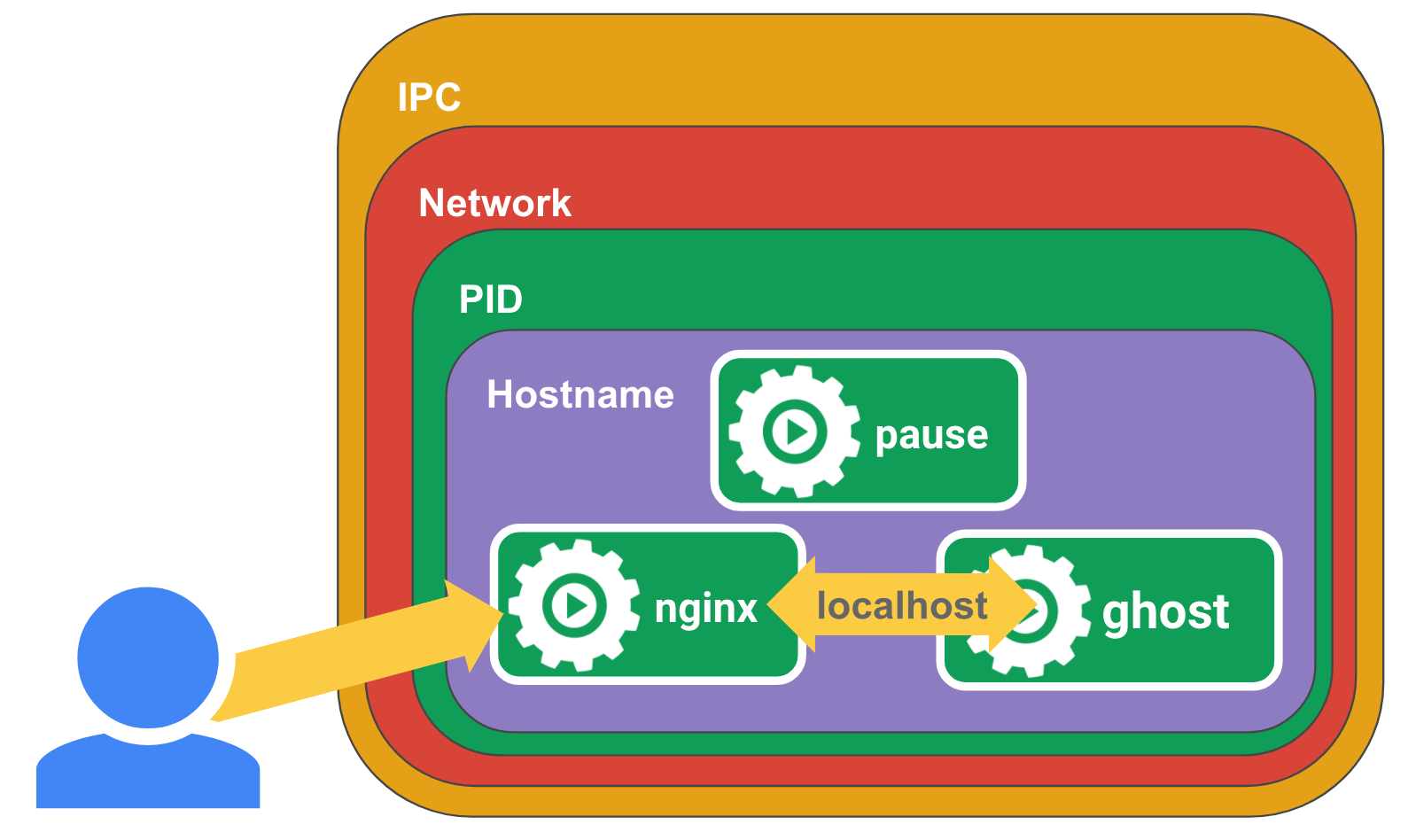
adopt localhost:8080 visit ghost page , Then you should be able to see ghost adopt Nginx The agent runs , because pause、nginx and ghost Sharing between containers network namespace, As shown in the figure below :
pod Commonly used way
pod There are two types of usage :
- pod Only one container runs in the . In this case, we can put pod A wrapper regarded as a container ,kubernetes Through management pod Way to manage containers ;
- pod Run multiple containers that need to share resources and work closely together . As shown in the figure below , Two containers pass through Volume Shared files ,Filer Puller Update files from the remote ,Web Server Responsible for the presentation of documents .

Whether to allocate two containers in different or the same pod, The following points usually need to be considered :
- Whether it is necessary for them to run in the same kubernetes node ?
- They represent a whole , Or an independent component ?
- Do they need to be expanded or reduced as a whole ?
Pod Use
establish Pod
In the following ways kubectl apply -f nginx-pod.yaml establish pod, And pass kubectl get pod see pod The state of , As shown below .
apiVersion: v1
kind: Pod
metadata:
  name: nginx  # pod  name
spec:
  containers:   #  List of containers
  - name: nginx #  Container name
    image: nginx:1.14.2 #  Containers use mirroring
    ports:  #  Container port mapping
    - containerPort: 80
perform kubectl describe pod nginx see pod The state of , The following shows pod Some information ,Status The fields are pod A summary introduction in its life cycle ,Running Express pod In normal operation
Name:         nginx
Namespace:    default
.....
Start Time:   Sat, 04 Jun 2022 09:24:36 +0000
Labels:       <none>
.....
Status:       Running
IP:           10.42.1.139
Containers:
  nginx:
    Container ID:   docker://xxxx
    Image:          nginx:1.14.2
    Image ID:       docker-pullable://
.....
pod Life cycle of
Pod After creation , Follow the defined lifecycle , from Pending The stage begins , If pod At least one container in the is started normally , entering Running, And then according to Pod Whether any of the containers in the has entered... Due to fault termination Succeeded or Failed Stage ,pod In its life cycle, it may be in the following states
- Pending: Pod Has been Kubernetes Cluster acceptance , But one or more containers are not ready to run . This includes Pod The time spent waiting for scheduling and downloading container images over the network .
- Running: Pod Bound to a node , And all containers have been created . At least one container is still running , Or in the process of starting or restarting .
- Succeeded: Pod All containers in have been successfully terminated , Will not restart .
- Failed:Pod All containers in have terminated , And at least one container is terminated due to failure . in other words , The container either exits in a non-zero state , It's either terminated by the system .
- Unknown: For some reason , Can't get Pod The state of . This phase is usually due to and should run Pod An error occurred while communicating with the node of .
pod Create a process
be-all Kubernetes Components Controller, Scheduler, Kubelet All use Watch Mechanism to monitor API Server, To get the event of object change , establish pod The general process is as follows :

- User pass Kubectl Submit Pod` Description file to API Server;
- API Server take Pod The information of the object is stored in Etcd;
- Pod The creation of will generate events , Return to API Server;
- Controller Listening for events ;
- Pod Mount the disk if necessary ,Controller Will check whether there are any that meet the conditions PV;
- If the conditions are met PV,Controller Will bind Pod and PV, Tell... About the binding relationship API Server;
- API Server Write binding information to Etcd;
- Generate Pod Update event ;
- Scheduler Listen to the Pod Update event ;
- Scheduler Would be Pod choice Node;
- If there is one that meets the conditions Node,Scheduler Will bind Pod and Node, And tell the binding relationship API Server;
- API Server Write binding information to Etcd;
- Generate Pod Update event ;
- Kubelet Listen to the Pod Update event , establish Pod;
- Kubelet inform CRI( Container runtime interface ) Download mirroring ;
- Kubelet inform CRI Run container ;
- CRI call Docker Run container ;
- Kubelet inform Volume Manager, Hang the disc on Node At the same time mount to Pod;
- CRI call CNI( Container network interface ) Configure container network ;
边栏推荐
猜你喜欢

Jeu de boutons de force 4 (version MySQL)
技术分享 | kubernetes pod 简介
I2C【2】-IIC为什么需要用开漏输出和上拉电阻bug

PAML|计算dN/dS值的生信软件

Lifting method (I) AdaBoost
Zhengweimin, academician of the Chinese Academy of Engineering: I am optimistic that China will have a place in the next it Era

自制C#编译器

【深入理解TcaplusDB技术】TcaplusDB导入数据

【LeetCode】8、字符串转换整数(atoi)

MitoZ|Multi-Kmer mode
随机推荐
Background and specificity of Worthington elastase
刷题笔记(十六)--二叉树:修改与构造
How to write the title of popular popular items in our media video
Beijing accelerates ecological construction, Medtronic Internet and Moore thread complete product compatibility and mutual certification
北京 加速生态建设 迈动互联与摩尔线程完成产品兼容互认证
自制C#编译器
HiCPlotter|HiC数据可视化工具
[deeply understand tcapulusdb technology] table management of document acceptance
IP-guard打印管控,防止打印渠道信息泄露
【深入理解TcaplusDB技术】单据受理之表管理
刷题笔记(十七)--二叉搜索树:关于属性问题
Advanced packaging, the beginning of a big cycle -- a symposium on semiconductor equipment
Enterprise data leakage prevention solution sharing
Contact five heart matchmaker to take off the order
利用for循环,分别计算1-100中奇数的和、偶数的和【方法一】
利用BioEdit做多序列一致性比对
迅为iTOP-3568开发板安装 RKNN Toolkit Lite2
安超云入选《CIOReview》2022年亚太区“十大云计算解决方案提供商”
Zhengweimin, academician of the Chinese Academy of Engineering: I am optimistic that China will have a place in the next it Era
洛谷P1608 路径统计 题解