当前位置:网站首页>The first WebAssembly program
The first WebAssembly program
2022-07-30 06:54:00 【yunteng521】
前言
WebAssembly/wasm WebAssembly 或者 wasm 是一个可移植、体积小、加载快并且兼容 Web 的全新格式,There are many advantages,This chapter tells aboutrust 编码 一个 wasm ,html调用
为什么用rust ,参考 https://blog.csdn.net/u012067469/article/details/100100813/
建议,Code in the programming language you are most familiar with
浏览器支持 情况 https://developer.mozilla.org/zh-CN/docs/WebAssembly
1:准备
centos7
rust1.55
2:环境搭建
1>rust 安装
根据CPU架构 下载相应的安装文件
https://forge.rust-lang.org/infra/other-installation-methods.html#rustup
2> wasm-pack 安装
https://rustwasm.github.io/docs/book/game-of-life/setup.html
3:创建工程
1>You can also download the template first git clone https://github.com/rustwasm/wasm-pack-template
2>cargo generate --git ./wasm-pack-template --name test
2>编写代码
mod utils;

use wasm_bindgen::prelude::*;

// When the `wee_alloc` feature is enabled, use `wee_alloc` as the global
// allocator.
#[cfg(feature = "wee_alloc")]
#[global_allocator]
static ALLOC: wee_alloc::WeeAlloc = wee_alloc::WeeAlloc::INIT;

#[wasm_bindgen]
extern {

    fn alert(s: &str);
}

#[wasm_bindgen]
pub fn greet() {

    alert("Hello, test!");
}

//testcode Start your own code 也就3个函数///
#[wasm_bindgen]
pub fn fib(i: u32) -> u32 {

    match i {

        0 => 0,
        1 => 1,
        _ => fib(i-1) + fib(i-2)
    }
}

#[wasm_bindgen]
pub fn double(i: u32) -> u32 {

    2*i
}

#[wasm_bindgen]
pub fn add(i: u32,j:u32) -> u32 {

    i+j
}
3>编译
wasm-pack build 坐等完成
After compiling, there are many more files
这里找到 当前目录 ./pkg/test_bg.wasm 这个文件
4: 测试wasm
1>创建个webdemo

test.html 文件内容
<!DOCTYPE html>
<html>
<head>
<meta charset="utf-8">
<title>IFE JavaScript Task 01</title>
</head>
<body>
<label>Please enter the name of the function to call:<input id="aqi-input" type="text"></label>
<br />
<label>Please enter parameter values for the function:<input id="aqi-input1" type="text"></label>
<br />
<button id="button">Confirm to fill in</button>
<div>您输入的值是:<span id="aqi-display">No entry yet</span></div>
<script src="js/testwasm.js"></script>
</script>
</body>
</html>
testwasm.js 内容如下
window.onload = prepare;
    function prepare(){

        if (!document.getElementById){

            return false;
        }//检查浏览器是否支持document.getElementById的DOM方法
        var submit = document.getElementById("button");
        submit.onclick = function(){

            clickButton();
        }//添加事件处理函数,把onclick事件绑定到ID为"button"元素上

		loadwasm1('test_bg.wasm').then(
		instance => {

		 window._wasminstance = instance ;
		 console.log("wasm load finish");
		});
    }
    function clickButton(){

		//let num =loadwasm1('wasm_hello_bg.wasm');
	// console.log(num);
	// return ;
        var output = document.getElementById("aqi-display");
        var input = document.getElementById("aqi-input");
		var input1 = document.getElementById("aqi-input1");
      // text = input.value;//获取ID为"aqi-input"的值
	  var text1 = "";
	  if(window._wasminstance){

		  if(typeof(input.value) == 'string'  && typeof(window._wasminstance.exports) == 'object'){

			  if(!isNaN(input.value)){
     //是数字
				let number1 = Number(input.value);
					switch(number1){

						case 1:text1 = window._wasminstance.exports.double(12).toString();break;
						case 2:text1 = window._wasminstance.exports.fib(12).toString();break;
						case 3:text1 = window._wasminstance.exports.add(12,12).toString();break;
					}
			  }else{

				  let instr1 = input.value.trim();
				  let instr2 = input1.value.trim();
				  let params = instr2.length >0?instr2.split("#"):'';
				  let func = window._wasminstance.exports[instr1] ;
				  if (func){


					  switch(params.length){

						  case 0: text1 = func(); break;
						  case 1: text1 = func(Number(params[0])); break;
						  case 2: text1 = func(Number(params[0]),Number(params[1])); break;
						  default:
						   text1 = func();
					  }

				  }
			  }
		  }
	  }
        output.innerHTML = text1;//把值写入ID为"aqi-display"之中
    }
	function loadWebAssembly(fileName) {

	  return fetch(fileName)
		.then(response => response.arrayBuffer())
		.then(buffer => WebAssembly.compile(buffer))
		.then(module => {
    return new WebAssembly.Instance(module) });
	};

	function loadwasm(fileName){

		return fetch(fileName).
		then(response => response.arrayBuffer()).
		then(bufferSource => WebAssembly.instantiate(bufferSource)).
		then(result => result.instance.exports.double(2)) ;
	};

	function loadwasm1(fileName){

			return fetch(fileName).
			then(response =>response.arrayBuffer()).
			then(bytes => WebAssembly.instantiate(bytes)).
			then(results => results.instance
	  );
	};

	function loadwasm2(fileName,importObject){

			return fetch(fileName).
			then(response =>response.arrayBuffer()).
			then(bytes => WebAssembly.instantiate(bytes,importObject)).
			then(results => results.instance
	  );
	};
2>测试 用的是chrome 97 测试的

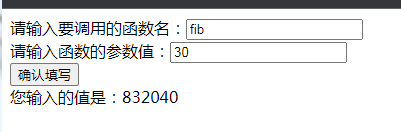
4: 另外一种方式生成wasm(不用模板)
Personally I think this is more convenient
1>cargo new --lib wasm-hello
2> lib.rs 修改代码
extern crate wasm_bindgen;

use wasm_bindgen::prelude::*;

#[wasm_bindgen]
pub fn fib(i: u32) -> u32 {
    match i {
        0 => 0,
        1 => 1,
        _ => fib(i-1) + fib(i-2)
    }
}
3>修改 Cargo.toml 增加
[dependencies]
wasm-bindgen="0.2.53"

[lib]
crate-type=["cdylib","rlib"]
4>wasm-pack build
在pkg 查找生成的wasm文件
5:If you need the project code, upload it later
上一张wasm 文件内容(273B 够小吧)
wasm文件内容
边栏推荐
- mysql delete duplicate data in the table, (retain only one row)
- Offensive and defensive world easy_web
- 【OS】操作系统高频面试题英文版(1)
- sqli-labs shooting range SQL injection learning Less-1
- Blind injection, error injection, wide byte injection, stack injection study notes
- Mysql 客户端常见异常分析
- [MATLAB]图像处理——交通标志的识别
- Student management system
- 【数仓】数据仓库高频面试题题英文版(1)
- Flink-流/批/OLAP一体得到Flink引擎
猜你喜欢
![CTFSHOW command execution [web29-web124] unfinished to be continued](/img/89/786fbe65af4c9f269530bf2d08e1a0.png)
CTFSHOW command execution [web29-web124] unfinished to be continued

uni-app: about custom components, easycom specs, uni_modules, etc.

3分钟告诉你如何成为一名黑客|零基础到黑客入门指南,你只需要掌握这五点能力

【MySQL功法】第5话 · SQL单表查询
Go简单实现协程池

国内数字藏品交易平台开发市场会开放二级市场吗

Redis 发布/订阅

oracle行转列、列转行总结

Jackson serialization failure problem - oracle data return type can't find the corresponding Serializer

Servlet基本原理与常见API方法的应用
随机推荐
SQL Server 数据库之生成与执行 SQL 脚本
A Spark task tuning 】 【 one day suddenly slow down how to solve
Nacos配置中心用法详细介绍
网上说的挖矿究竟是什么? 挖矿系统开发详解介绍
Remember a traffic analysis practice - Anheng Technology (August ctf)
《MySQL高级篇》四、索引的存储结构
TypeError The view function did not return a valid response. The function either returned None 的解决
"MySQL Advanced Chapter" four, the storage structure of the index
Oracle数据库SQL优化详解
【小程序项目开发-- 京东商城】uni-app之分类导航区域
【数仓】数据质量
Defense Ideas for a Type of SMS Vulnerability
C#中对委托的理解和使用
oracle row to column, column to row summary
TDengineGUI cannot connect to TDengine
【SQL】first_value 应用场景 - 首单 or 复购
Powerhouse Cup Preliminary WP
Bypassing the file upload vulnerability
C#预定义数据类型简介
[Mozhe Academy] Identity Authentication Failure Vulnerability Actual Combat