当前位置:网站首页>Hands on API development
Hands on API development
2022-06-27 12:02:00 【Hua Weiyun】
introduction
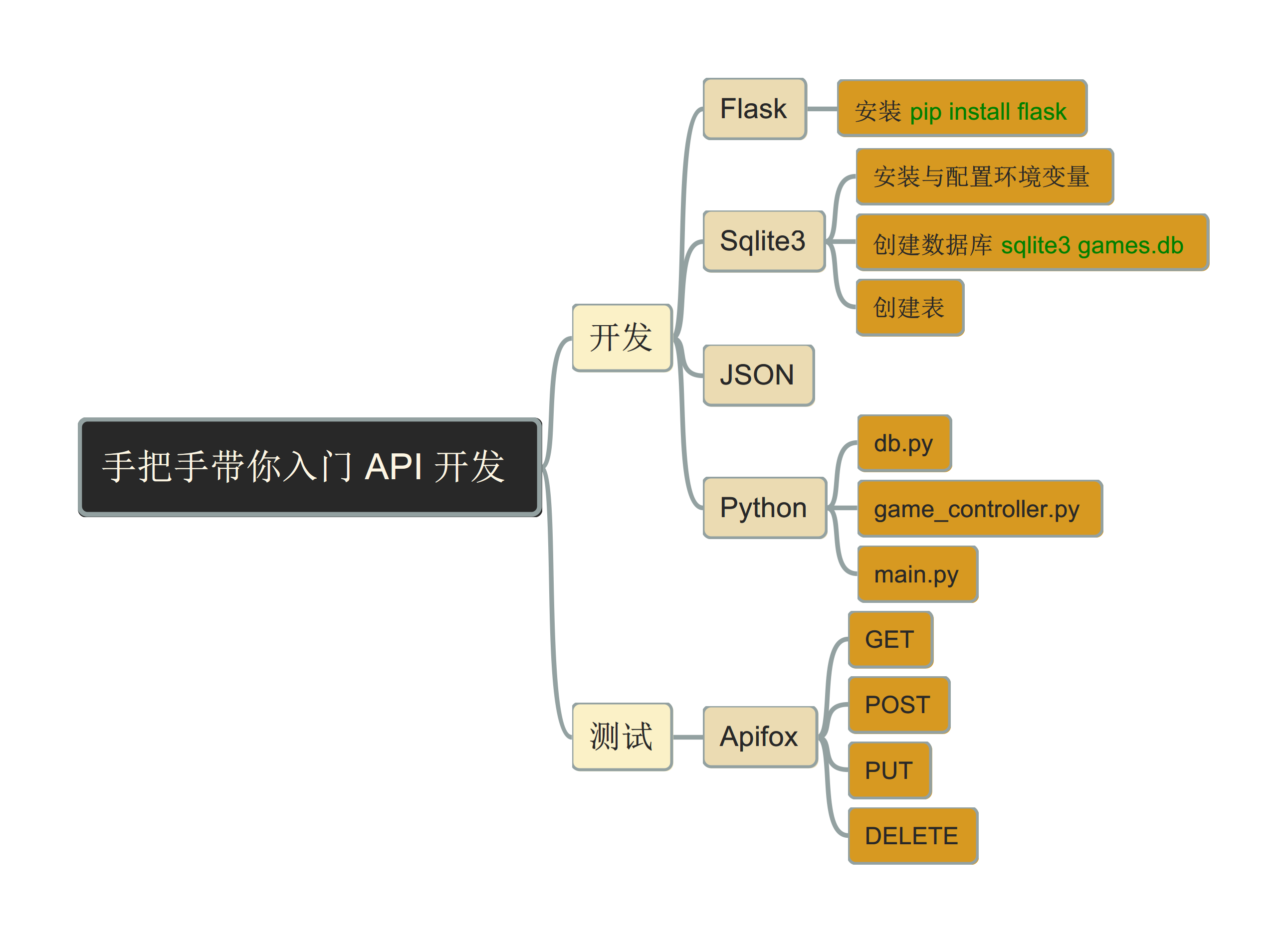
In this paper , You will learn how to use Flask、SQLite 3( Easy database ) and JSON Create... For data communication REST API.
This article USES the 4 The most commonly used HTTP Verb :GET、POST、PUT and DELETE, Corresponding database CRUD operation .
For example, it manages a game database games.db, Include name (name)、 Price (price) And rank (rate).
We will also use Flask Created API Expose several operations :
Get all games
Create a new game
Update game
Delete game
adopt ID Get games
First , We will use Python Create database related CRUD, Then we will be in API Use in Flask Expose all these functions , The encoding format is JSON.
install SQLite
Click on here , Download the corresponding of your system SQLite edition , This article takes Windows For example :

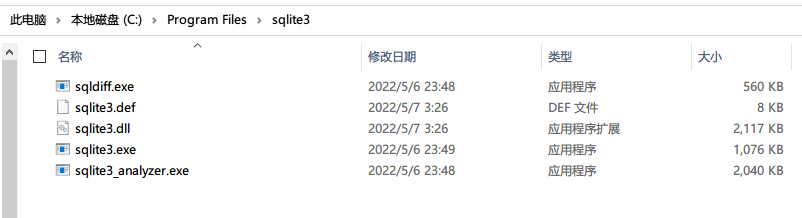
After downloading, the files in these two compressed packages Unzip to C Under a directory on the disk :
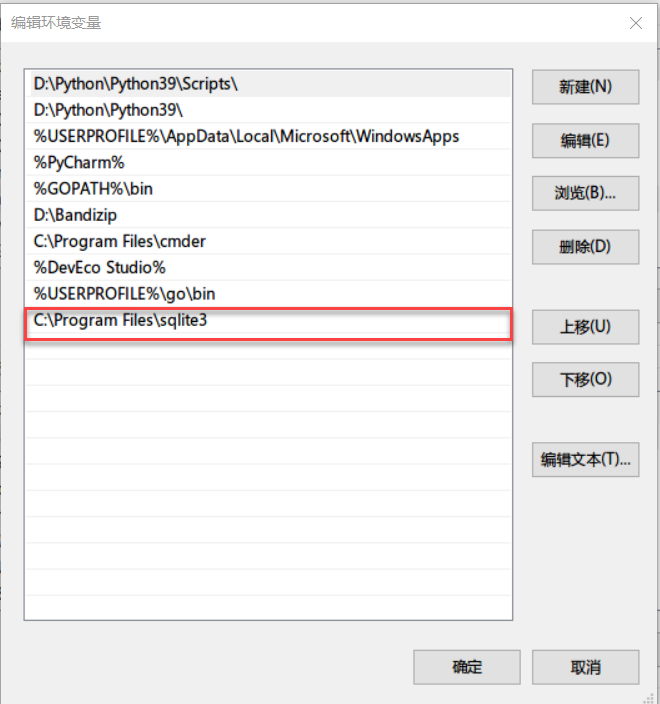
And add the directory to the environment variable :
see SQLite3 edition :
λ sqlite3SQLite version 3.38.5 2022-05-06 15:25:27Enter ".help" for usage hints.Connected to a transient in-memory database.Use ".open FILENAME" to reopen on a persistent database.sqlite>Create database
Use sqlite3 databaseName.db Command to create a SQLite database , This article creates a games.db database :
λ sqlite3 games.dbSQLite version 3.38.5 2022-05-06 15:25:27Enter ".help" for usage hints.sqlite> .databasesmain: C:\Program Files\cmder\games.db r/wCreate table
CREATE TABLE IF NOT EXISTS games( id INTEGER PRIMARY KEY AUTOINCREMENT, name TEXT NOT NULL, price REAL NOT NULL, rate INTEGER NOT NULL)establish db.py
As we saw in the previous step, the database will be called games.db . newly build Python Of SQLite3 Connection file db.py:
import sqlite3DATABASE_NAME = "games.db"# Get database connection def get_db(): conn = sqlite3.connect(DATABASE_NAME) return conn# Create database tables def create_tables(): tables = [ """ CREATE TABLE IF NOT EXISTS games ( id INTEGER PRIMARY KEY AUTOINCREMENT, name TEXT NOT NULL, price REAL NOT NULL, rate INTEGER NOT NULL ) """ ] db = get_db() cursor = db.cursor() for table in tables: cursor.execute(table)in , Besides , We have two functions :
One of them is
get_db(): Used to obtain a database connectionAnother function
create_tables(): WhengamesCreate a database table when the database table does not exist .
Now we have defined the database , Let's see how to use SQLite3 Database game CRUD operation .
establish game_controller.py
stay API Before exposing the database in , We will create a game controller , It will be responsible for preserving 、 to update 、 All operations of deleting and acquiring game data .
All of these functions are in a file called game_controller.py In the file of , It looks something like this :
from db import get_dbdef insert_game(name, price, rate): db = get_db() cursor = db.cursor() statement = "INSERT INTO games(name, price, rate) VALUES (?, ?, ?)" cursor.execute(statement, [name, price, rate]) db.commit() return Truedef update_game(id, name, price, rate): db = get_db() cursor = db.cursor() statement = "UPDATE games SET name = ?, price = ?, rate = ? WHERE id = ?" cursor.execute(statement, [name, price, rate, id]) db.commit() return Truedef delete_game(id): db = get_db() cursor = db.cursor() statement = "DELETE FROM games WHERE id = ?" cursor.execute(statement, [id]) db.commit() return Truedef get_by_id(id): db = get_db() cursor = db.cursor() statement = "SELECT id, name, price, rate FROM games WHERE id = ?" cursor.execute(statement, [id]) return cursor.fetchone()def get_games(): db = get_db() cursor = db.cursor() query = "SELECT id, name, price, rate FROM games" cursor.execute(query) return cursor.fetchall() In the document , We see several functions . insert_game Function to receive game data and insert it into the database (INSERT); All of these use prepared statements to prevent us from using Python and Flask Created this API Medium SQL Inject .
We also see other ways , for example update_game perform UPDATE Action to update the game ,delete_game From its id Delete game (DELETE),get_by_id From its id Return to the game ( Use SELECT operation ).
Finally, let's take a look at returning to all existing games get_games function .
Please note that , All functions use databases and cursors to perform all operations . Now we have the database operation CRUD, It's time to use Flask Open API All the contents of the
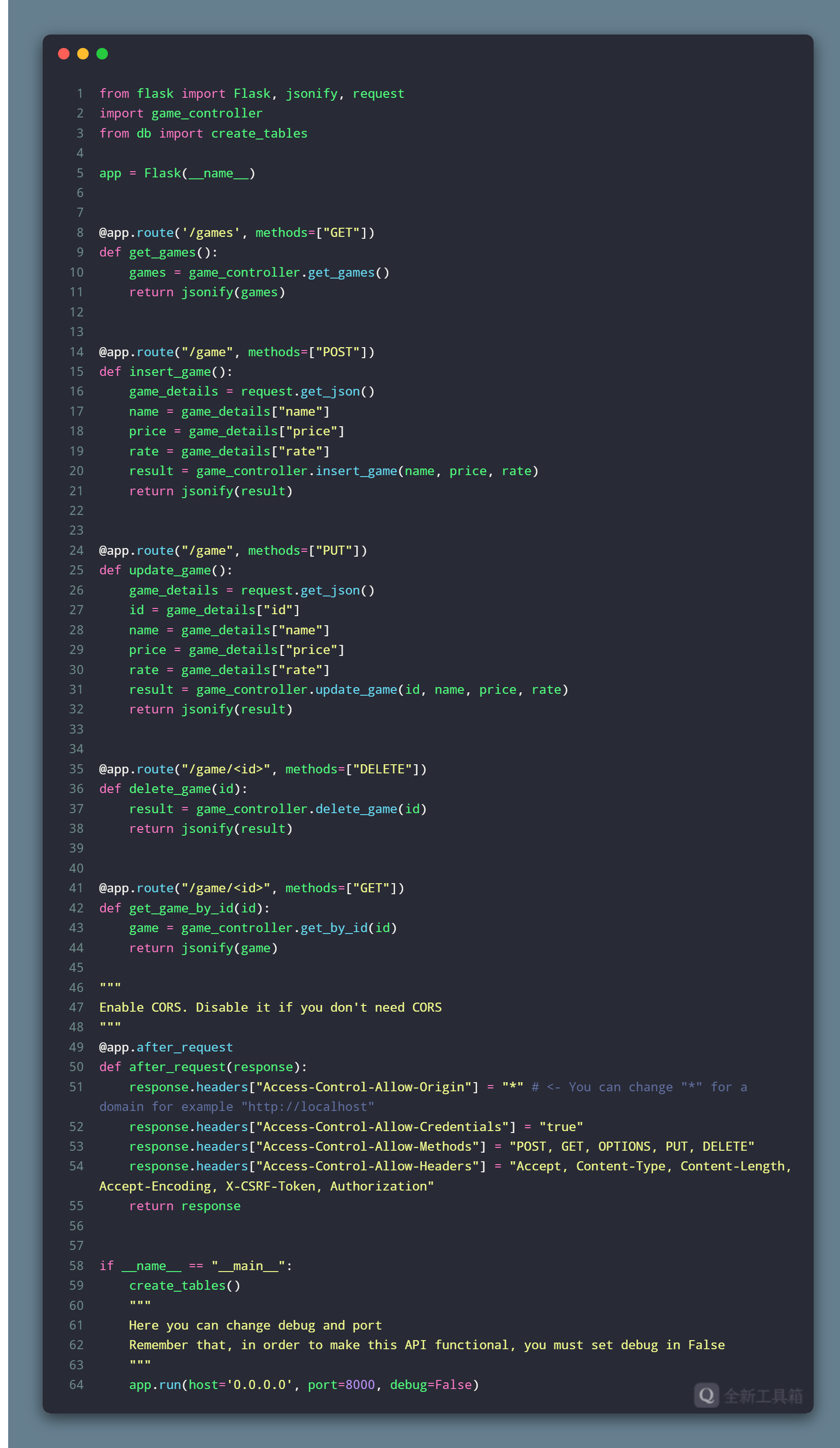
establish main.py
install flask

You can check the official Installation help :
$ pip install FlaskWe are API The first thing to do in is to create Flask Application and import game controller . We also imported a function from the database , Because we need to create tables when we start the application :
from flask import Flask, jsonify, requestimport game_controllerfrom db import create_tablesapp = Flask(__name__)And then use GET、PUT、POST and DELETE http Verb definition route :
@app.route('/games', methods=["GET"])def get_games(): games = game_controller.get_games() return jsonify(games)@app.route("/game", methods=["POST"])def insert_game(): game_details = request.get_json() name = game_details["name"] price = game_details["price"] rate = game_details["rate"] result = game_controller.insert_game(name, price, rate) return jsonify(result)@app.route("/game", methods=["PUT"])def update_game(): game_details = request.get_json() id = game_details["id"] name = game_details["name"] price = game_details["price"] rate = game_details["rate"] result = game_controller.update_game(id, name, price, rate) return jsonify(result)@app.route("/game/<id>", methods=["DELETE"])def delete_game(id): result = game_controller.delete_game(id) return jsonify(result)@app.route("/game/<id>", methods=["GET"])def get_game_by_id(id): game = game_controller.get_by_id(id) return jsonify(game)Each route corresponds to the game controller function we created earlier , And SQLite3 Database interaction .
When updating and inserting games , We use
get_jsonRead the requested JSON , Then visit the dictionary :
game_details = request.get_json()Delete or pass ID Get the case , We read from the route id Variable as <variable> And receive it in the method :
game = game_controller.get_by_id(id)this Python API adopt JSON communicate , So all responses are based on jsonify The contents returned by the function :
return jsonify(result)Last , We created Flask Application to start the server and listen for requests :
if __name__ == "__main__": create_tables() """ Here you can change debug and port Remember that, in order to make this API functional, you must set debug in False """ app.run(host='0.0.0.0', port=8000, debug=False) thus , We have complete main.py Function as follows :
from flask import Flask, jsonify, request, jsonimport game_controllerfrom db import create_tablesapp = Flask(__name__)@app.route('/games', methods=["GET"])def get_games(): games = game_controller.get_games() return jsonify(games)@app.route("/game", methods=["POST"])def insert_game(): game_details = json.loads(request.get_data()) name = game_details["name"] price = game_details["price"] rate = game_details["rate"] result = game_controller.insert_game(name, price, rate) return jsonify(result)@app.route("/game", methods=["PUT"])def update_game(): game_details = request.get_json() id = game_details["id"] name = game_details["name"] price = game_details["price"] rate = game_details["rate"] result = game_controller.update_game(id, name, price, rate) return jsonify(result)@app.route("/game/<id>", methods=["DELETE"])def delete_game(id): result = game_controller.delete_game(id) return jsonify(result)@app.route("/game/<id>", methods=["GET"])def get_game_by_id(id): game = game_controller.get_by_id(id) return jsonify(game)"""Enable CORS. Disable it if you don't need CORS"""@app.after_requestdef after_request(response): response.headers["Access-Control-Allow-Origin"] = "*" # <- You can change "*" for a domain for example "http://localhost" response.headers["Access-Control-Allow-Credentials"] = "true" response.headers["Access-Control-Allow-Methods"] = "POST, GET, OPTIONS, PUT, DELETE" response.headers["Access-Control-Allow-Headers"] = "Accept, Content-Type, Content-Length, Accept-Encoding, X-CSRF-Token, Authorization" return responseif __name__ == "__main__": create_tables() """ Here you can change debug and port Remember that, in order to make this API functional, you must set debug in False """ app.run(host='0.0.0.0', port=8000, debug=False)It is worth noting that , Here we add CORS, If you want to start with API Different domains use this API, You need to enable CORS. Just add the following code snippet to API( In the repository , You will find the added code , You can delete it as needed ):
"""Enable CORS. Disable it if you don't need CORS"""@app.after_requestdef after_request(response): response.headers["Access-Control-Allow-Origin"] = "*" # <- You can change "*" for a domain for example "http://localhost" response.headers["Access-Control-Allow-Credentials"] = "true" response.headers["Access-Control-Allow-Methods"] = "POST, GET, OPTIONS, PUT, DELETE" response.headers["Access-Control-Allow-Headers"] = "Accept, Content-Type, Content-Length, Accept-Encoding, X-CSRF-Token, Authorization" return responseStart the program and test
Use python3 main.py, Run our server and API :
* Serving Flask app 'main' (lazy loading) * Environment: production WARNING: This is a development server. Do not use it in a production deployment. Use a production WSGI server instead. * Debug mode: off * Running on all addresses (0.0.0.0) WARNING: This is a development server. Do not use it in a production deployment. * Running on http://127.0.0.1:8000 * Running on http://10.26.4.188:8000 (Press CTRL+C to quit)For the convenience of all the API Test of , Use to Apifox As an interface testing tool :
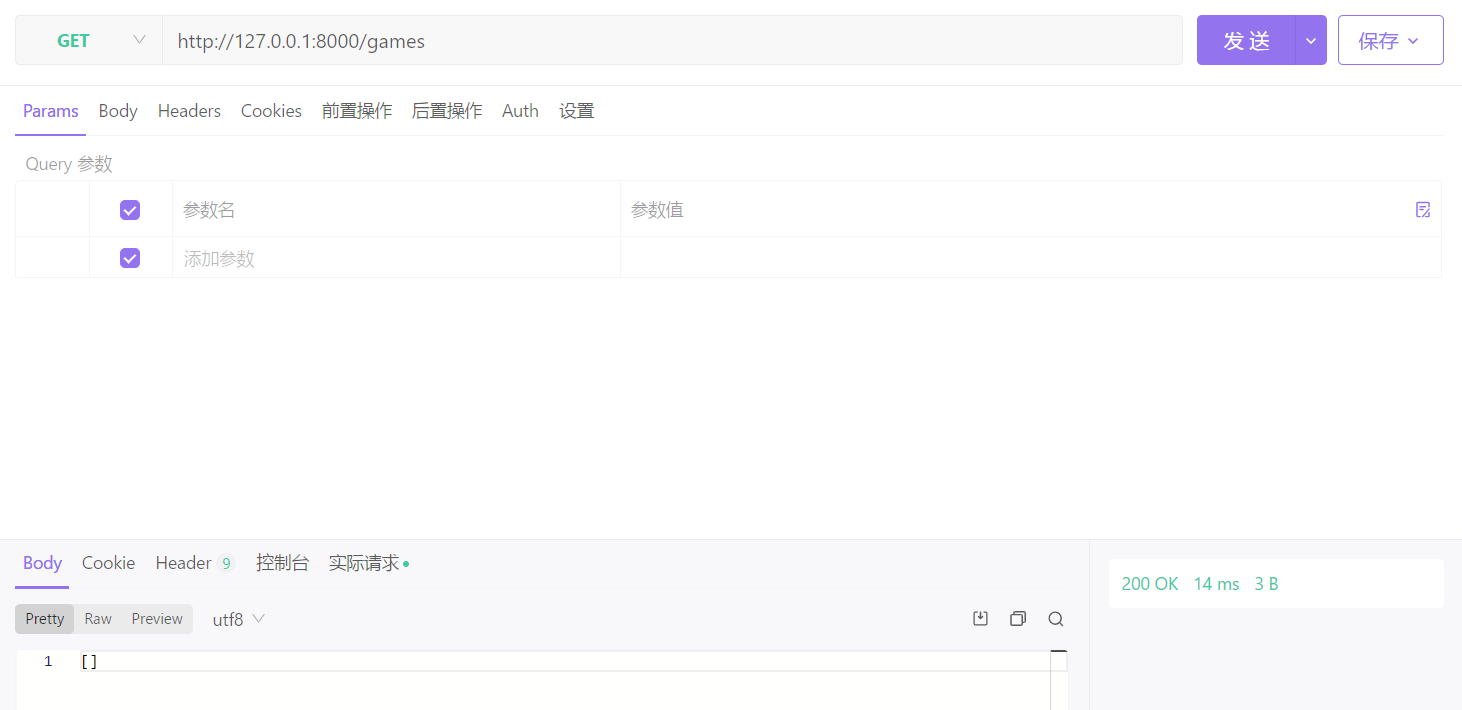
GET Get all game tests
visit http://127.0.0.1:8000/games. return 200 OK, But there are no games in the database , So return null JSON character string :
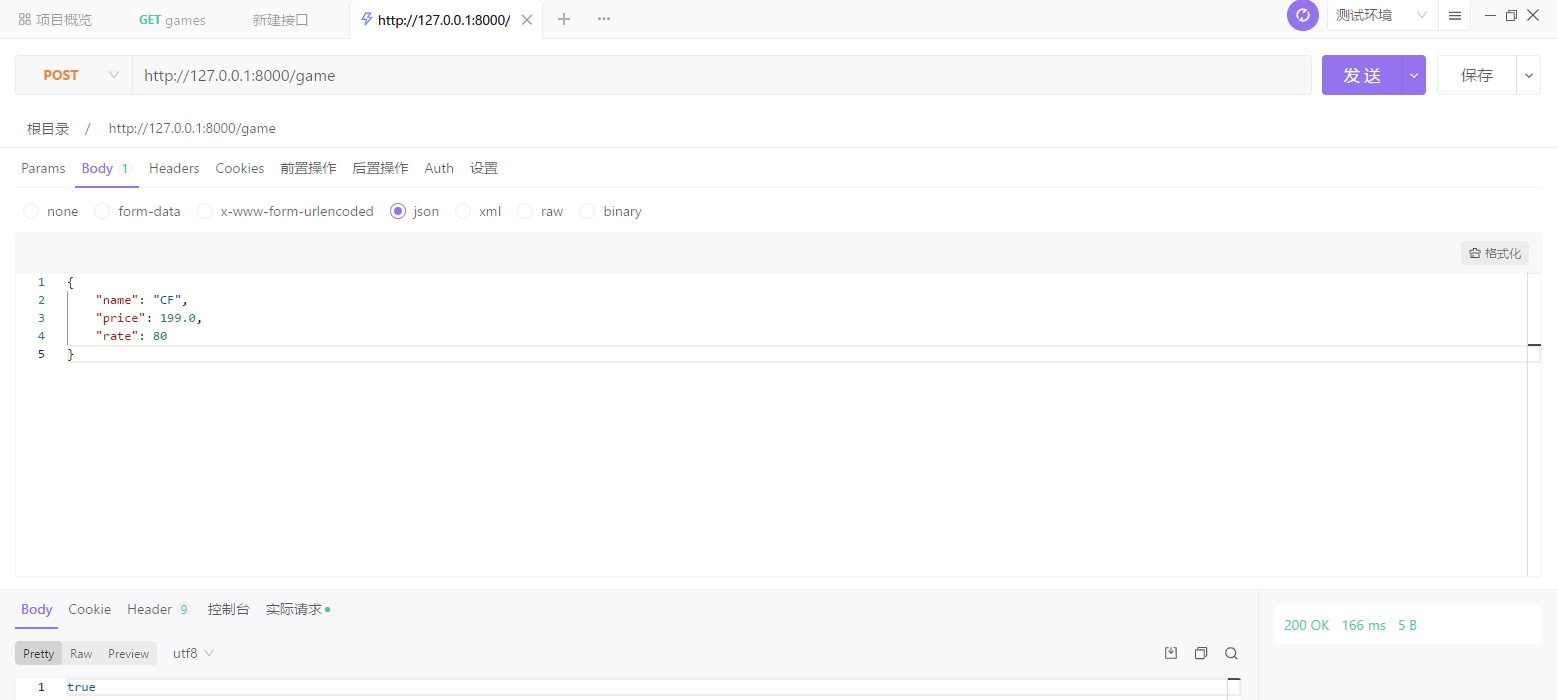
POST Add a game test
Because of the game id Since the increase , So you just need to send it to the external server name, price and rate:
The server background displays as follows :
127.0.0.1 - - [16/Jun/2022 14:51:05] "POST /game HTTP/1.1" 200 -PUT Modify the game content test
View all our current game content :
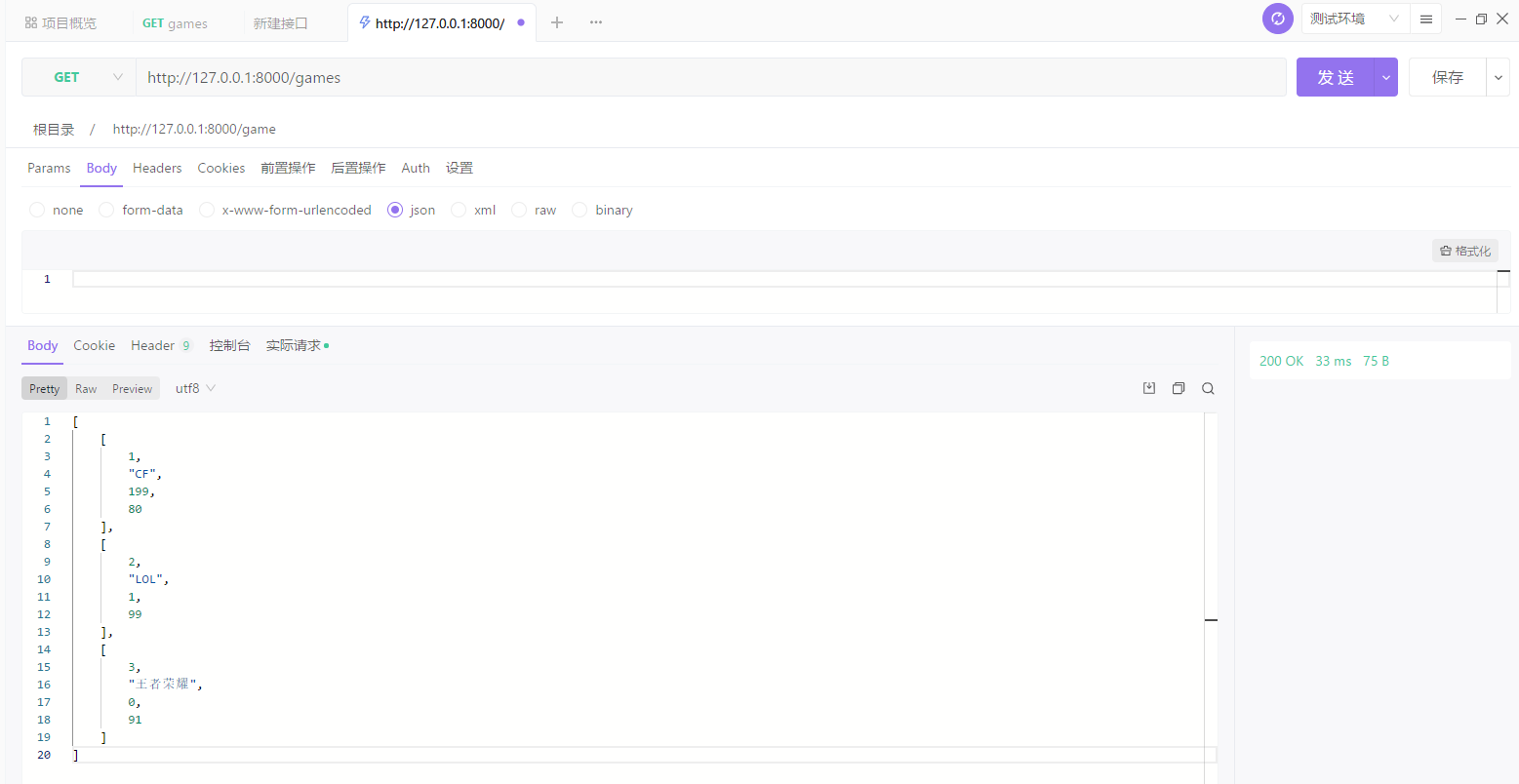
And then LOL The name of is changed to Hero alliance , At this point, we need to pass in four parameters :id,name, price, rate, Because according to id To find the game we want to change :
{ "id": 2, "name": " Hero alliance ", "price": 1, "rate": 99}The test success is as follows :
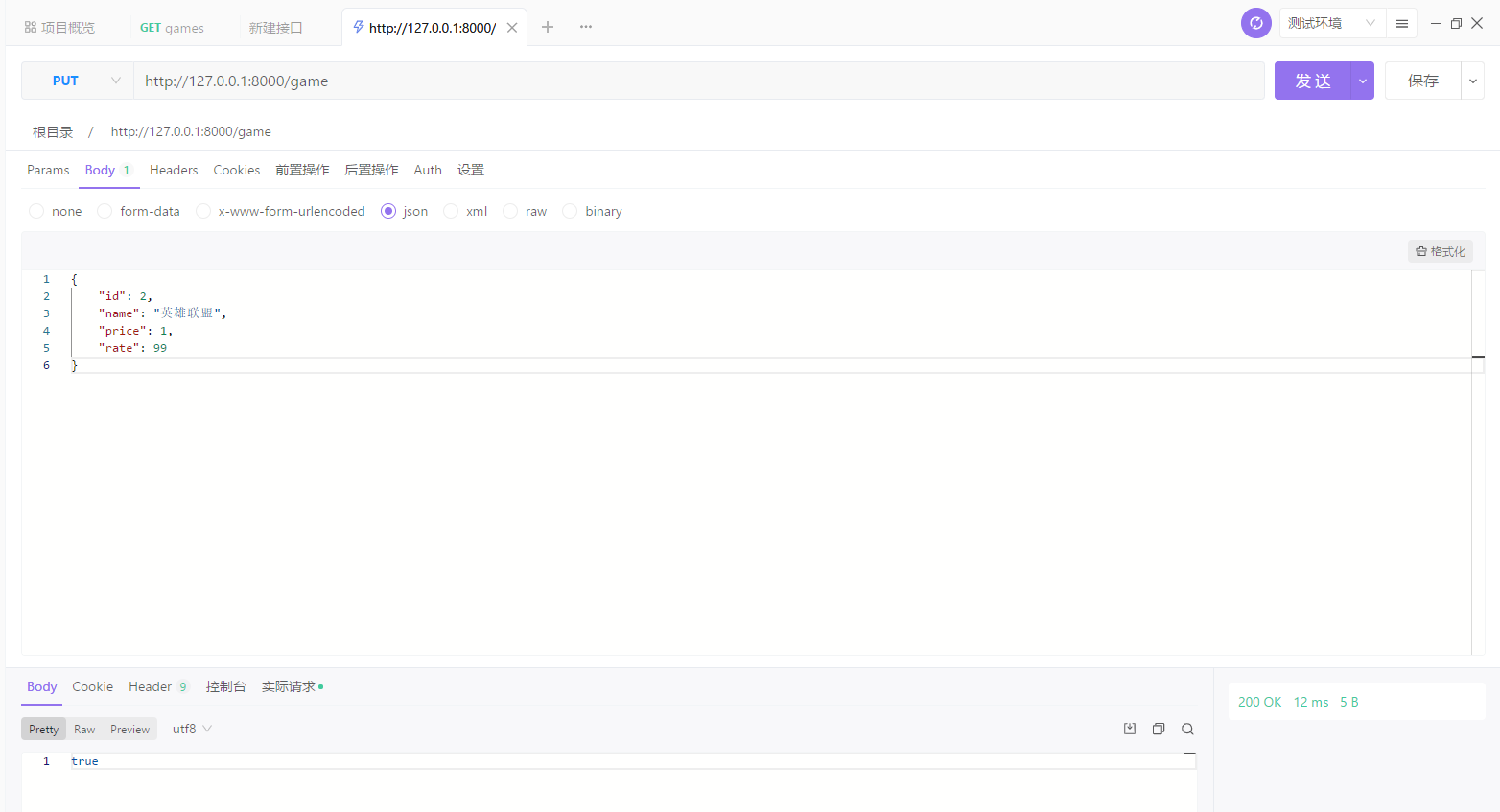
GET Get a single game content test
In order to check just for id by 2 Whether the game was renamed successfully , We can pass in http://127.0.0.1:8000/game/2 route :
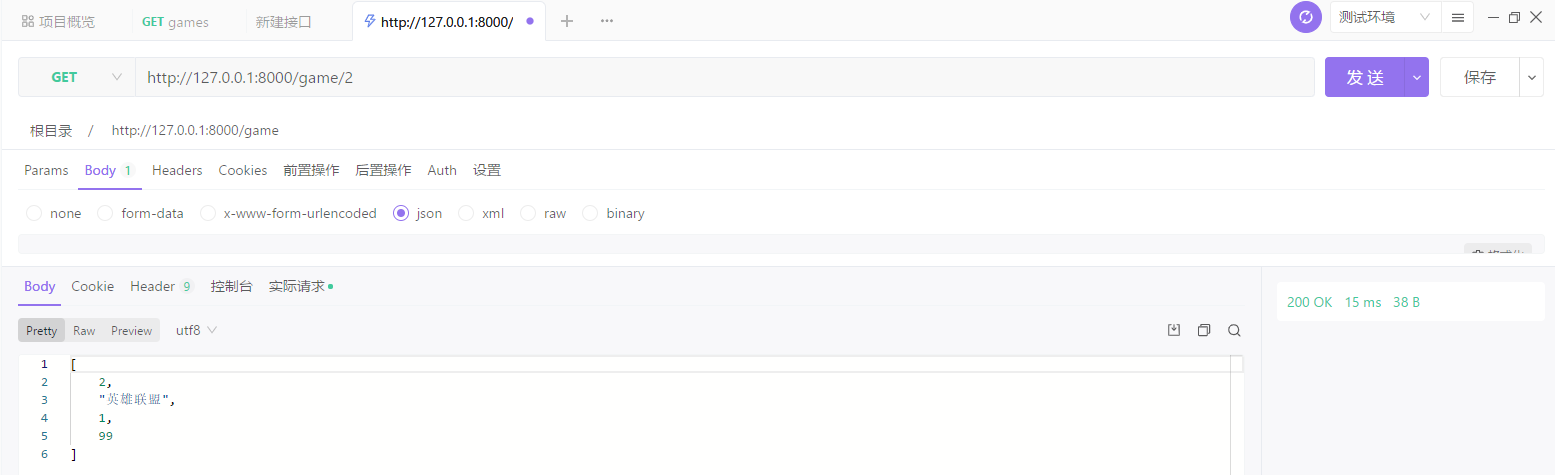
You can see ,PUT And current GET Requests are all OK Of .
DELETE Delete game test
Last , Come to our delete link , hold id by 3 Game content deleted :
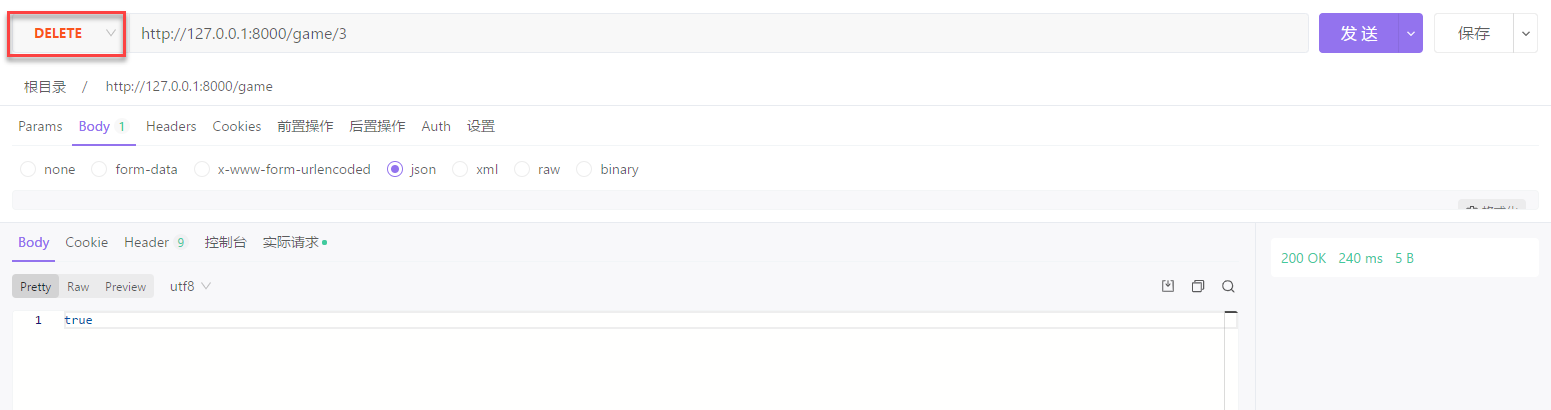
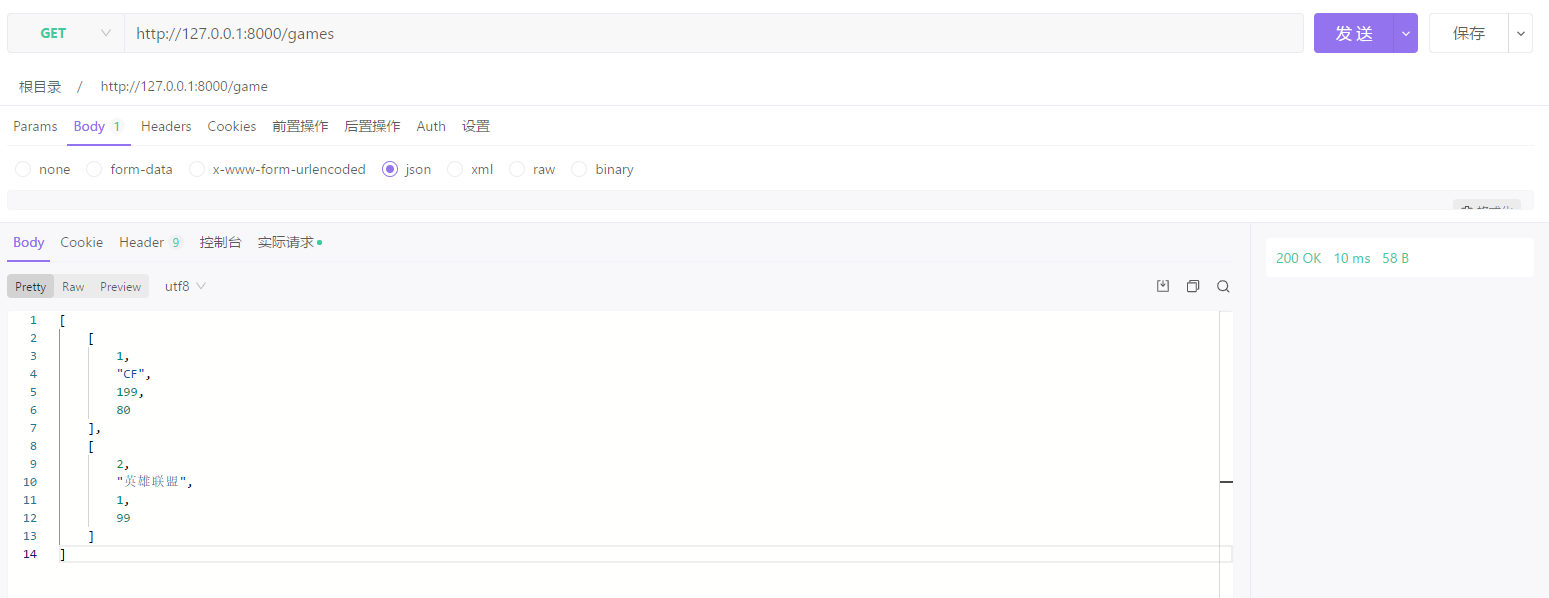
You can see that the deletion was successful , our API The test is complete OK Of
summary
Last , It is time for this article to make a summary .
This tutorial uses Python、SQLite3、Flask A simple game Rest API function , By means of Flask Process incoming HTTP Four requests for :GET、POST、PUT、DELETE, The most basic functions of adding, deleting, modifying and querying are realized .
The use of Apifox As our interface testing tool , A complete experience of a simple API Development process .
If the article is useful to you , Just like it before you leave , See you for the next article .
边栏推荐
- Jerry's constant feeding of dogs will cause frequent switch interruptions leading to timer [chapter]
- 记一次 .NET 某物管后台服务 卡死分析
- 15+ urban road element segmentation application, this segmentation model is enough!
- [tcapulusdb knowledge base] tcapulusdb doc acceptance - table creation approval introduction
- Summary of qstype class usage (III)
- R语言使用epiDisplay包的dotplot函数通过点图的形式可视化不同区间数据点的频率、使用by参数指定分组参数可视化不同分组的点图分布、使用dot.col参数指定分组数据点的颜色
- nifi从入门到实战(保姆级教程)——身份认证
- 如何修改 node_modules 裏的文件
- 56. Core principle of flutter - flutter startup process and rendering pipeline
- 面试突击60:什么情况会导致 MySQL 索引失效?
猜你喜欢
![[tcapulusdb knowledge base] Introduction to tmonitor system upgrade](/img/04/b1194ca3340b23a4fb2091d1b2a44d.png)
[tcapulusdb knowledge base] Introduction to tmonitor system upgrade
[tcapulusdb knowledge base] Introduction to tcapulusdb tcapsvrmgr tool (I)
【TcaplusDB知识库】TcaplusDB常规单据介绍

MapReduce principle analysis (in-depth source code)

Matlab exercises - create 50 rows and 50 columns of all zero matrix, all 1 matrix, identity matrix, diagonal matrix, and output the 135 element of the matrix.

Excel中输入整数却总是显示小数,如何调整?
Prevent being rectified after 00? I. The company's recruitment requires that employees cannot sue the company

In 2021, the global enhanced oil production surfactant revenue was about USD 202.3 million, and it is expected to reach USD 297.1 million in 2028
【TcaplusDB知识库】Tmonitor系统升级介绍
![[worthy of collection] centos7 installation MySQL complete operation command](/img/23/7c4b69e1abc3a3ceba9b79cebe1c9b.png)
[worthy of collection] centos7 installation MySQL complete operation command
随机推荐
Usage of rxjs mergemap
R语言使用MASS包的polr函数构建有序多分类logistic回归模型、使用VGAM包的vglm函数对有序多分类logistic回归模型进行平行性假设作检验
FileOutputStream
In 2021, the global carbon graphite brush revenue is about US $2366million, and it is expected to reach US $2701.8 million in 2028
How to adjust an integer that is entered in Excel but always displays decimals?
手把手带你入门 API 开发
[tcapulusdb knowledge base] tcapulusdb doc acceptance - table creation approval introduction
In depth analysis of error solutions and problems in dynamic loading of unity shadow and outline components
杰理之一直喂狗会频繁开关中断导致定时器【篇】
Unity Shader学习(二)第一个Shader
聊聊 Go 语言与云原生技术
Nvme2.0 protocol - new features
C/s architecture
On ticheck
[tcapulusdb knowledge base] tcapulusdb OMS business personnel permission introduction
C# wpf 实现撤销重做功能
2022CISCN华中 Web
Jerry's seamless looping [chapter]
Interview shock 60: what will cause MySQL index invalidation?
Summary of qstype class usage (II)