当前位置:网站首页>【无需公网IP】为远程桌面树莓派配置固定的公网TCP端口地址
【无需公网IP】为远程桌面树莓派配置固定的公网TCP端口地址
2022-07-24 05:22:00 【CpolarLisa】
上一篇
在上一篇文章中,我们在没有公网IP的环境下,通过cpolar内网穿透映射内网端口,成功实现了在Windows系统上远程桌面控制树莓派。
但免费使用cpolar所生成的公网地址,为随机公网地址,每隔24小时会变化。为了能够更高效的远程控制树莓派,我们可以为其配置固定的公网TCP端口地址,同时增大带宽,只需要将cpolar升级至专业套餐。
1. 升级cpolar至专业套餐
- 在树莓派上,打开cpolar官网登录进入后台,我们需要将cpolar升级到专业套餐,可以保留2个固定TCP地址,并增大带宽到3M。
cpolar官网:http://www.cpolar.com/
2. 保留一个固定的TCP地址
- cpolar套餐升级成功后,在官网后台,点击仪表盘——
预留,找到保留的TCP地址
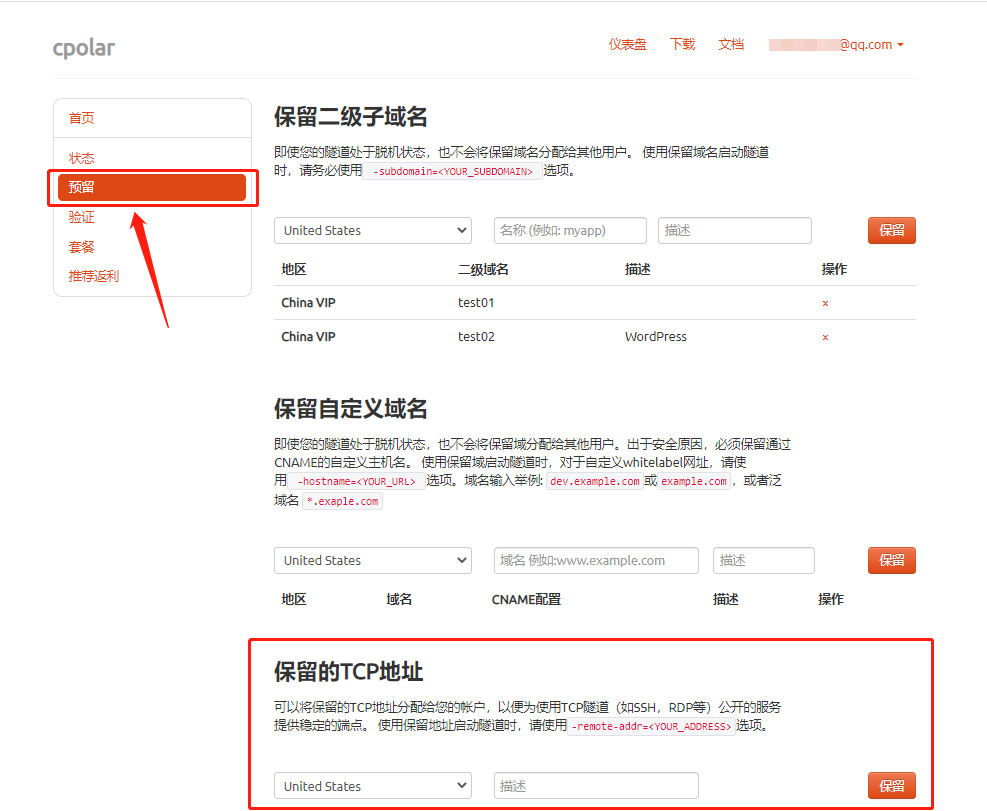
我们来为远程桌面保留一个固定的公网TCP端口地址,填写信息后,点击
保留:- 地区:选择China VIP
- 描述:填写rdp(可以自定义命名)

- 地址保留成功后,会自动生成一个公网TCP端口地址,我们把它复制下来:

3. 将固定的公网TCP端口地址配置到cpolar客户端
- 浏览器打开127.0.0.1:9200,登录cpolar web UI管理界面。在左侧仪表盘——
隧道管理——隧道列表,找到我们之前所创建的rdp隧道

点击
编辑,我们将刚刚所保留的固定TCP端口地址配置上:- 端口类型:改为
固定TCP端口 - 预留的TCP地址:填写刚刚保留成功的固定公网TCP端口地址
- 地区:选择
China VIP
- 端口类型:改为
然后,点击
更新
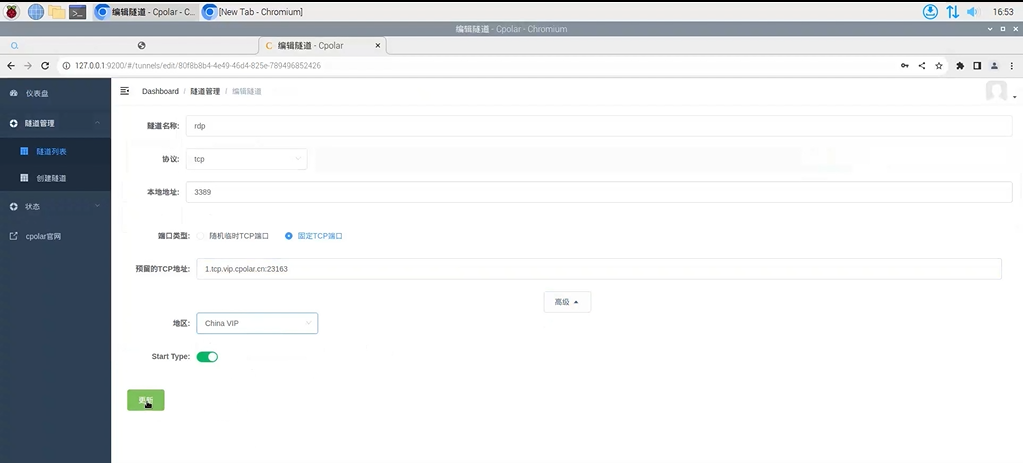
- 隧道更新成功后,我们点击左侧仪表盘的
状态——在线隧道列表,可以看到rdp隧道,已经由原来的随机公网地址,更新成为固定的公网TCP端口地址。
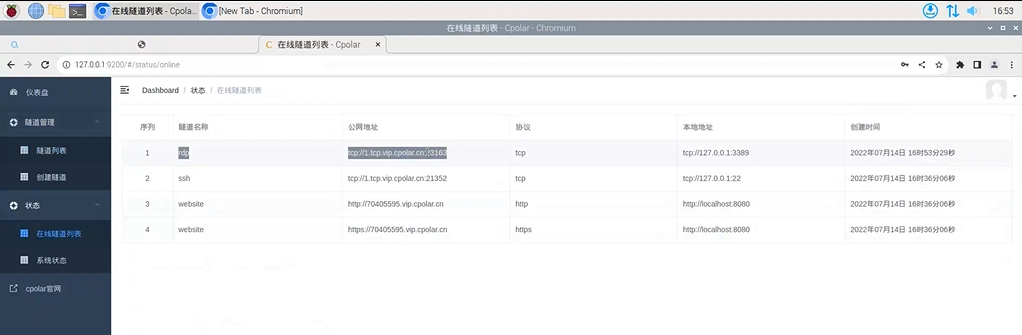
- 以后我们就可以使用固定的公网TCP端口地址,在Windows电脑上远程控制树莓派,而不需要每次先查看随机生成的公网tcp地址,再进行远程桌面控制,同时带宽也有增大,支持更高效的远程控制。


边栏推荐
- Typora installation package in November 2021, the last free version of the installation package to download v13.6.1
- MySQL基础---约束
- Lua基础
- Foundation of JUC concurrent programming (8) -- read write lock
- HAL_ Delay() delay error about 1ms
- unity2D游戏之让人物动起来-下
- Search of two-dimensional array of "sword finger offer" C language version
- Day-7 JVM end
- Sort ArrayList < ArrayList < double> >
- JDBC进阶—— 师承尚硅谷(DAO)
猜你喜欢

Day-7 JVM end
Qt新建工程简介

ue4 物品随机生成

Hit the wall record (continuously updated)
Introduction to QT new project

Openpose Unity 插件部署教程

ue4 换装系统3.最终成果

day6-jvm
Conversion of world coordinate system, camera coordinate system and image coordinate system

Write the list to txt and directly remove the comma in the middle
随机推荐
Learning rate optimization strategy
day3-jvm+排序总结
Xshell remote access tool
QT char to qstring hexadecimal and char to hexadecimal integer
day5-jvm
Channel attention and spatial attention module
Solve modularnotfounderror: no module named "cv2.aruco“
Pytorch single machine multi card distributed training
unity最新版本的Text(TMP)UI文本怎么显示中文
Accessing a one-dimensional array with a pointer
Day2 websocket+ sort
Day-7 JVM end
Draw contour cv2.findcontours function and parameter interpretation
Native JS magnifying glass effect
Oserror: [winerror 127] the specified program cannot be found. Error loading “caffe2_detectron_ops.dll“ or one of its dependencies
day5-jvm
常见十大漏洞总结(原理、危害、防御)
JDBC advanced -- learning from Shang Silicon Valley (DAO)
KMP代码分布详解
JVM system learning