当前位置:网站首页>Mysql database user management
Mysql database user management
2022-06-30 05:53:00 【Sxiny Xin】
One 、 Data table operation
1.1 Clone table
Generate the data records of the table into a new table
# adopt  LIKE  Method , Copy  lyong  Table structure generation  lyong_bak  surface
create table lyong_bak like lyong;
# Import data
insert into lyong_bak (select * from lyong);	   # Backup data content

There is no data in the table after backup , Just cloned the structure of the table 
take xy The data in is cloned into the backup xy_bak In the table 
Method 2 、 Import content when creating
create table lyong_bak02 (select * from lyong);

# Get the table structure of the data table 、 Index and other information
show create table lyong_bak\G;

1.2 Clear the table
Delete all data in the table
1.2.1deldte Delete
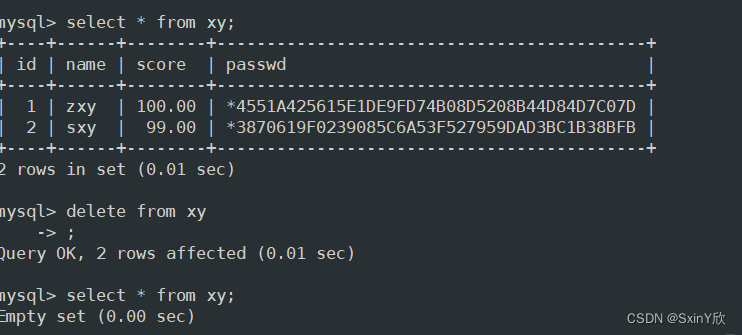
DELETE After emptying the table , There are deleted record entries in the returned result ;DELETE When working, delete record data line by line ; If there is a self growing field in the table , Use DELETE FROM After deleting all records , The newly added record will be changed from the original largest record ID Continue to write the record automatically later .
#delete from  Table name ;
delete from lly;

insert into lly(student_name,cardid,hobby) values('xyz',123456789,' nanjing ')
    -> ;
1.2.2 truncate Delete
TRUNCATE After emptying the table , No deleted entries are returned ;TRUNCATE When working, the table structure is rebuilt as it is , So in terms of speed TRUNCATE than DELETE Empty the watch, quick ; Use TRUNCATE TABLE After clearing the data in the table ,ID From 1 Start re recording .
truncate table info;

insert into lly(student_name,cardid,hobby) values('llly',654321,' Shanghai ');
1.2.3 Create a temporary table
After the temporary table is created successfully , Use SHOW TABLES The command cannot see the created temporary table , The temporary table will be destroyed after the connection exits .
If before exiting the connection , You can also perform operations such as adding, deleting, modifying, and querying , For example, use DROP TABLE Statement to manually and directly delete the temporary table .
## Add temporary table lyong01
create temporary table lyong01 (
id int(4) zerofill primary key auto_increment,
name varchar(10) not null,
cardid int(18) not null unique key,
hobby varchar(50));

##  View all tables in the current library
show tables;
## Add data to temporary table
insert into test03 values(1,'zhangsan',123456789,'watch a film');
## View all data in the current table
select * from lyong01;
## Exit database
quit

## Log in again and view
mysql -u root -p
## View all data in the temporary table created before , Found to have been automatically destroyed
select * from lyong01;
Two 、 User management
2.1 A new user
CREATE USER ‘ user name ’@‘ Source address ’ [IDENTIFIED BY [PASSWORD] ‘ password ’];
‘ user name ’: Specify the user name that will be created
‘ Source address ’: Specify which hosts the newly created user can log on to , You can use IP Address 、 Network segment 、 The form of host name , Available to local users localhost, Allow any host to log in. Wildcards are available %
‘ password ’:
If plaintext password is used , Direct input ’ password ’, Inserted into the database by Mysql Automatic encryption ;
If you use an encrypted password , You need to use it first SELECT PASSWORD(‘ password ’); Get ciphertext , Then add... To the statement PASSWORD ‘ Ciphertext ’;
If you omit “IDENTIFIED BY” part , Then the user's password will be empty ( Not recommended )
2.1.1 Create user using plaintext
CREATE USER 'liy'@'localhost' IDENTIFIED BY '123456';

2.1.2 Use ciphertext to create users
select password(‘123456’);
create user ‘zxy’@‘localhost’ identified by password ‘*E56A114692FE0DE073F9A1DD68A00EEB9703F3F1’;
View user information
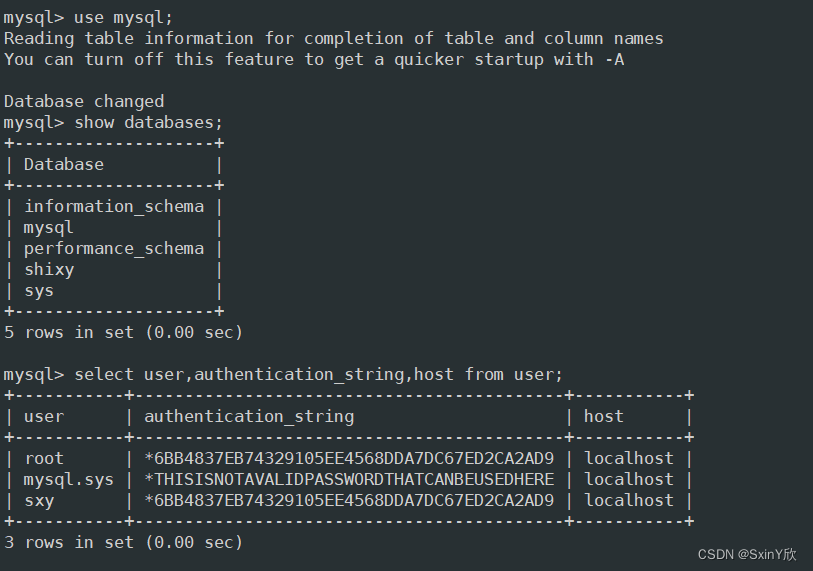
The created user is saved in mysql Database user table
use mysql
select user,authentication_string,host from user;
2、 View user information
use mysql;
select User,authentication_string,Host from user;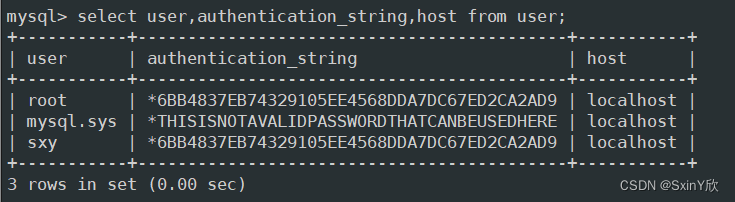
3、 Rename user
rename user 'sxy'@'localhost' to 'shixy'@'localhost';

select user,authentication_string,host from user;
4、 Delete user
drop user 'shixy'@'localhost';

select user,authentication_string,host from user;

3、 ... and 、 Database user authorization
1、 Grant authority
GRANT sentence : It is specially used to set the access rights of database users . When the specified user name does not exist ,GRANT Statement will create a new user ; When the specified user name exists ,GRANT Statement is used to modify user information .
GRANT Permission list ON Database name . Table name TO ' user name '@' Source address ' [IDENTIFIED BY ' password '];
Permission list : Used to list various database operations authorized for use , Separated by commas , Such as “select,insert,update”. Use “all” Indicates all permissions , You can authorize any operation .
Database name . Table name : The name of the database and table used to specify the authorization operation , You can use wildcards “”. for example , Use “kgc.” The object representing the authorization operation is kgc All the tables in the database .
‘ user name @ Source address ’: Used to specify the user name and the client address to which access is allowed , Who can connect 、 Where can I connect . The source address can be a domain name 、IP Address , You can also use “%” wildcard , Represents all addresses in an area or network segment , Such as “%.accp.com”、“192.168.80.%” etc. .
IDENTIFIED BY: Used to set the password string used by users when connecting to the database . When creating a new user , If you omit “IDENTIFIED BY” part , Then the user's password will be empty .
2、 Database authorization
show grants for [email protected];
# View user permissions
Specify which database users can view / surface , No access to other databases
grant select on test.* to [email protected];
# user yong Only test Query permission of all tables under the library
边栏推荐
- 抓取手机端变体组合思路设想
- MySQL日志管理、数据备份、恢复
- Xi'an Jiaotong 21st autumn online expansion resources of online trade and marketing (II)
- On line assignment of financial cost management in the 22nd spring of Western Polytechnic University [Full Score answer]
- 超简单 STM32 RTC闹钟 时钟配置
- [secretly kill little partner pytorch20 days] - [day4] - [example of time series data modeling process]
- At the beginning of 2022, people who are ready to change jobs should pay attention to
- Rotating box target detection mmrotate v0.3.1 getting started
- Xi'an Jiaotong automation control theory test simulation question [standard answer]
- Promise knowledge points
猜你喜欢

Voting vault: a new primitive for defi and Governance

Shenzhou ares tx6 boot logo modification tutorial

雲服務器部署 Web 項目

MySQL存储系统

86. separate linked list
![[Alibaba cloud] student growth plan answers](/img/34/cba975c0960d5595433adcb23f6e64.jpg)
[Alibaba cloud] student growth plan answers

Dao -- a beautiful new world?

Lantern Festival | maoqiu technology and everyone "guess riddles and have a good night"

Switch to software testing and report to the training class for 3 months. It's a high paying job. Is it reliable?

What kind of answer has Inspur given in the big AI model landing test?
随机推荐
Solidy - fallback function - 2 trigger execution modes
[Alibaba cloud] student growth plan answers
C. Divan and bitwise operations
Ultra simple STM32 RTC alarm clock configuration
09- [istio] istio service entry
Golden code of programmer interview
Intelligent deodorizer embedded development
STM32F103 series controlled OLED IIC 4-pin
C语言基础小操作
Idea of capturing mobile terminal variant combination
2022年,谁在推动音视频产业的新拐点?
Switch to software testing and report to the training class for 3 months. It's a high paying job. Is it reliable?
1380. lucky numbers in matrices
UE4_ Editor development: highlight the UI making method according to the assets dragged by the mouse (1)
How does WPS cancel automatic numbering? Four options
ECS deployment web project
Set of XXL job principles
聲網,站在物聯網的“土壤”裏
Create uiactionsheet [duplicate] - creating uiactionsheet [duplicate]
动态规划--怪盗基德的滑翔翼