当前位置:网站首页>Learn Tai Chi Maker - mqtt (IV) server connection operation
Learn Tai Chi Maker - mqtt (IV) server connection operation
2022-06-26 02:52:00 【xuechanba】
Tutorial links :http://www.taichi-maker.com/homepage/esp8266-nodemcu-iot/iot-tuttorial/mqtt-tutorial/client-connect-mqtt-server/
MQTT Server connection operation
PC client connection MQTT Server side
First , Let's learn how to use computer software to connect the client and server . We will install a free MQTT Client software – MQTTfx.
Registration code is required for the latest version of the official website , Otherwise it won't work , Directly install the... Provided by Taiji serial port 1.7.1 edition .
Watch the video during the operation .
If encryption is required during transmission , Just use TCP/TLS port :8883.
ESP8266 Connect MQTT Server side
ESP8266 Of Arduino There are multiple in the development environment MQTT library , We will use the most popular PubSubClient Library to implement MQTT Internet of things applications .
/**********************************************************************  Project name /Project :  Zero basic introduction to the Internet of things   Program name /Program name : connect_mqtt_server  The team /Team :  Taiji maker team  / Taichi-Maker (www.taichi-maker.com)  author /Author : CYNO Shuo   date /Date(YYYYMMDD) : 20201109  Purpose of procedure /Purpose :  The purpose of this program is to demonstrate how to use PubSubClient Library usage ESP8266 Connect to MQTT The server . -----------------------------------------------------------------------  This sample program is made by Taiji maker team 《 Zero basic introduction to the Internet of things 》 Sample program in .  This tutorial is designed and produced by friends who are interested in the development of the Internet of things . For more information about this tutorial , Please refer to the following pages : http://www.taichi-maker.com/homepage/esp8266-nodemcu-iot/iot-c/esp8266-nodemcu-web-client/http-request/ ***********************************************************************/
#include <ESP8266WiFi.h>
#include <PubSubClient.h>

//  Set up wifi Access information ( Please according to your WiFi Modify the information )
const char* ssid = "FAST_153C80";
const char* password = "123456798";
const char* mqttServer = "test.ranye-iot.net";

//  As above MQTT The server cannot connect normally , Please go to the following page to find a solution
// http://www.taichi-maker.com/public-mqtt-broker/

WiFiClient wifiClient;
PubSubClient mqttClient(wifiClient);

void setup() {

  Serial.begin(9600);

  // Set up ESP8266 The working mode is wireless terminal mode
  WiFi.mode(WIFI_STA);

  //  Connect WiFi
  connectWifi();

  //  Set up MQTT Server and port number
  mqttClient.setServer(mqttServer, 1883);

  //  Connect MQTT The server
  connectMQTTServer();
}

void loop() {

  if (mqttClient.connected()) {
     //  If the development board successfully connects to the server
    mqttClient.loop();          //  Keep the client's heartbeat
  } else {
                      //  If the development board fails to connect to the server
    connectMQTTServer();    //  Then try to connect to the server
  }
}

void connectMQTTServer(){

  //  according to ESP8266 Of MAC Address generation client ID( Avoid contact with other ESP8266 The client of ID The nuptial )
  String clientId = "esp8266-" + WiFi.macAddress();

  //  Connect MQTT The server
  if (mqttClient.connect(clientId.c_str())) {

    Serial.println("MQTT Server Connected.");
    Serial.println("Server Address: ");
    Serial.println(mqttServer);
    Serial.println("ClientId:");
    Serial.println(clientId);
  } else {

    Serial.print("MQTT Server Connect Failed. Client State:");
    Serial.println(mqttClient.state());
    delay(3000);
  }
}

// ESP8266 Connect wifi
void connectWifi(){


  WiFi.begin(ssid, password);

  // wait for WiFi Connect , Output success information after successful connection
  while (WiFi.status() != WL_CONNECTED) {

    delay(1000);
    Serial.print(".");
  }
  Serial.println("");
  Serial.println("WiFi Connected!");
  Serial.println("");
}
The operation results are as follows :
1、 Pay attention to... In the program
WiFi.status()
I said before , After the client sends a connection request to the server , After the server receives the request , Will return a packet CONNACK , This CONNACK The information in the packet is as follows ,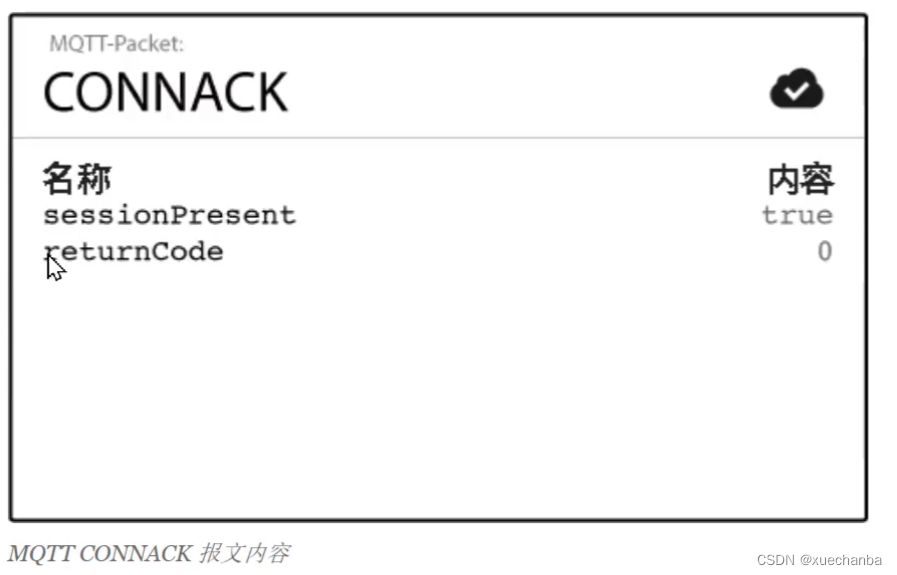
There are two , One is sessionPresent , One is returnCode . This returnCode It is in the program status The return value of the function .

2、 Pay attention to... In the program
void loop() {

  if (mqttClient.connected()) {
     //  If the development board successfully connects to the server
    mqttClient.loop();          //  Keep the client's heartbeat
  } else {
                      //  If the development board fails to connect to the server
    connectMQTTServer();    //  Then try to connect to the server
  }
}
mqttClient.loop(); Is to keep the client's heartbeat . This function should be called frequently ( Do not add delay function ).
3、 There may be doubts , It's the connection MQTT Server time
mqttClient.connect(clientId.c_str()
Send according to the above CONNECT message ,

In this message , Three parameters are required , But there is only one in the program , namely clientId , Why is that ?
In fact, the other two parameters have default values , namely cleanSession = true ,keepAlive = 15.
边栏推荐
- What is the sudden power failure of iPhone and how to solve it?
- 【解决】CMake was unable to find a build program corresponding to “Unix Makefiles“.
- Dreamcamera2 video recording, playing without sound, recording function is normal, using a third-party application for video recording, playing with sound
- MySQL updates records based on the queried data
- 组件与路由
- Wechat launched a web version transmission assistant. Is it really easy to use?
- 限制输入字符长度length英文1个字符中文2个字符
- Audio video and CPU architecture
- 使用 AnnotationDbi 转换 R 中的基因名称
- Golang--channel and select
猜你喜欢
Redis classic 20 questions

How to check and cancel subscription auto renewal on iPhone or iPad

df报错Stale file handle
Bloc入门之Cubit详解

Digital commodity DGE -- the dark horse of wealth in digital economy
学习太极创客 — MQTT(四)服务端连接操作
Pie chart metamorphosis record, the liver has 3000 words, collection is to learn!

如何提词条
Introduction to bloc: detailed explanation of cube

在UE内添加控制台工程(Programs)
随机推荐
R 语言马尔可夫链蒙特卡洛:实用介绍
Redis classic 20 questions
分享一些在内网操作的远程办公经验| 社区征文
MySQL must master 4 languages!
MySQL doit maîtriser 4 langues!
Install development cross process communication
Fresh graduates talk about their graduation stories
[机器翻译]—BLEU值的计算
记一个RestControll和Controller 引起的折磨BUG
How to solve the problem that the iPhone 13 lock screen cannot receive the wechat notification prompt?
What is the sudden power failure of iPhone and how to solve it?
Redis Lua沙盒绕过命令执行(CVE-2022-0543)
Redis Lua sandbox bypass command execution (cve-2022-0543)
Oracle连接问题以及解决方案
Explain the JVM clearly at one time and don't be asked by the interviewer again
在同花顺网上开户安全吗?如何网上开一个券商账户
【图像过滤】基于matlab GUI图像过滤系统【含Matlab源码 1913期】
How to adjust face input size
Which securities company should I choose to open an account online? Is it safe to open an account online?
What happens when the cloud answer does not display the third-party login button