当前位置:网站首页>Prompt unread messages and quantity before opening chat group
Prompt unread messages and quantity before opening chat group
2022-07-03 12:16:00 【favoritecode】
Prompt unread messages and quantity before opening the chat group
Today I write a case , The number of unread messages displayed before the chat group is opened . Not before , I checked a lot on the Internet and didn't find the answer , It's strange to think !QQ, Wechat has this function , How come no one posted the code ! Thought hard for a day , Came up with a plan , Can be realistic , But I don't know if it's the best , I hope it will help you ! I wish good !
The function to be realized is :
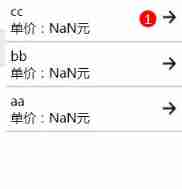
Click on cc after :
Back again 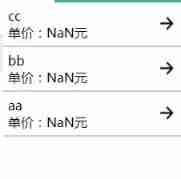
The message prompt is missing .
Implementation process :
1, Each speaker in the group should write down the time stamp of the speech
   var message = e.detail.value.message
      var date = new Date()
      var time = utils.getTime(date)
      timeStamp = Date.parse(date) / 1000;
      console.log(" The current timestamp is :" + timeStamp);
      const db = wx.cloud.database();
      db.collection("goodsMessageList").add({
        data: {
          message,
          goodsid,
          timeStamp,
          time,
        },
        success: res => {
          console.log(" Click. ")
          that.setData({
            currentMmessage: "",
          })
        },
        fail: err => {
          console.error("collection add fail", err)
          wx.showToast({
            title: ' fail in send !',
            icon: 'loading',
            duration: 1500
          })
          setTimeout(function () {
            wx.hideToast()
          }, 2000)
        },
        complete: res => {
          console.log("collection add complete")
        }
      })
Each time you open the chat group, the timestamp of the last message and the Group id And user's openid Stored in the database timeStampList in .
       app.getGoodsMessageList().then(res => {
          goodsMessageList = res
          lastTimeStamp = goodsMessageList[goodsMessageList.length - 1].timeStamp
          console.log("lastTimeStamp:::", lastTimeStamp)
          console.log("openid:::", openid)
          db.collection('timeStampList').where({
            goodsid,
            _openid: openid,
          }).get().then(res => {
            if (res.data.length != 0) {
              console.log("timeStampList:", res.data)
              db.collection('timeStampList').doc(res.data[0]._id).update({
                  data: {
                    lastTimeStamp
                  }
                })
                .then(console.log)
                .catch(console.error)

            } else {
              db.collection('timeStampList').add({
                  data: {
                    goodsid,
                    lastTimeStamp,
                  }
                })
                .then(res => {
                  console.log(res)
                })
                .catch(console.error)
            }
          })

          console.log("goodsMessageList:", goodsMessageList)
          scrollTop = goodsMessageList.length * 500
          that.setData({
            goodsMessageList,
            scrollTop,
          })
          if (goodsMessageList.length > 50) {
            var num = goodsMessageList.length - 50
            for (let i = 0; i < num; i++) {
              that.removeGoodsMessages(goodsMessageList[i]._id).then(res => {
                console.log("removeGoodsMessages res:", res)
              })
            }
          }
        })
app.getGoodsMessageList() Is the way to get group messages , This is relatively simple, so I won't write it .
Let's talk about whether there are unread messages when you open the chat page . When you open the homepage of the chat group , First get the message array of each group , Use... In data lookup Association query the timestamp of the last speech seen by this user in this group , Is the content of the above code . use for Cycle to compare the timestamp of all messages in this group with the timestamp of the last speech , There are several unread messages larger than it . Then put it into the information of your group and display it . Be careful , Use it well lookup Get the group message and the last timestamp of the user viewing this group , Use multiple for Loop to complete the query of each group and the query of message timestamp in the Group , use if(){} Judge , Every app It's not the same , Database table design is also different , So I'll focus on thinking , My code is for your reference !
  isNewMessage: function (cloudShowList) {
    var userOpenid = app.globalData.openid
    var unread = 0
    var flag = false
    return new Promise(function (resolve, reject) {
    for (let h = 0; h < cloudShowList.length; h++) {
      unread = 0
      flag = false
      for (let i = 0; i < cloudShowList[h].lastTimeStampList.length; i++) {
        if (cloudShowList[h].lastTimeStampList[i]._openid == userOpenid) {
          flag = true
          var lastTimeStamp = cloudShowList[h].lastTimeStampList[i].lastTimeStamp
          console.log("lastTimeStamp:", lastTimeStamp)
          for (let j = 0; j < cloudShowList[h].goodsMessageList.length; j++) {
            if (cloudShowList[h].goodsMessageList[j].timeStamp > lastTimeStamp) {
              unread++
              console.log("unread:", unread)
            }
          }
          cloudShowList[h].unread = unread
          break
        }
      }
      if (flag == false) {
        cloudShowList[h].unread = cloudShowList[h].goodsMessageList.length
      }
    }
    resolve(cloudShowList)
  })

  },
cloudShowList It is the basic group information obtained from the database , A collection of group chat messages and last timestamp groups for users to view this group . Back to cloudShowList You can basically render the page .
Don't understand , You can leave me a message ! See it for sure , I wish you happy programming ! Drink !
边栏推荐
- 2.7 overview of livedata knowledge points
- [combinatorics] permutation and combination (example of permutation and combination)
- Flutter Widget : KeyedSubtree
- Xiaopeng P7 hit the guardrail and the airbag did not pop up. The official responded that the impact strength did not meet the ejection requirements
- SLF4J 日志门面
- 手机号码变成空号导致亚马逊账号登陆两步验证失败的恢复网址及方法
- Duplicate numbers in the array of sword finger offer 03
- 抓包整理外篇fiddler———— 会话栏与过滤器[二]
- Atomic atomic operation
- 023 ([template] minimum spanning tree) (minimum spanning tree)
猜你喜欢


![[learning notes] DP status and transfer](/img/5e/59c64d2fe08b89fba2d7e1e6de2761.png)
随机推荐
If you can't learn, you have to learn. Jetpack compose writes an im app (I)
Redis 笔记 01:入门篇
Oracle advanced (I) realize DMP by expdp impdp command
Introduction to concurrent programming (I)
regular expression
4000字超详解指针
在网上炒股开户可以吗?资金安全吗?
Introduction to the implementation principle of rxjs observable filter operator
previous permutation lintcode51
Optimize interface performance
2.7 overview of livedata knowledge points
shardingSphere分库分表<3>
Summary of development issues
AOSP ~ NTP (Network Time Protocol)
Flutter Widget : KeyedSubtree
Pragma pack syntax and usage
手机号码变成空号导致亚马逊账号登陆两步验证失败的恢复网址及方法
New features of ES6
[MySQL special] read lock and write lock
Vulnhub pyexp