当前位置:网站首页>MySQL advanced statement (I) (there is always someone who will make your life no longer bad)
MySQL advanced statement (I) (there is always someone who will make your life no longer bad)
2022-07-25 11:03:00 【Steve lu】
Preface
mysql senior SQL Sentence main learning select sentence
This chapter mainly consists of three parts :
- mysql Refine Query
- mysql Database functions
- mysql stored procedure
# Prepare two sheets for the experiment
use stevelu;
create table location (Region char(20),Store_Name char(20));
insert into location values('East','Boston');
insert into location values('East','New York');
insert into location values('West','Los Angeles');
insert into location values('West','Houston');
mysql> select * from location ;
+--------+-------------+
| region | store_name  |
+--------+-------------+
| East   | Boston      |
| East   | New York    |
| West   | Los Angeles |
| West   | Houstion    |
+--------+-------------+

create table store_info (Store_Name char(20),Sales int(10),Date char(10));
insert into store_info values('Los Angeles','1500','2020-12-05');
insert into store_info values('Houston','250','2020-12-07');
insert into store_info values('Los Angeles','300','2020-12-08');
insert into store_info values('Boston','700','2020-12-08');
mysql> select * from store_info;
+-------------+-------+------------+
| Store_Name  | Sales | Date       |
+-------------+-------+------------+
| Los Angeles |  1500 | 2020-12-05 |
| Houston     |   250 | 2020-12-07 |
| Los Angeles |   300 | 2020-12-08 |
| Boston      |   700 | 2020-12-08 |
+-------------+-------+------------+
One 、mysql Refine Query (1)
1.1 SELECT
---- SELECT ---- Displays all data records for one or more fields in the table
 grammar :SELECT " Field " FROM " Table name ";

# Query the specified fields in the table
mysql> SELECT Store_Name FROM store_info;
+-------------+
| Store_Name  |
+-------------+
| Los Angeles |
| Houston     |
| Los Angeles |
| Boston      |
+-------------+

# When querying, you can reorder the fields
mysql> select date,Store_Name,Sales from store_info;
+------------+-------------+-------+
| date       | Store_Name  | Sales |
+------------+-------------+-------+
| 2020-12-05 | Los Angeles |  1500 |
| 2020-12-07 | Houston     |   250 |
| 2020-12-08 | Los Angeles |   300 |
| 2020-12-08 | Boston      |   700 |
+------------+-------------+-------+

1.2 DISTINCT
---- DISTINCT ---- Do not display duplicate data records
 grammar :SELECT DISTINCT " Field " FROM " Table name ";

# Do not display duplicate records (DISTINCT Before the field )
mysql> SELECT DISTINCT Store_Name FROM store_info;
+-------------+
| Store_Name  |
+-------------+
| Los Angeles |
| Houston     |
| Boston      |
+-------------+
mysql> SELECT DISTINCT Store_Name,date FROM store_info;
+-------------+------------+
| Store_Name  | date       |
+-------------+------------+
| Los Angeles | 2020-12-05 |
| Houston     | 2020-12-07 |
| Los Angeles | 2020-12-08 |
| Boston      | 2020-12-08 |
+-------------+------------+

1.3 WHERE
---- WHERE ---- Conditional query
 grammar :SELECT " Field " FROM " Table name " WHERE " Conditions ";

# Inquire about Store_Name by Houston The record of
mysql> select * from store_info where Store_Name='Houston';
+------------+-------+------------+
| Store_Name | Sales | Date       |
+------------+-------+------------+
| Houston    |   250 | 2020-12-07 |
+------------+-------+------------+

# Inquire about Sales Greater than 1000 Of Store_Name
mysql> SELECT Store_Name FROM store_info WHERE Sales > 1000;
+-------------+
| Store_Name  |
+-------------+
| Los Angeles |
+-------------+

1.4 AND OR
---- AND OR ---- And   or
 grammar :SELECT " Field " FROM " Table name " WHERE " Conditions 1" {
   [AND|OR] " Conditions 2"}+ ;
# Inquire about sales Greater than 500 Less than 1000 Of store_name
mysql> select store_name from store_info where sales >500 and sales <1000;
+------------+
| store_name |
+------------+
| Boston     |
+------------+
# see sales Greater than 200 Less than 500, Or greater than 1000, And remember to add parentheses with or at the same time , Treat the brackets as a whole first
mysql> select store_name,sales from store_info where (sales >200 and sales <500) or sales>1000;
+-------------+-------+
| store_name  | sales |
+-------------+-------+
| Los Angeles |  1500 |
| Houston     |   250 |
| Los Angeles |   300 |
+-------------+-------+

1.5 IN
---- IN ---- Data records showing known values
# The values in parentheses are used as a pool , If there is one matching this field, it will display ( Use single quotation marks for values )
 grammar :SELECT " Field " FROM " Table name " WHERE " Field " IN (' value 1', ' value 2', ...);
# Inquire about Store_Name be equal to 'Los Angeles' or  'Houston'
mysql> SELECT * FROM store_info WHERE Store_Name IN ('Los Angeles', 'Houston');
+-------------+-------+------------+
| Store_Name  | Sales | Date       |
+-------------+-------+------------+
| Los Angeles |  1500 | 2020-12-05 |
| Houston     |   250 | 2020-12-07 |
| Los Angeles |   300 | 2020-12-08 |
+-------------+-------+------------+
3 rows in set (0.00 sec)

# Inquire about Store_Name It's not equal to 'Los Angeles' or  'Houston' ( Reverse the above operation )
mysql> SELECT * FROM store_info WHERE Store_Name not IN ('Los Angeles', 'Houston');
+------------+-------+------------+
| Store_Name | Sales | Date       |
+------------+-------+------------+
| Boston     |   700 | 2020-12-08 |
+------------+-------+------------+
1 row in set (0.00 sec)

1.6 BETWEEN
---- BETWEEN ---- Display data records in the range of two values
 grammar :SELECT " Field " FROM " Table name " WHERE " Field " BETWEEN ' value 1' AND ' value 2';( The value is small on the left and large on the right )
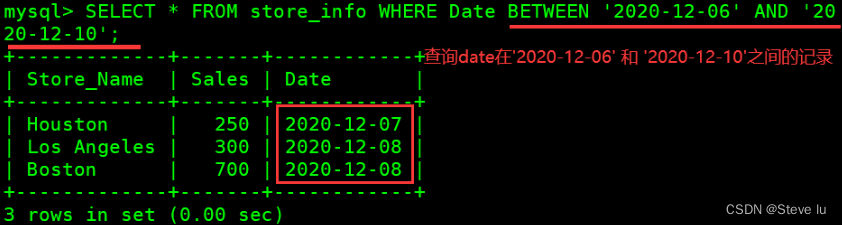
# Inquire about date stay '2020-12-06'  and  '2020-12-10' Between the records
mysql> SELECT * FROM store_info WHERE Date BETWEEN '2020-12-06' AND '2020-12-10';
+-------------+-------+------------+
| Store_Name  | Sales | Date       |
+-------------+-------+------------+
| Houston     |   250 | 2020-12-07 |
| Los Angeles |   300 | 2020-12-08 |
| Boston      |   700 | 2020-12-08 |
+-------------+-------+------------+
3 rows in set (0.00 sec)
1.7 Wildcard and like
---- wildcard ---- Usually, wildcards are used with  LIKE  Used together ( And Linux The wildcards are different )
---- LIKE ---- Match a pattern to find the data record we want
 grammar :SELECT " Field " FROM " Table name " WHERE " Field " LIKE { Pattern };
SELECT * FROM Store_Info WHERE Store_Name like '%os%';
% : A percent sign means zero 、 One or more characters
_ : The underline represents a single character

'A_Z': All with  'A'  At first , Another character of any value , And in  'Z'  String ending with . for example ,'ABZ'  and  'A2Z'  They all fit this pattern , and  'AKKZ'  It does not accord with  ( Because in  A  and  Z  There are two characters between , Not a character ).
'ABC%':  All with  'ABC'  Starting string . for example ,'ABCD'  and  'ABCABC'  All fit the pattern .
'%XYZ':  All with  'XYZ'  a null-terminated string . for example ,'WXYZ'  and  'ZZXYZ'  All fit the pattern .
'%AN%':  All contain  'AN' The string of this pattern . for example ,'LOS ANGELES'  and  'SAN FRANCISCO'  All fit the pattern .
'_AN%': All the second letters are  'A'  And the third letter is  'N'  String . for example ,'SAN FRANCISCO'  In line with this pattern , and  'LOS ANGELES'  It doesn't fit the pattern .


# Query to on At the end of the Store_Name The record of
mysql> select * from store_info where store_name like '%on';
+------------+-------+------------+
| Store_Name | Sales | Date       |
+------------+-------+------------+
| Houston    |   250 | 2020-12-07 |
| Boston     |   700 | 2020-12-08 |
+------------+-------+------------+
2 rows in set (0.00 sec)

1.7 ORDER BY
---- ORDER BY ---- Sort by keyword ( It is usually a sort of numerical value )
 grammar :SELECT " Field " FROM " Table name " [WHERE " Conditions "] ORDER BY " Field " [ASC, DESC];
#ASC  It's sorted in ascending order , Is the default sort method .
#DESC  It's sorted in descending order .

# Yes Sales Value descending sort
mysql> SELECT Store_Name,Sales,Date FROM store_info ORDER BY Sales DESC;
+-------------+-------+------------+
| Store_Name  | Sales | Date       |
+-------------+-------+------------+
| Los Angeles |  1500 | 2020-12-05 |
| Boston      |   700 | 2020-12-08 |
| Los Angeles |   300 | 2020-12-08 |
| Houston     |   250 | 2020-12-07 |
+-------------+-------+------------+
4 rows in set (0.00 sec)

# Yes store_name Alphabetical ascending sort of values
mysql> select * from store_info order by store_name;
+-------------+-------+------------+
| Store_Name  | Sales | Date       |
+-------------+-------+------------+
| Boston      |   700 | 2020-12-08 |
| Houston     |   250 | 2020-12-07 |
| Los Angeles |  1500 | 2020-12-05 |
| Los Angeles |   300 | 2020-12-08 |
+-------------+-------+------------+
4 rows in set (0.00 sec)

Two 、 function
2.1 Mathematical functions
| Mathematical functions | meaning |
|---|---|
| abs(x) | return x The absolute value of |
| rand() | return 0 To 1 The random number |
| mod(x,y) | return x Divide y The remainder after |
| power(x,y) | return x Of y Power |
| round(x) | Return from x The nearest integer |
| round(x,y) | Retain x Of y The rounded value of a decimal place |
| sqrt(x) | return x The square root of |
| truncate(x,y) | Return to digital x Truncated to y A decimal value |
| ceil(x) | Returns greater than or equal to x Minimum integer of |
| floor(x) | Returns less than or equal to x Maximum integer for |
| greatest(x1,x2…) | Returns the maximum value in the collection , You can also return the maximum value of multiple fields |
| least(x1,x2…) | Returns the smallest value in the set , You can also return the smallest value of multiple fields |
# Only numeric values can be manipulated
mysql> SELECT abs(-1), rand(), mod(5,3), power(2,3), round(1.89);
+---------+--------------------+----------+------------+-------------+
| abs(-1) | rand()             | mod(5,3) | power(2,3) | round(1.89) |
+---------+--------------------+----------+------------+-------------+
|       1 | 0.2744006926886744 |        2 |          8 |           2 |
+---------+--------------------+----------+------------+-------------+

mysql> SELECT round(1.8937,3), truncate(1.235,2), ceil(5.2), floor(2.1), least(1.89,3,6.1,2.1);
+-----------------+-------------------+-----------+------------+-----------------------+
| round(1.8937,3) | truncate(1.235,2) | ceil(5.2) | floor(2.1) | least(1.89,3,6.1,2.1) |
+-----------------+-------------------+-----------+------------+-----------------------+
|           1.894 |              1.23 |         6 |          2 |                  1.89 |
+-----------------+-------------------+-----------+------------+-----------------------+
# Yes member Table generate random sort
mysql> select * from member order by rand();
+----+----------+--------+--------+---------+--------------------+
| id | name     | cardid | phone  | address | remark             |
+----+----------+--------+--------+---------+--------------------+
|  1 | zhangsan | 123123 | 123123 | nanjing | this is vip        |
|  3 | wangwu   | 123123 | 123123 | wuxi    | this is vvvip      |
|  4 | zhaoliu  | 123123 | 123123 | nantong | this is vip member |
|  2 | lisi     | 123123 | 123123 | suzhou  | this is vvip       |
+----+----------+--------+--------+---------+--------------------+
4 rows in set (0.00 sec)
![[ Failed to transfer the external chain picture , The origin station may have anti-theft chain mechanism , It is suggested to save the pictures and upload them directly (img-YE9YJr3A-1654474591021)(mysql High level statements .assets/1654044375982.png)]](/img/b9/3ec04712f31ab77989eae2311208f5.png)

2.2 Aggregate functions
| Aggregate functions | meaning |
|---|---|
| avg() | Returns the average value of the specified column |
| count() | Returns the value of the specified column NULL The number of values |
| min() | Returns the minimum value of the specified column |
| max() | Returns the maximum value of the specified column |
| sum(x) | Returns the sum of all values in the specified column |
# In the query table sales maximal
mysql> select max(sales) from store_info;
+------------+
| max(sales) |
+------------+
|       1500 |
+------------+
1 row in set (0.00 sec)

# In the query table sales The smallest
mysql> select min(sales) from store_info;
+------------+
| min(sales) |
+------------+
|        250 |
+------------+
1 row in set (0.00 sec)

# You can also find the minimum or maximum value by sorting
mysql> select sales from store_info order by sales asc limit 1;
+-------+
| sales |
+-------+
|   250 |
+-------+

# Inquire about sales Average value
mysql> select avg(sales) from store_info;
+------------+
| avg(sales) |
+------------+
|   687.5000 |
+------------+
1 row in set (0.00 sec)

# seek sales It's worth it and
mysql> select sum(sales) from store_info;
+------------+
| sum(sales) |
+------------+
|       2750 |
+------------+
1 row in set (0.00 sec)


Create a new one city surface , For demonstration count() function
create table city (name char(20));
insert into city values('nanjing');
insert into city values('hangzhou');
insert into city values('shanghai');
insert into city values();
insert into city values();
insert into city values('beijing');
insert into city values();
insert into city values();

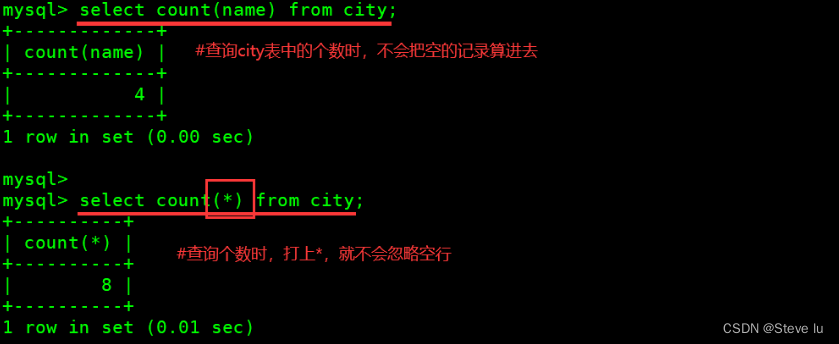
# Inquire about city The number in the table , Do not include empty records
mysql> select count(name) from city;
+-------------+
| count(name) |
+-------------+
|           4 |
+-------------+
# When querying the number , In the play *, You won't ignore blank lines
mysql> select count(*) from city;
+----------+
| count(*) |
+----------+
|        8 |
+----------+
2.3 String function
| String function | meaning |
|---|---|
| trim() | Returns a value with the specified format removed |
| concat(x,y) | The parameters that will be provided x and y Concatenate into a string |
| substr(x,y) | Get from string x No y A string starting at a position , Follow substring() Functions work the same |
| substr(x,y,z) | Get from string x No y The starting length of a position is z String |
| length(x) | Return string x The length of |
| replace(x,y,z) | The string z Alternative string x String in y |
| upper(x) | The string x All of the letters of the alphabet become capital letters |
| lower(x) | The string x All of the letters of the are changed into lower case letters |
| left(x,y) | Return string x Before y Characters |
| right(x,y) | Return string x After y Characters |
| repeat(x,y) | The string x repeat y Time |
| space(x) | return x A space |
| strcmp(x,y) | Compare x and y, The value returned can be -1,0,1 |
| reverse(x) | The string x reverse |
Returns a value with the specified format removed
SELECT TRIM ([ [ Location ] [ The string to remove ] FROM ]  character string );
#[ Location ]: The value of can be  LEADING ( At first ), TRAILING ( ending ), BOTH ( The beginning and the end ).
#[ The string to remove ]: From the beginning of the string 、 ending , Or a string removed from the beginning and end . The default is space .

mysql> SELECT TRIM(LEADING 'Ne' FROM 'New York');
+------------------------------------+
| TRIM(LEADING 'Ne' FROM 'New York') |
+------------------------------------+
| w York                             |
+------------------------------------+
1 row in set (0.00 sec)

The parameters that will be provided x and y Concatenate into a string
mysql> select concat('zhang','san');
+-----------------------+
| concat('zhang','san') |
+-----------------------+
| zhangsan              |
+-----------------------+
--- stay zhangsan Add a space in the middle , Is to add a space string
mysql> select concat('zhang',' ','san');
+---------------------------+
| concat('zhang',' ','san') |
+---------------------------+
| zhang san                 |
+---------------------------+

mysql> select * from location;
+--------+-------------+
| region | store_name  |
+--------+-------------+
| East   | Boston      |
| East   | New York    |
| West   | Los Angeles |
| West   | Houstion    |
+--------+-------------+
4 rows in set (0.00 sec)
--- Yes location Merge the two fields in the table , Be careful not to use quotation marks
mysql> select concat(region,store_name) from location;
+---------------------------+
| concat(region,store_name) |
+---------------------------+
| EastBoston                |
| EastNew York              |
| WestLos Angeles           |
| WestHoustion              |
+---------------------------+
4 rows in set (0.00 sec)

--- Such as sql_mode Open the PIPES_AS_CONCAT,"||" Treat as the concatenation operator of a string, not as the or operator , And string splicing function Concat Similar , This sum Oracle The database is used in the same way
SELECT Region || ' ' || Store_Name FROM location

Get from string x No y The starting length of a position is z String
mysql> SELECT substr(concat(region,store_name),5) FROM location;
+-------------------------------------+
| substr(concat(region,store_name),5) |
+-------------------------------------+
| Boston                              |
| New York                            |
| Los Angeles                         |
| Houstion                            |
+-------------------------------------+
4 rows in set (0.00 sec)
--- Display only Angele
mysql> SELECT substr(store_name,5,6) FROM location where store_name='Los Angeles';
+------------------------+
| substr(store_name,5,6) |
+------------------------+
| Angele                 |
+------------------------+
1 row in set (0.00 sec)


Return string x The length of
mysql> select store_name,length(store_name) from location;
+-------------+--------------------+
| store_name  | length(store_name) |
+-------------+--------------------+
| Boston      |                  6 |
| New York    |                  8 |
| Los Angeles |                 11 |
| Houstion    |                  8 |
+-------------+--------------------+
4 rows in set (0.00 sec)

The string z Alternative string x String in y
mysql> select replace(region,'st','stern') from location;
+------------------------------+
| replace(region,'st','stern') |
+------------------------------+
| Eastern                      |
| Eastern                      |
| Western                      |
| Western                      |
+------------------------------+
4 rows in set (0.00 sec)

3、 ... and 、mysql Refine Query (2)
3.1 GROUP BY
Yes GROUP BY The query results of the following fields are summarized and grouped , Usually used in combination with aggregate functions ;
GROUP BY There is a principle , Where there are GROUP BY The fields that appear later , Must be in SELECT Behind the ;
Where there are SELECT Later on 、 Fields that do not appear in the aggregate function , Must appear in GROUP BY Back .
 grammar :SELECT " Field 1", SUM(" Field 2") FROM " Table name " GROUP BY " Field 1";
--- Yes store_name Grouping , Also on sales null
mysql> SELECT store_name, SUM(Sales) FROM store_info GROUP BY store_name ORDER BY SUM(Sales) desc;
+-------------+------------+
| store_name  | SUM(Sales) |
+-------------+------------+
| Los Angeles |       1800 |
| Boston      |        700 |
| Houston     |        250 |
+-------------+------------+
3 rows in set (0.00 sec)

3.2 HAVING
HAVING The existence of sentences makes up for WHERE Keywords cannot be combined with aggregate functions .
 grammar :SELECT " Field 1", SUM(" Field 2") FROM " Table name " GROUP BY " Field 1" HAVING ( Function conditions );
mysql> SELECT store_name, SUM(Sales) FROM store_info GROUP BY store_name having sum(sales)>1000;
+-------------+------------+
| store_name  | SUM(Sales) |
+-------------+------------+
| Los Angeles |       1800 |
+-------------+------------+

3.3 Alias
 grammar :SELECT " Table alias "." Field 1" [AS] " Field alias " FROM " Table name " [AS] " Table alias ";
--- Field set alias
mysql> SELECT store_name, SUM(Sales) as total FROM store_info GROUP BY store_name having sum(sales)>1000;
+-------------+-------+
| store_name  | total |
+-------------+-------+
| Los Angeles |  1800 |
+-------------+-------+
1 row in set (0.00 sec)
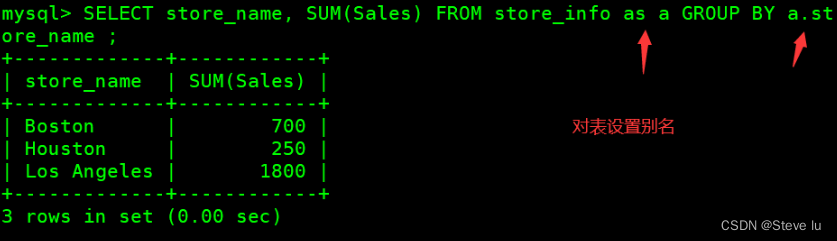
--- Table alias
mysql> SELECT store_name, SUM(Sales) FROM store_info as a GROUP BY a.store_name ;
+-------------+------------+
| store_name  | SUM(Sales) |
+-------------+------------+
| Boston      |        700 |
| Houston     |        250 |
| Los Angeles |       1800 |
+-------------+------------+
3 rows in set (0.00 sec)

3.4 Self connection of tables
--- By ranking scores
mysql> select * from student;
+------+----------+-------+
| id   | name     | score |
+------+----------+-------+
|    1 | zhangsan |    70 |
|    2 | lisi     |   100 |
|    3 | wangwu   |    80 |
|    4 | zhaoliu  |    90 |
+------+----------+-------+
mysql> select A.name,A.score,count(A.score) rank from student as A,student as B where A.score<=B.score group by A.name,A.score order by rank asc;
+----------+-------+------+
| name     | score | rank |
+----------+-------+------+
| lisi     |   100 |    1 |
| zhaoliu  |    90 |    2 |
| wangwu   |    80 |    3 |
| zhangsan |    70 |    4 |
+----------+-------+------+
4 rows in set (0.00 sec)


3.5 Subquery
 Connect tables , stay WHERE  Clause or  HAVING  Clause to insert another  SQL  sentence
 grammar :SELECT " Field 1" FROM " form 1" WHERE " Field 2" [ Comparison operator ] 			# External query
(SELECT " Field 1" FROM " form 2" WHERE " Conditions ");						# Internal query

# Can be symbolic operators , for example  =、>、<、>=、<= ; It can also be a literal operator , for example  LIKE、IN、BETWEEN
--- Multiple table joins
mysql> select * from store_info A, location B where A.store_name=B.store_name;
+-------------+-------+------------+--------+-------------+
| Store_Name  | Sales | Date       | region | store_name  |
+-------------+-------+------------+--------+-------------+
| Boston      |   700 | 2020-12-08 | East   | Boston      |
| Los Angeles |  1500 | 2020-12-05 | West   | Los Angeles |
| Los Angeles |   300 | 2020-12-08 | West   | Los Angeles |
+-------------+-------+------------+--------+-------------+
3 rows in set (0.00 sec)

mysql> select * from store_info;
+-------------+-------+------------+
| Store_Name  | Sales | Date       |
+-------------+-------+------------+
| Los Angeles |  1500 | 2020-12-05 |
| Houston     |   250 | 2020-12-07 |
| Los Angeles |   300 | 2020-12-08 |
| Boston      |   700 | 2020-12-08 |
+-------------+-------+------------+
4 rows in set (0.01 sec)

mysql> select store_name from location where region='west';
+-------------+
| store_name  |
+-------------+
| Los Angeles |
| Houstion    |
+-------------+
2 rows in set (0.00 sec)

mysql> select sum(sales) from store_info where store_name in (select store_name from location where region='west');
+------------+
| sum(sales) |
+------------+
|       1800 |
+------------+
1 row in set (0.00 sec)

3.6 EXISTS
It is used to test whether the inner query produces any results , Whether Boolean value is true or not
# If any , The system will execute the SQL sentence . If not , The whole  SQL  Statement will not produce any results .
 grammar :SELECT " Field 1" FROM " form 1" WHERE EXISTS (SELECT * FROM " form 2" WHERE " Conditions ");
mysql> select sum(sales) from store_info where exists(select * from location where region = 'west');
+------------+
| sum(sales) |
+------------+
|       2750 |
+------------+
1 row in set (0.00 sec)

mysql> select sum(sales) from store_info where exists(select * from location where region = 'westeee');
+------------+
| sum(sales) |
+------------+
|       NULL |
+------------+
1 row in set (0.00 sec)

3.7 Link query
- inner join( Internal connection ): Only rows with equal join fields in two tables are returned
- left join( Left connection ): Return records including all records in the left table and those with the same connection fields in the stone table
- right join( The right connection ): Returns records that include all records in the right table and join fields in the left table
3.7.1 inner join( Internal connection )
 # Connect data records with equal field records in two tables
  Method 1 :
 select * from location A inner join store_info B on A.store_name=B.store_name;
  Method 2 :
 select * from location A, store_info B where A.store_name=B.store_name;
 # Connect two data record pairs with the same field data records in the table region Fields are summarized, grouped, and summed
select A.region region,sum(B.sales) sales from location A,store_info B where A.store_name = B.store_name group by region;


3.7.2 left join( Left connection )
mysql> select * from location A LEFT JOIN store_info B on A.store_name=B.store_name;
+--------+-------------+-------------+-------+------------+
| Region | Store_Name  | Store_Name  | Sales | Date       |
+--------+-------------+-------------+-------+------------+
| East   | Boston      | Boston      |   700 | 2020-12-08 |
| East   | New York    | NULL        |  NULL | NULL       |
| West   | Los Angeles | Los Angeles |  1500 | 2020-12-05 |
| West   | Los Angeles | Los Angeles |   300 | 2020-12-08 |
| West   | Houston     | Houston     |   250 | 2020-12-07 |
+--------+-------------+-------------+-------+------------+
5 rows in set (0.01 sec)

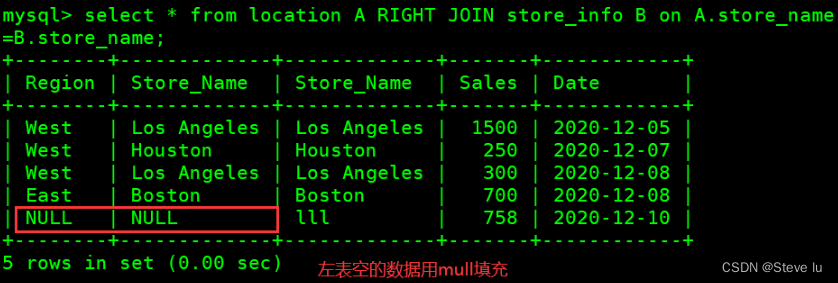
3.7.3 right join( The right connection )
mysql> select * from location A RIGHT JOIN store_info B on A.store_name=B.store_name;
+--------+-------------+-------------+-------+------------+
| Region | Store_Name  | Store_Name  | Sales | Date       |
+--------+-------------+-------------+-------+------------+
| West   | Los Angeles | Los Angeles |  1500 | 2020-12-05 |
| West   | Houston     | Houston     |   250 | 2020-12-07 |
| West   | Los Angeles | Los Angeles |   300 | 2020-12-08 |
| East   | Boston      | Boston      |   700 | 2020-12-08 |
| NULL   | NULL        | lll         |   758 | 2020-12-10 |
+--------+-------------+-------------+-------+------------+
5 rows in set (0.00 sec)
边栏推荐
- ONNX Runtime介绍
- String longest common prefix
- Flask框架——Flask-WTF表单:数据验证、CSRF保护
- mysql高级语句(一)(总有一个人的出现,让你的生活不再继续糟糕)
- HCIA experiment (10) nat
- 【flask高级】结合源码解决flask经典报错:Working outside of application context
- API supplement of JDBC
- Dataset and dataloader data loading
- 【flask高级】从源码深入理解flask的应用上下文和请求上下文
- Idea overall font size modification
猜你喜欢

Basic experiment of microwave technology - Filter Design

2021 CEC笔试总结

6. PXE combines kickstart principle and configuration to realize unattended automatic installation
学习周刊 - 总第 63 期 - 一款开源的本地代码片段管理工具

湖仓一体电商项目(二):项目使用技术及版本和基础环境准备

Acquisition and compilation of UE4 source code

Kraken中事件通道原理分析
【flask高级】从源码深入理解flask的应用上下文和请求上下文

Implementation of recommendation system collaborative filtering in spark

UE4.26源码版学习广域网独立服务器时遇到的客户端运行黑屏问题

随机推荐
【信息系统项目管理师】思维导图系列精华汇总
Understand the life cycle and route jump of small programs
DICOM medical image viewing and browsing function based on cornerstone.js
【策略模式】就像诸葛亮的锦囊
UE4 collision
Google Earth Engine——统计逐年土地分类的频率
HCIA experiment (10) nat
Hucang integrated e-commerce project (II): project use technology, version and basic environment preparation
【flask高级】结合源码解决flask经典报错:Working outside of application context
Nb-iot control LCD (date setting and reading)
HCIP(12)
接口流量突增,如何做好性能调优?
Deadlock event of thread pool
UE4.26源码版学习广域网独立服务器时遇到的客户端运行黑屏问题
哥廷根大学提出CLIPSeg:一个使用文本和图像prompt能同时作三个分割任务的模型
数字孪生万物可视 | 联接现实世界与数字空间
100W!
性能测试中TPS的计算【杭州多测师】【杭州多测师_王sir】
大佬们,flink cdc table api , mysql to mysql,一个应用程序,可以
使用Three.js实现炫酷的赛博朋克风格3D数字地球大屏