当前位置:网站首页>HCIA experiment (10) nat
HCIA experiment (10) nat
2022-07-25 10:54:00 【Rainy days_】
【1】 The first stage
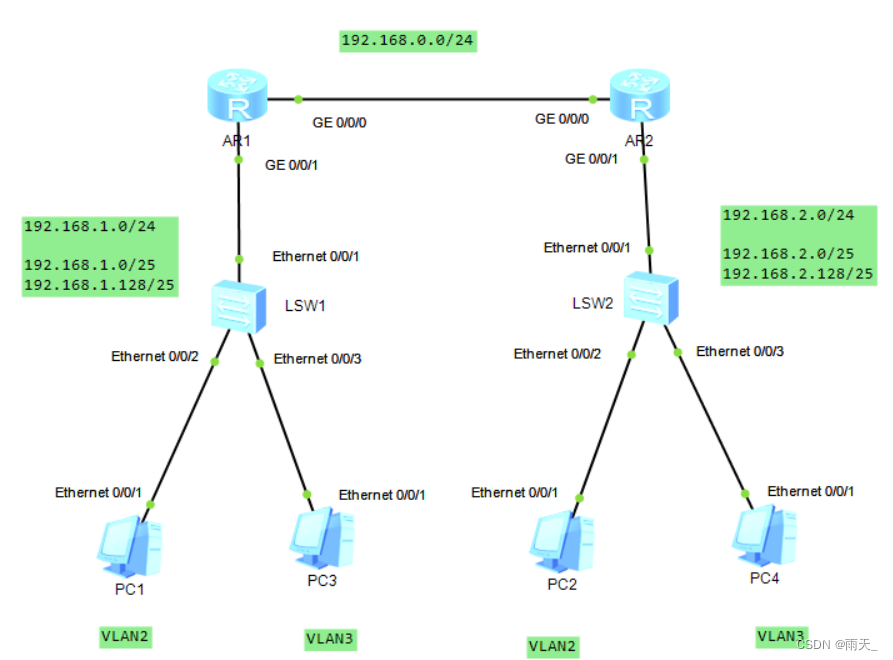
1. Create... On the switch VLAN
[sw1]int e0/0/2
[sw1-Ethernet0/0/2]port link-type access
[sw1-Ethernet0/0/2]port default vlan 2
[sw1]int e0/0/3
[sw1-Ethernet0/0/3]port link-type access
[sw1-Ethernet0/0/3]port default vlan 3
[sw1]int e0/0/1
[sw1-Ethernet0/0/1]port link-type trunk
[sw1-Ethernet0/0/1]port trunk allow-pass vlan all
[sw2]int e0/0/2
[sw2-Ethernet0/0/2]port link-type access
[sw2-Ethernet0/0/2]port default vlan 2
[sw2]int e0/0/3
[sw2-Ethernet0/0/2]port link-type access
[sw2-Ethernet0/0/2]port default vlan 3
[sw2]int e0/0/1
[sw2-Ethernet0/0/1]port link-type trunk
[sw2-Ethernet0/0/1]port trunk allow-pass vlan all
2. Configure router , Turn on ARP function
[r1]int g0/0/1.1
[r1-GigabitEthernet0/0/1.1]dot1q termination vid 2
[r1-GigabitEthernet0/0/1.1]ip add 192.168.1.1 25
[r1-GigabitEthernet0/0/1.1]arp broadcast enable
[r1]int g0/0/1.2
[r1-GigabitEthernet0/0/1.2]dot1q termination vid 3
[r1-GigabitEthernet0/0/1.2]ip add 192.168.1.129 25
[r1-GigabitEthernet0/0/1.2]arp broadcast enable
[r1]int g0/0/0
[r1-GigabitEthernet0/0/0]ip add 192.168.0.1 30
[r2]int g0/0/1.1
[r2-GigabitEthernet0/0/1.1]dot1q termination vid 2
[r2-GigabitEthernet0/0/1.1]ip add 192.168.2.1 25
[r2-GigabitEthernet0/0/1.1]arp broadcast enable
[r2]int g0/0/1.2
[r2-GigabitEthernet0/0/1.2]dot1q termination vid 3
[r2-GigabitEthernet0/0/1.2]ip add 192.168.2.129 25
[r2-GigabitEthernet0/0/1.2]arp broadcast enable
[r2]int g0/0/0
[r2-GigabitEthernet0/0/0]ip add 192.168.0.2 30
3. Turn on DHCP service
[r1]dhcp enable
[r1]ip pool 01
[r1-ip-pool-01]network 192.168.1.0 mask 25
[r1-ip-pool-01]gateway-list 192.168.1.1
[r1-ip-pool-01]dns-list 114.114.114.114
[r1]ip pool 02
[r1-ip-pool-02]network 192.168.1.128 mask 25
[r1-ip-pool-02]gateway-list 192.168.1.129
[r1-ip-pool-02]dns-list 114.114.114.114
[r1]int g0/0/1.1
[r1-GigabitEthernet0/0/1.1]dhcp select global
[r1]int g0/0/1.2
[r1-GigabitEthernet0/0/1.2]dhcp select global
[r2]dhcp enable
[r2]ip pool 01
[r2-ip-pool-01]network 192.168.2.0 mask 25
[r2-ip-pool-01]gateway-list 192.168.2.1
[r2-ip-pool-01]dns-list 114.114.114.114
[r2]ip pool 02
[r2-ip-pool-02]network 192.168.2.128 mask 25
[r2-ip-pool-02]gateway-list 192.168.2.129
[r2-ip-pool-02]dns-list 114.114.114.114
[r2]int g0/0/1.1
[r2-GigabitEthernet0/0/1.1]dhcp select global
[r2]int g0/0/1.2
[r2-GigabitEthernet0/0/1.2]dhcp select global
4. stay PC End open DHCP service
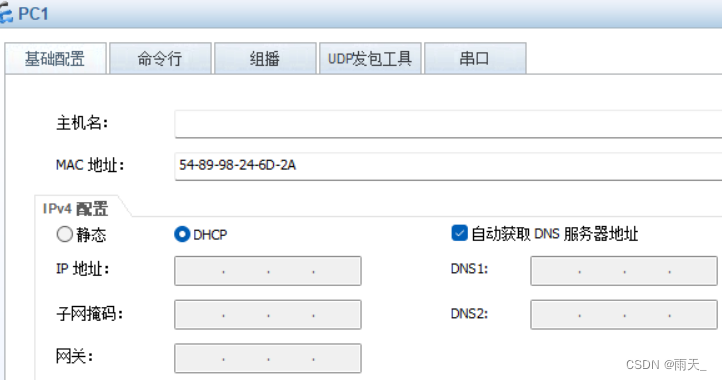

verification 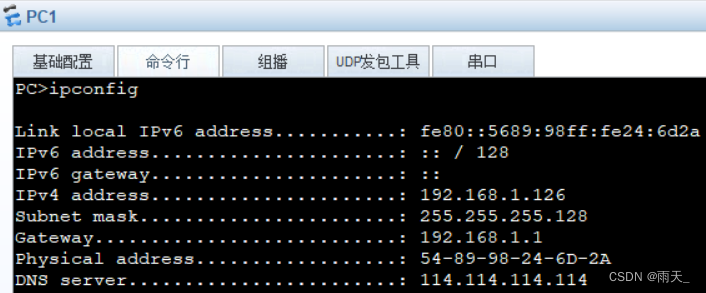

5. Declare
[r1]rip 1
[r1-rip-1]ver 2
[r1-rip-1]network 192.168.1.0
[r1-rip-1]network 192.168.0.0
[r2]rip 1
[r2-rip-1]ver 2
[r2-rip-1]network 192.168.2.0
[r2-rip-1]network 192.168.0.0
see 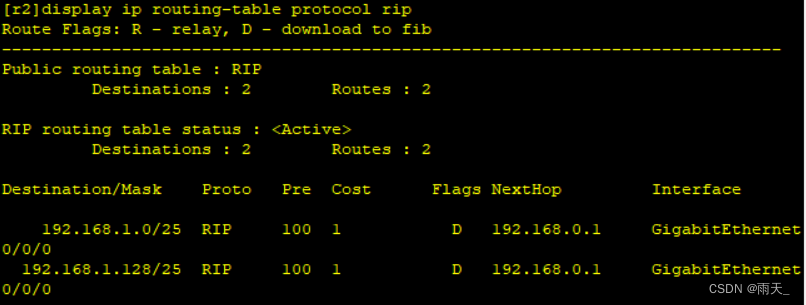
( Route summary )
[r1]int g0/0/0
[r1-GigabitEthernet0/0/0]rip summary-address 192.168.1.0 255.255.255.0
[r2]int g0/0/0
[r2-GigabitEthernet0/0/0]rip summary-address 192.168.2.0 255.255.255.0
testing 

6. Silent interface
[r1]rip 1
[r1-rip-1]silent-interface g0/0/1.1
[r1-rip-1]silent-interface g0/0/1.2
[r2]rip 2
[r2-rip-2]silent-interface g0/0/1.1
[r2-rip-2]silent-interface g0/0/1.2
7. test


【2】 The second stage ( LAN access Wan )

1. Supplementary configuration of router interface
[r2]int g0/0/2
[r2-GigabitEthernet0/0/2]ip add 12.1.1.1 24
[isp]int g0/0/0
[isp-GigabitEthernet0/0/0]ip add 12.1.1.2 24
[isp]int g0/0/1
[isp-GigabitEthernet0/0/1]ip add 1.1.1.1 24
2. visit ISP, Configure the default route
[r1]rip 1
[r1-rip-1]default-route originate
[r2]ip route-static 0.0.0.0 0 12.1.1.2
3. Define private that can be converted IP Address range
[r2]acl 2000
[r2-acl-basic-2000]rule permit source 192.168.0.0 0.0.255.255
( The interface of the public network , Source IP The address is changed to be public IP)
[r2]int g0/0/2
[r2-GigabitEthernet0/0/2]nat outbound 2000
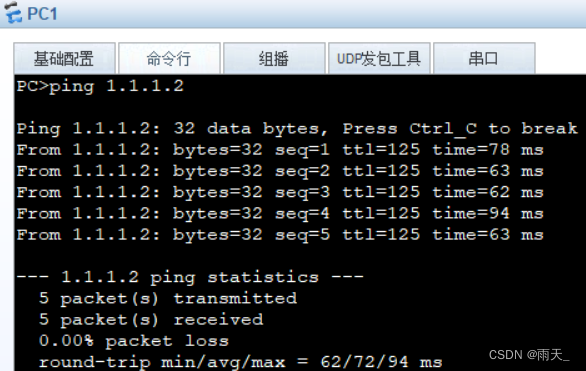
4. test



边栏推荐
猜你喜欢






随机推荐
QT | mouse events and wheel events qmouseevent, qwheelevent
JS hash table 02
我,AI博士生,在线众筹研究主题
Configuration of static routes (take Huawei ENSP as an example)
ONNX Runtime介绍
Pytorch tensor list is converted to tensor list of tensor to tensor using torch.stack()
Electromagnetic field and electromagnetic wave experiment I familiar with the application of MATLAB software in the field of electromagnetic field
[strategic mode] like Zhugeliang's brocade bag
AI系统前沿动态第43期:OneFlow v0.8.0正式发布;GPU发现人脑连接;AI博士生在线众筹研究主题
4.FTP服务配置与原理
微波技术基础实验一 滤波器的设计
After switching the shell command line terminal (bash/zsh), CONDA cannot be used: command not found
Fastdfs offline deployment (Graphic)
【域泛化】2022 IJCAI领域泛化教程报告
Idea overall font size modification
VLAN configuration and application (take Huawei ENSP as an example)
Flask框架——Flask-WTF表单:数据验证、CSRF保护
Disabled and readonly and focus issues
HCIA实验(06)
2021 致景笔试总结