当前位置:网站首页>(7) Pyqt5 tutorial -- > > window properties and basic controls (continuous update)
(7) Pyqt5 tutorial -- > > window properties and basic controls (continuous update)
2022-06-25 12:37:00 【haoming Hu】
1. Form settings
| Set the form name | setWindowTitle(‘title’) |
|---|---|
| Set the form icon | self.setWindowIcon(‘image path’) |
| Change the size of the form | self.resize(height, wide) |
| Get the size of the form | self.size() |
| Get the width of the form | self.width() |
| Get the height of the form | self.height() |
| Do not stretch window size | self.setFixedSize(width,height) |
| Don't maximize | self.setWindowFlags(QtCore.Qt.WindowMinimizeButtonHint) |
| Get the starting coordinates of the window | self.pos() |
| Get the size and position of the window | self.frameGeometry() |
| Set window initialization position | self.setGeometry(x, y, width, height) |
| Set the window size | self.setFixedSize(width, height) |
2. Basic controls
1. Message box —>QMessageBox
Inheritance relationships :QtWidgets.QMessageBox
Message box type
| QMessageBox.information | Message box |
|---|---|
| QMessageBox.question | Question and answer box |
| QMessageBox.warning | Warning box |
| QMessageBox.critical | Error box |
| QMessageBox.about | About the box |
give an example :QMessageBox.information(QWidget, ‘Title’, 'Content‘, buttons)
QWidget: It's an interface parameter , It can be understood as a parent window
Title: The title of the message box
Content: The contents of the message box
buttons: The button in the message box ( Can be more )
Parametric button There are many kinds , As follows
- QMessageBox.Ok
- QMessageBox.Yes
- QMessageBox.No
- QMessageBox.Close
- QMessageBox.Cancel
- QMessage.Open
- QMessage.Save
There will be a return value after the message box runs , The return value is which button you choose , Here's a concrete example
        choice=QtWidgets.QMessageBox.question(self,u'Notice!',u'Are you sure to exit?'
            ,QtWidgets.QMessageBox.Yes,QtWidgets.QMessageBox.No)

        if choice==QtWidgets.QMessageBox.Yes:
            print(" You chose the OK button ")
        else:
             print(" You chose the no button ")
Running effect :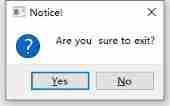
2. Single line text box :QLineEdit
This is a single line of text input , Be similar to QQ Input box of login interface , You can set plaintext or ciphertext
Let's first introduce some common methods owned by this class
Some methods don't need to pass parameters , Some need
| setFont(combobox.currentFont()) | Set the font |
|---|---|
| setPlaceholderText() | Set the text box to display text |
| setMaxLength() | Set the maximum number of characters allowed in the text box |
| setReadOnly() | Set the text to read-only |
| setText() | Set the content of the text box |
| text() | Returns the contents of the text box |
| setDragEnable() | Sets whether the text box accepts dragging |
| selectAll() | Future generations |
| setFocus() | Get the focus |
self.setAlignment( Parameters ) Used to set the alignment of text
| Qt.AlignLeft | Align horizontally to the left |
|---|---|
| Qt.AlignRight | Horizontally right aligned |
| Qt.AlignCenter | Align horizontally and Center |
| Qt.AlignJustify | Adjust the spacing horizontally and align the ends |
| Qt.AlignTop | Vertical alignment up |
| Qt.AlignBottom | Align vertically down |
| Qt.AlignVCenter | Align vertically in the middle |
self.setEchoMode( Parameters ) Used to set the encoding format
| Parameters | explain |
|---|---|
| QLineEdit.Normal | Normal display of input characters , This is the default option |
| QLineEdit.NoEcho | No input characters are displayed , Commonly used for password type input , And the length is confidential |
| QLineEdit.Password | Display platform related password masking characters , Instead of the actual input character |
| QLineEdit.PasswordEchoOnEdit | Display characters when editing , Responsible for displaying password type input |
self.setInputMask( Parameters )
| Parameters | explain |
|---|---|
| 000.000.000.000;_ | ip Address , The white space character is ‘_’ |
| HH:HH:HH:HH:HH:HH; | MAC Address |
| 0000-00-00 | date , White space characters are spaces |
| >AAAAA-AAAAA-AAAAA-AAAAA-AAAAA;# | License number , The white space character is ‘_’, All letters are capitalized |
self.setValidator() Set the verifier for the text box ( Validation rule ), Any text that may be entered will be restricted
| Parameters | explain |
|---|---|
| QIntValidator | Limit input integers |
| QDoubleValidator | Limit the input of floating point numbers |
| QRegexpValidator | Check that the input matches the regular expression |
QLineEdit Common signals
| selectionChanged | As long as you select the content to send the change, the signal will be sent |
|---|---|
| textChanged | When modifying text content , This signal will be transmitted |
| editingFinished | When editing text ends , This signal will be transmitted |
There are two ways to see the specific parameter requirements , Or go to the source code , Or read the official manual
The official manual looks like this , Reading the manual should be the fastest 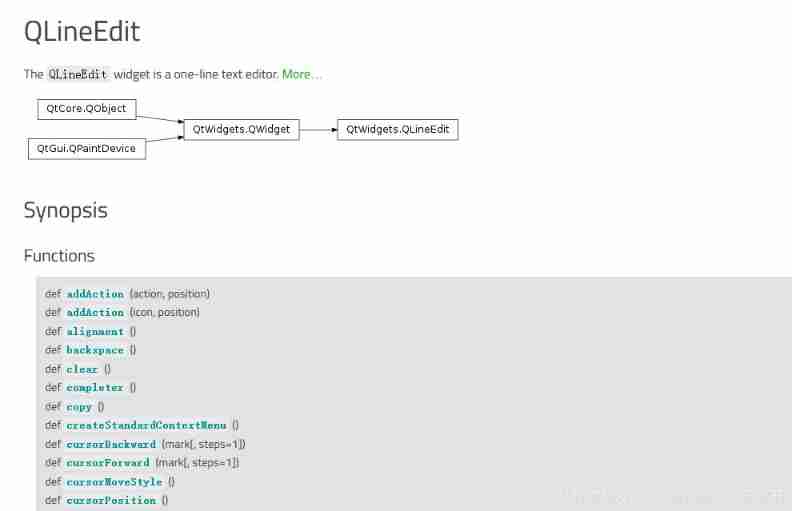

3. Text edit box QTextEdit And text browsing boxes QTextBrowser
4. Various button
5. label QLabel
6. Drop down the selection box comboBox
7. Digital adjustment box QSpinBox
8. Slider bar QSlider
9. knob QDial
10. Progress bar QProgressBar
11. Timer QTimer
12. Digital display QLCDNumber
13. Color dialog
14. Font selection dialog box
15. File selection dialog
边栏推荐
- The R language uses the follow up The plot function visualizes the longitudinal follow-up map of multiple ID (case) monitoring indicators, and uses stress The type parameter specifies the line type of
- Penetration tool environment -- use of cknife Chinese kitchen knife
- Record a debugging when curl has no return value
- PHP replaces the key of a two-dimensional array with a specified element value
- Zhangxiaobai's way of penetration (VIII) - detailed operation steps of SQL injection - Boolean blind injection of blind injection
- Kotlin study notes
- R language uses GLM function to build Poisson logarithmic linear regression model, processes three-dimensional contingency table data to build saturation model, and poisgof function of epidisplay pack
- MySQL and excel tables importing database data (Excel for MySQL)
- Go defer little knowledge
- ECSHOP video list_ ECSHOP uploading video, video classification, video list playing video function
猜你喜欢

Installation and removal of MySQL under Windows

Happy shopkeeper source code -- Introduction to happy shopkeeper system development mode

Navicat premium view password scheme

【数据中台】数据中台的OneID是个什么鬼,主数据它不香吗?

Full nanny tutorial of Market Research Competition (experience sharing)

19. Implementation of MVVM architecture based on WPF event to command

Zhangxiaobai's way of penetration (V) -- detailed explanation of upload vulnerability and parsing vulnerability

ECSHOP quickly purchases goods, simplifies the shopping process, and improves the user experience through one-step shopping

刷入Magisk通用方法
![[oceanbase] Introduction to oceanbase and its comparison with MySQL](/img/1c/bd2bcddb7af4647407d2bc351f5f5d.png)
[oceanbase] Introduction to oceanbase and its comparison with MySQL
随机推荐
MySQL and excel tables importing database data (Excel for MySQL)
Explain factor analysis in simple terms, with case teaching (full)
【数据中台】数据中台的OneID是个什么鬼,主数据它不香吗?
Digital currency exchange -- digital currency exchange system development source code sharing
Some fields are ignored in tp6 query
Huikan source code -- Huikan app system secondary development source code sharing
Initialize the project using the express framework
Penetration tool environment -- use of cknife Chinese kitchen knife
The dist function of R language calculates the distance between two samples in dataframe data, returns the distance matrix between samples, and specifies the distance calculation method through the me
Why should Apple change objc_ Type declaration for msgsend
R language uses GLM function to build Poisson logarithmic linear regression model, processes three-dimensional contingency table data to build saturation model, and poisgof function of epidisplay pack
Laravel task scheduling
Kotlin study notes
Go novice exploration road 2
Arm immediate
ARM V7 连续加载/存储
Ten commandments of self-learning in machine learning
MySQL common interview questions
How to use SPSS to do grey correlation analysis? Quick grasp of hand-to-hand Teaching
Does sklearex make your sklearn machine learning model training fly fast?