当前位置:网站首页>Malicious code analysis practice - lab03-01 Exe basic dynamic analysis
Malicious code analysis practice - lab03-01 Exe basic dynamic analysis
2022-06-12 10:33:00 【Bng!】
Malicious code analysis practice ——Lab03-01.exe Basic dynamic analysis
1. The experiment purpose
Comprehensive use of various analytical tools , analysis Lab03-01.exe Basic information of , And speculate its function .
2. Experimental environment ( Hardware 、 Software )
VMware virtual machine (winxp):
Hardware : processor Intel Core i5-10210U CPU @ 1.60GHz 2.11 GHz
Software :32 Bit operating system
kali virtual machine
3. The experimental steps ( Describe the operation process in detail , The key analysis needs to be attached with screenshots )
(1) Static analysis
①MD5 value

②peid analysis

You can see Lab03-01.exe Has been shelled
③strings analysis
strings Lab03-01.exe


Found some registry information and a exe File and a possible domain name
Guess analysis may visit the website to download some Trojan files through the connection, or through vmx32to64.exe Download open some back doors ,, Therefore, the dynamic analysis focuses on the addition and deletion of registry modification information and files, as well as networking operations
(2) dynamic analysis
①regshot Registry analysis
Regshot Run after the first snapshot Lab03-01.exe
function Lab03-01.exe Record the second snapshot after 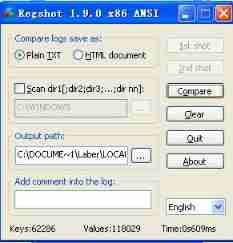
Click on compare After comparing the registry information twice, it is found that the new registry key value 
Found in the self start item VideoDriver Key value is added in 43 3A 5C 57 49 4E 44 4F 57 53 5C 73 79 73 74 65 6D 33 32 5C 76 6D 78 33 32 74 6F 36 34 2E 65 78 65, Replace it with the characters C:\WINDOWS\system32\vmx32to64.exe, explain VideoDriver The self starting item points to system32 In the catalog vmx32to64.exe
②process explorer analysis
open explorer The lower window of the DLLs Dynamic link library

function Lab03-01.exe After the discovery 
stay Lab03-01.exe in ws2_32.dll and wshtcpip.dll Therefore, it indicates that there are network operations
③process monitor analysis
Get into Filter Add filter criteria to the window 

It was predicted that the program would be downloaded during the previous static analysis vmx32to64.exe file , Gu Zai run Lab03-01.exe Can after ctrl+F Search directly vmx32to64.exe after 
Found in windows\system32 Create a write under the path vmx32to64.exe File and in currentversion\run I created VideoDriver Key value of self starting item
Came to windows\system32 View under directory vmx32to64 file


View its MD5 Value found to be the same as Lab03-01.exe equally , So come to the conclusion Lab03-01.exe Copy yourself to windows\system32 Under the table of contents , In the above registry analysis VideoDriver The key value of the self starting item points to windows\system32 The next path vmx32to64.exe
④ApateDNS Network access analysis

Found that it visited www.practicalmalwareanalysis.com This web site
ApateDNS Refer to the article for virtual network configuration 《 Malicious code analysis practice —— Use Apatedns and Inetsim Simulate the network environment 》
4. The experimental conclusion
Lab03-01.exe To copy itself to system32 Under the table of contents , And start up automatically
And Lab03-01.exe Run to make access www.practicalmalwareanalysis.com website
边栏推荐
- How to play the 2022 Taobao 618 Super Cat Games? Playing skills of 2022 Taobao 618 Cat Games
- Pseudo static setting of access database in win2008 R2 iis7.5
- Chapter 3 search
- CTF freshman cup PHP deserialization question - EzPop
- Download Notepad++
- Vscode code debugging skills
- 蓝桥杯2015年CA省赛(填坑中)
- 看看你有没有陷入“标签化”客户和 用户 的陷阱?
- PHP occupies memory
- Oculus quest generation opens Bluetooth connection
猜你喜欢

1268_ Implementation of FreeRTOS task context switching

容器江湖的爱恨情仇

Bug easily ignored by recursion
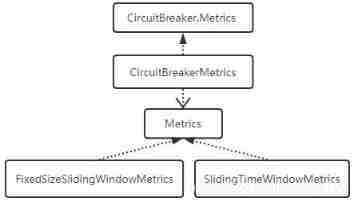
Circuitbreaker fuse of resilience4j -- Measurement of circuitbreakermetrics index

Set SVG color

2022淘宝618超级喵运会玩法攻略 618超级喵运会玩法技巧
![[MySQL] index invalidation and index optimization](/img/af/9ed540aab764f4962ccc9bbfe406f3.jpg)
[MySQL] index invalidation and index optimization

Is the acceptance standard a test case?
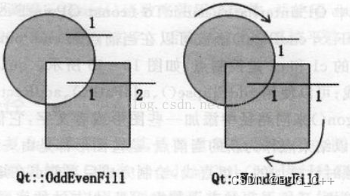
QT custom window fillets

Dynamic proxy
随机推荐
Get array median
JS string combination
Oculus quest generation opens Bluetooth connection
JS open common application market
conda 安装tensorflow 测试tensorflow
What can QA do in a "de QA" project?
2022京东618预售定金怎么退?京东618定金能退吗?
MYSQL用户与权限管理,角色管理
看看你有没有陷入“标签化”客户和 用户 的陷阱?
Several methods of importing ThinkPHP
Leetcode2154. Multiply the found value by 2 (binary search)
PHP wechat red packet allocation logic
[MySQL] learn more about the clustered indexes and auxiliary indexes (b+ tree indexes) in InnoDB
Class. Forname connection MySQL driver keeps throwing classnotfoundexception exception solution
验收标准到底是不是测试用例?
2022京东618预售定金怎么退?京东618定金能退吗?
4. creator mode
golang中的定时器
Machine learning is not something you can use if you want to use it
How to play the 2022 Taobao 618 Super Cat Games? What are the strategies for the Super Cat Games