当前位置:网站首页>MySQL - adding, deleting, querying and modifying tables
MySQL - adding, deleting, querying and modifying tables
2022-06-21 13:35:00 【Longbow dog learning C】
Add or delete check change CRUD:Create( establish ),Retrieve( Read ),Update( to update ),Delete( Delete )
One .Create
Create a table to hold student information

1. Single line data + Insert all columns
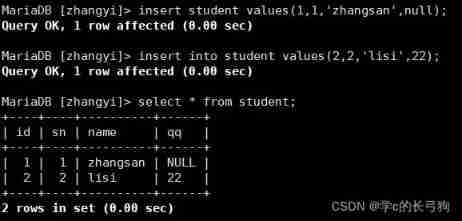
2. Multi row data + Specify column insertion

3. Insert or update
When primary key or unique key conflicts , You can select the syntax for synchronous update :
INSERT INTO students (id, sn, name) VALUES (1, 1, 'zhang')
ON DUPLICATE KEY UPDATE sn = 1, name = 'zhang';
Query OK, 2 rows affected (0.47 sec)
-- 0 row affected:  There are conflicting data in the table , But the value of the conflicting data and  update  The values are equal
-- 1 row affected:  There are no conflicting data in the table , Data is inserted
-- 2 row affected:  There are conflicting data in the table , And the data has been updated
--  adopt  MySQL  Function to get the number of affected data rows
SELECT ROW_COUNT();
+-------------+
| ROW_COUNT() |
+-------------+
|      2      |
+-------------+
4. Replace
If there is no conflict, insert directly , In case of conflict, delete and then insert .

Two .Retrieve
select Column


1. Full column query

However, it is generally not recommended to use * Make a full column query .
2. Specified column query

3. Query field expression
3.1 Fields not included in the table

3.2 The expression contains a field

3.3 The expression contains multiple fields

4. Specify an alias for the query results

5. The results were de duplicated
select distinct table_ele_name from table_name
WHERE Conditions
Comparison operator :
Operator explain
>, >=, <, <= Greater than , Greater than or equal to , Less than , Less than or equal to
= be equal to ,NULL unsafe , for example NULL = NULL The result is NULL
<=> be equal to ,NULL Security , for example NULL <=> NULL The result is TRUE(1)
!=, <> It's not equal to
BETWEEN a0 AND a1 Range match ,[a0, a1], If a0 <= value <= a1, return TRUE(1)
IN (option, ...) If it is option Any one of , return TRUE(1)
IS NULL yes NULL
IS NOT NULL No NULL
LIKE Fuzzy matching .% Denotes any number of ( Include 0 individual ) Any character ;_ Represents any character
Logical operators :
Operator explain
AND More than one condition must be TRUE(1), The result is TRUE(1)
OR Any one of the conditions is TRUE(1), The result is TRUE(1)
NOT Condition is TRUE(1), The result is FALSE(0)
This is the full meter
1. We find that our math score is less than 80 Classmate

2. Next, let's look for Chinese scores in 【75,85】 Classmate

The above uses and Perform conditional splicing , Next use between...and...

3. The grade of Chinese is 80.81 or 82 Classmate

What we use above is or, Let's use in Conditions

4. A classmate surnamed Zhang

above % Match any number of arbitrary characters , If you use _, Match an arbitrary character . Let's insert data to verify .

5. Students whose Chinese scores are better than those in mathematics

6. The total score is lower than 150 Classmate

7. The total score is greater than 150 A classmate whose surname is not Zhang ( Li Si ) , So let's verify that

Sorting results
-- ASC In ascending order ( From small to large )
-- DESC For the descending order ( From big to small )
-- The default is ASC
1. We will display the data in the table in ascending order of math scores

2. We will display the data in the table in descending order of math scores
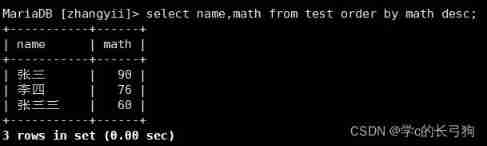
3. In ascending order of language , Display in descending mathematical order

When collation conflicts , First follow the sorting rules written first .
4. Query students and total scores , Display from high to low ( Descending )

5. Check the results of students surnamed Zhang , The results are displayed from high to low according to math scores ( Descending )

Filter result page
-- from s Start , Screening n Bar result , More definite than the second usage , It is recommended to use
SELECT ... FROM table_name [WHERE ...] [ORDER BY ...] LIMIT n OFFSET s;
To better watch , Let's insert another data


3、 ... and .Update
1. Change Zhang San's score to 85


2. Li Si's Chinese , The math scores were changed to 85

3. Add to the last one 10 branch

We can see that the last one is 130 branch ( As a result of mistakes 130 Calculation )

4. Double the Chinese scores of all the students

Four .delete
Delete data in table
1. Delete Zhang San's data

2. Next, we delete the entire table data ( Use with caution )

Truncation table


5、 ... and . Insert query results
Create a repeating table

Create a non repeating table

6、 ... and . Aggregate functions
function explain
COUNT([DISTINCT] expr) Returns the of the queried data Number
SUM([DISTINCT] expr) Returns the of the queried data The sum of the , It's not that numbers don't make sense
AVG([DISTINCT] expr) Returns the of the queried data Average , It's not that numbers don't make sense
MAX([DISTINCT] expr) Returns the of the queried data Maximum , It's not that numbers don't make sense
MIN([DISTINCT] expr) Returns the of the queried data minimum value , It's not that numbers don't make sense
1. Check how many students there are in the class

2. View the... Collected in the table qq Number

边栏推荐
- [in depth understanding of tcapulusdb technology] tcapulusdb business data backup
- 还在用generator生成xxx管理系统的CRUD代码?来看看我是怎么写的
- Repair for a while, decisively reconstruct and take responsibility -- talk about CRM distributed cache optimization
- 3D slicer saves segmentation results
- Numpy | insert variable length character array test OK
- 《預訓練周刊》第50期:無解碼變換器、神經提示搜索、梯度空間降維
- SCCM基于已安装的 APP创建客户端集合并定期推送应用更新
- 服务治理的工作内容
- 618 Nuggets digital collection? Burberry and other luxury brands fight against metauniverse
- How to use search engine?
猜你喜欢

hands-on-data-analysis 第二单元 第四节数据可视化

Sharing new experiences in home office | community essay solicitation
Collection reference type in JS

Summary of several ways to calculate distance
百度交易中台之钱包系统架构浅析

Sort query results according to the input order of fuzzy query jancode

Babbitt yuancosmos daily must read: wechat may ban a official account for the first time on the grounds of "involving secondary transactions in digital collections", and the new regulations of the pla

Summary of the latest remote deployment O & M tools
![[in depth understanding of tcapulusdb technology] tcapulusdb construction data](/img/83/200cd9705138583eee6b3db55135ff.png)
[in depth understanding of tcapulusdb technology] tcapulusdb construction data

分布式事务处理方案大 PK

随机推荐
[in depth understanding of tcapulusdb technology] tcapulusdb construction data
scrapy_ Redis distributed crawler
MySQL约束(创建表时的各种条件说明)
塔米狗分享:产权交易的方式及其产权交易市场数据化意义
Explanation of common mesh generation methods in workbench
PHP uses grafika to synthesize pictures and generate poster images
3. operator
Questions and answers No. 43: application performance probe monitoring principle PHP probe
Apache shardingsphere 5.1.2 release | new driving API + cloud native deployment to create a high-performance data gateway
C language elementary (VII) structure
uva11991
3. function improvement
Pretraining Weekly No. 50: No Decode converter, neural prompt search, gradient Space reduction
百问百答第43期:应用性能探针监测原理-PHP探针
5000 word analysis: the way of container security attack and defense in actual combat scenarios
[in depth understanding of tcapulusdb technology] tcapulusdb business data backup
Deep understanding of convolution in convolution neural network
map. Values() to copy list and ArrayList
Tami dog sharing: the way of property right transaction and the significance of data-based property right transaction market
Are you still using generator to generate crud code of XXX management system? Let's see what I wrote