当前位置:网站首页>10 minutes to master the installation steps of MySQL
10 minutes to master the installation steps of MySQL
2022-06-27 16:29:00 【Yufanghuashou】
mysql As a database commonly used in daily development , It's very important for every programmer , Come with me today mysql Your installation journey .
One 、 install
1、 How to install the package
1.1、 Get installation package
Yes mysql For people who have been in contact , We all know mysql It is divided into commercial version and community version , Because it's just for development 、 The use of learning , Select the community version here to install . First open the official website .
https://www.mysql.com/

mysql Download from the official website
Go to the download page , Slide to the bottom to see the download link of the community version , Here's the picture ,

mysql Download address
Jump to the download page of the Community Edition

mysql The download page
You can see that there are many ways to install , Here, first select the installation package of binary files , Go to the corresponding page , Select the required version to download , The environment I want to install here is centos7, So the following version is selected here ,

When the download is complete , Use rz The command is uploaded to linux On the machine ,rz The order is linux Command below , If you don't have this command, you can install Baidu by yourself .

1.2、 Use the installation package to install ( Failed to install )
In the above steps, the installation package has been successfully uploaded to linux On the machine , Pictured above , The next step is to decompress , Use the following command ,
tar -xvf mysql-8.0.26-1.el8.x86_64.rpm-bundle.tar After decompression , You can see these files
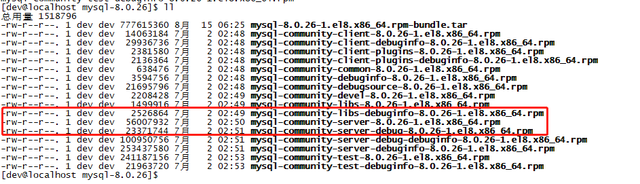
mysql The extracted file
Just install it , Here is rpm package , So use rpm Command to install

mysql install
Show the following ,

mysql Error during installation
Indicates a missing dependency , For example, lack of GLIBC_2.28、OPENSSL_1_1_0 etc. , I haven't successfully installed it here , So it doesn't continue here , A friend who knows something can give me a suggestion . Next, install in another way .
2、yum The way
2.1、 Get the installation file
stay mysql Your download page is mysql Of yum file ,

download mysql Of yum file
Download this file to your local ,

Download local yum file
Upload the file to linux On the machine , As mentioned earlier, you can use rz command , I have passed it here ,

Upload to linux Of yum file
Let's install
2.2、 install
2.2.1、 add to mysql Of rpm To yum Source
Because of the yum Installation method of , So put the above yum Add files to yum In the source ,
yum localinstall mysql80-community-release-el7-3.noarch.rpm Check yum In source mysql
yum repolist all | grep mysql 
You can see that the newly added status is enabled , Pictured above , in addition , If there are other versions whose status is enabled , Be sure to shut it down , Use the following command
yum-config-manager --disable MySQL Cluster 7.5 Community2.2.2、 Delete previous version
If you've installed it before mysql, You can use the following command to view
yum list installed | grep mysqlI've installed... Here , So there are the following dependencies

You can use the following command to delete
yum -y remove mysql-community-client.x86_64
2.2.3、 install
Use the following installation command to install ,
yum install mysql-community-serverHere's the picture
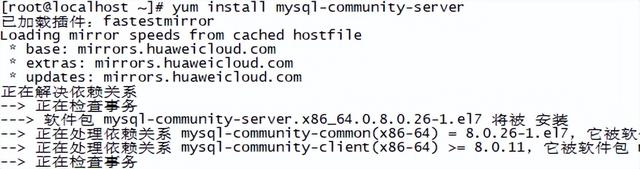
mysql setup script
Just install it .
After installation, check whether the installation is successful .

The figure above shows that the installation has been successful .
Two 、 To configure
Just installed mysql Can only be accessed locally , Lack of remote access , So here we need to configure , Because of the use of yum Install by default , that mysql Where was it installed? That
2.1、mysql Installation position of
Use the following command
which mysqldThe results are as follows

After installation mysql The location of
You can see that it is installed in /usr/sbin Under the table of contents ,
that mysql Where is your configuration file ,
/usr/sbin/mysqld --verbose --help |grep -A 1 'Default options' Here's the picture ,

As can be seen from the above, first read /etc/my.cnf, And then there was etc/mysql/my.cn And then there was /usr/etc/my.cnf Continue reading in this order , That is to say, only one directory exists in the above paths my.cnf that will do . Let's look at /etc/ Whether there is

my.cnf The location of
The file exists , Edit the file
The document is as follows ,

my.inf The contents of the document
You can see mysql Data directory for 、pid Other configuration . remember log-error=/var/log/mysqld.log This configuration . All right, let's start
2.2、 start-up mysql
Use the following command to start mysql
service mysqld start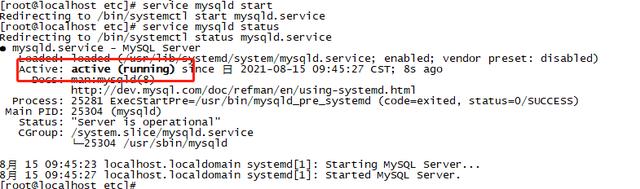
mysql Start state of
You can see that it has been started successfully . Now log in
2.3、 Log in locally
Now the service has started ,mysql It comes with a local client , You can use the client mode to start , So what's our account and password? That , Don't worry , Above we remember log-error=/var/log/mysqld.log This is also a configuration , This is a mysql Start log , Look at this file

mysql Your default account number
Find the key sentence from the above , That is to say mysql When starting, it will give root A temporary password , I am here 0Q*_k1F.KFo9, Use this password to log in ,
mysql -hlocalhost -uroot -p
Log in with the default account mysql
You can see that you have successfully logged in , Just mentioned that root Your password is temporary , Then you need to change the password now .
2.4、 modify root The temporary password for
You have just logged in successfully , But because you use a temporary password , So I can't do anything , You must change the temporary password ,

mysql> alter user [email protected] identified by '123!QAZ';Change your password here . That's it root Password modification . Use exit After the command exits , Just log in with a new password .
2.5、 Add remote login account
mysql> create user 'root'@'%' identified by 'root';// Refresh the permissions mysql> flush privileges;Added root Your remote login account ;

In this way, you can use root Remote login .
2.6、 Use navicat Remote login
Use navicat Connect mysql, here mysql The version is 8, The following error occurred while connecting

Log in locally using the command line , Execute the following command
mysql> use mysql;mysql> alter user 'root'@'%' identified with mysql_native_password by '123!QAZ';mysql> flush privileges;Then log in as follows ,
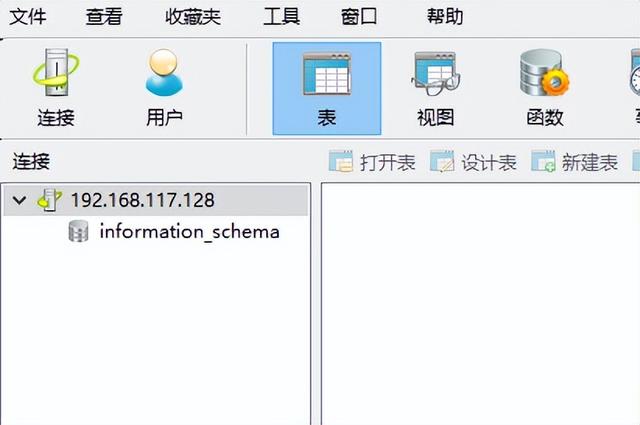
2.7、 to grant authorization
You can see from the above picture that root The permission of the account is obviously not the maximum , It needs to be authorized ,
mysql> grant all privileges on *.* to 'root'@'%' WITH GRANT OPTION;mysql> flush privileges;
3、 ... and 、 summary
This article records mysql Installation steps of , And threw out some problems and solutions , The problems left in this paper , I hope you can come up with a solution , Thank you for your .
边栏推荐
- 基于 Nebula Graph 构建百亿关系知识图谱实践
- Domain name binding dynamic IP best practices
- 10分钟掌握mysql的安装步骤
- QT5 之信号与槽机制(信号与槽的基本介绍)
- If you want to use DMS to handle database permissions, can you only use Alibaba cloud ram accounts (Alibaba cloud RDS)
- P.A.R.A 方法在思源的简易应用(亲测好用)
- Alibaba cloud liupeizi: Inspiration from cloud games - innovation on the end
- The two trump brand products of Langjiu are resonating in Chengdu, continuously driving the consumption wave of bottled liquor
- What are the password requirements for waiting insurance 2.0? What are the legal bases?
- Slow bear market, bit Store provides stable stacking products to help you cross the bull and bear
猜你喜欢

Sigkdd22 | graph generalization framework of graph neural network under the paradigm of "pre training, prompting and fine tuning"
Leetcode daily practice (Yanghui triangle)

What should the ultimate LAN transmission experience be like

数组表示若干个区间的集合,请你合并所有重叠的区间,并返回 一个不重叠的区间数组,该数组需恰好覆盖输入中的所有区间 。【LeetCodeHot100】

Li Chuang EDA learning notes 16: array copy and array distribution

Leetcode daily practice (longest substring without repeated characters)

面试半年,上个月成功拿到阿里P7offer,全靠我啃烂了这份2020最新面试题!

Leetcode daily practice (sum of two numbers)

Weekly snapshot of substrate technology 20220411

Introduce you to ldbc SNB, a powerful tool for database performance and scenario testing
随机推荐
Introduce you to ldbc SNB, a powerful tool for database performance and scenario testing
Can polardb-x be accessed through the client of related tools as long as the client supporting JDBC / ODBC protocol is afraid?
鴻蒙發力!HDD杭州站·線下沙龍邀您共建生態
#yyds干货盘点# 解决剑指offer:二叉树中和为某一值的路径(三)
Bit.Store:熊市漫漫,稳定Staking产品或成主旋律
Relation and operation of ORM table
Raspberry pie preliminary use
Introduce you to ldbc SNB, a powerful tool for database performance and scenario testing
C système de gestion de la charge de travail des enseignants en langues
Qt5 signal and slot mechanism (basic introduction to signal and slot)
What should the ultimate LAN transmission experience be like
C语言集合运算
Cesium realizes satellite orbit detour
Markdown syntax
PolarDB-X开源版有没有支持 mysql5.7 的版本?
National food safety risk assessment center: do not blindly and unilaterally pursue "zero addition" and "pure natural" food
Array represents a collection of several intervals. Please merge all overlapping intervals and return a non overlapping interval array. The array must exactly cover all the intervals in the input. 【Le
泰山OFFICE技术讲座:第一难点是竖向定位
面试半年,上个月成功拿到阿里P7offer,全靠我啃烂了这份2020最新面试题!
Mihayou sued Minmetals trust, which was exposed to product thunderstorms