当前位置:网站首页>Comparison of packet capturing tools fiddler and Wireshark
Comparison of packet capturing tools fiddler and Wireshark
2022-07-26 10:24:00 【JackieZhengChina】
Read about Network security technology Everyone knows a noun “ Grab the bag ”. That's for outsiders , I will ask what is grabbing ? in consideration of , Everyone's technical level varies , I try to use a non professional tone to simply say .
Grab the bag It is to intercept the data packets sent and received by network transmission 、 retransmission 、 edit 、 Transfer and deposit, etc , Also used to check network security . Packet capture is often used for data interception and so on . Hackers often use packet capturing software to obtain your unencrypted online data , And then by analyzing , Combine social engineering to attack . therefore , Learn to grab bags , It is very important to learn network security technology well .

When we do interface testing , It is often necessary to verify whether the message sent is correct , Or when something goes wrong , View the mobile client sent to server Whether the contents of the package on the end are correct , You need to use the bag grabbing tool . What are the commonly used packet capturing tools for engineers and programs ? Today, let's talk about the most commonly used 2 Kind of .
Fiddler Is in windows Programs running on , Dedicated to capture HTTP,HTTPS Of .
wireshark Can acquire HTTP, Can also get HTTPS, But it can't be decrypted HTTPS, therefore wireshark Look not to understand HTTPS The content in .
summary , If it's processing HTTP,HTTPS Or use it Fiddler, Other agreements like TCP,UDP Just use wireshark.
One 、Fiddler
When to start fiddler, The program will treat itself as a proxy , So http Requests go through... Before reaching the target server fiddler, alike , be-all http The response will flow through before returning to the client fiddler.
Fiddler You can grab support http The data package of the agent's arbitrary program , If you want to grab https conversation , Install the certificate first .
Fiddler How it works
Fiddler Acting as agent web Working as a server , It uses a proxy address :127.0.0.1, port :8888. When Fiddler Proxy will be set automatically , It automatically logs off the agent when it exits , So it doesn't affect other programs . But if Fiddler Abnormal exit , This time because Fiddler No automatic logout , It will make the web page inaccessible . The solution is to restart Fiddler.


Fiddler How to capture Firefox Conversation
Can support HTTP The data package of any program of the agent can be Fiddler Sniffing ,Fiddler The operation mechanism of is actually monitoring on the local machine 8888 Port of HTTP agent .Fiddler2 Default at startup IE The agent of is set to 127.0.0.1:8888, Other browsers need to be set manually , So will Firefox The agent of is changed to 127.0.0.1:8888 You can listen to the data .
Firefox To set up a proxy
Click on : Tools -> Options, stay Options Click on the dialog box Advanced tab - > network tab -> setting.
Firefox Install in Fiddler plug-in unit
modify Firefox The agent in is troublesome , no need fiddler We need to get rid of the agent . Recommend you in firefox Use in fiddler hook plug-in unit , It's very convenient for you to use Fiddler obtain firefox Medium request and response, When you install fiddler after , It's already installed Fiddler hook plug-in unit , You need to firefox To enable this plug-in to open firefox tools->Add ons -> Extensions start-up FiddlerHook


Fiddler How to capture HTTPS conversation
By default ,Fiddler Not captured HTTPS conversation , You need to set , open Fiddler Tool->Fiddler Options->HTTPS tab

Choose checkbox, The following dialog box will pop up , Click on "YES"


Click on "Yes" after , It's set up
Fiddler Basic interface of
have a look Fiddler Basic interface of

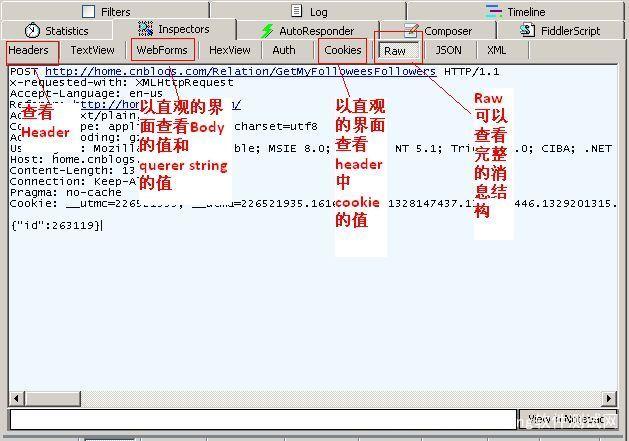
Inspectors tab There are many views below Request perhaps Response The news of . among Raw Tab Can view the complete message ,Headers tab View only the header. Here's the picture
Fiddler Of HTTP Statistical view
By displaying all HTTP Traffic volume ,Fiddler It's easy to show you which files generated the page you're currently requesting . Use Statistics Tab , Users can select multiple sessions to get the total information statistics of these sessions , For example, the number of bytes of multiple requests and transfers .
Select the first request and the last request , Get the total time spent loading the entire page . From the bar chart, you can also distinguish which requests take the most time , So as to optimize the access speed of the page

QuickExec Use of the command line
Fiddler There is a command line tool called QuickExec, Allows you to enter commands directly .
Common commands are :
help Open the official use page , All the orders will be listed
cls Clear the screen (Ctrl+x You can also clear the screen )
select Commands for selecting a session
.png Used for selection png Suffix picture
bpu to intercept request

Fiddler Set breakpoint modification in Request
Fiddler The most powerful function is to set breakpoints , Once the breakpoint is set , You can modify httpRequest Any information about includes host, cookie Or data in the form . There are two ways to set breakpoints
The first one is : open Fiddler Click on Rules-> Automatic Breakpoint ->Before Requests( This method interrupts all sessions )
How to eliminate command ? Click on Rules-> Automatic Breakpoint ->Disabled
The second kind : Entering commands on the command line : bpu http://www.baidu.com ( This method will only break http://www.baidu.com)
How to eliminate command ? Entering commands on the command line bpu

Two 、Wireshark
Wireshark It is another kind of bag grabbing tool , This tool is better than fiddler More powerful , More messages . You may ask : With fiddler, Why use wireshark Well ? Here under , In the test , Discovery use fiddler Grab the bag , Some bags are not caught , For example, when verifying anti cheating information , Anti cheating pingback The message of information is used fiddler I didn't catch , use wireshark I got it . There's another situation , It's verification cna When , If you use it first fiddler Grab the bag , If you don't plant cna When , Never in the future cna 了 , It's weird . The solution is to uninstall the package and reinstall , For the first time to use wireshark Grab the bag .
Wireshark advantage :
1、 Powerful protocol resolution capability , Layer one to seven full decoding , Cover all at one glance , It's especially helpful to study the details of the protocol .
2、 about https Encrypted traffic , Just put the browser's session key Automatic import wireshark,Wireshark It can be decrypted automatically https Traffic .
Wireshark deficiencies :
Although you can customize the filter list , But to capture a particular TCP Flow /Session Traffic needs to write a long filter list , It's very unfriendly for beginners .
Examples of operation :
wireshark Is to capture the network package of a certain network card on the machine , When you have multiple network cards on your machine , You need to choose a network card .

Click on Caputre->Interfaces.. The following dialog box appears , Choose the right network card . And then click "Start" Button , Start the bag. :

One 、WireShark Interface

1、Display Filter( Display filter ), Used for filtration ;
2、Packet List Pane( Packet list ), Show captured packets , Active and destination addresses , Port number ;
3、Packet Details Pane( Package details ), Show fields in package ;
4、Dissector Pane(16 Hexadecimal data );
5、Miscellanous( Address bar , miscellaneous ).
Two 、Wireshark Display filtering
Using filtering is very important , For beginners wireshark when , Will get a lot of redundant information , In thousands or even tens of thousands of records , It's hard to find what you need . Get lost . Filters help us quickly find the information we need in a large amount of data .
There are two types of filters :
1、 One is the display filter , It's the one on the main interface , Used to find the required records in the captured records
2、 One is the capture filter , Packets used to filter capture , To avoid capturing too many records . stay Capture -> Capture Filters Set in .
3、 ... and 、 Preservation filtering
stay Filter Hurdles , Fill in Filter After the expression of , Click on Save Button , Take a name . such as "Filter 102",Filter There's more on the bar "Filter 102" The button .
Four 、 Rules for filtering expressions
Expression rules
1. Protocol filtering such as TCP, Display only TCP agreement .
2.IP Filter
such as ip.src ==192.168.1.102 Show source address as 192.168.1.102,ip.dst==192.168.1.102, The target address is 192.168.1.102.
3. Port filtering
tcp.port ==80, Port is 80 Of
tcp.srcport == 80, Display only TCP The desired port of the protocol is 80 Of .
4.Http Mode filtering
http.request.method=="GET", Display only HTTP GET Methodical .
5. The logical operator is AND/ OR
5、 ... and 、 Packet list (Packet List Pane)
Display in the panel of the package list , Number , Time stamp , source address , Destination address , agreement , length , And package information . You can see that different protocols are displayed in different colors . You can also change the rules of the display colors , View ->Coloring Rules.
6、 ... and 、 Package details (Packet Details Pane)
This panel is our most important , Used to view each field in the agreement . Each line of information is
·Frame: Overview of data frames in physical layer
·Ethernet II: Data link layer Ethernet frame header information
·Internet Protocol Version 4: The Internet layer IP Baotou department information
·Transmission Control Protocol: Transport layer T Data segment header information for , Here is TCP
·Hypertext Transfer Protocol: Application layer information , Here is HTTP agreement
7、 ... and 、Wireshark With the corresponding OSI Seven layer model

8、 ... and 、TCP Specific contents of the package
You can see it in the picture below wireshark Captured TCP Each field in the package .

summary :
in general , The two packet capturing software have their own advantages and disadvantages , The key to choice lies in what our needs are , Of course , For software testing practitioners , Both software are very necessary to learn ~
Original address :https://baijiahao.baidu.com/s?id=1612020651990482782&wfr=spider&for=pc
---------------------
author : Zhongyuan Encyclopedia
source :CSDN
original text :https://blog.csdn.net/qq_32231883/article/details/89407789
Copyright notice : This is the author's original article , Please attach a link to the blog post !
Content analysis By:CSDN,CNBLOG One click reprint plugin for blog posts
边栏推荐
- 2022/07/25------字符串的排列
- [C language] LINQ overview
- Cause: could't make a guess for solution
- On the compilation of student management system of C language course (simple version)
- 【Halcon视觉】软件编程思路
- Use of Android grendao database
- 简单化构造函数的继承方法(二)- ES6中的class继承
- Li Kou daily question 917
- Flask框架初学-03-模板
- 【Halcon视觉】阈值分割
猜你喜欢

Dynamically determine file types through links
![[Halcon vision] affine transformation](/img/f1/32284c71e78e6eea390fdb6058ba0f.png)
[Halcon vision] affine transformation
抓包工具fiddler和wireshark对比

Learning about tensor (III)

Map key not configured and uniapp routing configuration and jump are reported by the uniapp < map >< /map > component

PLC概述

videojs转canvas暂停、播放、切换视频

Study on the basis of opencv

What will the new Fuzhou Xiamen railway bring to Fujian coastal areas?

Session based recommendations with recurrent neural networks
随机推荐
On the compilation of student management system of C language course (simple version)
The problem of incomplete or partial display of the last recyclerview is solved
Uniapp error 7 < Map >: marker ID should be a number
About automatic operation on Web pages
Error in render: "typeerror: cannot read properties of undefined (reading 'length')" --- error when calling interface
Netease cloud UI imitation -- & gt; sidebar
Google与Pixar开发Draco支持USD格式 加速3D对象传输<转发>
Tower of Hanoi II | tower of Hanoi 4 columns
The difference between equals and = =
30 minutes to thoroughly understand the synchronized lock upgrade process
Use spiel expressions in custom annotations to dynamically obtain method parameters or execute methods
js下载文件,FileSaver.js导出txt、excel文件
Time series anomaly detection
【Halcon视觉】数组
PTA class a 1002
Okaleido ecological core equity Oka, all in fusion mining mode
About the declaration and definition of template functions [easy to understand]
【Halcon视觉】图像滤波
畅听,网文流量竞争的下一站?
Learning about opencv (1)