当前位置:网站首页>Dormitory maintenance management system based on stm32+rfid design
Dormitory maintenance management system based on stm32+rfid design
2022-06-29 10:40:00 【DS brother Bruce Lee】
1. demand
demand : One bedroom, one label , Scan labels on the device side , Input information such as whether the maintenance is successful or not through the display screen and submit it to the platform
System Architecture : A device end + An upper computer
Hardware selection :
(1)STM32F103RCT6 As the master controller at the equipment end MCU
(2)RC522 As a RF card swiping device at the device end , Reading and writing IC card
(3) Multiple sheets IC card , The simulation represents each dormitory
Realize the idea :
Design a host computer , It is used to manage and view maintenance information , When the maintenance of dormitory equipment or maintenance is completed , adopt STM32 Upper RC522 Brush this bedroom IC card , Identify which bedroom this is , After successful identification, a dialog box pops up on the software , Fill in the event of this repair or overhaul , Click Submit after filling .
The software has two functions :
(1) Registration function : Each bedroom has one IC card , This card needs to be registered in the maintenance inspection system for the first time , Fill in this IC The information of the dormitory corresponding to the card .
(2) maintenance 、 Maintenance report submission : When the overhaul is completed 、 After overhaul , Fill in the report .
(3) View history , You can view the repair , All detailed report information of overhaul , Can export execl form , It is convenient for the public to view .
(4) register 、 maintenance 、 Maintenance records are stored in the database , Easy to manage .
Specific functions of the hardware :
STM32 There are two buttons on the , One LCD screen , One RC522 modular , When the terminal swipes the card ,LCD A query prompt will pop up on the display ? “ Is it maintenance or overhaul ”, Press the button 1 Or press the key 2 after , The card number will be uploaded to the upper computer . The upper computer communicates with the lower computer through serial port .
2. Demonstration effect


3. Host computer software design
3.1 Communication description
The upper computer communicates with the equipment through the serial port , It is used in the upper computer SQLITE The database holds all the key information , In the database 3 A watch , A table stores the maintenance inspection information , One table is the account information , A table is a record of feedback .
A,F39A471B,   register
B,F39A471B,   Overhaul
C,F39A471B,   maintenance
3.2 Build development environment
The upper computer software adopts Qt framework design ,Qt It's a cross platform C++ GUI application framework .Qt It's a 1991 Year by year Qt Company Cross platform development C++ GUI application development framework . It can develop GUI Program , It can also be used to develop non GUI Program , For example, console tools and servers . Simply speaking ,QT It can easily help you make software with interface , It doesn't even require you to put a lot of energy .
QT Official website :https://www.qt.io/

QT Introduction to learning practical column : https://blog.csdn.net/xiaolong1126626497/category_11400392.html
QT5.12.6 Download address :
https://download.qt.io/archive/qt/5.12/5.12.6/
Open the download link and select the following version to download :
qt-opensource-windows-x86-5.12.6.exe 13-Nov-2019 07:28 3.7G Details
Installation of network software is interrupted , Otherwise, you will be prompted to enter the account .
During installation , Check one in the first check box mingw 32 The compiler can , The others are OK by default , Click next to continue the installation .

choice MinGW 32-bit compiler :

choice MinGW 32-bit compiler :

Once installed , Copy the source code project to the English path , Double click the project file to open .

After the project is opened , Click the green triangle button in the lower left corner to compile and run .

The operation effect is as follows :

3.3 effect


3.4 Database insert code example
// Create a maintenance information table in the database
void Widget::CreateStudentSurface()
{

    // database : Build table , If it exists, it is not created , Create... If it doesn't exist
    QSqlQuery sql_query(database);

    // The following statement queries whether the specified table exists .
    sql_query.exec(QString("select count(*) from sqlite_master where type='table' and name='%1'").arg("student"));
    if(sql_query.next())
    {

        if(sql_query.value(0).toInt()==0)
        {

            qDebug(" The maintenance inspection record database table does not exist . Ready to create .\n");
            // Create a table   Create a table statement :create table <table_name> (f1 type1, f2 type2,…);
            /* CREATE TABLE  Is a keyword that tells the database system to create a new table . * CREATE TABLE  Statement followed by the unique name of the table  *  Or identification */
            /* The following statement :  Create a name student Table of , The fields are ID、 Number 、 Location name 、 type 、 event */
            QString create_sql = "create table student(id int primary key, number varchar(100),name varchar(100),type varchar(100),enevt varchar(1024))";

            sql_query.prepare(create_sql);
            if(!sql_query.exec())
            {

                Log_Text_Display(" Maintenance inspection record database table creation failed .\n");
            }
            else
            {

                Log_Text_Display(" The maintenance inspection record database table was created successfully .\n");
            }
        }
        else
        {

            Log_Text_Display(" The maintenance inspection record database table exists . No need to create .\n");
        }
    }
}


// Add information
void Widget::on_pushButton_add_student_clicked()
{

    QString number=ui->lineEdit_student_number->text();
    QString name=ui->lineEdit_student_name->text();
    if(number.isEmpty()||name.isEmpty())
    {

        QMessageBox::information(this," Tips "," Please fill in the data carefully before adding .",
        QMessageBox::Ok,QMessageBox::Ok);
        return;
    }

    // Add maintenance inspection location information
    LuRu_data(number,name);
}


// Input data   Pass in the equipment number and location name
void Widget::LuRu_data(QString number,QString name)
{

    // Create a table without a table
    CreateStudentSurface();

    // Add data to table
    // Save data to database
    QSqlQuery sql_query(database);

    // Query whether there is duplicate data in the original database table
    // Query all data
    sql_query.prepare("select * from student");
    if(!sql_query.exec())
    {

        Log_Text_Display(" Error querying the maintenance inspection record database .\n");
    }
    else
    {

        while(sql_query.next())
        {

            //ID、 Number 、 Location name 、 type 、 event
            // int id = sql_query.value(0).toInt(); //ID
            QString find_number = sql_query.value(1).toString(); // Number
            QString find_name = sql_query.value(2).toString(); // Location name
            QString find_type = sql_query.value(3).toString(); // type
            QString find_event = sql_query.value(4).toString(); // event
            // Determine whether there is any conflict between the numbers
            if(number==find_number)
            {

                QMessageBox::information(this," Tips "," The number you entered already exists in the database !\n Please fill in .",
                QMessageBox::Ok,QMessageBox::Ok);
                return;
            }
        }
    }

    // Ready to insert data
    // The most inquired ID
    QString select_max_sql = "select max(id) from student";
    int max_id = 0;
    sql_query.prepare(select_max_sql);
    if(!sql_query.exec())
    {

        Log_Text_Display(" The maintenance inspection information table is the largest ID To find the failure .\n");
    }
    else
    {

        while(sql_query.next())
        {

            max_id = sql_query.value(0).toInt();
        }
        Log_Text_Display(QString("data base max id:%1\n").arg(max_id));

        // Add data
        // insert data   Insert statement :insert into <table_name> values (value1, value2,…);
        QString insert_sql = tr("insert into student values(?,?,?,?,?)");
        sql_query.prepare(insert_sql);
        //ID、 Number 、 Location name 、 type 、 event
        sql_query.addBindValue(max_id+1); //id
        sql_query.addBindValue(number);
        sql_query.addBindValue(name);
        sql_query.addBindValue("----");
        sql_query.addBindValue("----");
        if(!sql_query.exec())
        {

            Log_Text_Display(" Failed to insert the data in the maintenance inspection information table .\n");
            return;
        }
        else // Insert the success
        {

            // If the insertion succeeds, the page will be cleared
            ui->lineEdit_student_name->clear();
         // ui->lineEdit_student_type->clear();
            ui->lineEdit_student_number->clear();
        }
    }

    // Update the maintenance inspection information table data display
    on_pushButton_update_student_clicked();
}
4. STM32 Equipment end design
If you need all the project source code 、 The source code of the upper computer can be downloaded here :
https://download.csdn.net/download/xiaolong1126626497/85682742
If you need to see the video demonstration of the project , You can see here :
be based on STM32+RFID Designed dormitory maintenance management system
4.1 Chinese characters are modeled

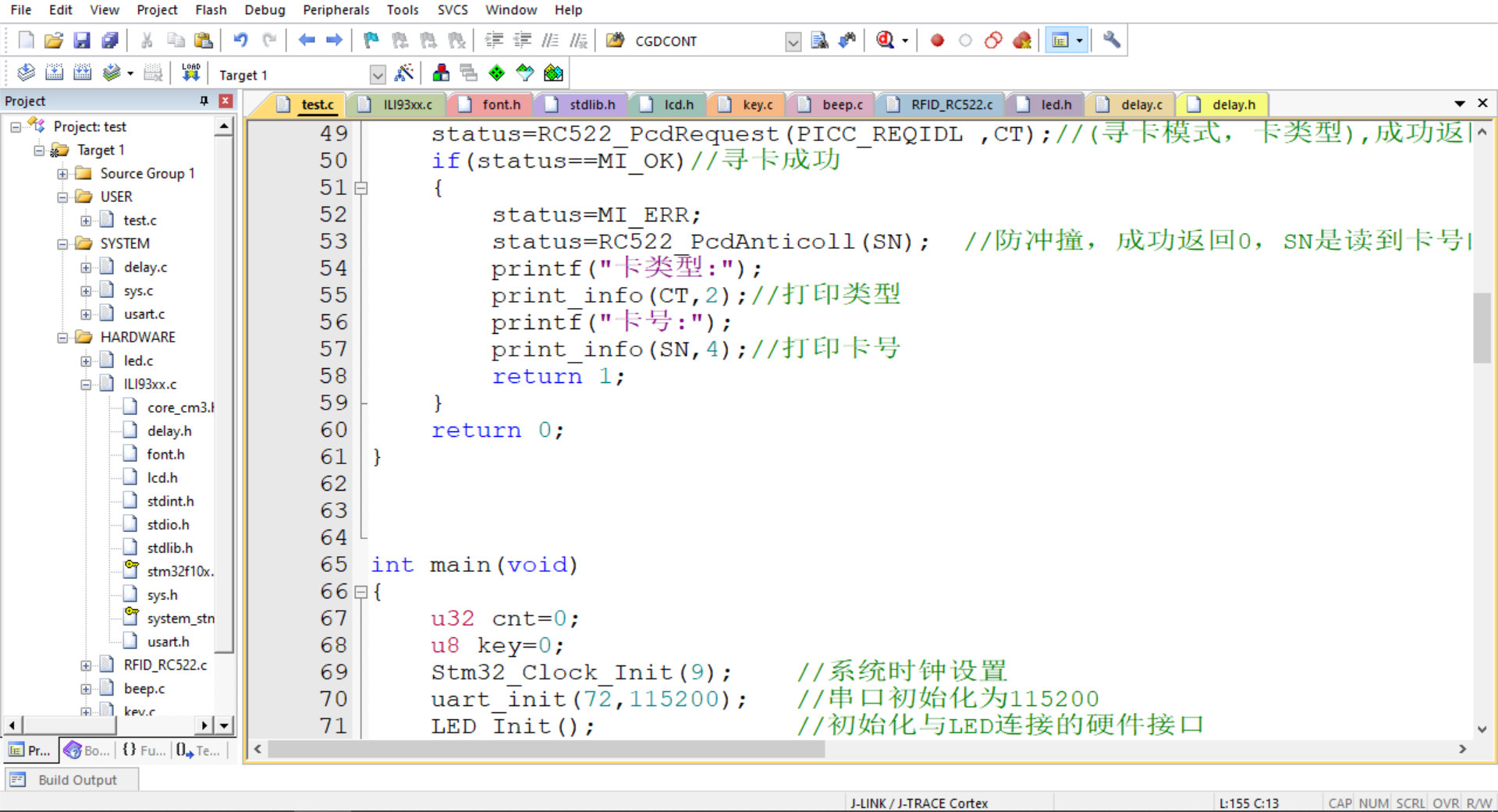
4.2 keil engineering
4.3 Hardware connection
RC522 External interface of RF module :
*1--SDA <----->PB5-- Film selection foot
*2--SCK <----->PB4-- Clock line
*3--MOSI<----->PA12-- Output
*4--MISO<----->PA11-- Input
*5-- In the air
*6--GND <----->GND
*7--RST <----->PA8-- Reset the foot
*8--VCC <----->VCC
4.4 main.c Code
#include "sys.h"
#include "delay.h"
#include "usart.h"
#include "led.h"
#include "lcd.h"
#include "RFID_RC522.h"
#include "key.h"
#include "beep.h"

unsigned char SN[4]={
    88,88,88,88}; // Default card number

u8 SendBuff[50];

/*  The functionality :  Print card number  */
void print_info(unsigned char *p,int cnt)
{

  int i;
	for(i=0;i<cnt;i++)
	{

		printf("0x%X ",p[i]);
	}
	printf("\r\n");
}


/*  The functionality :  Card reading number -- The card number of the electronic tag   Return value : 1 success  0 Failure  */
int ReadCardNumber(void)
{

    unsigned char CT[2];// Card type
	u8 status=1;
	status=RC522_PcdRequest(PICC_REQIDL ,CT);//( Card search mode , Card type ), Successfully returns 0
	if(status==MI_OK)// Card search succeeded
	{

	    status=MI_ERR;
	    status=RC522_PcdAnticoll(SN);  // Collision proof , Successfully returns 0,SN Is the address where you read the card number
		printf(" Card type :");
		print_info(CT,2);// Print type
		printf(" Card number :");
	    print_info(SN,4);// Print card number
        return 1;
	}
    return 0;
}


int main(void)
{

    u32 cnt=0;
 	u8 key=0;
  	Stm32_Clock_Init(9);	// System clock settings
	uart_init(72,115200);	// The serial port is initialized to 115200
	LED_Init();		  		// Initialization and LED Connected hardware interface
 	LCD_Init();
    KEY_Init();
    BEEP_Init();
	POINT_COLOR=RED;
    RC522_Init();		 //RC522

    //LCD_DisplayData(24*1,0,24,24,font_data[0]);
    //LCD_DisplayData(24*2,0,24,24,1);
    //LCD_DisplayData(24*3,0,24,24,2);

    DisplayData(24*0,0,24,24,(u8*)font_data[0],WHITE,BLACK);
    DisplayData(24*1,0,24,24,(u8*)font_data[1],WHITE,BLACK);
    DisplayData(24*2,0,24,24,(u8*)font_data[2],WHITE,BLACK);
    DisplayData(24*3,0,24,24,(u8*)font_data[3],WHITE,BLACK);
    DisplayData(24*4,0,24,24,(u8*)font_data[4],WHITE,BLACK);
    DisplayData(24*5,0,24,24,(u8*)font_data[5],WHITE,BLACK);
    DisplayData(24*6,0,24,24,(u8*)font_data[6],WHITE,BLACK);
    DisplayData(24*7,0,24,24,(u8*)font_data[7],WHITE,BLACK);
    DisplayData(24*8,0,24,24,(u8*)font_data[8],WHITE,BLACK);
    DisplayData(24*9,0,24,24,(u8*)font_data[9],WHITE,BLACK);

    delay_ms(100);
  	while(1)
	{

        // Read the card number
        if(ReadCardNumber())
        {

            DisplayData(0,100,24,24,(u8*)font_data[16],WHITE,BLACK);
            DisplayData(24,100,24,24,(u8*)font_data[17],WHITE,BLACK);

            sprintf((char*)SendBuff,"%X%X%X%X",SN[0],SN[1],SN[2],SN[3]);

            LCD_ShowString(24*3,105,300,300,16," ");
            LCD_ShowString(24*3,105,300,300,16,SendBuff);

            BEEP=1;
            delay_ms(100);
            BEEP=0;


            // register
            DisplayData(0,200,24,24,(u8*)font_data[10],WHITE,BLACK);
            DisplayData(24*1,200,24,24,(u8*)font_data[11],WHITE,BLACK);


            // Overhaul
            DisplayData(24*2+24*3,200,24,24,(u8*)font_data[12],WHITE,BLACK);
            DisplayData(24*3+24*3,200,24,24,(u8*)font_data[13],WHITE,BLACK);

            // maintenance
            DisplayData(24*4+24*6,200,24,24,(u8*)font_data[14],WHITE,BLACK);
            DisplayData(24*5+24*6,200,24,24,(u8*)font_data[15],WHITE,BLACK);

            while(1)
            {

                key=KEY_Scan(0);
                if(key)
                {

                   printf("key=%d\r\n",key);

                    // register
                   if(key==3)
                   {

                       sprintf((char*)SendBuff,"A,%X%X%X%X,",SN[0],SN[1],SN[2],SN[3]);
                      printf("%s\r\n",SendBuff);
                   }
                   // Overhaul
                   else if(key==2)
                   {

                       sprintf((char*)SendBuff,"B,%X%X%X%X,",SN[0],SN[1],SN[2],SN[3]);
                      printf("%s\r\n",SendBuff);
                   }
                   // maintenance
                   else if(key==1)
                   {

                      sprintf((char*)SendBuff,"C,%X%X%X%X,",SN[0],SN[1],SN[2],SN[3]);
                      printf("%s\r\n",SendBuff);
                   }
                   break;
                }
                delay_ms(50);
                LED0=!LED0;
             }

            LCD_Clear(WHITE);
            DisplayData(24*0,0,24,24,(u8*)font_data[0],WHITE,BLACK);
            DisplayData(24*1,0,24,24,(u8*)font_data[1],WHITE,BLACK);
            DisplayData(24*2,0,24,24,(u8*)font_data[2],WHITE,BLACK);
            DisplayData(24*3,0,24,24,(u8*)font_data[3],WHITE,BLACK);
            DisplayData(24*4,0,24,24,(u8*)font_data[4],WHITE,BLACK);
            DisplayData(24*5,0,24,24,(u8*)font_data[5],WHITE,BLACK);
            DisplayData(24*6,0,24,24,(u8*)font_data[6],WHITE,BLACK);
            DisplayData(24*7,0,24,24,(u8*)font_data[7],WHITE,BLACK);
            DisplayData(24*8,0,24,24,(u8*)font_data[8],WHITE,BLACK);
            DisplayData(24*9,0,24,24,(u8*)font_data[9],WHITE,BLACK);


        }

		cnt++;
        delay_ms(10);
        if(cnt>=20)
        {

            cnt=0;
            LED1=!LED1;
            LED0=!LED0;
        }
	}
}
边栏推荐
猜你喜欢

【评论送书】适合初学者的 6 个有趣的 R 语言项目
C#窗体向另一个窗体实时传值

Call another interface button through win32API

Bug的描述、定级、生命周期
Buuctf-- connotative software

CLR via C reading notes - single instance application

有了这款工具,自动化识别验证码再也不是问题
arcgis创建postgre企业级数据库

Reprint: five methods to determine whether an object has attributes
With this tool, automatic identification and verification code is no longer a problem
随机推荐
js post下载文件
Solve the problem that zxing's QR code contains Chinese garbled code
How to quickly complete disk partitioning
在实践中学习Spark计算框架(01)
Call another interface button through win32API
Alibaba cloud server is installed and configured with redis. Remote access is unavailable
Contents of advanced mathematics
Is it safe to open a securities account? Is it reliable?
SQL Server 数据库的统计查询
通过Win32API调用另一界面的按钮
【C语言进阶】动态内存管理
Virtual machine port scanning
攻防世界-Re-insfsay
View CSDN blog rankings
Add/modify/drop column of alter table operation in MySQL
【C语言进阶】自定义类型
Reading notes of CLR via C -clr boarding and AppDomain
std::make_ shared<T>/std::make_ Unique < T> and std:: shared_ ptr<T>/std::unique_ The difference and relation between PTR < t >
LVGL库入门教程 - 动画
Linux下Redis安装及集群搭建