当前位置:网站首页>Battery control of QT widget (qpainter)
Battery control of QT widget (qpainter)
2022-06-11 02:02:00 【Penguins on the volcano】
List of articles
GitHub Address : QWidgetPro , Select subproject Battery
QT QWidget For other articles, please click here : QT QWidget
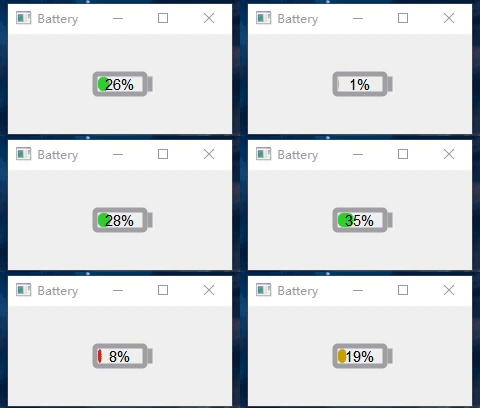
One 、 effect
In this paper QPainter To draw the battery control , By the way, it is suitable for beginners QT QWidget
Reference is made to the flying blue cloud God Qt Open source works 25- Battery power control , by comparison , This article is more suitable for beginners to learn , Removed various Q_PROPERTY Properties defined , Reduced flexibility , But it's better to be simple and easy to understand .
Two 、 The key information
1. Drive input
Set up a 100ms Periodic timer , Constantly triggering inputValue() function
	inputTimer = new QTimer(this);
	inputTimer->setInterval(100);
	connect(inputTimer, SIGNAL(timeout()), this, SLOT(inputValue()));
	inputTimer->start();
void Battery::inputValue()
{

    if(_isForward)      _currentValue += 1;
    else                _currentValue -= 1;

    if(_currentValue >= 45)  {

        _currentValue = 45;
        _isForward = false;
    }
    if(_currentValue <= _minValue) {

        _currentValue = _minValue;
        _isForward = true;
    }
    // Repaint , Will call paintEvent() function
    this->update();
}
2. Drawing process
● Draw battery border , Use painter->drawRoundedRect() according to The absolute position of the upper left corner and the width and height of the rectangle To determine the unique rectangle
// Center the rectangle
batteryRect = QRectF((width()-_batteryWidth)/2, (height()-_batteryHeight)/2, _batteryWidth, _batteryHeight);
painter->drawRoundedRect(batteryRect, 2, 2);
● Draw the battery head , Use painter->drawLine() Line drawing function
QLineF line(batteryRect.topRight().x()+5, batteryRect.topRight().y()+5, batteryRect.topRight().x()+5, batteryRect.bottomRight().y()-5);
painter->drawLine(line);
● Draw interior fill , Use painter->drawRoundedRect() according to The absolute position of the upper left and lower right corners To determine the unique rectangle
// Locate the upper left corner
QPointF topLeft(batteryRect.topLeft().x() + _margin, batteryRect.topLeft().y() + _margin);
// Identify the lower right corner of the change ,
QPointF bottomRight(batteryRect.topLeft().x() + width + _margin, batteryRect.bottomRight().y() - _margin);
QRectF rect(topLeft, bottomRight);

painter->drawRoundedRect(rect, 5, 5);
● Draw internal text :
// stay  batteryRect  In the middle
painter->drawText(batteryRect,Qt::AlignCenter,value);
3、 ... and 、 Complete code
battery.cpp
#pragma execution_character_set("utf-8")

#include "battery.h"
#include "qpainter.h"
#include "qtimer.h"
#include "qdebug.h"
#include "ui_battery.h"

Battery::Battery(QWidget *parent)
    : QMainWindow(parent)
    , ui(new Ui::Battery)
    , _currentValue(10)
    , _margin(3)
    , _minValue(0)
    , _maxValue(100)
    , _isForward(true)
    , _batteryWidth(50)
    , _batteryHeight(20)

{

// ui->setupUi(this); // drive UI The designer
// setFixedSize(300, 180); // Fixed size
    setBaseSize(350, 180);

    ///-- Set a timer , cycle  10ms , The input values  inputValue()
    inputTimer = new QTimer(this);
    inputTimer->setInterval(100);
    connect(inputTimer, SIGNAL(timeout()), this, SLOT(inputValue()));
    inputTimer->start();
}

Battery::~Battery()
{

    if (inputTimer->isActive()) {

        inputTimer->stop();
    }
    delete ui;
}

///--1.  Draw the event
/* Called whenever the widget needs to be redrawn ,  Each widget to display output must implement it .  This event handler can be reimplemented in subclasses to receive drawing events .  It can be repaint() or update() Result .  Many widgets when they are requested , They simply redraw the entire interface , But some widgets draw only the requested area QPaintEvent::region() To optimize , for example ,QListView and QCanvas That's what it does .  Link to the original text :https://blog.csdn.net/u012151242/article/details/78947024 */
void Battery::paintEvent(QPaintEvent *)
{

    // Drawing preparation , Enable anti aliasing
    QPainter painter(this);
    painter.setRenderHints(QPainter::Antialiasing | QPainter::TextAntialiasing);

    ///--1.1  Draw borders and headers
    drawBorder(&painter);
    ///--1.2  Draw fill
    drawBg(&painter);
    ///--1.3  Internal percentage
    drawText(&painter);
}

///--1.1  Draw borders and headers
void Battery::drawBorder(QPainter *painter)
{

    // Save state
    painter->save();

    // Set the color and thickness of the pen
    painter->setPen(QPen(Qt::gray, 5));
    // No brush filling
    painter->setBrush(Qt::NoBrush);
    // Draw the given rounded rectangle   rectangular  xRadius yRadius
// painter->drawRoundedRect(batteryRect, borderRadius, borderRadius);

    // The battery border is centered
    batteryRect = QRectF((width()-_batteryWidth)/2, (height()-_batteryHeight)/2, _batteryWidth, _batteryHeight);
    painter->drawRoundedRect(batteryRect, 2, 2);

    // Battery head : Draw a straight line
    painter->setPen(QPen(Qt::gray, 5));
    QLineF line(batteryRect.topRight().x()+5, batteryRect.topRight().y()+5, batteryRect.topRight().x()+5, batteryRect.bottomRight().y()-5);
    painter->drawLine(line);

    // Reply to saved status
    painter->restore();
}

///--1.2  Draw fill
void Battery::drawBg(QPainter *painter)
{

    painter->save();

    // Determine brush color
    if(_currentValue<=10) {

        painter->setBrush(QColor(204, 38, 38));  // red
    }
    else if (_currentValue <= 20) {

        painter->setBrush(QColor(198, 163, 0));  // yellow
    }
    else {

        painter->setBrush(QColor(50, 205, 51));  // green
    }

    // The current power is converted to wide
    double width = _currentValue * (batteryRect.width() - (_margin * 2)) / 100;

    // Locate the upper left corner
    QPointF topLeft(batteryRect.topLeft().x() + _margin, batteryRect.topLeft().y() + _margin);
    // Identify the lower right corner of the change ,  At least give me 10,  Show the internal fill
    QPointF bottomRight(batteryRect.topLeft().x() + width + _margin, batteryRect.bottomRight().y() - _margin);
    QRectF rect(topLeft, bottomRight);

    // No line width
    painter->setPen(Qt::NoPen);
    painter->drawRoundedRect(rect, 5, 5);
    painter->restore();
}

///--1.3  Internal percentage
void Battery::drawText(QPainter *painter) {


    painter->save();

    painter->setPen(Qt::black);
    painter->setFont(QFont("Arial",11));

    QString value = QString::number(_currentValue) + "%";

    // A good way to center text
    painter->drawText(batteryRect,Qt::AlignCenter,value);

    painter->restore();
}

//1.  drive 、 Input
void Battery::inputValue()
{

    if(_isForward)      _currentValue += 1;
    else                _currentValue -= 1;

    if(_currentValue >= 45)  {

        _currentValue = 45;
        _isForward = false;
    }
    if(_currentValue <= _minValue) {

        _currentValue = _minValue;
        _isForward = true;
    }
    // Repaint , Will call paintEvent() function
    this->update();
}


///--- Set brush ,  Gradient color
// QLinearGradient batteryGradient(QPointF(0, 0), QPointF(0, height()));
// if (currentValue <= alarmValue) {

// batteryGradient.setColorAt(0.0, alarmColorStart);
// batteryGradient.setColorAt(1.0, alarmColorEnd);
// } else {

// batteryGradient.setColorAt(0.0, normalColorStart);
// batteryGradient.setColorAt(1.0, normalColorEnd);
// }
// painter->setBrush(batteryGradient); // Brush fill
battery.h
#ifndef BATTERY_H
#define BATTERY_H

#include <QMainWindow>

QT_BEGIN_NAMESPACE
namespace Ui {
     class Battery; }
QT_END_NAMESPACE

class Battery : public QMainWindow

{

    Q_OBJECT

public:
    Battery(QWidget *parent = nullptr);
    ~Battery();

protected:
    void paintEvent(QPaintEvent *);
    void drawBorder(QPainter *painter);
    void drawBg(QPainter *painter);
    void drawText(QPainter *painter);

private slots:
    void inputValue();

private:
    Ui::Battery *ui;
    double _currentValue;
    int _margin;
    double _minValue;                // minimum value
    double _maxValue;                // Maximum
    bool _isForward;                 // Move forward or not
    int _batteryWidth;
    int _batteryHeight;

    QRectF batteryRect;             // Battery body area
    QTimer *inputTimer;                  // Draw the timer
};

#endif // BATTERY_H
GitHub Address : QWidgetPro , Select subproject Battery
QT QWidget For other articles, please click here : QT QWidget
边栏推荐
- Coordinates of the capital of each province in China
- [matlab] image compression coding (DCT, RLE)
- [leetcode] merge K ascending linked lists
- flutter_ Swiper carousel map plug-in
- Loki learning summary (1) -- the best choice of Loki small and medium-sized project log system
- AI 狂想|来这场大会,一起盘盘 AI 的新工具!
- Task05: tree
- 1.2. Ros+px4 preliminary basic knowledge
- How to change the administrator's Avatar in win11? Win11 method of changing administrator image
- Win11画图工具没了怎么重新安装
猜你喜欢

MeterSphere教程:接口返回结果为空时如何进行断言

关于CS-3120舵机使用过程中感觉反应慢的问题
Video compression data set TVD
![[leetcode] delete duplicate Element II in the sorting linked list](/img/24/0f8e4a2d15732997c8eb8973669bf7.jpg)
[leetcode] delete duplicate Element II in the sorting linked list
![[leetcode] ordered linked list transformation binary search tree](/img/9f/86e819beb8dc678d79c3e307891402.jpg)
[leetcode] ordered linked list transformation binary search tree

逻辑漏洞 / 业务漏洞

Win11系统使用DISM命令备份驱动程序的方法

Project sorting of Online Exercise System Based on gin and Gorm

1.4px4 program download

On permutation and Combination in Probabilistic Statistics
随机推荐
Interviewer: let me introduce the items in your resume. Tell me more about them, and attach the actual project
Leetcode 2054 two best non overlapping events
Xpath注入
kubernetes 二进制安装(v1.20.15)(七)加塞一个工作节点
In May, the main growth ranking list (platform of station B) of the single flying melon data up was released
数据库概述
Loki learning summary (1) -- the best choice of Loki small and medium-sized project log system
【交通标志识别】基于matlab GUI YCbCr特征提取+BP神经网络交通标志识别【含Matlab源码 1869期】
1.3 introduction to ROS UAV
What if ROS lacks a package
中国各省份省会的坐标
Flutter status management
flutter_ Swiper carousel map plug-in
[leetcode] same tree + symmetric binary tree
The argument type ‘int?‘ can‘t be assigned to the parameter type ‘num‘
【Qt】error: QApplication: No such file or directory 解决方案
[matlab] basic image operation (point operation, arithmetic operation, scaling and rotation)
[leetcode] restore binary search tree
On permutation and Combination in Probabilistic Statistics
Alibaba cloud Tianchi online programming training camp_ Task arrangement