当前位置:网站首页>Static route configuration instance learning record
Static route configuration instance learning record
2022-07-23 12:59:00 【Amateur visionary】
Static route configuration instance
Routes set manually are called static routes , Static routing is fixed , It will not change automatically with the change of network topology
List of articles
1、 The goal of the experiment
Learn how to configure static routes , Understand the characteristics of router hop by hop forwarding .
2、 Network topology
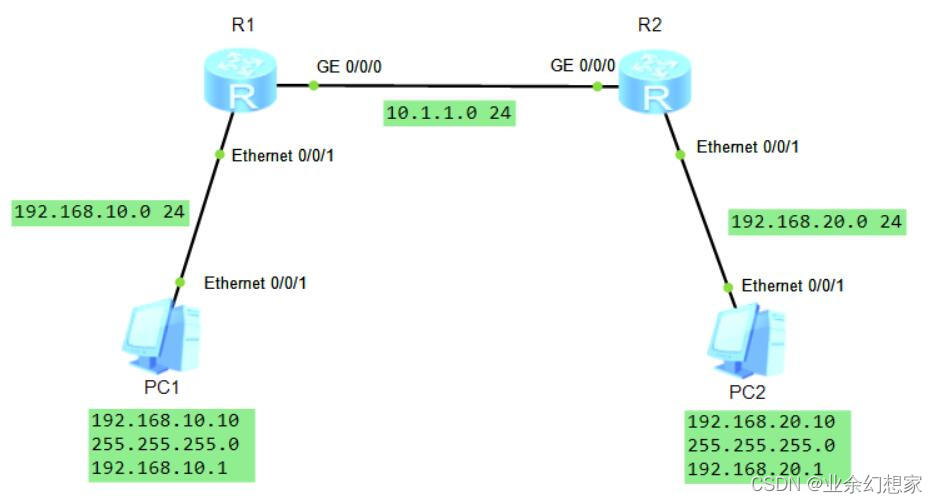
3、 Configuration steps
(1) Configure ports by topology IP Address
R1 To configure :
<R1>system-view  // Enter the system view
[R1]interface GigabitEthernet0/0/0
[R1-GigabitEthernet0/0/0]ip address 10.1.1.1 24  // configure port  IP  Address (IP  Address : 10.1.1.1  Subnet mask : 24)
[R1-GigabitEthernet0/0/0]quit
[R1]interface Ethernet0/0/1
[R1-Ethernet0/0/1]ip address 192.168.10.1 24  // configure port  IP  Address (IP  Address : 192.168.10.1  Subnet mask : 24)
[R1-Ethernet0/0/1]quit
R2 To configure :
<R2>system-view  // Enter the system view
[R2]interface GigabitEthernet0/0/0
[R2-GigabitEthernet0/0/0]ip address 10.1.1.2 24  // configure port  IP  Address (IP  Address : 10.1.1.2  Subnet mask : 24)
[R2-GigabitEthernet0/0/0]quit
[R2]interface Ethernet0/0/1
[R2-Ethernet0/0/1]ip address 192.168.20.1 24  // configure port  IP  Address (IP  Address : 192.168.20.1  Subnet mask : 24)
[R2-Ethernet0/0/1]quit
(2) Configure static routing
R1 To configure :
[R1]ip route-static 192.168.20.0 24 10.1.1.2 //ip route-static [ Destination address segment ] [ Destination address subnet mask ] [ Next jump IP Address ]
R2 To configure :
[R2]ip route-static 192.168.10.0 24 10.1.1.1 //ip route-static [ Destination address segment ] [ Destination address subnet mask ] [ Next jump IP Address ]
4、 test
(1) View the established route entries , Static routing... Look
Tips : Use display ip routing-table Command to view the routing table
see R1 Routing table :
[R1]display ip routing-table  // View routing table
Route Flags: R - relay, D - download to fib
------------------------------------------------------------------------------
Routing Tables: Public
         Destinations : 7        Routes : 7

Destination/Mask    Proto   Pre  Cost      Flags NextHop         Interface

       10.1.1.0/24  Direct  0    0           D   10.1.1.1        GigabitEthernet
0/0/0
       10.1.1.1/32  Direct  0    0           D   127.0.0.1       GigabitEthernet
0/0/0
      127.0.0.0/8   Direct  0    0           D   127.0.0.1       InLoopBack0
      127.0.0.1/32  Direct  0    0           D   127.0.0.1       InLoopBack0
   192.168.10.0/24  Direct  0    0           D   192.168.10.1    Ethernet0/0/1
   192.168.10.1/32  Direct  0    0           D   127.0.0.1       Ethernet0/0/1
   192.168.20.0/24  Static  60   0          RD   10.1.1.2  GigabitEthernet  // R1  This is the static route
0/0/0
see R2 Routing table :
[R2]display ip routing-table  // View routing table
Route Flags: R - relay, D - download to fib
------------------------------------------------------------------------------
Routing Tables: Public
         Destinations : 7        Routes : 7

Destination/Mask    Proto   Pre  Cost      Flags NextHop         Interface

       10.1.1.0/24  Direct  0    0           D   10.1.1.2        GigabitEthernet
0/0/0
       10.1.1.2/32  Direct  0    0           D   127.0.0.1       GigabitEthernet
0/0/0
      127.0.0.0/8   Direct  0    0           D   127.0.0.1       InLoopBack0
      127.0.0.1/32  Direct  0    0           D   127.0.0.1       InLoopBack0
   192.168.10.0/24  Static  60   0          RD   10.1.1.1          GigabitEthernet  // R2  This is the static route
0/0/0
   192.168.20.0/24  Direct  0    0           D   192.168.20.1    Ethernet0/0/1
   192.168.20.1/32  Direct  0    0           D   127.0.0.1       Ethernet0/0/1
(2)PC1 You can talk to PC2 Interworking
use PC1 Go to ping PC2 Of IP Address , The discovery has ping Through the notes : Access to the host IP The first few addresses may appear Request timeout! ( request timeout ) Tips , Normal phenomenon

use PC2 Go to ping PC1 Of IP Address , Discovery can also ping through notes : Access to the host IP The first few addresses may appear Request timeout! ( request timeout ) Tips , Normal phenomenon

5、 Summary
Configuring static routing is mainly to understand the concept of target address network segment and next hop .
In the routing table , Static routing Proto The field is displayed as Static, By default , Routing priority Pre by 60, The routing overhead is 0.
Advantages of static routing : It does not occupy network bandwidth and system resources , Security .
Disadvantages of static routing : When a failure occurs in the network , Static routing doesn't automatically fix , It must be manually configured one by one by the network administrator , It cannot automatically make corresponding adjustments according to the changes of network status .
边栏推荐
猜你喜欢

浅做一下思科实验吧!

学习日记——(路由与交换技术)单臂路由

C language can also write Plants vs. Zombies

Unity3d+moba+ skill indicator (II)

DHCP原理与配置

Hcip --- condition matching and OSPF Protocol
手动配置DHCP服务
Hcip ---- relevant knowledge points of GRE protocol, mGRE environment and OSPF Protocol

Learning diary - (routing and switching technology) dynamic routing (RIP protocol) and static routing

Telnet 配置实例学习记录
随机推荐
C language can also write Plants vs. Zombies
查询交叉编译出的可执行文件依赖库
PostgreSQL k8s部署模板
C # custom bidirectional linked list
DHCP second experiment
0 dynamic programming leetcode918. Maximum sum of circular subarrays
在二叉排序树中删除节点
OSPF 单区域配置实例学习记录
Learning diary - (routing and switching technology) OSPF Protocol
路由与交换技术——静态路由
写一个可执行文件依赖.so的测试用例
2020-09-20
Explain the flow control mechanism and congestion control mechanism of TCP in detail
学习日记——(路由与交换技术)ACL访问控制列表
Understand the article frankly and get the HTTP protocol cache
Nas里搭建Frpc客户端【超级无脑】
Gameframework: resource hot code analysis, check version information, download version files, verify version files, get the number of updated files, download files, taskpool
psutil监控的简单使用
Unity3d HD rendering pipeline cannot play video on the model
Learning diary - (routing and switching technology) dynamic routing (RIP protocol) and static routing