当前位置:网站首页>Redis sentry
Redis sentry
2022-06-23 06:12:00 【BugMaker-shen】
List of articles
One 、 Brief introduction to sentry
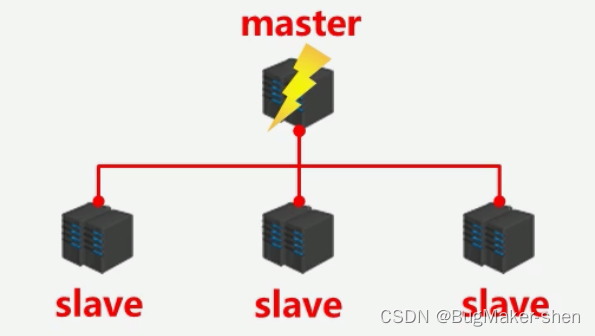
If master It's down. , The Sentry will find one slave As master, Notify all others slave Connect new master, Start a new master And slave, Data synchronization ( Copy in full *N+ Partial reproduction *N)
There are several problems with this process : Who will confirm master It's down. ? How to find one master? After modifying the configuration , The original master What if it's restored ?
sentry (sentinel) : It monitors each server in the master-slave structure Distributed systems , When there is a failure, through The voting mechanism chooses a new one master, And put all slave Connect to the new master; The sentry is also a redis The server , It just doesn't provide data services , Usually the number of sentinels is odd ( Prevent a tie in the voting )
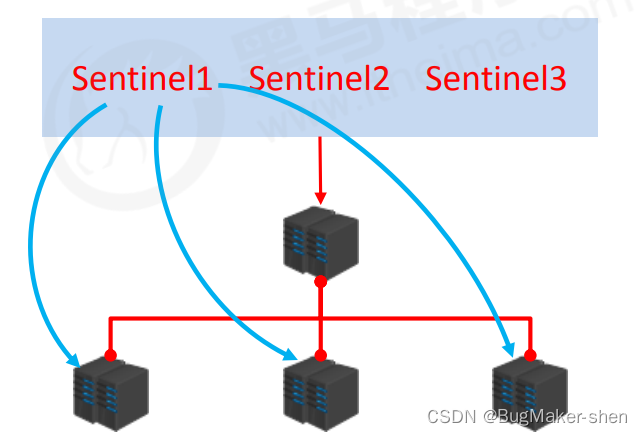
The role of a sentry
- monitor : Keep going on master Survival tests 、master And slave Operation detection
- notice ( remind ): When there is a problem with the monitored server , To the other ( The sentry room , client ) Sending notice
- Automatic failover : Disconnect the downtime master And slave Connect , Pick one slave As master, Will others slave Connect to the new master, And inform the client of the new server address
Two 、 Configure sentinel mode
Configure the master-slave structure of one drag two , Three sentries ( The configuration is the same , Different ports ), The configuration file is Redis In the root directory sentinel.conf
Activate the sentry
redis-sentinel sentinel- Port number .conf
1. Write the sentry's configuration file

#  Port occupied by sentinel service
port 26379
# dir Keep the sentry log
dir /tmp
# mymaster: It means that the sentinel monitors master, You can call it whatever you want
# 2: If there is 2 A sentinel thought mymaster Hang up , So this one master It really hung up , Usually set to half the total number of sentinels  + 1
sentinel monitor mymaster 127.0.0.1 6379 2
# mymaster 30000ms No response , The sentry thought mymaster Hang up
sentinel down-after-milliseconds mymaster 30000
#  new master When it's chosen , A few at a time slave Data synchronization
#  The smaller the value , The less pressure on the server , The slower the synchronization ; The bigger this is , The more pressure you put on the server , The faster the synchronization
sentinel parallel-syncs mymaster 1
#  If the synchronization time exceeds 180000ms, Data synchronization timeout
sentinel failover-timeout mymaster 180000

Modify the sentinel log directory

Modify the port , Generate configuration files for the other two sentinels . The ports used by the three sentinels are 26379、26380、26381

2. To write redis The configuration file for the server
see redis Server profile ,6379 by master,6380 by slave

Generate 6381 Of slave

3. start-up redis Servers and sentinels
Start one master, two slaves, three redis The server

start-up 26379 sentry

Log in to the started through the client 26379 Sentinel server

Data operations cannot be performed on the sentinel server , Only some instructions corresponding to the Sentry can be executed , We type in info Command to view information

info In the output information , We can see the Sentinels watching master as well as master Corresponding slave Number , And currently monitoring this master Number of sentinels
Check out the currently started 26379 The configuration file corresponding to the sentry , Found that the configuration file has changed

start-up 26380 sentry

Let's check again 26379 Sentinel profile 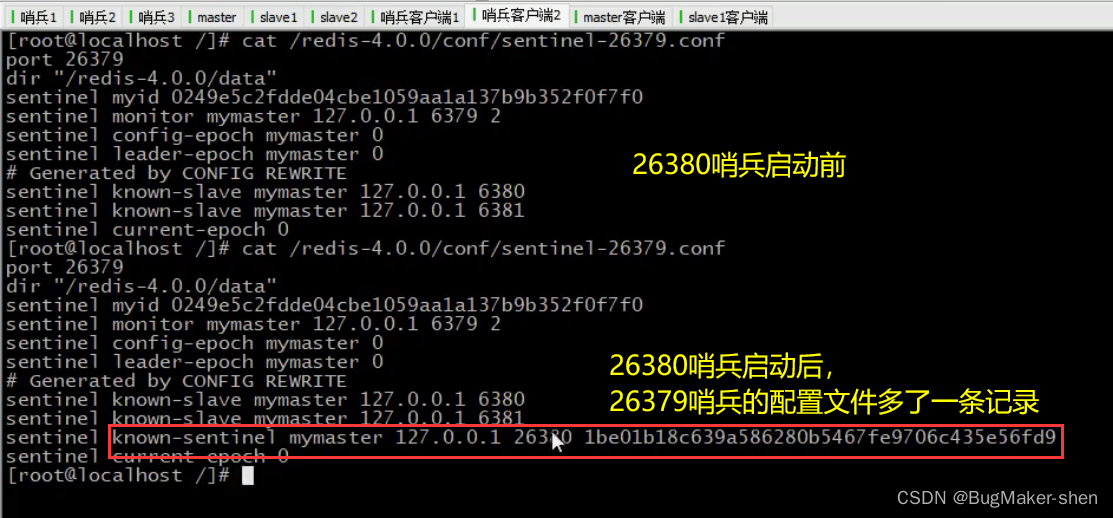
here 26379 Sentinel server also has 2638 Sentinel surveillance master A reminder of . We now know , Every time a new Sentry is activated to monitor the same master, Sentinels can recognize each other

Empathy ,3 Sentinels watch the same master, The configuration files of the three sentinels and the terminal prompt information are all mutual , Can detect each other
4. Verify the role of the sentry
If master It's down. , The Sentry will find one slave As master, Notify all others slave Connect new master. Let's demonstrate this function
Let's quit first master
What we set in the sentry configuration file is ,30000ms Inside master No response , The sentry thought master It's down ,30000ms after , sentry 1 The terminal of has the following prompt information :

As master Of 6379 After offline , The main process is for all sentinels to confirm 6379 Is it really offline , I'm sure 6379 Start voting after going offline , from slave Choose a new master, Then for the others slave change master. And take the old ones off the line 6379master Set to slave, Back 6379 After going online, it is directly slave
We started 6379 redis The server 
see 26379 A reminder of , Find out 6379 Become slave
3、 ... and 、 How the sentry works
The sentry goes through three stages in the process of master-slave switching : monitor 、 notice 、 Fail over
- monitor : Sync information
- notice : Stay connected
- Fail over : Find the problem 、 campaign for sentinel、 Choose new master、 new master In office , other slave Switch master, primary master When you recover, you become slave
1. monitor
It is used to synchronize the status information of each node

The sentry sent a message to the other sentries ping, Get each sentinel The state of ( Whether online )
obtain master The state and master attribute , Include runid、role etc.
according to master Medium slave Information , Look for each one slave Get their details , Include slave Of runid、role、master_host、master_port、offset etc.
Let's talk about it in detail , sentry 、master and slave How to exchange information between

At this time, the first sentry goes online to connect master, Get master Of info, meanwhile master And the sentry info. And then according to master I got something about slave Information about , De link slave, And then get it slave Of info, So the first sentry got master And all slave Of info

Then the second sentry goes online to connect master, from master Get info, from master Of info You can know the current master-slave environment master、slave、sentinel The number of ip:port, Then the sentry went to find others slave and sentinel Exchange information
While taking the information, you will sentinel Establish and publish between - Subscription channel , To share info

Third sentinel Connect master After the launch , Will get all the current master、slave、sentinel Of info, And add sentinel Release - Subscription channel
2. notice
sentinel Will take turns asking master and slave Information about , And then in sentinel My circle of friends posted , other sentinel Subscribe to 
3. Fail over
First sentinel1 Keep asking master, No response , Until the time in the sentry configuration file is exceeded, it is considered as this master Hang up , therefore sentinel1 hold master The status of is marked as sdown( Subjective offline ), Then I will send a message in my circle of friends saying master Hang up

So other sentinel And keep asking master, See if there is any response . If more than half sentinel Later, I thought master Hang up , Then put master The status of is marked as odown( Objective offline )
master Once marked as odown,sentinels There will be a meeting , Choose one through a certain algorithm sentinel To go from slave Choose a new one from master
Now? sentinel A new one will be selected according to the following principles master: online 、 Quick response 、 And the original master There is much information exchange 、offset Big ( Data synchronization is timely )、runid wait

Select new master after ,sentinel I can do the following :
- For the new master send out salve of no one, Disconnect NEW master And the original master The master-slave relationship of
- To the other slave Send new master Of ip:port, Let others slave Redefining master
边栏推荐
- Tencent security 2021 report white paper collection (download attached)
- Three most advanced certifications, two innovative technologies and two outstanding cases, Alibaba cloud appeared at the cloud native industry conference
- [cocos2d-x] erasable layer:erasablelayer
- Tcp/ip explanation (version 2) notes / 3 link layer / 3.4 bridge and switch
- Data migration from dolphin scheduler 1.2.1 to dolphin scheduler 2.0.5 and data test records after migration
- [cocos2d-x] screenshot sharing function
- Implementation of linear list linked list structure
- jvm-04.对象的内存布局
- Summary of ant usage (I): using ant to automatically package apk
- Centos7部署radius服务-freeradius-3.0.13-15.el7集成mysql
猜你喜欢

ant使用总结(三):批量打包apk

jvm-06.垃圾回收器

jvm-04. Object's memory layout
![[Stanford Jiwang cs144 project] lab2: tcpreceiver](/img/70/ceeca89e144907226f29575def0e4d.png)
[Stanford Jiwang cs144 project] lab2: tcpreceiver

Pyqt5 setting window top left Icon

Difference between MySQL read committed and repeatability

【Cocos2d-x】自定义环形菜单

New classes are launched | 5 minutes each time, you can easily play with Alibaba cloud container service!
Redis 哨兵
![[cocos2d-x] screenshot sharing function](/img/fc/e3d7e5ba164638e2c48bc4a52a7f13.png)
[cocos2d-x] screenshot sharing function
随机推荐
Pat class B 1021 digit statistics
Pyinstaller package exe setting icon is not displayed
十一、纺织面料下架功能的实现
Pyqt5 设置窗口左上角图标
[focus on growth and build a dream for the future] - TDP year-end event, three chapters go to the Spring Festival!
【开源项目】excel导出lua配置表工具
True MySQL interview question (XXII) -- condition screening and grouping screening after table connection
jvm-06.垃圾回收器
Vant web app calendar component performance optimization calendar add min date the minimum date page loads slowly
100-300 cases of single chip microcomputer program (detailed explanation of notes)
Infotnews | which Postcard will you receive from the universe?
ant使用总结(三):批量打包apk
Day_13 传智健康项目-第13章
Work accumulation - judge whether GPS is on
jvm-03.jvm内存模型
SSM project construction
Matplotlib savefig multiple picture overlay
给定二叉树的某个节点,返回该节点的后继节点
Wireshark TS | 视频 APP 无法播放问题
Pat class B 1011 C language