当前位置:网站首页>Un7.13: how to add, delete, modify and query in vs Code?
Un7.13: how to add, delete, modify and query in vs Code?
2022-07-28 01:09:00 【Excellent little Aiko】
With VS-Code Widespread use , More and more people realize its convenience , More and more people directly omit the background code , combination node.js To realize the function of code integration , This can not only reduce the use of code , It also saves memory , Make the computer run more fluently , today , Let me tell you how to VS-Code To achieve a complete set of additions, deletions, modifications and checks .
Software required :IDEA、VS-Code、Redis.
One 、 Complete background code , In the previous background code, I only changed a little , Is in the controller Of remove When transferring parameters in the method , Combined with the RequestBody annotation , The code is as follows :
    @PostMapping("/remove")
    public AjaxResult remove(@RequestBody String id){
        int rows=channelService.deleteChannelById(id);
        return toAjax(rows);// If rows>0, success
    }
Two 、 open vs-code, Implement new functions .
1、 open channel.js file , Write the new method , Pay attention to the path of the interface , The code is as follows :
// newly added channel
export function addChannel(data){
        return request({
            url: '/basic/channel/add', // The path of the request
            method: 'post',  // Request mode get、post
            params: data  // Requested parameters
        });
    }
2、 open index.vue file , take addChannel Import , Add a comma to separate the previously imported methods , The code is as follows :
import {listChannel,addChannel,removeChannel,getChannel,editChannel} from '@/api/basic/channel'; // Import request background interface js file 3、 Add new buttons in the view layer , And write the rows and columns , The code is as follows :
<el-row>
        <el-col>
            <el-button @click="handleAdd" type="primary" icon="el-icon-plus" size="mini"> newly added </el-button>
        </el-col>
    </el-row>
        <el-table :data="channelList" stripe>
            <el-table-column label="ID" prop="id" align="center"></el-table-column>
            <el-table-column label=" Column name " prop="channelName" align="center"></el-table-column>
            <el-table-column label=" Show " prop="isShow" align="center">
              <template slot-scope="scope">
                     {
   {scope.row.isShow == 0? ' hide ':' Show '}}
              </template>
            </el-table-column>
</el-table>
4、 establish handleAdd function , By inquiring api, Pop up window with el-dialog, The code is as follows :
 Write at the business level
// Click the Add button to trigger , Pop up the modal window of the new column el-dialog
        handleAdd(){
            // this.resetForm("form");// Reset form
            this.form.id = null,
            this.form.channelName = null,
            this.form.isShow = null,
            this.title = " Add column ";
            this.open = true;// Open the dialog box
        },


 Write in the view layer
<!-- Two buttons in the dialog -->
            <div slot="footer">
                <el-button type="primary" @click="submitForm"> determine </el-button>
                <el-button @click="cancel"> Cancel </el-button>
            </div>
5、 Submit Form , This code needs to be written in sumitForm In the method , The code is as follows :
submitForm{
addChannel(this.form).then(response => {
console.log(response);
if(response.code == 200){// Add success
this.$modal.msgSuccess(response.msg);//magSuccess Tips for success
}else{// Add failure
this.$modal.msgError(response.msg);// Tips for failure
}
this.open = false;// close dialog boxes
this.getList();// Refresh List
})
}
3、 ... and 、 Delete function .
1、 open channel.js file , Send delete request , The code is as follows :
// according to id Delete channel
export function removeChannel(id){
        return request({
            url: '/basic/channel/remove', // The path of the request
            method: 'post',  // Request mode get、post
            data: id  // Requested parameters
        });
    }
2、 take removeChannel Import , Separate them with commas , The code is as follows :
import {listChannel,addChannel,removeChannel,getChannel,editChannel} from '@/api/basic/channel'; // Import request background interface js file 3、 Add delete button in the view layer , Send data in id, The code is as follows :
<el-table-column label=" operation " align="center">
      <template slot-scope="scope">
           <el-button @click="handleDelete(scope.row.id)" type="text" icon="el-icon-delete" size="mini"> Delete </el-button>
      </template>
</el-table-column>
4、 Create functions in the business layer , Name and @click The same as in China , And then id Pass in , Judge , If the return value is 200, Delete successful , Dou is ah Bi , stay VS-Code in , There are hints of success and failure , Just call it directly , The code is as follows :
      // Delete
        handleDelete(id){
            removeChannel(id).then(response => {
                console.log(response);
                if(response.code == 200){// Delete successful
                    this.$modal.msgSuccess(response.msg);//magSuccess Tips for success
                }else{// Delete failed
                    this.$modal.msgError(response.msg);// Tips for failure
                }
                this.getList();// Refresh List
            })
        }
Four 、 Modify the function , The modification is divided into two steps , The first step is to get the data , The second step is to modify .
1、 open channel.js file , The first thing to send is a request to get data , Then send the modification request , The code is as follows :
// according to id Inquire about channel list
export function getChannel(id){
        return request({
            url: '/basic/channel/get_info?id='+id, // The path of the request
            method: 'get',  // Request mode get、post
        });
    }

// modify channel
export function editChannel(data){
        return request({
            url: '/basic/channel/edit', // The path of the request
            method: 'post',  // Request mode get、post
            params: data  // Requested parameters
        });
    }
2、 take getChannel and editChannel Import together , The middle is separated by commas , The code is as follows :
import {listChannel,addChannel,removeChannel,getChannel,editChannel} from '@/api/basic/channel'; // Import request background interface js file 3、 Add a Modify button in the view layer , The code is as follows :
<el-table-column label=" operation " align="center">
                <template slot-scope="scope">
                    <el-button @click="handleDelete(scope.row.id)" type="text" icon="el-icon-delete" size="mini"> Delete </el-button>
                </template>
            </el-table-column>
4、 Create functions in the business layer , Name and @click The same as in China , And then id Pass in , Backfill form data , The code is as follows :
        // modify
        handleUpdate(id){
            this.title = " Modify column ";
            this.open = true;// Pop-up dialog box
            getChannel(id).then(response => {
                this.form = response.data;// Form data backfill
            });
        },
5、 Judge , If the return value is 200, Delete successful , Otherwise failure , stay VS-Code in , Success and failure have been encapsulated , Just call it directly , The code is as follows :
         // modify
            var params = {
                id: this.form.id,
                channelName: this.form.channelName,
                isShow: this.form.isShow
            }
            editChannel(params).then(response => {
                console.log(response);
                if(response.code == 200){// Modification successful
                    this.$modal.msgSuccess(response.msg);//magSuccess Tips for success
                }else{// Modification failed
                    this.$modal.msgError(response.msg);// Tips for failure
                }
                this.open = false;// close dialog boxes
                this.getList();// Refresh List
                })
Let's talk about it here , In fact, the method of adding and modifying is the same when it comes to the database , Are walking sumitForm Method , So I used the way of judgment to write , If the data in the database is empty , Just go and add methods , If the database has this data , Then I will automatically get and backfill , Then take the modification method , The judging code is as follows :
        // Submit Form
        submitForm(){
            console.log(" Column name :"+this.form.channelName);
            console.log(" Whether or not shown "+this.form.isShow);
            if(this.form.id == null){// add to
                addChannel(this.form).then(response => {
                console.log(response);
                if(response.code == 200){// Add success
                    this.$modal.msgSuccess(response.msg);//magSuccess Tips for success
                }else{// Add failure
                    this.$modal.msgError(response.msg);// Tips for failure
                }
                this.open = false;// close dialog boxes
                this.getList();// Refresh List
                })
            }else{// modify
            var params = {
                id: this.form.id,
                channelName: this.form.channelName,
                isShow: this.form.isShow
            }
            editChannel(params).then(response => {
                console.log(response);
                if(response.code == 200){// Modification successful
                    this.$modal.msgSuccess(response.msg);//magSuccess Tips for success
                }else{// Modification failed
                    this.$modal.msgError(response.msg);// Tips for failure
                }
                this.open = false;// close dialog boxes
                this.getList();// Refresh List
                })
            }
        },
5、 Reset search form , Otherwise, when you click Add , The obtained data will be directly displayed .
       // Reset search form
        resetQuery(){
                this.resetForm("queryForm");// Reset form
                this.handQuery();// Refresh request
        },
5、 ... and 、 test .
1、 Add functionality .
Before adding
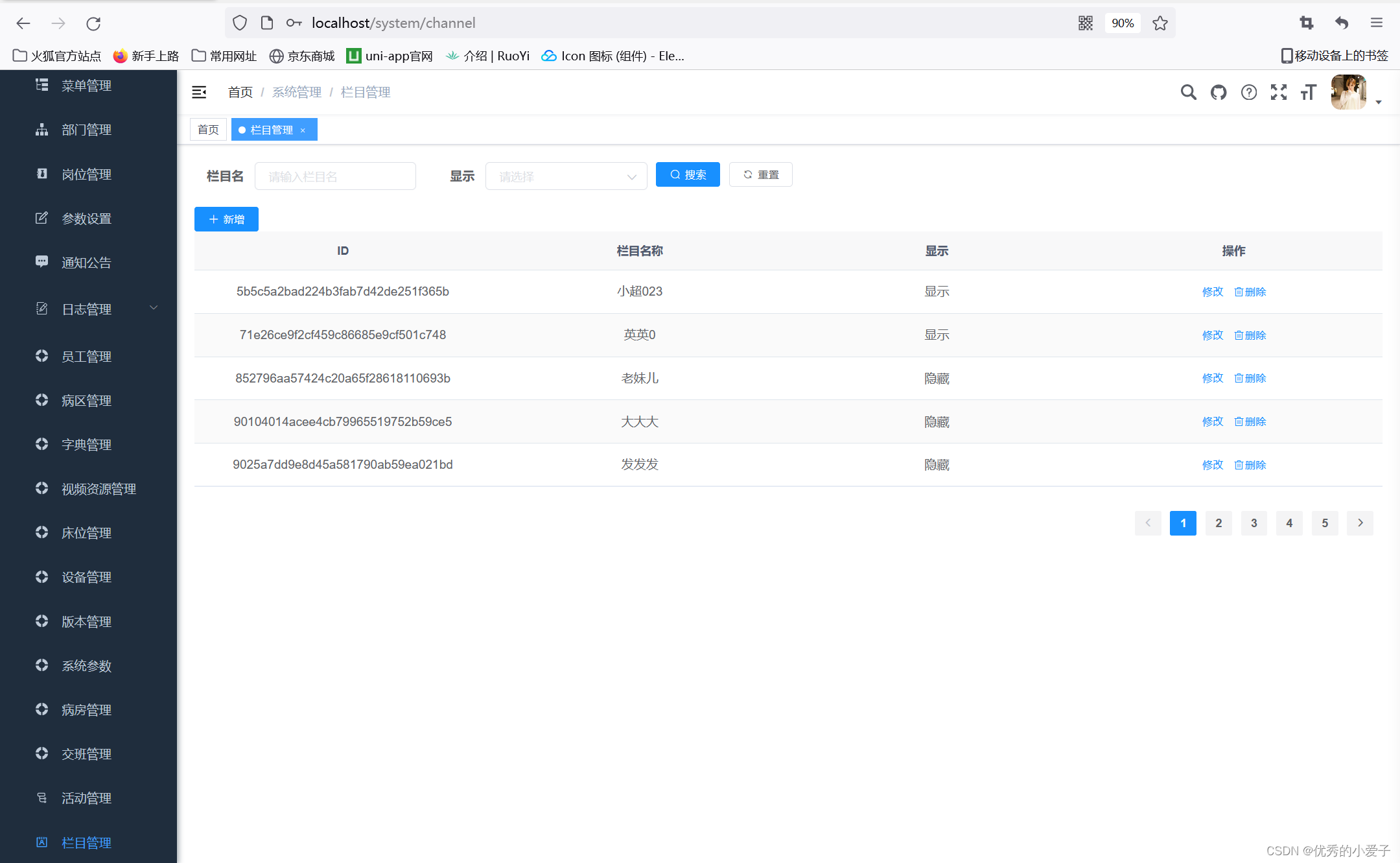
After adding

2、 Modify the function .
Before the change
After modification

3、 Delete function .
Before deleting
After deleting

So far , The functions of adding, deleting, modifying and checking are all realized , The complete code is attached .
channel.js
// Send network request , amount to uni-app Inside uni.request()
import request from '@/utils/request';
// Inquire about channel list
export function listChannel(query){
    return request({
        url: '/basic/channel/list', // The path of the request
        method: 'get',  // Request mode get、post
        params: query  // Requested parameters
    });
}

// newly added channel
export function addChannel(data){
        return request({
            url: '/basic/channel/add', // The path of the request
            method: 'post',  // Request mode get、post
            params: data  // Requested parameters
        });
    }

// according to id Delete channel
export function removeChannel(id){
        return request({
            url: '/basic/channel/remove', // The path of the request
            method: 'post',  // Request mode get、post
            data: id  // Requested parameters
        });
    }
// according to id Inquire about channel list
export function getChannel(id){
        return request({
            url: '/basic/channel/get_info?id='+id, // The path of the request
            method: 'get',  // Request mode get、post
        });
    }

// modify channel
export function editChannel(data){
        return request({
            url: '/basic/channel/edit', // The path of the request
            method: 'post',  // Request mode get、post
            params: data  // Requested parameters
        });
    }
index.vue
<!--  View layer  -->
<template>
    <div class="app-container">
    <el-form :model="queryParam" ref="queryForm" size="small" :inline="true" label-width="68px">
    <el-form-item label=" Column name " prop="channelName">
        <el-input placeholder=" Please enter the column name " v-model="queryParam.channelName" clearable></el-input>
    </el-form-item>
    <el-form-item label=" Show " prop="isShow">
        <el-select placeholder=" Please select " v-model="queryParam.isShow" size="small" clearable>
            <el-option v-for="s in showList" :label="s.label" :value="s.value" :key="s.value"></el-option>
        </el-select>
    </el-form-item>
    <el-button @click="handQuery" type="primary" size="mini" icon="el-icon-search"> Search for </el-button>
    <el-button @click="resetQuery" size="mini" icon="el-icon-refresh"> Reset </el-button>
    </el-form>
    <!-- Entire rows and columns -->
    <el-row>
        <el-col>
            <el-button @click="handleAdd" type="primary" icon="el-icon-plus" size="mini"> newly added </el-button>
        </el-col>
    </el-row>
        <el-table :data="channelList" stripe>
            <el-table-column label="ID" prop="id" align="center"></el-table-column>
            <el-table-column label=" Column name " prop="channelName" align="center"></el-table-column>
            <el-table-column label=" Show " prop="isShow" align="center">
              <template slot-scope="scope">
                     {
   {scope.row.isShow == 0? ' hide ':' Show '}}
              </template>
            </el-table-column>
            <el-table-column label=" operation " align="center">
                <template slot-scope="scope">
                    <el-button @click="handleUpdate(scope.row.id)" type="text" icon=“el-icon-edit” size="mini"> modify </el-button>
                    <el-button @click="handleDelete(scope.row.id)" type="text" icon="el-icon-delete" size="mini"> Delete </el-button>
                </template>
            </el-table-column>
        </el-table>
        <!-- Pager -->
        <pagination :page.sync="queryParam.pageNum" :limit.sync="queryParam.pageSize" layout="prev,pager,next" :total="queryParam.total" @pagination="getList"></pagination>
        <!-- Dialog box , Let the dialog box show -->
        <el-dialog :title="title" width="500px" append-to-body :visible.sync="open">
            <el-form label-width="80px" :model="form" ref="form">
                <el-form-item label=" Column name ">
                    <el-input v-model="form.channelName" placeholder=" Please enter the column name "></el-input>
                </el-form-item>
                <el-form-item label=" Show ">
                    <el-select v-model="form.isShow" placeholder=" Please select " size="mini">
                        <el-option v-for="s in showList" :label="s.label" :value="s.value" :key="s.value"></el-option>
                    </el-select>
                </el-form-item>
            </el-form>
            <!-- Two buttons in the dialog -->
            <div slot="footer">
                <el-button type="primary" @click="submitForm"> determine </el-button>
                <el-button @click="cancel"> Cancel </el-button>
            </div>
        </el-dialog>
    </div>
</template>
<!--  The business layer  -->
<script>
//  If importing multiple files , Use commas to separate the curly brackets
import {listChannel,addChannel,removeChannel,getChannel,editChannel} from '@/api/basic/channel';  // Import request background interface js file

export default {
    // data ( Declaration of variables )
    data(){
        return{
                title:null,
                open: false,// Control the opening of the dialog
                channelList: null,
                queryParam: {  // Parameters of the query
                channelName: null,  //channel name , And background projects channel The attributes of the entity class correspond to , It is recommended to copy and paste directly
                isShow: null, // Whether or not shown ,0= No display ;1 Show
                // Variables for the pager
                pageNum: 1,  // Page number
                pageSize: 5,  // Number of entries per page
                total: 0  // Total number of articles
          },
        // form properties
        form:{
            id: null,
            channelName: null,  //channel name , And background projects channel The attributes of the entity class correspond to , It is recommended to copy and paste directly
            isShow: null // Whether or not shown ,0= No display ;1 Show
        },
            // Contents displayed in the drop-down list
            showList:[
                {label:' hide ',value:0},
                {label:' Show ',value:1}
            ]
        }
    },
    // Page initialization function , amount to uniapp Medium onShow
    created(){
        this.getList();
    },
    // function
    methods:{
        /* Inquire about channel list */
        getList(){

            listChannel(this.queryParam).then(response => {
                console.log(response);// Print data
                this.channelList = response.rows;// Request one rows, Get a set
                this.queryParam.total = response.total;// Request a total number , Get a variable function
            });
        },
        // Table data condition search
        handQuery(){
                this.queryParam.pageNum = 1;// Return the pager
                this.getList();
            },
        // Reset search form
        resetQuery(){
                this.resetForm("queryForm");// Reset form
                this.handQuery();// Refresh request
        },
        // Click the Add button to trigger , Pop up the modal window of the new column el-dialog
        handleAdd(){
            // this.resetForm("form");// Reset form
            this.form.id = null,
            this.form.channelName = null,
            this.form.isShow = null,
            this.title = " Add column ";
            this.open = true;// Open the dialog box
        },
        // Submit Form
        submitForm(){
            console.log(" Column name :"+this.form.channelName);
            console.log(" Whether or not shown "+this.form.isShow);
            if(this.form.id == null){// add to
                addChannel(this.form).then(response => {
                console.log(response);
                if(response.code == 200){// Add success
                    this.$modal.msgSuccess(response.msg);//magSuccess Tips for success
                }else{// Add failure
                    this.$modal.msgError(response.msg);// Tips for failure
                }
                this.open = false;// close dialog boxes
                this.getList();// Refresh List
                })
            }else{// modify
            var params = {
                id: this.form.id,
                channelName: this.form.channelName,
                isShow: this.form.isShow
            }
            editChannel(params).then(response => {
                console.log(response);
                if(response.code == 200){// Modification successful
                    this.$modal.msgSuccess(response.msg);//magSuccess Tips for success
                }else{// Modification failed
                    this.$modal.msgError(response.msg);// Tips for failure
                }
                this.open = false;// close dialog boxes
                this.getList();// Refresh List
                })
            }
        },
        cancel(){
            this.open = false;// close dialog boxes
        },
        // modify
        handleUpdate(id){
            this.title = " Modify column ";
            this.open = true;// Pop-up dialog box
            getChannel(id).then(response => {
                this.form = response.data;// Form data backfill
            });
        },
        // Delete
        handleDelete(id){
            removeChannel(id).then(response => {
                console.log(response);
                if(response.code == 200){// Delete successful
                    this.$modal.msgSuccess(response.msg);//magSuccess Tips for success
                }else{// Delete failed
                    this.$modal.msgError(response.msg);// Tips for failure
                }
                this.getList();// Refresh List
            })
        }
    }
}
</script>

<!--  Style sheets  -->
<style>

</style>
end~~
边栏推荐
- Programmer growth Chapter 30: do you really understand feedback?
- 《KMP复习 + AC自动机》前传
- Can TSMC Samsung build a production line without American equipment for Huawei?
- If a table has nearly ten million data and crud is relatively slow, how to optimize it
- Jerry Zhi has problems in real-time adjustment of sound change effect in magic sound mode [chapter]
- 0-1 knapsack problem
- 立即报名 | 云原生技术交流 Meetup 广州站已开启,8 月 6 号与你相遇!
- uniapp显示富文本效果demo(整理)
- Learning note 12: Eratosthenes screening method to find prime numbers (within 100) and magic square matrix
- [original] [crawler series] briefly get the most popular topics, related topics and description information
猜你喜欢

Retinanet网络结构详解

Demo: the test interface receives duplicate data and creates documents in a short time

IP address & subnet mask

【OpenCV 例程 300篇】241. 尺度不变特征变换(SIFT)

How to smoothly go online after MySQL table splitting?

Array related knowledge

《KMP复习 + AC自动机》前传

福特SUV版“野马”正式下线,安全、舒适一个不落

激活最大化
![Jerry, if you turn on Bluetooth again, one for two. When the mobile phone is connected to the prototype, it will appear and cannot be connected [chapter]](/img/6c/d4a45981a7fc87f6a82a91017f8ce8.png)
Jerry, if you turn on Bluetooth again, one for two. When the mobile phone is connected to the prototype, it will appear and cannot be connected [chapter]
随机推荐
[CruiseControl]Build Result JSP
Code random notes_ Hash_ 1002 find common characters
leetcode:1997. 访问完所有房间的第一天【跳跃dp】
进程与进程调度
Storage of deep planing data in memory
线性代数 【23】 概念的深入01 - Points坐标点和Vectors向量
Swoole协程
Network device hard core technology insider firewall and security gateway (VIII) virtualization artifact (middle)
论文赏析[ICLR18]联合句法和词汇学习的神经语言模型
Thesis appreciation [iclr18] a neural language model combining syntax and vocabulary learning
网络设备硬核技术内幕 防火墙与安全网关篇 (八) 虚拟化神器 (中)
0-1 knapsack problem
Jerry caused other messages to accumulate in the message pool [article]
Jerry Zhi doesn't play hidden audio files [article]
数据库故障容错之系统时钟故障
Recommended system - offline recall: u2tag2i, ICF
Srv6 debut
scrollview、tableView嵌套解决方案
Swear, swear, swear
Oracle错误: ORA-01722 无效数字