当前位置:网站首页>Solve the problem that the server cannot be connected via SSH during reinstallation
Solve the problem that the server cannot be connected via SSH during reinstallation
2022-06-30 12:18:00 【Nagging program dog】
The cause of the problem
@@@@@@@@@@@@@@@@@@@@@@@@@@@@@@@@@@@@@@@@@@@@@@@@@@@@@@@@@@@
@ WARNING: REMOTE HOST IDENTIFICATION HAS CHANGED! @
@@@@@@@@@@@@@@@@@@@@@@@@@@@@@@@@@@@@@@@@@@@@@@@@@@@@@@@@@@@
IT IS POSSIBLE THAT SOMEONE IS DOING SOMETHING NASTY!
Someone could be eavesdropping on you right now (man-in-the-middle attack)!
It is also possible that a host key has just been changed.
The fingerprint for the ECDSA key sent by the remote host is
SHA256:+U+xy3dOfsLZ4KWbCUQvfajA//gL/FIYxaVPFcbkSQU.
Please contact your system administrator.
Add correct host key in /Users/liu_pc/.ssh/known_hosts to get rid of this message.
Offending ECDSA key in /Users/liu_pc/.ssh/known_hosts:1
ECDSA host key for ip has changed and you have requested strict checking.
Host key verification failed.
When we Linux After the server chooses to reinstall the system , Again using ssh [email protected] When logging into the server from the command line , An error will be reported as above , The reason is that the computer where our command line is located is connected to the server successfully for the first time , Will record a ip+RSA The secret key to , Due to server reinstallation ,Linux Server's RSA Public key change , So the same ip The public keys of the two cannot be matched , So there will be this problem .
The solution to the problem
edit Mac Under the system user file known_hosts file . Due to inconsistent individual user names , Please change the command by yourself .
vi /Users/liu_pc/.ssh/known_hosts

Normally there will be ip + rsa The text of the public key , stay vi Use the insert mode to delete the corresponding ip+rsa The text of the public key .
Use :wq Save the file .
And then use ssh Command login .
边栏推荐
- 并行接口8255A
- 200. 岛屿数量
- R language ggplot2 visualization: gganimate package is based on Transition_ The time function creates a dynamic scatter graph animation (GIF), and uses the labs function to add a dynamic time title to
- 1175. 质数排列 : 乘法原理运用题
- 1254. 统计封闭岛屿的数目
- The sci-fi ideas in these movies have been realized by AI
- Lvgl widget styles
- 实现多方数据安全共享,解决普惠金融信息不对称难题
- DMA controller 8237a
- Object mapping - mapping Mapster
猜你喜欢

SuperMap iDesktop 常见倾斜数据处理全流程解析

麒麟软件韩乃平:数字中国建设需要自己的开源根社区

Ensemble de cartes
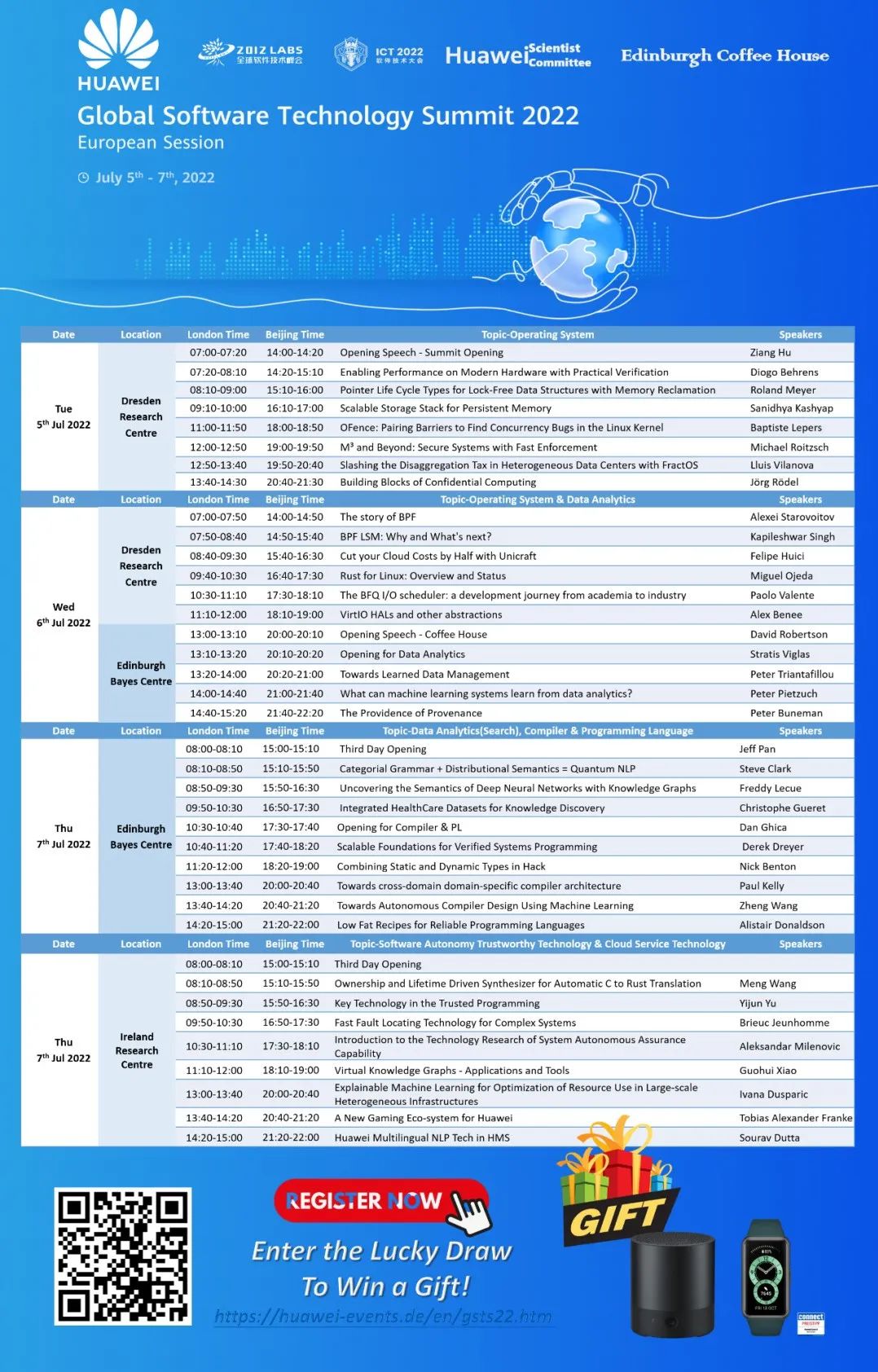
Conference Preview - Huawei 2012 lab global software technology summit - European session

海思3559万能平台搭建:YUV格式简介

MySQL索引和优化的理解学习

A Generic Deep-Learning-Based Approach for Automated Surface Inspection-论文阅读笔记

90. (cesium chapter) cesium high level listening events

beego开发博客系统学习(二)

海思3559开发常识储备:相关名词全解
随机推荐
R语言ggplot2可视化:使用ggplot2可视化散点图、aes函数中的colour参数指定不同分组的数据点使用不同的颜色显示
A High-Precision Positioning Approach for Catenary Support Components With Multiscale Difference阅读笔记
Edusoho enterprise training version intranet only deployment tutorial (to solve the problems of player, upload and background jam)
R language ggplot2 visualization: use ggplot2 visualization scatter diagram and the size parameter in AES function to specify the size of data points (point size)
Redis - SDS simple dynamic string
Redis - ziplist compressed list
R language ggplot2 visualization: gganimate package is based on Transition_ The time function creates a dynamic scatter graph animation (GIF), and uses the labs function to add a dynamic time title to
WebView, Scrollview sliding conflict correction
How can c write an SQL parser
这些电影中的科幻构想,已经用AI实现了
剑指 Offer 05. 替换空格: 把字符串 s 中的每个空格替换成“%20“
A Generic Deep-Learning-Based Approach for Automated Surface Inspection-論文閱讀筆記
杂文:自家的智能家居方案研究
海思3559 sample解析:venc
1175. 质数排列 : 乘法原理运用题
并行接口8255A
串行通信接口8250
爱可可AI前沿推介(6.30)
SuperMap iDesktop 常见倾斜数据处理全流程解析
SuperMap iClient3D for WebGL 加载TMS瓦片