当前位置:网站首页>GO language study notes one
GO language study notes one
2022-07-30 05:02:00 【N. LAWLIET】
Learning go through algorithms
First go locale install
Enter goLang official websitehttps://golang.google.cn/dl/
I downloaded the go1.15.15.windows-amd64.msi version
After downloading, start the installation, it will automatically configure the environment variables, and then run cmd to see if the go version command is executed to see if the installation is successful.After installing go, install vscode and download it from the official website.
Then create a new goPath folder, and then create three folders under this folder, src, pkg and bin respectively. This folder is the go execution path, then edit the environment variable, create a new GOPATH in the system environment variable and put the goPathThe path is placed in it, and the ; interval is used to create a new go execution directory later.Then put %GOPATH% in Path.
Then configure the vscode setting.json (the location is in File->Preferences->Settings->The icon in the upper right corner opens the settings)
{"go.buildOnSave": "workspace","go.lintOnSave": "package","go.vetOnSave": "package","go.buildTags": "","go.buildFlags": [],"go.lintFlags": [],"go.vetFlags": [],"go.coverOnSave": false,"go.useCodeSnippetsOnFunctionSuggest": false,"go.formatOnSave": true,"go.formatTool": "goreturns","go.goroot": "D:\\Go","go.gopath": "D:\\GoPath","go.gocodeAutoBuild": false,"workbench.iconTheme": "vscode-icons","gopls": {"experimentalWorkspaceModule": true} },"go.toolsManagement.autoUpdate": true,"window.zoomLevel": -1,"terminal.integrated.sendKeybindingsToShell": true}Here, change go.goroot to your own go installation location, and go.gopath to the go execution file location.
Install the god extension in vscode after configuration

After installation, create a new go file, vscode will prompt you to install some plugins, click all install.
The installation may not be successful here, if the installation fails, you need to enter cmd to execute
go env -w GO111MODULE=on
go env -w GOPROXY=https://proxy.golang.com.cn,direct
Then execute go env to see if the change is successful, then go back and execute all install , if it still fails, you need to install manually
- In the
%GOPATH%\src\directory, create the pathgolang.org\x - Go to
%GOPATH%\src\golang.org\x, download the source code of the required toolsgit clone https://github.com/golang/tools.git tools - After the clone is completed, a tools folder will be generated, so that the source code required by the tool is ready
- Go to
%GOPATH%and execute go install github.com/ramya-rao-a/go-outlinego install github.com/acroca/go-symbolsgo install golang.org/x/tools/cmd/gurugo install golang.org/x/tools/cmd/gorenamego install github.com/rogpeppe/godefgo install github.com/sqs/goreturnsgo install github.com/cweill/gotests/gotests- Process golint separately, the source code of golint is located at
https://github.com/golang/lint, after entering%GOPATH%\src\golang.org\xExecutegit clone https://github.com/golang/lintdownload the source code required by golint - Go to
%GOPATH%and executego install github.com/golang/lint/golint
At this point, you are basically done, it is possible that the installation of gopls will fail
Also enter %GOPATH% and execute go install golang.org/x/tools/cmd/gopls
Then create a new main folder in src and then execute hold down shift and right-click to enter PowerShell to execute the go mod init main command, and then execute go build
At this point, the go locale is set up.
Finally, if you want vscode to run normally, you also need to configure lang.json (run -> add configuration) to configure it according to your own server and needs
{"name": "Launch","type": "go","request": "launch","mode": "debug","program": "${fileDirname}","env": { //environment variables"GOPATH":"D:/goPath","GOOS":"windows" //To be compiled into win},"args": [],"showLog": true,"configurations": [ ]}边栏推荐
- 05 Detailed explanation of the global configuration file application.properties
- Compound Types--references, pointers
- Usage of EFR32 as sniffer for Zigbee/Thread
- Plan for many situations in the processing chain
- 1315_Use the LOOPBACK simulation mode to test whether the pyserial installation is successful
- Simulation Problem (Part 1)
- 三、依赖配置管理
- 22. 为什么需要消息队列?使用消息队列有什么好处?
- 【Vitis】ZCU102开发板PS端控制PL端复位的代码实现
- 模拟问题(中)
猜你喜欢

Usage of EFR32 as sniffer for Zigbee/Thread

IGBT wafers used in photovoltaic inverters

Six, read application configuration + log configuration

Small program npm package--API Promise

Small programs use npm packages to customize global styles

Hexagon_V65_Programmers_Reference_Manual(14)

斐波那契数列的递归优化《备忘录递归》
GO语言学习笔记一
![[Awards every week] The](/img/78/4b510b190475d603490614d2c8199f.png)
[Awards every week] The "Edge Containers" track of the Cloud Native Programming Challenge invites you to fight!
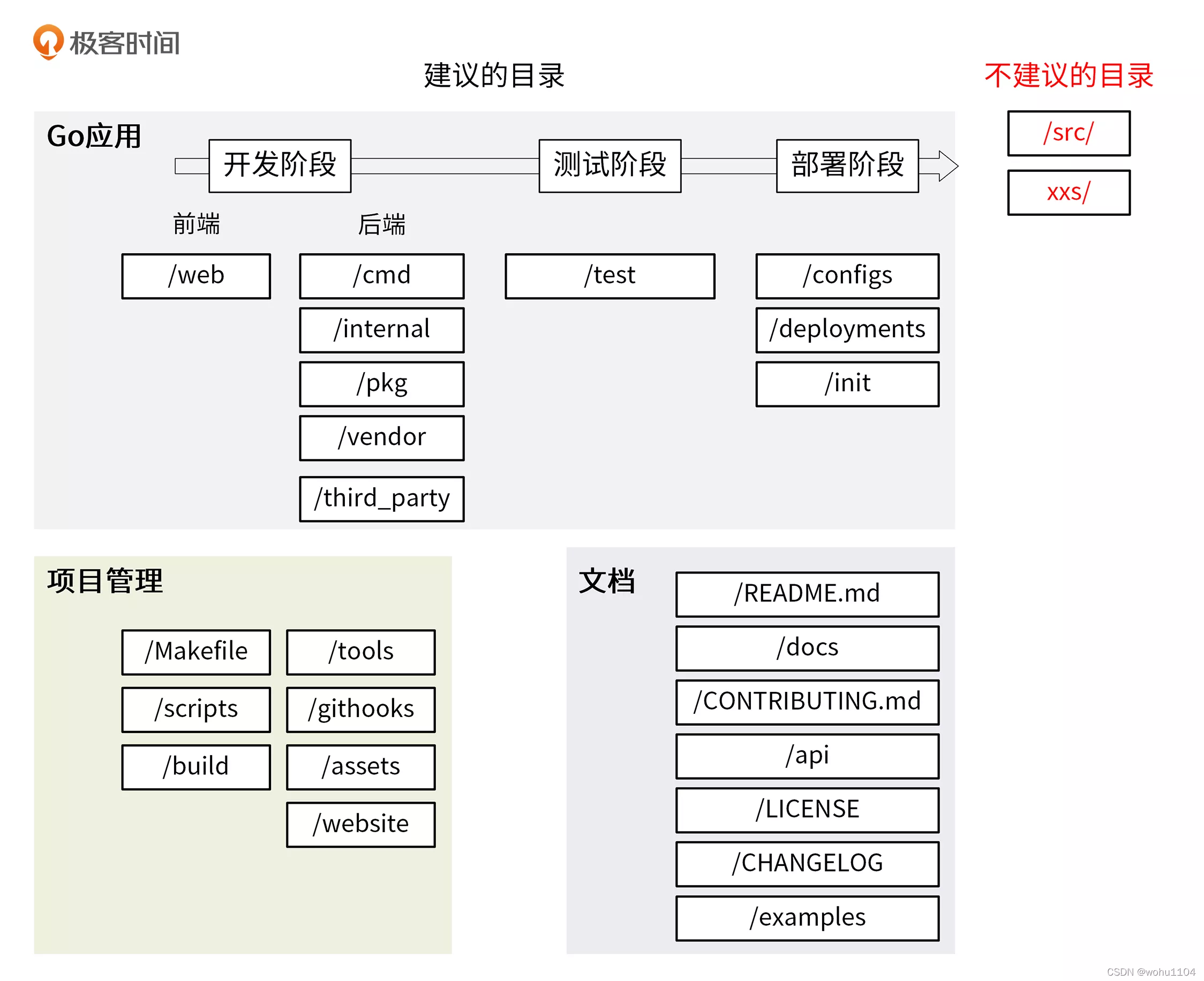
Go study notes (84) - Go project directory structure
随机推荐
Let's talk about what SaaS is, and the problems encountered...
Code open source design and implementation ideas
SVN 查看用户名密码
字符串问题(下)
Hexagon_V65_Programmers_Reference_Manual(12)
Predictive maintenance scheduling of multiple power equipment based on data-driven fault prediction
Simulation problem (middle)
LeetCode Algorithm 328. Parity linked list
POJ1321 chessboard problem (detailed explanation)
如何与墨西哥大众VW Mexico建立EDI连接
双指针问题(中)
go语言学习笔记二
七、自定义配置
Plan for many situations in the processing chain
Using the GPU parallel computing 】 【 OpenCL&OpenCLUtilty GPU parallel computing
Naive Bayes Classification
The Double Pointer Problem (Part 2)
Notes on "The Law of Construction"---Chapter 10 Typical Users and Scenarios
SVN View Username and Password
DAY17, CSRF vulnerability