当前位置:网站首页>tkinter使用WebView2网页组件(续篇)
tkinter使用WebView2网页组件(续篇)
2022-06-12 05:29:00 【Smart-Space】
引言
在“很久”之前的一篇文章(tkinter使用WebView2网页组件_Smart-Space的博客-CSDN博客_tkinter webview)中,我介绍了如何在tkinter中通过pywebview创建一个与tkinter相契合的WebView2控件。但是,那一种控件,有如下缺点:
- 使用pywebview提供的窗口进行嵌入,会出现延时、嵌入失败等问题
- 因为pywebview窗口使用高分辨率,导致tkinter窗口(自动)必须高gdi
- 点击控件后,tkinter窗口将失去焦点
- 需要额外的进程支持pywebview窗口
这些问题都是有读者反馈的,我也“深受其害”。
这次准备把它重改。因为思路基本变了,所以重新写一篇续篇。
提前声明
最新的tkwebview2与tkinterie一样,需要在STA线程模式下创建。因为我们不再使用窗口,而网页渲染本身涉及到多线程,因此需要使用STA线程模式。
重写tkwebview2
前提概括
本次,我们不再直接使用pywebview提供的窗口,而是直接使用其提供的EdgeChrome抽象类,创建基于WinFroms的WebView2组件。我已经写过了一些在tkinter中嵌入WinForms控件的文章,包括tkinterie使用的WebBrowser。
from tkinter import Frame,Tk
import ctypes
from uuid import uuid4
import clr
from webview.window import Window
from webview.platforms.edgechromium import EdgeChrome
clr.AddReference('System.Windows.Forms')
clr.AddReference('System.Threading')
from System.Windows.Forms import Control
from System.Threading import Thread,ApartmentState,ThreadStart

user32=ctypes.windll.user32
创建类
这个基本没变:
class WebView2(Frame):
    '''tkinter的WebView2绑定,基于pywebview & pythonnet'''

    def __init__(self,parent,width:int,height:int,url:str='',**kw):
        Frame.__init__(self,parent,width=width,height=height,**kw)
        #...
操作WinFroms
首先我们需要创建一个WinFroms的Control类,一是为了承载WebView2,二是提供一个可用的控件句柄。
其次,我们需要通过pywebview提供的Window和EdgeChrome类创建一个WebView2控件,并加入到Control中,再获取EdgeChrome所对应的WebView2控件。
这里的线程uid名称借用了pywebview的思路:使用一个列表
windows,通过它判断Window类所需要的uid名称。
        control=Control()
        uid = 'master' if len(windows) == 0 else 'child_' + uuid4().hex[:8]
        window=Window(uid,str(id(self)), url=None, html=None, js_api=None, width=width, height=height, x=None, y=None,
                      resizable=True, fullscreen=False, min_size=(200, 100), hidden=False,
                      frameless=False, easy_drag=True,
                      minimized=False, on_top=False, confirm_close=False, background_color='#FFFFFF',
                      transparent=False, text_select=False, localization=None)
        self.web_view=EdgeChrome(control,window)
        self.control=control
        self.web=self.web_view.web_view#EdgeChrome.web_view
        windows.append(window)
接下来的操作就和以前一样了,待会直接给完整代码。
虽然是创建逻辑完全不一样,但是需要改的量很少。不过我倒是研究了pywebview的platforms.edgechromium很久,最后摸索出新的tkwebview2。同时,也希望喜欢玩tkinter的朋友也能静心研究。
完整类代码
class WebView2(Frame):
    '''tkinter的WebView2绑定,基于pywebview & pythonnet'''

    def __init__(self,parent,width:int,height:int,url:str='',**kw):
        Frame.__init__(self,parent,width=width,height=height,**kw)
        control=Control()
        uid = 'master' if len(windows) == 0 else 'child_' + uuid4().hex[:8]
        window=Window(uid,str(id(self)), url=None, html=None, js_api=None, width=width, height=height, x=None, y=None,
                      resizable=True, fullscreen=False, min_size=(200, 100), hidden=False,
                      frameless=False, easy_drag=True,
                      minimized=False, on_top=False, confirm_close=False, background_color='#FFFFFF',
                      transparent=False, text_select=False, localization=None)
        self.web_view=EdgeChrome(control,window)
        self.control=control
        self.web=self.web_view.web_view
        windows.append(window)
        self.width=width
        self.height=height
        self.parent=parent
        self.chwnd=int(str(self.control.Handle))
        user32.SetParent(self.chwnd,self.winfo_id())
        user32.MoveWindow(self.chwnd,0,0,width,height,True)
        self.__go_bind()

    def __go_bind(self):
        self.bind('<Destroy>',lambda event:self.web.Dispose())
        self.bind('<Configure>',self.__resize_webview)
    def __resize_webview(self,event):
        user32.MoveWindow(self.chwnd,0,0,self.winfo_width(),self.winfo_height(),True)

    def get_url(self):
        #返回当前url,若果没有则为空
        return self.web_view.get_current_url()

    def evaluate_js(self,script):
        #执行javascript代码,并返回最终结果
        return self.web_view.evaluate_js(script)

    def load_css(self,css):
        #加载css
        self.web_view.load_css(css)

    def load_html(self,content,base_uri=None):
        #加载HTML代码
        #content=HTML内容
        #base_uri=基本URL,默认为启动程序的目录
        self.web_view.load_html(content,base_uri)

    def load_url(self,url):
        #加载全新的URL
        self.web_view.load_url(url)

    def none(self):
        pass
关于WebView2的更多WinFroms操作,见微软提供的说明文档。
效果
测试代码
def main():
    if not have_runtime():#没有webview2 runtime
        install_runtime()
    root=Tk()
    root.title('pywebview for tkinter test')
    root.geometry('1200x600+5+5')

    frame=WebView2(root,500,500)
    frame.pack(side='left')
    frame.load_html('<h1>hi hi</h1>')

    frame2=WebView2(root,500,500)
    frame2.pack(side='left',padx=20,fill='both',expand=True)
    frame2.load_url('https://smart-space.com.cn/')

    root.mainloop()

if __name__ == "__main__":
    t = Thread(ThreadStart(main))
    t.ApartmentState = ApartmentState.STA
    t.Start()
    t.Join()
最终效果
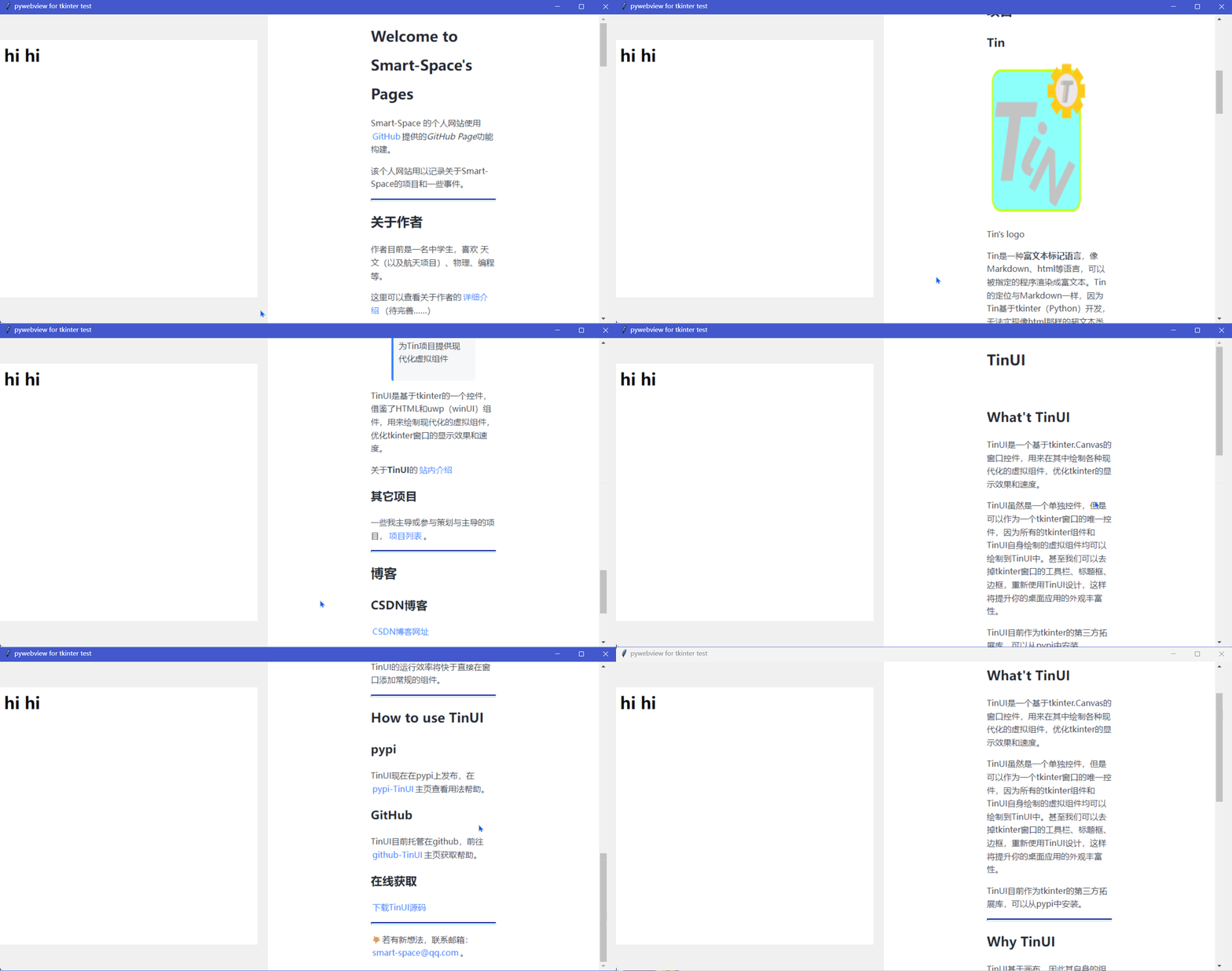
- 减少运行消耗
- 点击组件后tkinter仍然有焦点(可以对比之前的tkwebview2效果中tkinter窗口标题栏)
- 可直接使用WebView2
- 不自动使用高GDI
结语
静下心,放松~~。
一个新的tkwebview2不就出来了吗?(时间抚平了故事的曲折)
tkinter创新
边栏推荐
- 51. reverse order pairs in the array
- 59 - I. maximum value of sliding window
- Classes and objects, methods and encapsulation
- Automated test - dark horse headline test project
- 16. 最接近的三数之和
- New knowledge today
- Enhanced vegetation index evi, NDVI data, NPP data, GPP data, land use data, vegetation type data, rainfall data
- 60. points of N dice
- Yolov5 realizes road crack detection
- Redis cluster cluster capacity expansion and data migration
猜你喜欢

Selenium crawler automatically captures TOEFL test position of NEEA website
按键精灵的简单入门

Save the object in redis, save the bean in redis hash, and attach the bean map interoperation tool class

什么是工程预付款

38. appearance series

DMA RDMA technology details

Test work summary - performance test indicators

How long is the company's registered capital subscribed

Multi thread learning v. volatile visibility and cache inconsistency, instruction reordering

论文阅读_图神经网络GIN
随机推荐
Go 接口实现原理【高阶篇】
4.3 模拟浏览器操作和页面等待(显示等待和隐式等待、句柄)
DMA RDMA technology details
Matlab: image rotation and interpolation and comparison of MSE before and after
公司注册认缴资金多久
Please remove any half-completed changes then run repair to fix the schema history
Yolo opencv scale identification scale reading identification water gauge identification water level identification source code
What is thinking
Servlet core
@Configurationproperties value cannot be injected
[cjson] precautions for root node
JS to determine whether the tags of multiple classes are empty
Fundamentals of intensive learning openai gym environment construction demo
How long is the company's registered capital subscribed
JS set the position of the current scroll bar
How to quickly reference uview UL in uniapp, and introduce and use uviewui in uni app
Soil type, soil texture, soil nutrient and change data, soil organic matter, soil pH, soil nitrogen, phosphorus and potassium
Classes and objects, methods and encapsulation
org. apache. ibatis. binding. BindingException: Invalid bound statement (not found)
Quickly get PCA (principal component analysis) (principle code case)