当前位置:网站首页>Detailed explanation of DHCP distribution address of routing / layer 3 switch [Huawei ENSP]
Detailed explanation of DHCP distribution address of routing / layer 3 switch [Huawei ENSP]
2022-07-28 08:52:00 【Shangjin vegetable pig】
List of articles
One . Preface
DHCP: Two computers connected to the Internet communicate with each other , Must have their own IP Address , because IP Limited address resources , Broadband access operators can't allocate a fixed number of broadband subscribers IP Address , So use DHCP Method to assign temporary address to the users on the Internet .
Recently, there is a class design demand . Let's look at the demand first :
Existing demand of a company 500 This device can be connected to the external network , The company has 5 Departments , Namely A\B\C\D\E,
Every department needs 100 device , And the second floor is required to be isolated .
As we can see above , We have finished task one :
1. Make a reasonable plan IP( Use private IP) With subnets .
Now let's solve demand two :
2. It is proposed to adopt DHCP Distribution address ( expand )
At the layer 3 switch DHCP Before sending the address , We need to have a general understanding of routing DHCP Distribution address , as follows :
Two . route DHCP Distribution address
Take a look at the topology :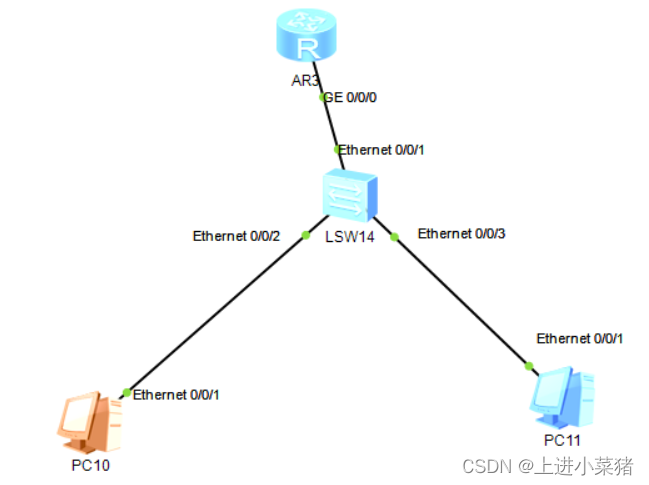
First step , Go to the router first :
Get into 0/0/0
int GigabitEthernet 0/0/0
Add gateway and mask
[R1-GigabitEthernet0/0/0]ip address 192.168.1.254 24
go back to R1
Create an address pool
[R1]ip pool PC
Input gateway
[R1-ip-pool-PC]gateway-list 192.168.1.254
Input network segment
[R1-ip-pool-PC]network 192.168.1.0 mask 24
Return to R1
Turn on DHCP
[R1]dhcp enable
Get into 0/0/0
[R1]int GigabitEthernet 0/0/0
Turn on global overall situation
[R1-GigabitEthernet0/0/0]dhcp select global
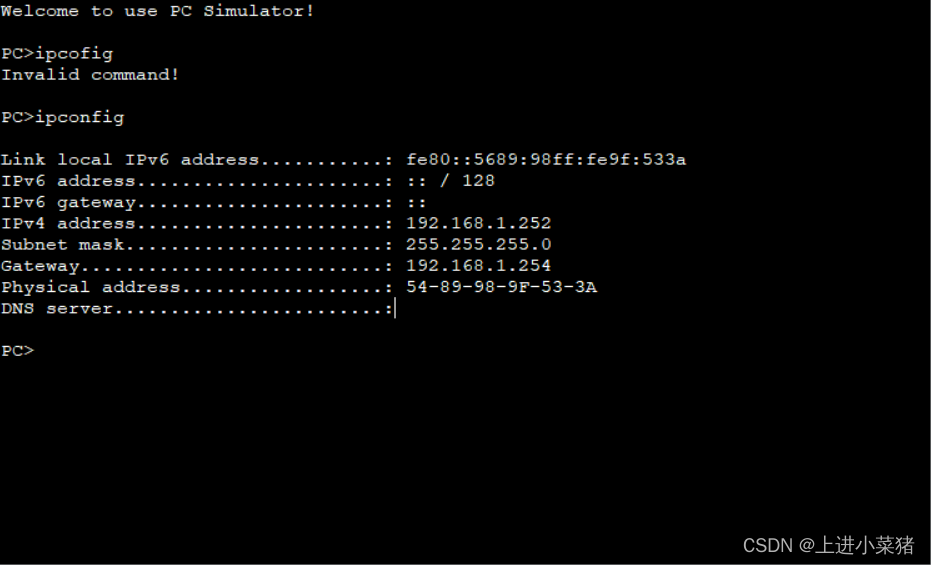
testing :
ipconfig
3、 ... and . Switch DHCP Distribution address ( Lord )
3.1 The detailed steps
Take a look at the topology first :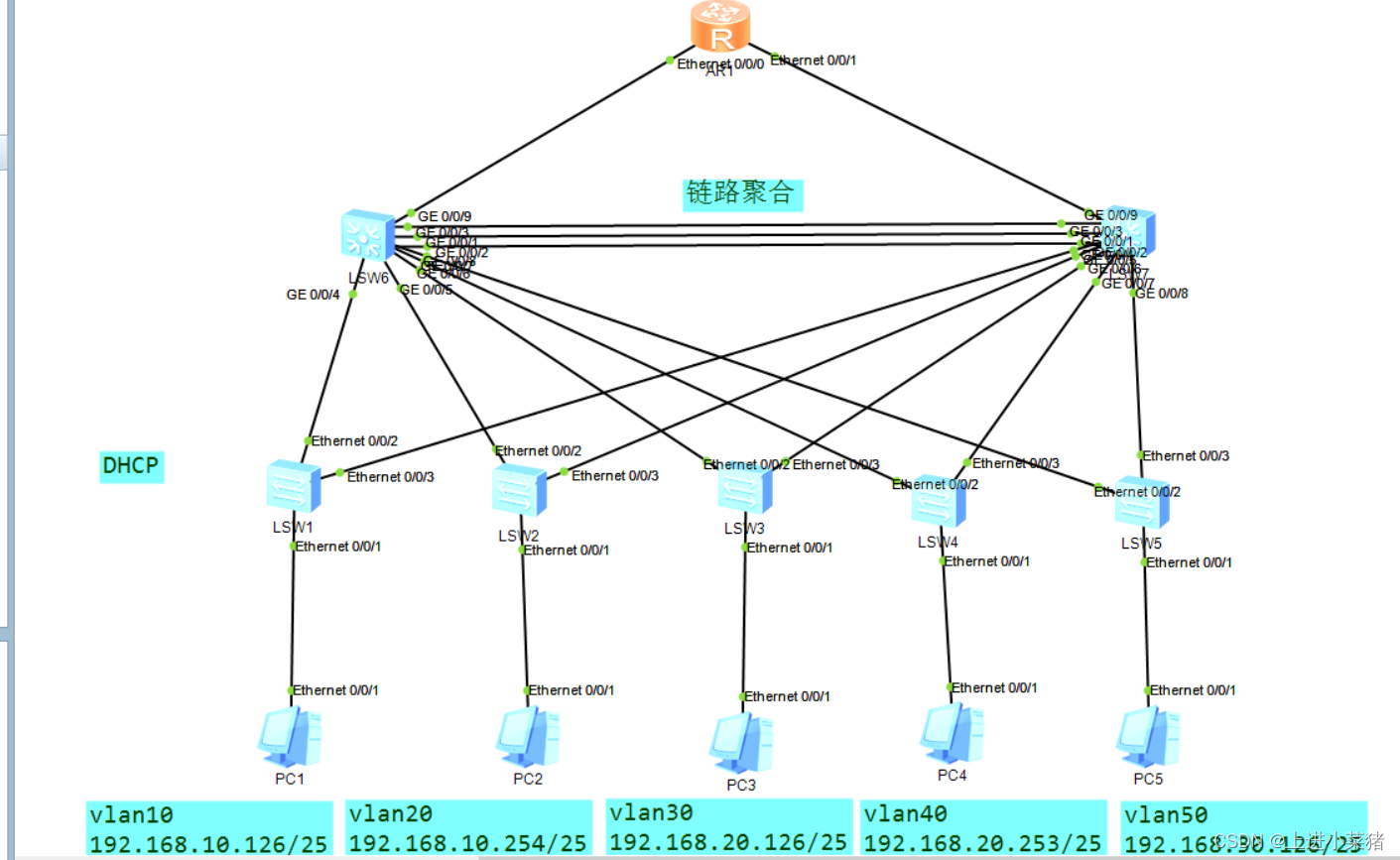
We have done subnet division before , as follows :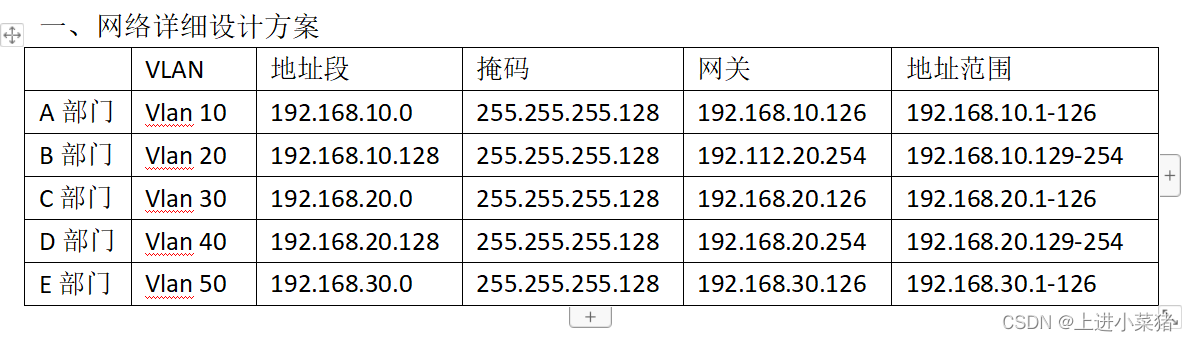
To configure DHCP Here comes the step : high energy alert !
Step 1 access layer :
First configure the access layer switch LSW1~LSW5:
First configure vlan
vlan batch 10 20 30 40 50

Set the interface of the access terminal to access Pattern , release vlan10 adopt
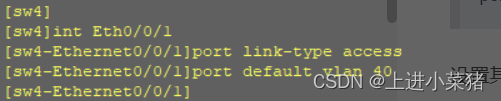
int Eth0/0/1
port link-type access
port default vlan 10
Set other 3 Interfaces are trunk Pattern , Let go of all vlan adopt
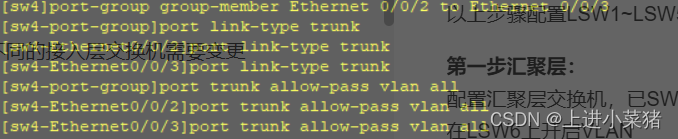
port-group group-member Ethernet 0/0/2 to Ethernet 0/0/3
port link-type trunk
port trunk allow-pass vlan all
The above steps configure LSW1~LSW5, Be careful port default vlan 10 Switches in different access layers need to be changed
Step 1 convergence layer :
Configure the aggregation layer switch , has SWL6 For example .
stay LSW6 Upper opening VLAN
vlan batch 10 20 30 40 50
Set interface group , Set to trunk Pattern :
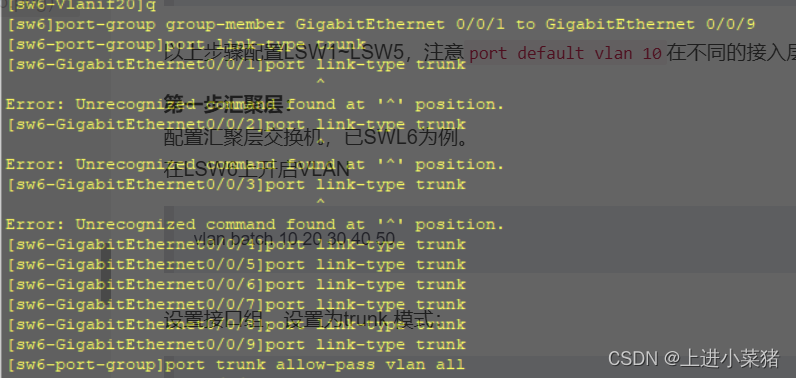
port-group group-member GigabitEthernet 0/0/1 to GigabitEthernet 0/0/9
port link-type trunk
Release all vlan:
port trunk allow-pass vlan all
Switch on DHCP
dhcp enable
Write logical interface ,ip The address is the terminal gateway address , Mask 25 position
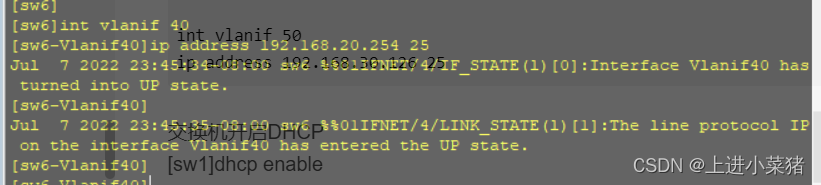
int vlanif 10
ip address 192.168.10.126 25
Create five ip pool , And assign ip paragraph , Distribute gateway
ip pool 1
network 192.168.10.0 mask 25
gateway-list 192.168.10.126
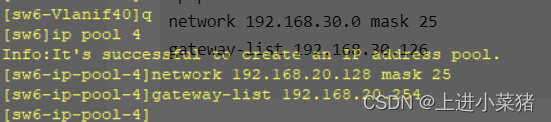
Select the global address pool for DHCP Client side usage
int Vlan 10
dhcp select global

The terminal device is set to DHCP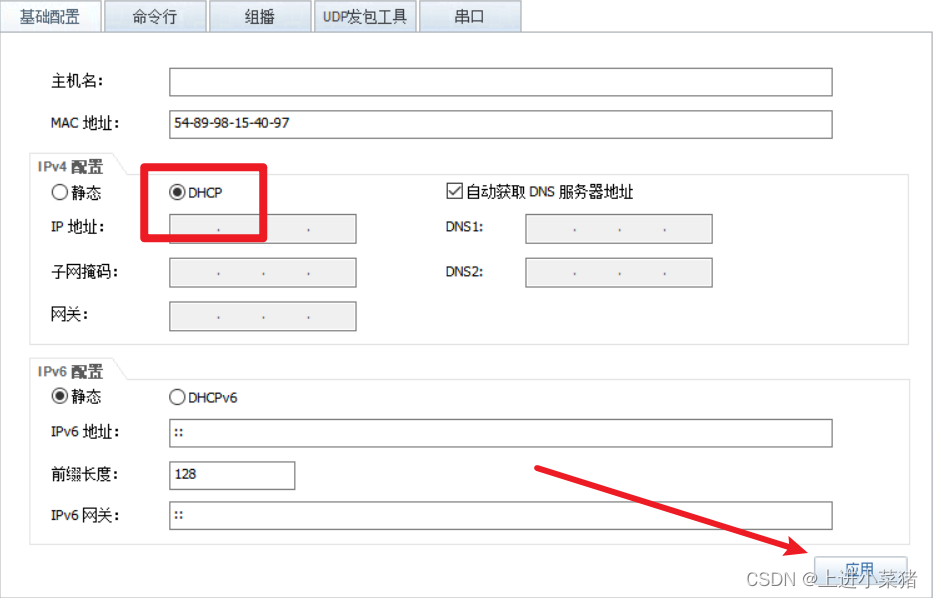
Input ipconfig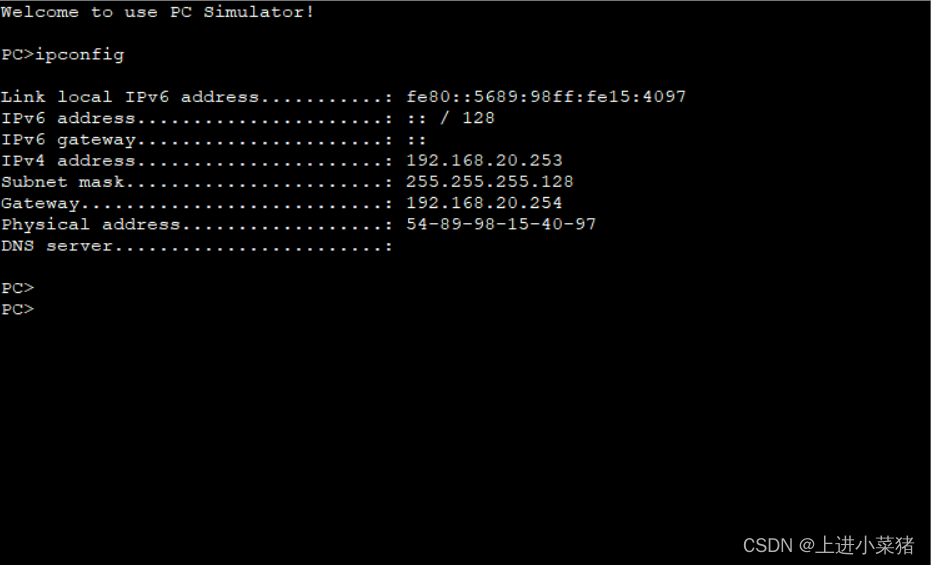
DHCP Address distribution succeeded !
3.2 Convenient command collection
Access layer switch
vlan batch 10 20 30 40 50
int Eth0/0/1
port link-type access
port default vlan 10
port-group group-member Ethernet 0/0/2 to Ethernet 0/0/3
port link-type trunk
port trunk allow-pass vlan all
Convergent layer switch
vlan batch 10 20 30 40 50
port-group group-member GigabitEthernet 0/0/1 to GigabitEthernet 0/0/9
port link-type trunk
port trunk allow-pass vlan all
Switch on DHCP
dhcp enable
int vlanif 10
ip address 192.168.10.126 25

int vlanif 20
ip address 192.168.10.254 25

int vlanif 30
ip address 192.168.20.126 25

int vlanif 40
ip address 192.168.20.254 25

int vlanif 50
ip address 192.168.30.126 25
Switch on DHCP
[sw1]dhcp enable
dhcp enable
Create five ip pool , And assign ip paragraph , Distribute gateway
ip pool 1
network 192.168.10.0 mask 25
gateway-list 192.168.10.126

ip pool 2
network 192.168.10.128 mask 25
gateway-list 192.168.10.254

ip pool 3
network 192.168.20.0 mask 25
gateway-list 192.168.20.126

ip pool 4
network 192.168.20.128 mask 25
gateway-list 192.168.20.254

ip pool 5
network 192.168.30.0 mask 25
gateway-list 192.168.30.126
Select the global address pool for DHCP Client side usage
int Vlan 10
dhcp select global

int Vlan 20
dhcp select global

int Vlan 30
dhcp select global

int Vlan 40
dhcp select global

int Vlan 50
dhcp select global
边栏推荐
- 为什么 ThreadLocal 可以做到线程隔离?
- Kubernetes technology and Architecture (VII)
- Js继承方法
- 图片批处理|必备小技能
- NDK series (6): let's talk about the way and time to register JNI functions
- PHP Basics - PHP uses mysqli
- Day112. Shangyitong: Mobile verification code login function
- ciou损失
- PHP基础知识 - PHP 使用 PDO
- Pyflink connecting iceberg practice
猜你喜欢

Shell programming specifications and variables

Introduction of functions in C language (blood Book 20000 words!!!)

Source code analysis of linkedblockingqueue
![Chapter 2-2 calculation of piecewise function [1]](/img/40/cad6bf92849624199af0fd1ba1d433.jpg)
Chapter 2-2 calculation of piecewise function [1]

思迈特软件Smartbi完成C轮融资,推动国产BI加速进入智能化时代

Js继承方法

置顶各大平台,22版面试核心知识解析笔记,强势上榜
![[opencv] generate transparent PNG image](/img/0a/4afc9bda411634562f4b0f3915a7ba.png)
[opencv] generate transparent PNG image

Digital signatures and Ca certificates

Argocd Web UI loading is slow? A trick to teach you to solve
随机推荐
oracle sql 问题
CAT1 4g+ Ethernet development board 232 data is sent to the server through 4G module TCP
Introduction of functions in C language (blood Book 20000 words!!!)
How to configure phpunit under window
Uniapp ---- detailed steps to obtain the longitude and latitude of the current position and other information (including applet)
Smart software completed round C financing, making Bi truly "inclusive"
[activity registration] User Group Xi'an - empowering enterprise growth with modern data architecture
Blog building 7: Hugo
Chapter 2-2 calculation of piecewise function [1]
Flink Window&Time 原理
A new method of exposing services in kubernetes clusters
Use of tkmapper - super detailed
Basic syntax of jquey
Dry goods semantic web, Web3.0, Web3, metauniverse, these concepts are still confused? (top)
Pyspark changes the column order and saves it into iceberg database
kubernetes之Deployment
Hcip --- LDP and MPLS Technology (detailed explanation)
Redis 基本知识,快来回顾一下
Simple use of unity queue
Can‘t connect to server on ‘IP‘ (60)