当前位置:网站首页>[tkinter beautification] window out of system style (common to three systems)
[tkinter beautification] window out of system style (common to three systems)
2022-07-24 15:10:00 【It's time to wake up】
Preface
A lot of people say tkinter no way , It's not , That's not true , Including window style customization . In fact, these can be solved by code , For the convenience of others tkinter People who , I posted the code I wrote before , Too lazy to introduce
Code
Toplvel.py
# This code is based on MIT Open source agreement
import tkinter as tk
try:
    import mss
    from PIL import Image
    from PIL import ImageTk
    graber = mss.mss()
    enable_grab = 1
except:
    enable_grab = 0
#enable_grab = 0
############### StyledToplevel ###############
class Toplevel(tk.Toplevel):
    """ a Toplevel with Style initalizal configure: eight risizers -> Toplevel.rp_<direction> a titlebar -> Toplevel.title you can change the function _configure_size to change Toplevel's action please use like a normal Toplevel. """
    def __init__(self,*a,**b):
        super(self.__class__,self).__init__(*a,**b)
        self.overrideredirect(1)
        self._icon = tk.Toplevel(self)
        self._grab = tk.Label(self._icon)
        self._grab.pack(expand=1,fill="both")
        self.title = _Titlebar(self,bg="white")
        self.title.pack()
        self.aera = tk.Frame(self,bg="#f0f0f0")
        self.rp_n = tk.Frame(self,cursor="sb_v_double_arrow")
        self.rp_s = tk.Frame(self,cursor="sb_v_double_arrow")
        self.rp_w = tk.Frame(self,cursor="sb_h_double_arrow")
        self.rp_e = tk.Frame(self,cursor="sb_h_double_arrow")
        self.rp_nw = tk.Frame(self,cursor="size_nw_se")
        self.rp_ne = tk.Frame(self,cursor="size_ne_sw")
        self.rp_sw = tk.Frame(self,cursor="size_ne_sw")
        self.rp_se = tk.Frame(self,cursor="size_nw_se")
        self._setup()
        self.geometry("200x200+0+0")
        self._configure_size()
    def _setup(self):
        self._resizable_w = 1
        self._resizable_h = 1
        self._zoom = 0
        self._zoomable = 1
        self._icon.bind("<FocusIn>",self._icon_focusin,1)
        self.rp_n.bind("<B1-Motion>",_move_n,1)
        self.rp_s.bind("<B1-Motion>",_move_s,1)
        self.rp_w.bind("<B1-Motion>",_move_w,1)
        self.rp_e.bind("<B1-Motion>",_move_e,1)
        self.rp_nw.bind("<B1-Motion>",_move_nw,1)
        self.rp_ne.bind("<B1-Motion>",_move_ne,1)
        self.rp_sw.bind("<B1-Motion>",_move_sw,1)
        self.rp_se.bind("<B1-Motion>",_move_se,1)
        self._icon_trace()
        self._update_size()
    def _configure_size(self):
        self.update()
        # geo = self.geometry()
        # w,h = geo.split("x")
        # h,x,y = h.split("+")
        # w,h,x,y = int(w),int(h),int(x),int(y)
        w = int(self.winfo_width())
        h = int(self.winfo_height())
        x = int(self.winfo_x())
        y = int(self.winfo_y())
        self.rp_n.place(x=2,y=0,width=w-4,height=2)
        self.rp_s.place(x=2,y=h-2,width=w-4,height=2)
        self.rp_w.place(x=0,y=2,width=2,height=h-4)
        self.rp_e.place(x=w-2,y=2,width=2,height=h-4)
        self.rp_nw.place(x=0,y=0,width=2,height=2)
        self.rp_ne.place(x=0,y=w-2,width=2,height=2)
        self.rp_sw.place(x=0,y=h-2,width=2,height=2)
        self.rp_se.place(x=w-2,y=h-2,width=2,height=2)
        self.title.place(x=2,y=2,width=w-4,height=20)
        self.aera.place(x=2,y=22,width=w-4,height=h-24)
    def _icon_trace(self):
        if self.winfo_ismapped():
            geo = self.geometry()
            w,h = geo.split("x")
            h,x,y = h.split("+")
            w,h,x,y = int(w),int(h),int(x),int(y)
            self._icon.geometry("%dx%d+%d+%d"%(w//2,h//2,x+w//4,y+h//4))
            #self._icon.update()
        self.after(10,self._icon_trace)
    def _icon_focusin(self,e):
        self._icon.update()
        self._icon.iconify()
        self.deiconify()
    def iconify(self):
        if self.winfo_ismapped():
            geo = self.geometry()
            w,h = geo.split("x")
            h,x,y = h.split("+")
            w,h,x,y = int(w),int(h),int(x),int(y)
            # self._icon.geometry("%dx%d+%d+%d"%(w//2,h//2,x+w//4,y+h//4))
            #self._icon.deiconify()
            if enable_grab:
                monitor = {
    "top":y,"left":x,"width":w,"height":h}
                mss_image = graber.grab(monitor)
                pil_image = Image.new("RGB",(w,h))
                pil_image.frombytes(mss_image.rgb)
                tk_image = ImageTk.PhotoImage(image=pil_image.resize((w//2,h//2)))
                #tk.Label(self.aera,image=tk_image).pack()
                self._grab["image"] = tk_image
                self._grab.image = tk_image
                self._icon.update()
            self.withdraw()
    def _update_size(self):
        self._configure_size()
        self.after(100,self._update_size)
    def resizable(self,x=None,y=None):
        if x is not None:
            self._resizable_w = x
        if y is not None:
            self._resizable_h = y
        return self._resizable_w,self._resizable_h
    def zoom(self):
        z = self._zoom
        if z:
            self.geometry(z)
            self._zoom = 0
        else:
            if self._zoomable:
                self._zoom = self.geometry()
                w = self.winfo_screenwidth()
                h = self.winfo_screenheight()
                self.geometry("%dx%d+0+0"%(w,h))
    def zoomable(self,boolean=1):
        self._zoomable = boolean

class _Titlebar(tk.Frame):
    "Move Window"
    def __init__(self,master=None,*a,**b):
        super().__init__(master=master,*a,**b)
        self.bind("<Button-1>",self._setpos,1)
        self.bind("<B1-Motion>",self._move,1)
        self.bind("<Double-Button-1>",lambda e:self.master.zoom(),1)
        self.mx=0;self.my=0
    def _setpos(self,event):
        x = self.master.winfo_x()
        y = self.master.winfo_y()
        self.mx = event.x_root-x
        self.my = event.y_root-y
    def _move(self,event):
        mx,my = self.mx,self.my
        self.master.geometry("+{}+{}".format(event.x_root-mx,event.y_root-my))
def _move_n(e):
    "Resizable window"
    widget = e.widget
    window = widget.master
    rex,rey = window.resizable()
    if not rey or window._zoom:
        return
    rx,ry = window.winfo_x(),window.winfo_y()
    rw,rh = window.winfo_width(),window.winfo_height()
    mx,my = e.x_root,e.y_root
    bx,by = rx+rw,ry+rh
    bw,bh = bx,by
    window.geometry("{}x{}+{}+{}".format(rw,by-my,rx,my))
def _move_s(e):
    widget = e.widget
    window = widget.master
    rex,rey = window.resizable()
    if not rey or window._zoom:
        return
    rx,ry = window.winfo_x(),window.winfo_y()
    rw,rh = window.winfo_width(),window.winfo_height()
    mx,my = e.x_root,e.y_root
    bx,by = rx+rw,ry+rh
    bw,bh = bx,by
    window.geometry("{}x{}+{}+{}".format(rw,my-ry,rx,ry))
def _move_w(e):
    widget = e.widget
    window = widget.master
    rex,rey = window.resizable()
    if not rex or window._zoom:
        return
    rx,ry = window.winfo_x(),window.winfo_y()
    rw,rh = window.winfo_width(),window.winfo_height()
    mx,my = e.x_root,e.y_root
    bx,by = rx+rw,ry+rh
    bw,bh = bx,by
    window.geometry("{}x{}+{}+{}".format(bw-mx,rh,mx,ry))
def _move_e(e):
    widget = e.widget
    window = widget.master
    rex,rey = window.resizable()
    if not rex or window._zoom:
        return
    rx,ry = window.winfo_x(),window.winfo_y()
    rw,rh = window.winfo_width(),window.winfo_height()
    mx,my = e.x_root,e.y_root
    bx,by = rx+rw,ry+rh
    bw,bh = bx,by
    window.geometry("{}x{}+{}+{}".format(mx-rx,rh,rx,ry))
def _move_nw(e):
    widget = e.widget
    window = widget.master
    rex,rey = window.resizable()
    if not (rex and rey) or window._zoom:
        return
    rx,ry = window.winfo_x(),window.winfo_y()
    rw,rh = window.winfo_width(),window.winfo_height()
    mx,my = e.x_root,e.y_root
    bx,by = rx+rw,ry+rh
    bw,bh = bx,by
    window.geometry("{}x{}+{}+{}".format(bw-mx,by-my,mx,my))
def _move_ne(e):
    widget = e.widget
    window = widget.master
    rex,rey = window.resizable()
    if not (rex and rey) or window._zoom:
        return
    rx,ry = window.winfo_x(),window.winfo_y()
    rw,rh = window.winfo_width(),window.winfo_height()
    mx,my = e.x_root,e.y_root
    bx,by = rx+rw,ry+rh
    bw,bh = bx,by
    window.geometry("{}x{}+{}+{}".format(mx-rx,by-my,rx,my))
def _move_sw(e):
    widget = e.widget
    window = widget.master
    rex,rey = window.resizable()
    if not (rex and rey) or window._zoom:
        return
    rx,ry = window.winfo_x(),window.winfo_y()
    rw,rh = window.winfo_width(),window.winfo_height()
    mx,my = e.x_root,e.y_root
    bx,by = rx+rw,ry+rh
    bw,bh = bx,by
    window.geometry("{}x{}+{}+{}".format(bw-mx,my-ry,mx,ry))
def _move_se(e):
    widget = e.widget
    window = widget.master
    rex,rey = window.resizable()
    if not (rex and rey) or window._zoom:
        return
    rx,ry = window.winfo_x(),window.winfo_y()
    rw,rh = window.winfo_width(),window.winfo_height()
    mx,my = e.x_root,e.y_root
    bx,by = rx+rw,ry+rh
    bw,bh = bx,by
    window.geometry("{}x{}+{}+{}".format(mx-rx,my-ry,rx,ry))
##############################
StyledToplevel = Toplevel

attributes = dict(tk.Tk.__dict__)  # keep the old attributes of StyleToplevel
attributes.update(dict(Toplevel.__dict__))
Tk = type("Tk",(tk.Tk,),dict(attributes)) # build Tk instead of Toplevel
Tk.__doc__ = Toplevel.__doc__.replace("Toplevel","Tk")
You can import , As Tk/Toplevel Use
#demo
import tkinter as tk
import Toplevel
root = Toplevel.Tk()
root.mainloop()
effect
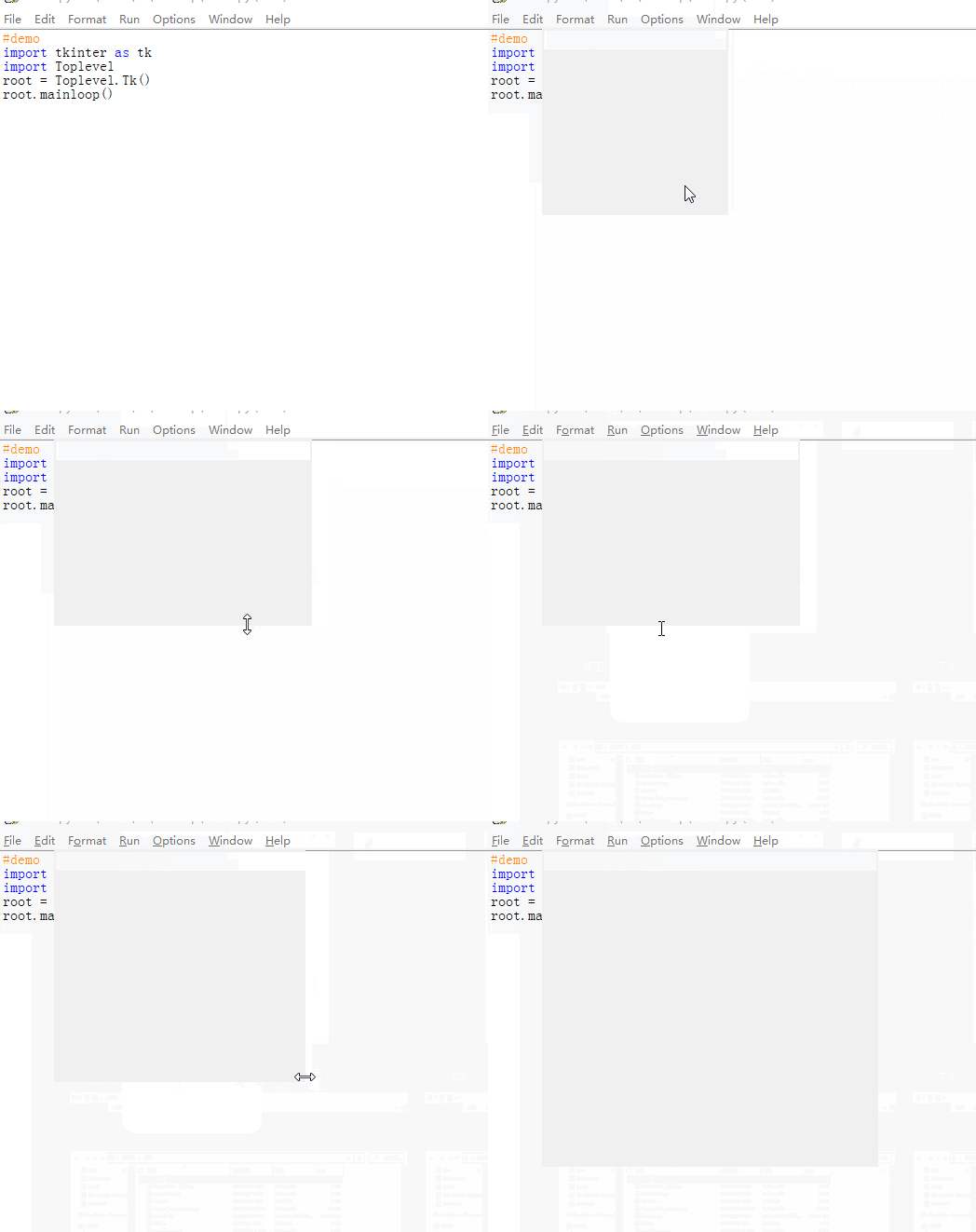
It looks simple , But as long as we can make the first step , Beautify something , It can be easily solved !
summary
–
This article is from CSDN On 2022/7/17 10:56
边栏推荐
- VSCode如何调试Nodejs
- JS native - array sorting to find out the characters with the largest number of strings
- DS graph - minimum spanning tree
- Overall testing framework for performance testing
- Outlook tutorial, how to set rules in outlook?
- Chiitoitsu
- JSON file editor
- Comparison of traversal speed between map and list
- 图的存储和遍历
- Calculate the M-day moving average price of two stocks
猜你喜欢

Number of bytes occupied by variables of type char short int in memory
onBlur和onChange冲突解决方法

Spark: get the access volume of each time period in the log (entry level - simple implementation)
![[matlab] matlab drawing Series II 1. Cell and array conversion 2. Attribute cell 3. delete Nan value 4. Merge multiple figs into the same Fig 5. Merge multiple figs into the same axes](/img/4d/b0ba599a732d1390c5eeb1aea6e83c.png)
[matlab] matlab drawing Series II 1. Cell and array conversion 2. Attribute cell 3. delete Nan value 4. Merge multiple figs into the same Fig 5. Merge multiple figs into the same axes

多数据源配置下,解决org.apache.ibatis.binding.BindingException: Invalid bound statement (not found)问题

Vector introduction and underlying principle
"After 00" is coming! Digital data ushers in a new generation of "codeless" forces
DS binary tree - maximum distance of binary tree nodes
REST风格

Activity Registration: how to quickly start the open source tapdata live data platform on a zero basis?
随机推荐
Chiitoitsu
Intelligent operation and maintenance scenario analysis: how to detect abnormal business system status through exception detection
Overview of dobesie wavelet (DB wavelet function) in wavelet transform
Number of bytes occupied by variables of type char short int in memory
Grpc middleware implements grpc call retry
The vs compiled application is missing DLL
Summary of feature selection: filtered, wrapped, embedded
深入浅出边缘云 | 2. 架构
JSON file editor
【USENIX ATC'22】支持异构GPU集群的超大规模模型的高效的分布式训练框架Whale
XOR procedure
27. Directory and file system
VSCode如何调试Nodejs
Android SQLite database practice
Getting started with mongodb
DS binary tree - maximum distance of binary tree nodes
C operator priority memory formula
PrestoUserError: PrestoUserError(type=USER_ERROR, name=INVALID_FUNCTION_ARGUMENT, message=“Escape st
Preparation of mobile end test cases
Unity uses NVIDIA flex for unity plug-in to realize the effects of making software, water, fluid, cloth, etc. learning tutorial