当前位置:网站首页>[advanced ROS] Lecture 9 robot model motion based on rviz and arbotix control
[advanced ROS] Lecture 9 robot model motion based on rviz and arbotix control
2022-07-28 02:22:00 【Life is like Zhaoxu】
【ROS Advanced 】 About 9 be based on Rviz and Arbotix Controlled robot model motion

List of articles
Preface
In the last blog section, we systematically learned about URDF File programming optimization method , namely Xacro, A kind of XML Optimization language , Through the basic concepts 、 Grammar explanation 、 The description of code examples shows how to improve URDF Reusability of documents 、 Security and efficiency , The article in this section mainly introduces Rviz How to use in the environment Arbotix Control the motion of the robot model .
One 、Arbotix Introduction to function package
- Problem introduction :
In previous studies , We go through URDF The file realizes the static creation of robot model , And through visualization software Rviz Observe and implement basic operations , Then you want further simulation operations , It is necessary to complete the motion control of the robot model , Here we will introduce a corresponding function package to complete the target requirements .
1. Basic introduction :

Arbotix:Arbotix It is a control motor 、 Steering gear control panel , And provide the corresponding ros Function pack , The functions of this feature pack can not only drive real Arbotix Control panel , It also provides a differential controller , Update the robot by receiving speed control commands joint state , So as to help us realize the robot in rviz Movement in .
notes : This differential controller is located at python In the package , The complete package also includes a variety of controllers , Corresponding motor 、 Manipulator and gripper, etc ;
2. Installation tutorial :
- Command line calls directly :
sudo apt-get install ros-noetic-arbotix
- git Installation source :
git clone https://github.com/vanadiumlabs/arbotix_ros.git\qquad Call after downloading
catkin_makeAfter compiling ;

Two 、 Control the movement process
1. preparation
- Create Feature Pack , And write URDF file / adopt Xacro To optimize

- add to Arbotix To configure : The configuration file control.yaml as follows
#  This file is the controller configuration file , A robot model may have multiple controllers , such as :  chassis 、 Mechanical arm 、 Gripper ( manipulator ).... #  therefore , root  name  yes  controller controllers: {

   #  Single controller settings  base_controller: {

          # type :  Differential controller
       type: diff_controller,
       # Reference coordinates
       base_frame_id: base_footprint,
       # The distance between the two wheels
       base_width: 0.2,
       # Control frequency
       ticks_meter: 2000,
       #PID Control parameter , Make the robot wheels reach the expected speed quickly
       Kp: 12,
       Kd: 12,
       Ki: 0,
       Ko: 50,
       # Acceleration limit
       accel_limit: 1.0
    }
}
2. Write and start launch file
- To write launch file :
\qquad The basic requirements :
\qquad 1. Called arbotix_python Under the function package arbotix_driver node
\qquad 2. adopt file Load the configuration file to obtain the robot information in order to drive the movement
\qquad 3. To configure sim by true, Complete the simulation environment requirements
<launch>
    <!--1. Load in the parameter server urdf-->
    <!--<param name="robot_description" textfile="$(find urdf01_rviz)/urdf/xacro/demo05_car_base.urdf" />-->
    <param name="robot_description" command="$(find xacro)/xacro $(find urdf01_rviz)/urdf/xacro/car.urdf.xacro" />
    <!--2. start-up rviz-->
    <node pkg="rviz" name="rviz" type="rviz" args="-d $(find urdf01_rviz)/config/show_mycar.rviz"/>

    <!--3. Joint status publishing node -->
    <node pkg="joint_state_publisher" type="joint_state_publisher" name="joint_state_publisher"/>
    <!--4. Robot status publishing node -->
    <node pkg="robot_state_publisher" type="robot_state_publisher" name="robot_state_publisher"/>

    <!-- Integrate  arbotix  Motion control node , And load parameters -->
    <node pkg="arbotix_python" type="arbotix_driver" name="driver" output="screen">
        <rosparam command="load" file="$(find urdf01_rviz)/config/control.yaml" />
        <param name="sim" value="true" />
    </node>
</launch>
- start-up launch file : Use
roslaunchCommand is enough - To configure Rviz: modify Fixed Frame as well as TF、Odometry Under the Topic Set to odom etc.

- Control motion : Topic at this time
/cmd_velappear , Therefore, we can complete motion control by publishing topic messages or entering commands , The effect is as follows :
rostopic pub -r 10 /cmd_vel geometry_msgs/Twist '{linear: {x: 0.2, y: 0, z: 0}, angular: {x: 0, y: 0, z: 0.5}}'
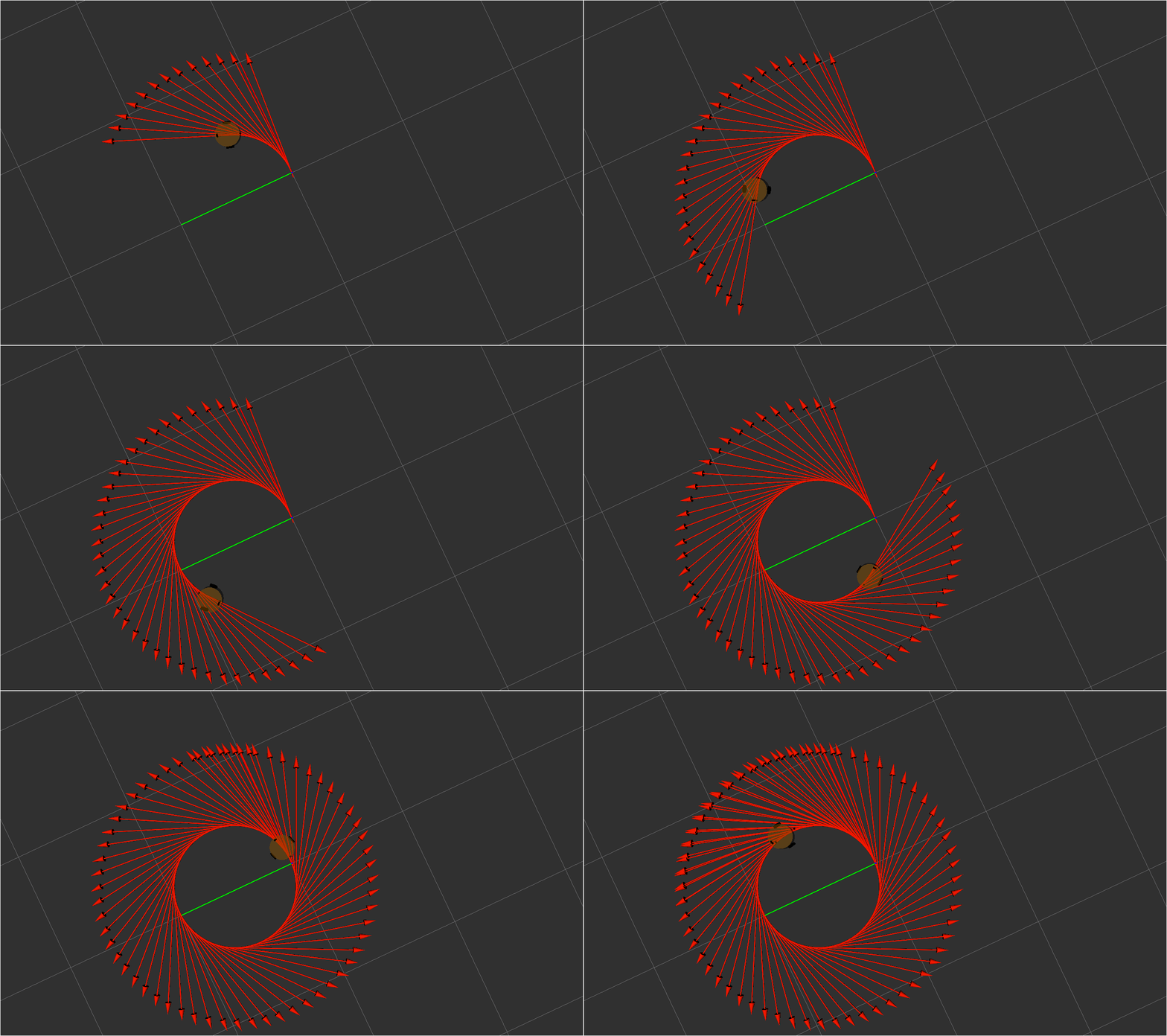
Be careful : If you want to further operate, you can modify Rviz Set up :
- Display the direction of trolley movement : take Odometry Next status Under the topic It is amended as follows /odom;
- Change the arrow represented by the direction of motion : take Odometry Next shape Of shaft radius Make changes ;
- Display the robot coordinate system : Turn on TF arrow ;
summary
- Statement : The blog section of this section refers to CSDN User zhaoxuzuo ROS course , The main content of this paper is to use Arbotix The function package is Rviz Complete the motion control of the static model of the robot in the environment , From the basic introduction 、 Install the tutorial to the final actual control example , Put it in simple terms from practice , Experience how to actually control robot movement . The next section will introduce in Gazebo Robot model simulation in , Coming soon .

边栏推荐
- MySQL高可用和主从同步
- In it, there is a million talent gap, and the salary rises, but it is not capped
- Plato Farm在Elephant Swap上铸造的ePLATO是什么?
- 【Star项目】小帽飞机大战(六)
- 【愚公系列】2022年07月 Tabby集成终端的使用
- 新零售业态下,零售电商RPA助力重塑增长
- [website construction] update SSL certificate with acme.sh: change zerossl to letsencrypt
- 学会这招再也不怕手误让代码崩掉
- 你所不知道的WMS
- 组原必备知识点
猜你喜欢

Leetcode hot topic Hot 100 - > 2. Add two numbers

Flex布局—固定定位+流式布局—主轴对齐—侧轴对齐—伸缩比

新零售业态下,零售电商RPA助力重塑增长

Codeworks round 810 (Div. 2) a~c problem solution

正则表达式

C# 使用Abp仓储访问数据库时报错记录集

OBS键盘插件自定义diy
测试/开发程序员的级别“陷阱“,级别不是衡量单维度的能力......

Talk to ye Yanxiu, an atlassian certification expert: where should Chinese users go when atlassian products enter the post server era?

Uniapp summary (applet)
随机推荐
Product interpretation - Design and distributed expansion of metersphere UI test module
数据输出-绘制动图
埃睿迪再度亮相数字中国峰会 持续深化用科技守护绿水青山
Synchronized details
SkyWalking分布式系统应用程序性能监控工具-中
Which database is the fastest to query data only?
Clear the cause of floating and six methods (solve the problem that floating affects the parent element and the global)
【愚公系列】2022年07月 Tabby集成终端的使用
Appium 点击操作梳理
网络必知题目
C# 使用Abp仓储访问数据库时报错记录集
Flume (5 demos easy to get started)
产品解读丨MeterSphere UI测试模块的设计与分布式扩展
重要安排-DX12引擎开发课程后续直播将在B站进行
数据输出-图片注释、标注
一种比读写锁更快的锁,还不赶紧认识一下
新零售业态下,零售电商RPA助力重塑增长
LeetCode 热题 HOT 100 -> 3. 无重复字符的最长子串
WMS you don't know
Fluorite network, difficult to be a "lone brave"