当前位置:网站首页>rhcsa 第四天
rhcsa 第四天
2022-08-01 06:41:00 【喳喳叽】
目录
a. cat查看/etc/passwd文件内容,且输出时带行号
b.使用more/less查看/etc/passwd内容,且每页显示10行
c.使用head/tail分别查看文件前5行内容和后5行内容
d.使用grep查看/etc/passwd中和root相关的内容
一.文件内容浏览
命令


说明:以上所有命令均可以结合管道符使用
a. cat查看/etc/passwd文件内容,且输出时带行号

b.使用more/less查看/etc/passwd内容,且每页显示10行
[[email protected] ~]# more -10 /etc/passwd

[[email protected] ~]# less -10 /etc/passwd
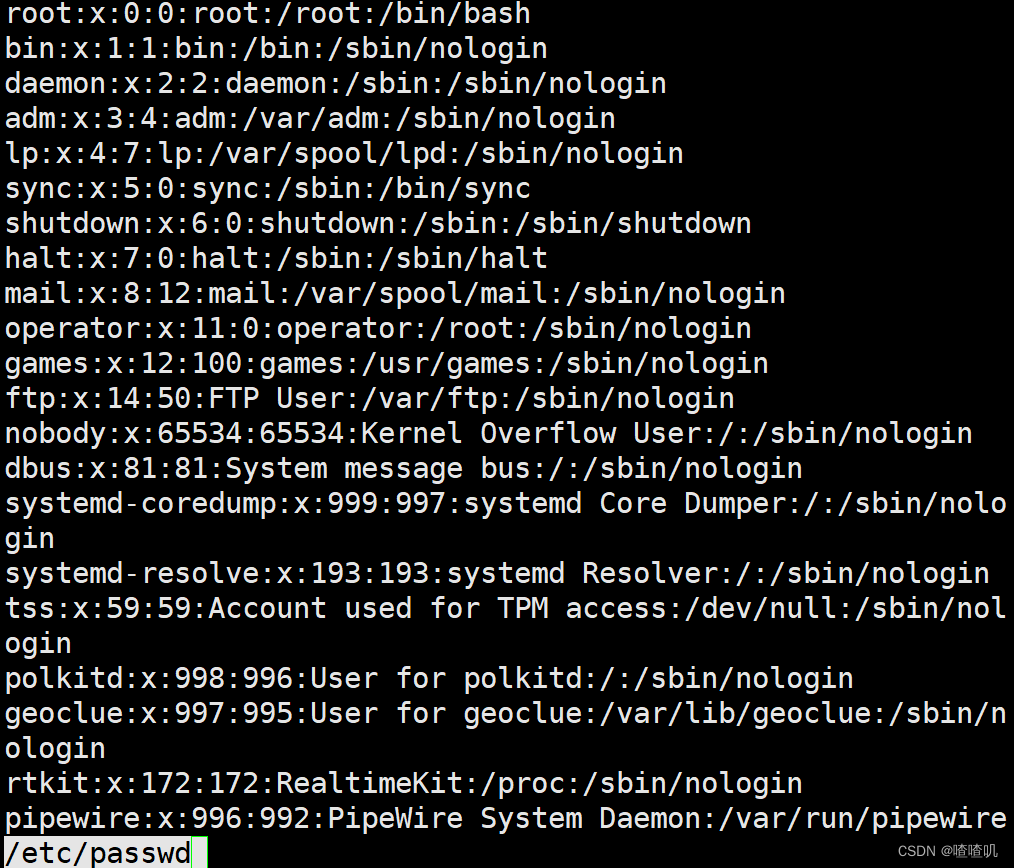
c.使用head/tail分别查看文件前5行内容和后5行内容
[[email protected] ~]# head -5 /etc/passwd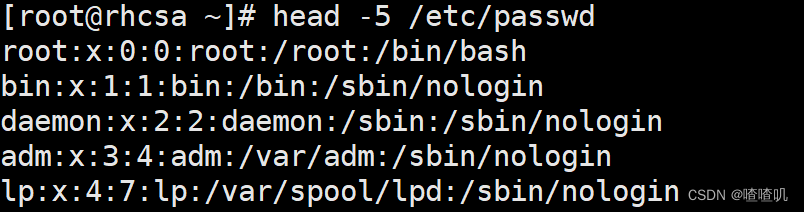
[[email protected] ~]# tail -5 /etc/passwd

d.使用grep查看/etc/passwd中和root相关的内容
[[email protected] ~]# grep root /etc/passwd
二.cut命令使用:
cut命令用于按列提取文本内容,语法为: cut [选项] 文件名称
系统文件在保存用户数据信息时,每一项值之间是采用冒号来间隔的,先查看一下:

cut命令的使用
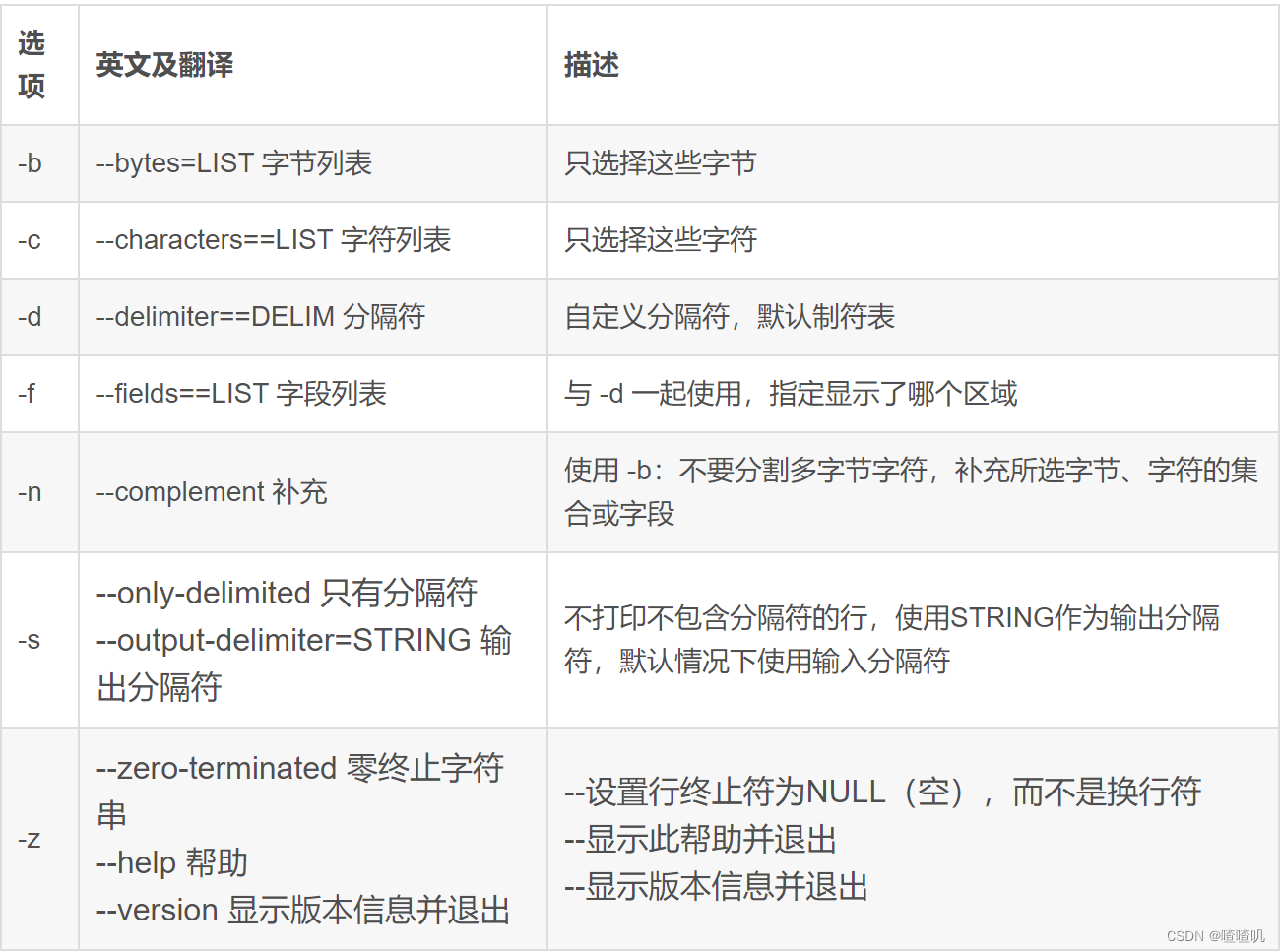
给定文件cut_data.txt且内容为:
| No | Name | Score | |
| 1 | zhang | 20 | |
| 2 | li | 80 | |
| 3 | wang | 90 | |
| 4 | sum | 60 |
使用默认定界符切割文件内容,且输出切割后的第一个字段
[[email protected] ~]# touch cut_data.txt
[[email protected] ~]# vim cut_data.txt
rootarhcsa ~]# cat cut_data.txt
No  Name   Score
1    zhang    20
2     li            80
3     wang    90
4     sun       60
[[email protected] ~]# cut -d" " -f1 cut_data.txt
No
1
2
3
4
切割文件内容,且输出切割后的第一个字段和第三个字段
[[email protected] ~]# cut -d" " -f1,3 cut_data.txt
No Score
1     20
2     80
3     90
4     60
按字节切割:输出切割的第一个字节到第10个字节的内容
[[email protected] ~]# cut -b 1-10 cut_data.txt
No  Name   Sc
1   zhang   20
2   li      80
3   wang    90
4   sun     60
按字符切割:输出切割后的第一个字符和第5个字符的内容
[[email protected] ~]# cut -c 1,5 cut_data.txt
Na
la
2
3n
4n
按指定分界符去切割:内容如下, 输出第一个字段和第三个字段内容
No|Name|Score
1|zhang|20
2|li|80
3|wang|90
4|sun|60
[[email protected] ~]# vim cut_data.txt
[[email protected] ~]# cat cut_data.txt
No|Name|Score
1|zhang|20
2|li|80
3|wang|90
4|sun|60
[[email protected] ~]# cut -d"|" -f1,3 cut_data.txt
No|Score
1|20
2|80
3|90
4|60
三.uniq命令使用:
新建文件uniq_data.txt,文件内容为
Welcome to Linux
Windows
Windows
Mac
Mac
Linux
使用uniq命令输出去重后的结果
[[email protected] ~]# touch uniq_data.txt
[[email protected] ~]# vim uniq_data.txt
[[email protected] ~]# cat uniq_data.txt
Welcome to Linux
Windows
Windows
Mac
Mac
Linux
[[email protected] ~]# uniq uniq_data.txt
Welcome to Linux
Windows
Mac
Linux
使用uniqmingl只输出重复的行
[[email protected] ~]# uniq -d uniq_data.txt
Windows
Mac
使用uniq命令输出不重复的行
[[email protected] ~]# uniq -u uniq_data.txt
Welcome to Linux
Linux
使用uniq命令统计重复次数
[[email protected] ~]# uniq -c uniq_data.txt
      1 Welcome to Linux
      2 Windows
      2 Mac
      1 Linux
四.sort命令:
sort命令用于对文本内容进行排序显示,语法为: sort [选项] 文件名称
sort命令使用

给定文件 num.txt, args.txt
文件内容:num.txt
1
3
5
2
4
文件内容:args.txt
test
args1
args2
args4
args4
args3
对num.txt进行排序,且将结果输出到sorted_num.txt中
[[email protected] ~]# touch num.txt
[[email protected] ~]# vim num.txt
[[email protected] ~]# cat num.txt
1
3
5
2
4
[[email protected] ~]# sort num.txt >> sorted num.txt
[[email protected] ~]# more sortes num.txt
more: stat of sortes num.txt failed: No such file or directo
1
2
3
4
5
对args.txt进行排序,且将结果输出到sorted_args.txt中
[[email protected] ~]# touch args.txt
[[email protected] ~]# vim args.txt
[[email protected] ~]# cat args.txt test
argsl
args2
args4
args4
args3
[[email protected] ~]# sort args.txt >> sorted_args.txt
[[email protected] ~]# more sorted_args.txt
args1
args2
args3
args4
args4
test
对num.txt和args.txt进行排序,且将结果输出到sorted_merge.txt中
[[email protected] ~]# sort -n args.txt num.txt>>sorted_merge.txt
[[email protected] ~]# more sorted _merge.txt

args1
args2
args3
args4
args4
test
1
2
3
4
5
对args.txt排序后去重输出
[[email protected] ~]# sort -u args.txt

args1
args2
args3
args4
args4
test
合并sorted_args.txt和sorted_num.txt且输出
[[email protected] ~]# cat sorted_args.txt >> sorted num.txt
[[email protected] ~]# more sorted_num.txt
1
2
3
4
args1
args2
args3
args4
args4
test
给定文件info_txt:按第二列作为key进行排序
| No | Name | Score | |
| 1 | zhang | 20 | |
| 2 | li | 80 | |
| 3 | wang | 90 | |
| 4 | sum | 60 |
[[email protected] ~]# touch info.txt
[[email protected] ~]# vim info.txt
[[email protected] ~]# sort -t" " -k2 info.txt
2  li  80
No Name Score
4  sun 60
3  wang 90
1  zhang 20
五.替换文件中的字符显示tr
tr 指令从标准输入读取数据,经过替换或者删除后,将结果输出到标准输出。
将26个小写字母的后13个字母替换成大写字母
[[email protected] ~]# echo :"abcdefghijkmlnopqrstuvwxyz"| tr n-z N-Z
:abcdefghijkmlNOPQRSTUVWXYZ
将hello 123 world 456中的数字替换成空字符
[[email protected] ~]# echo "hello 1223 world 456" | tr 1-6 “  ”
hello      world
将hello 123 world 456中字母和空格替换掉,只保留数字
[[email protected] ~]# echo "hello 123 world 456" | tr -c 1-6 " "
123 456边栏推荐
猜你喜欢




随机推荐
MATLAB program design and application of MATLAB 2.5
信息系统项目管理师必背核心考点(五十六)配置控制委员会(CCB)的工作
LeetCode每日一题(309. Best Time to Buy and Sell Stock with Cooldown)
MVVM project development (commodity management system 1)
[Translation] Securing cloud-native communications: From ingress to service mesh and beyond
uva10825
Offer brush questions - 1
return;代表含义
深度比较两个对象是否相同
first unique character in characters
Srping bean in the life cycle
问下 mysql向pg同步多个表的话 有什么好的方案吗?
Why is the lightweight VsCode used more and more?Why eat my C drive 10G?How to Painlessly Clean VsCode Cache?Teach you how to lose weight for C drive
轻量级的VsCode为何越用越大?为什么吃了我C盘10G?如何无痛清理VsCode缓存?手把手教你为C盘瘦身
Sound Signal Processing Fundamental Frequency Detection and Time-Frequency Analysis
从零开始—仿牛客网讨论社区项目(一)
Detailed explanation of the crawler framework Scrapy
【翻译】确保云原生通信的安全:从入口到服务网及更远的地方
sum of special numbers
Robot_Framework: keyword