当前位置:网站首页>Set up Jenkins environment and automatically associate packaged project jars for automatic release
Set up Jenkins environment and automatically associate packaged project jars for automatic release
2022-06-29 08:14:00 【Muyiyang who likes fire shadow】
This article focuses on how to use Docker Building a jenkins Environmental Science , And how to use this jenkins Build automatically 、 Automatic release and other pipeline operations .
One .Docker Build... In the environment jenkins
We open the front hair Docker Environment interface , The overall procedure is : Pull jenkins Mirror image --> Set the image mount directory and authorization --> Mount directory mapping 、 Turn on port mapping 、docker function jenkins Mirror image --> see jenkins Image operation --> see jenkins Run log -->windows Virtual machine configuration port mapping --> Browser access jenkins Console .
(1) Pull jenkins Mirror image :
stay docker in , It mainly loads images one by one ( It can be understood as a service out of the box file ) Run , Before running these images , You need to pull these images from the image warehouse first , The running image is displayed in docker The container exists independently , Different docker Containers do not interfere with each other .
docker pull jenkins/jenkins
You can see docker It will automatically pull the latest version for us jenkins Mirror image , Of course, you can set the pull version by yourself

docker images
View the pulled image

The next step is to set jenkins The mount directory for , We use /usr/local/jenkins Directory as Mount Directory , And set permissions
mkdir -p /usr/local/jenkins
chmod 777 /usr/local/jenkins
The next step is to mount the directory mapping 、 Turn on port mapping 、docker function jenkins Mirror image
docker run -d -p 8080:8080 -v /usr/local/jenkins:/var/jenkins_home -v /etc/localtime:/etc/localtime --restart=always -u root --name my_jenkins jenkins/jenkins
The above command is used directly docker Run the jenkins The mirror , Need to focus on :
(1)-p 8080:8080, It is important to note that jenkins Internal default use 8080 Port to start , That is to say, we need to enable the host and by default docker In container 8080 Mapping between ports , Let the host and this docker Container of 8080 Ports can access each other .
(2)-v /usr/local/jenkins:/var/jenkins_home, What needs to be noticed is this docker Inside the container jenkins An image is actually a file system , We can use the command to enter docker Inside the mirror
docker ps -a
docker exec -it <Container ID> /bin/bash
It can be found that we can pass cd Get to this jenkins Of /var/jenkins_home In the catalog , That is to say, each docker Inside the container is an independent linux environmental system , After entering, you can go through exit sign out docker Inside of container .

therefore , above -v /usr/local/jenkins:/var/jenkins_home Will be docker Mount directory of the external host , And docker The actual inside of the container jenkins Directory to mount and bind , So that we can directly reference to... By accessing the mount directory of the host docker Inside the container jenkins.
(3)-u root --name my_jenkins jenkins/jenkins, We need to use the administrator account root To operate , Then reprint this to docker Take a name for the internal image my_jenkins It is convenient to distinguish multiple identical published images .
Run the command completely through the above , You can go to docker Run a... In the container jenkins Mirror instance .
docker ps -al

CONTAINER ID IMAGE COMMAND CREATED STATUS PORTS NAMES
3342f36002f3 jenkins/jenkins "/usr/bin/tini -- /us" 21 hours ag Up 22 hours 0.0.0.0:8080->8080/tcp, 50000/tcp my_jenkins
You can see jenkins Instance started , Port binding is also performed .
docker logs my_jenkins
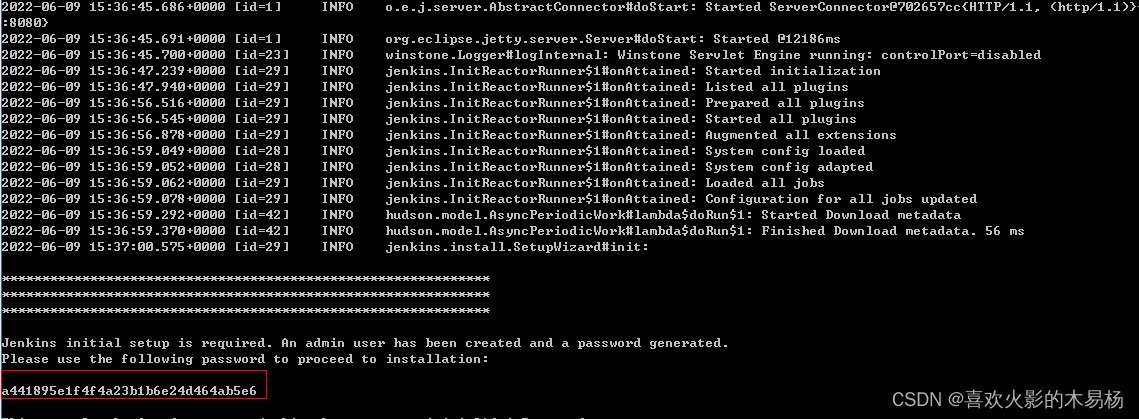
View the running log of the image , We can see the operation , At the same time, remember that there will be a password after successful operation ( Red box ), This password is used to log in for the first time jenkins The password for the console .

however , We visit... In a computer browser localhost:8080 But you will find that you can't open jenkins Console , That's because although Docker Environmental Science --Docker The internal port mapping has been associated , But our computer mainframe VirtualBox and Docker The port mapping of the environment is not open , That is to say, you can use a computer browser to access 8080 In fact, you can't reach the virtual machine 8080 Of , So we need to be in VirtualBox Port configuration in ( Of course for linux Physical machines do not need this layer of operation ).
open VirtualBox-- Set up -- grid -- The connection mode can be NAT-- senior -- Port forwarding --
With the specified port mapping


In this way, you can access... Through the browser localhost:8080 open jenkins Console. , The first time I landed , Password in

Output the password marked in the red box in the above startup log , You can log in , Install the wait using the recommended configuration , Then create a new user .


The following can be found in jenkins Create a publishing pipeline on .
边栏推荐
猜你喜欢
笔记本电脑快速连接手机热点的方法

Line features & surface features of vSLAM features

征文投稿丨使用轻量应用服务器搭建博客环境

sql语句concat搜索不出结果

Simulation time and bag operation in ROS
友元,静态关键字,静态方法以及对象间的关系

What are the constraints in MySQL? (instance verification)
Soliciting articles and contributions - building a blog environment with a lightweight application server

jsp学习部分

Robotframework learning notes: introduction to robot framework and browserlibrary (playwright)

随机推荐
[repair collection function, update login interface] knowledge payment applet, blog applet, full version open source code, resource realization applet, with 299 whole station resource data
软重启(reboot)
《动手学深度学习》(一)-- 线性神经网络
SQL Server 开启cdc
服装产业发展趋势|供应链|智能制造
Talking about Nacos configuration center from Nacos client
Ceres optimization based on sophus
AI deep dive of Huawei cloud
Using method and de duplication of distinct() in laravel
qtcreator设置字符集
[eye of depth wuenda machine learning homework class phase IV] summary of logistic regression
C compiler - implicit function declaration
AC自动机
Hook introduction
征文投稿丨使用轻量应用服务器搭建博客环境
About the many to many cascading insertion of sqlsugar (the ID of the collection attribute cannot be obtained, so the intermediate table cannot be maintained)
MongoDB-使用mongo/mongosh命令行连接数据库
PostgreSQL安装:The database cluster initialisation failed,stack Hbulider安装
[eye of depth Wu Enda's fourth operation class] summary of multiple linear regression with multiple variables
Hook 簡介