当前位置:网站首页>Mongodb- connect to the database using the mongo/mongosh command line
Mongodb- connect to the database using the mongo/mongosh command line
2022-06-29 08:00:00 【Growth path of Xiaobo test】
The previous article introduced :MongoDB- stay windows Install one locally on the computer mongodb The database of
however , The direct introduction is through GUI Tools to connect to the database , There is no introduction to using the command line to connect , Today, I would like to add :
1
Use mongo command
Find... In the installation directory bin Under the table of contents , There is one mongo.exe, Double click it :

What if you forget where to install it ?
It can be found in the service list MongoDB Corresponding windows service , Then double click on the service , You can see the installation directory :

Every time you need to go to the installation directory to start , Is it troublesome ? Is there a simpler way ?
The answer was yes . Will install under the directory bin Directory configuration to environment variables :

Be careful : The above method can only be used to connect local mongo service , If you want to connect to a deployed on another server mongo database , You can use the following command :
mongo -u  user name  -p  password  --port  Port number  --host ip  Database name


mongo ip:port/ database   -u  user name  -p  password


mongo "mongodb://ip:port"
Equivalent to our usual input mongo When , The default connection is local mongo And the port is 27017 Of . Of course , There must be many other optional parameters for using command line connections , If you need it, you can go to the official website to check the information and research .
2
Use mongosh command
After installation , Default in bin Not in the catalog mongosh Ordered by :
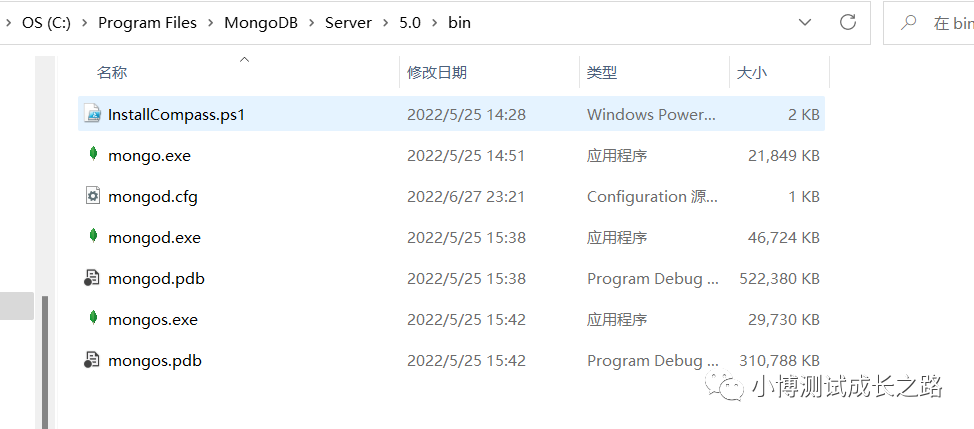
At this time, you can go to the next one on the official website MongoDB Shell, Download address :
https://www.mongodb.com/try/download/shell
After downloading , It is recommended to install to bin Under the table of contents , In this way, the environment variables do not need to be reconfigured , After installation , Let's see bin Contents under the directory :
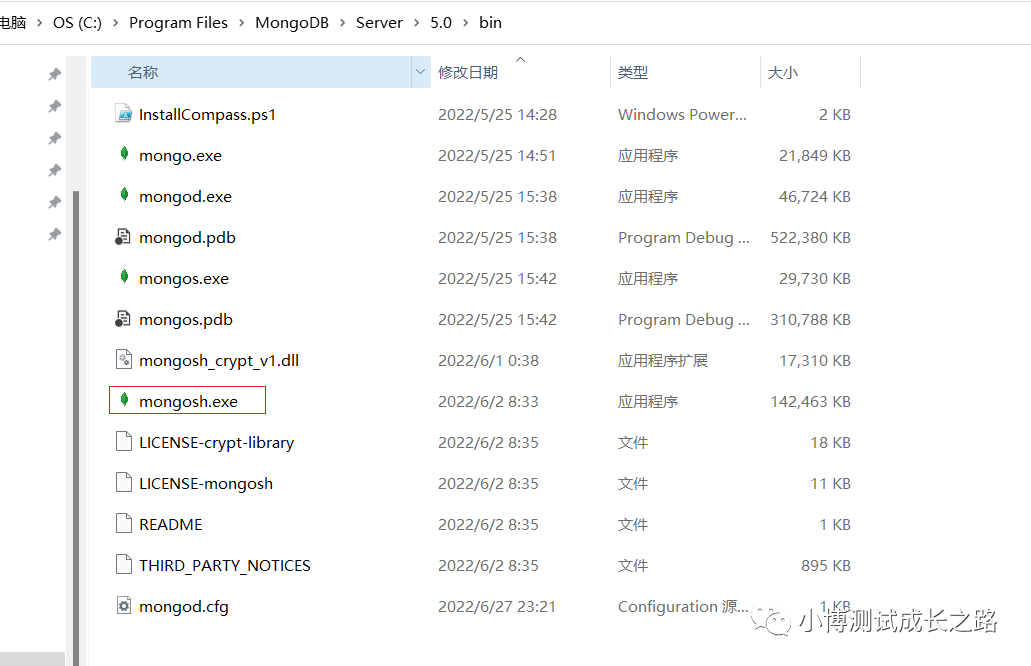
Once installed , Connect to the local default database , You can also use mongosh Command to connect directly :

When you want to connect to a database on another server , You can use the following command :
mongosh "mongodb://ip:port"
mongosh ip:port/ database   -u  user name  -p  password
mongosh -u  user name  -p  password  --port  Port number  --host ip  Database name
It's been tested anyway , Use the above 3 Command format to connect , No matter it's used mongo still mongosh Can be connected successfully .
If the article is helpful to you , You can click a like to support it ~

stamp “ Read the original ” Let's recharge !
边栏推荐
- Interviewer: why does database connection consume resources? Where are the resources consumed?
- C#导入csv到mysql数据库中
- 指针引用数组元素
- C compiler - implicit function declaration
- js:Array.reduce累加计算、合并数组
- SQL injection bypass (6)
- Vulnhub's dc7 target
- Viewing application and installation of Hana database license
- Reflection - project management thinking of small and medium-sized companies - make the products first and the functions first
- Process communication - Pipeline
猜你喜欢

Common MySQL errors and solutions summarized painstakingly (I)

Viewing application and installation of Hana database license

手把手系列---安装SpotBugs、并快速上手使用

打包时提示: Property ‘sqlSessionFactory‘ or ‘sqlSessionTemplate‘

Postman pre request
How to permanently set Mysql to utf8 encoding?
Handle series - install spotbugs and use them quickly

Vulnhub's DC8 target
Appium 环境搭建

After crossing, she said that the multiverse really exists
随机推荐
Vulnhub's DC8 target
PostgreSQL安装:The database cluster initialisation failed,stack Hbulider安装
Interviewer: why does database connection consume resources? Where are the resources consumed?
自动化测试 - uiautomator2框架应用 - 自动打卡
MySQL中有哪些约束?(实例验证)
JS XOR obfuscation code
【工控老马】单片机与西门子S7-200通信原理详解
Vulnhub's dc6 target
Vulnhub's dc9 target
mysql 开启日志功能
postman预处理/前置条件Pre-request
JSP learning part
程序调试 - Debug/Release 版本
【量化投资系统】问题记录及解决方法
软件测试鸾音鹤信
Electric check code configuration
C#导入csv到mysql数据库中
Embedded product anti-theft version
jsp学习部分
1031 Hello World for U