当前位置:网站首页>MongoDB-使用mongo/mongosh命令行连接数据库
MongoDB-使用mongo/mongosh命令行连接数据库
2022-06-29 06:41:00 【小博测试成长之路】
之前的文章中有介绍:MongoDB-在windows电脑本地安装一个mongodb的数据库
但是,直接介绍的都是通过GUI工具去连接数据库,并没介绍用命令行的方式去连接,今天补充一下:
1
使用mongo命令
找到安装目录下的bin目录下,有一个mongo.exe,双击一下就可以:

如果忘记安装到哪个位置了怎么办呢?
可以在服务列表找到MongoDB对应的windows服务,然后双击服务,就可以看到安装的目录:

每次都要到安装目录下去启动,是不是很麻烦呢?有没有更简便的方法呢?
答案当时是有啦。将安装目录下的bin目录配置到环境变量中:

注意:以上这种方法只能连接本地的mongo服务,如果想连接其他服务器上部署的mongo数据库,可以采用下面的命令:
mongo -u 用户名 -p 密码 --port 端口号 --host ip 数据库名


mongo ip:port/数据库  -u 用户名 -p 密码


mongo "mongodb://ip:port"
相当于我们平常输入mongo的时候,默认连接的是本地的mongo且端口是27017的。当然,使用命令行连接的方式肯定还有其他很多可选参数,大家有需要的可以自己去官网查查资料研究研究。
2
使用mongosh命令
安装后,默认在bin目录下是没有mongosh的命令的:
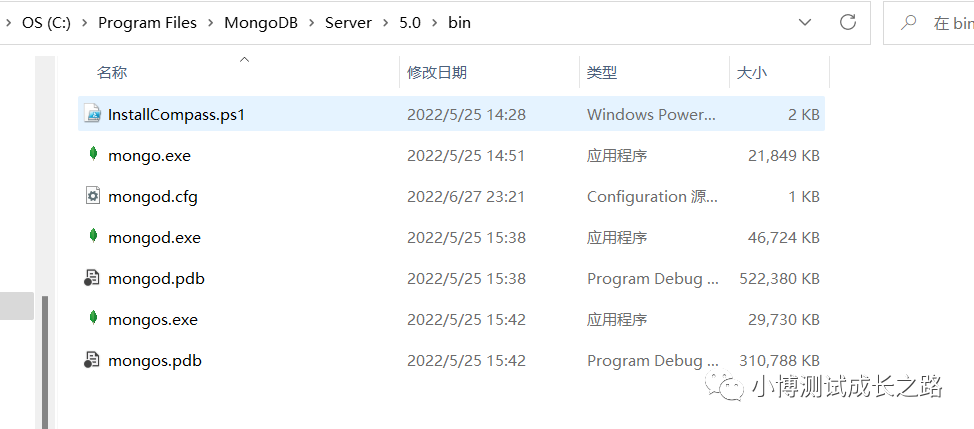
这个时候可以去官网下一个MongoDB Shell,下载地址:
https://www.mongodb.com/try/download/shell
下载完之后,建议安装到bin目录下 ,这样环境变量就不用再重新去额外配置了,安装完之后,我们再看一下bin目录下的内容:
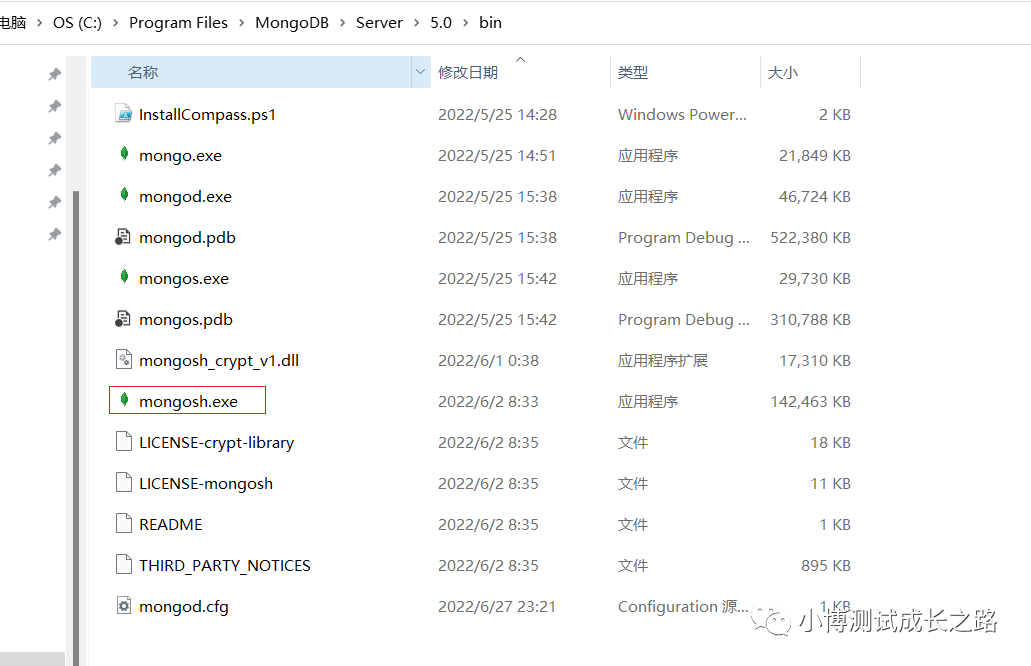
安装好之后,连接本地默认的数据库的话,也可以使用mongosh的命令直接连接:

要连接其他服务器的数据库时,可以使用下面的命令:
mongosh "mongodb://ip:port"
mongosh ip:port/数据库  -u 用户名 -p 密码
mongosh -u 用户名 -p 密码 --port 端口号 --host ip 数据库名
反正经过测试,用以上3种命令格式去连接,不管是使用mongo还是mongosh都可以连接成功。
如果写的文章对你有帮助,可以点个赞支持一下哟~

戳“阅读原文”一起来充电吧!
边栏推荐
- Cv:: mat and Base64 conversion (including picture compression and decompression)
- Vibration signal generation and processing based on MATLAB Doppler effect
- How to permanently set Mysql to utf8 encoding?
- Prompt during packaging: property 'sqlsessionfactory' or 'sqlsessiontemplate'‘
- [industrial control old horse] detailed design of PLC six way responder system
- 蓝桥杯——最小框架
- Appium 环境搭建
- Kyushu cloud helps Inner Mongolia's "counting from the east to the west" project to drive the smart new ecology of the surveying and mapping industry
- How to share the virtual environment of pycharm to jupyter Lab
- TF. Repeat and stack operations of slim
猜你喜欢
![[FreeRTOS] interrupt mechanism](/img/ab/9b1d07048b4631d7cc95db99ed529a.png)
[FreeRTOS] interrupt mechanism

4年工作经验,多线程间的5种通信方式都说不出来,你敢信?

Concurrent idempotent anti shake

ROS2中的行为树 BehaviorTree

Using cdockablepane to realize floating window in MFC

Viewing application and installation of Hana database license

Detailed design of PLC program control system for washing machine
1032 Sharing

Simulation analysis of sailing dynamics

【工控老马】基于PLC的花样喷泉设计原理详解
随机推荐
Cartographer中的线程池操作
呕心沥血总结出来的MySQL常见错误以及解决方法(一)
程序调试 - Debug/Release 版本
358. K 距离间隔重排字符串 排序
【工控老马】基于西门子S7-200PLC的跑马灯控制系统的设计方案详解
tf. compat. v1.assign
Appium automation test foundation ADB common commands (III)
from xx import*等价于from xx import *,不一定要加空格
AI与元宇宙擦出火花:人类失去的只有枷锁,获得的是全方面的解放
Kingbasees coping with transaction rollback caused by too fast growth of table age
编译原理王者之路
tf. count_ nonzero
施努卡:轮胎自动抓取安装,3D视觉定位,机器人自动抓取
Software testing
Vulnhub's dc7 target
循环嵌套问题:为什么大循环在内,小循环在外可以提高程序的运行效率
tf. to_ int64
Loop nesting: why can large loops inside and small loops outside improve the running efficiency of programs
nor flash 应用层操作
Viewing application and installation of Hana database license