当前位置:网站首页>【HCIE安全】双机热备-主备备份
【HCIE安全】双机热备-主备备份
2022-07-26 20:23:00 【异小生】
双机热备技术产生的原因
传统的组网方式如图所示,内部用户和外部用户的交互报文全部通过FW1。如果FW1出现故障,内部网络中所有以FW1作为默认网关的主机与外部网络之间的通讯将中断,通讯可靠性无法保证。
在网络架构设计时,通常会在关键位置部署两台(双机)或多台设备,以提升网络的可能性。
双机热备在路由器上的部署
路由器不会记录报文的交换状态和应用层信息,因此路由器的双机部署,只需要做好路由备份就可以保证业务的可靠性。
双机热备协议架构
VRRP(虚拟冗余协议)
负责单个接口的 故障检测和流量引导。每个VRRP备份组拥有一个虚拟IP地址,作为网络的网关地址;在VRRP主备倒换时通过发送免费ARP来刷新对接设备的MAC转发表来引导流量。
VGMP(VRRP组管理协议,华为私有)
将系统中所有的VRRP备份组集中管理,控制状态统一切换,保证出现故障时上行流量能同步切换到备用防火墙。
HRP(华为冗余协议,华为私有)
负责双机之间的数据同步。
主备备份和负载分担应用场景

在防火墙双机热备组网中必须首先解决两个问题:
1、防火墙必须能够检测到链路或设备故障。
2、防火墙检测到故障后能够实现流量平滑切换。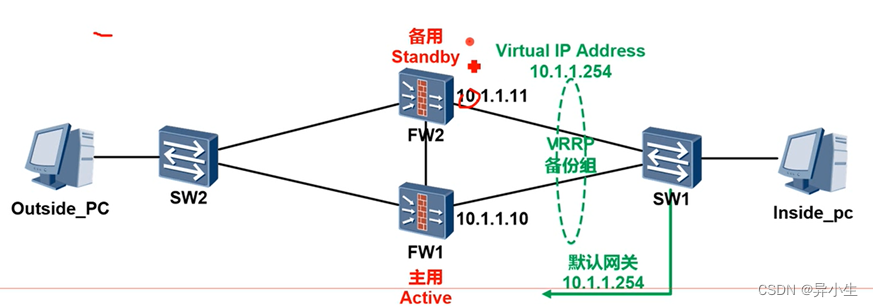
当放火墙上下行业务端口上配置了VRRP备份组时,这两个VRRP备份组是独立运行的,可能出现上下行VRRP备份组状态不一致的情况。
例如,主用网关防火墙上内侧接口故障,VRRP倒换到备用防火墙,因此出去的流量从备用防火墙转发。但是对于外网侧的VRRP,主用网关的防火墙上VRRP仍然是主,因此回程的流量仍然会送会到主用网关防火墙上,但业务流量无法送回内网,导致业务中断。
VGMP产生
为了解决前面提到的单独配置VRRP可能遇到的状态不一致问题,华为在VRRP的基础上开发了VGMP组管理协议(VRRP Group Management Protocol),即VGMP。
VGMP提出VRRP管理组的概念,将同一台防火墙上的多个VRRP备份组都加入到一个VRRP管理组,由管理组统一管理所有VRRP备份组,通过统一空着各VRRP备份组状态的切换,来保证管理组内的所有VRRP备份组状态都是一致的。
HRP介绍
HRP(Huawei Redundancy Protoco)协议,用来将主防火墙关键配置和连接状态等数据向备防火墙同步。
HRP模块提供了基础的数据备份机制和传输功能。各个应用模块收集本模块需要备份的数据,提供给HRP模块,HRP模块负责将数据发送到対端防火墙的对应模块,应用模块需要再将HRP模块提交上来数据进行解析,并加入到防火墙的动态运行数据池中。
备份内容:要备份的连接状态数据包括TCP/UDP的会话表、ServerMap表项、动态黑名单、NO-PAT表项、ARP表项等。
HRP数据备份范围
能够备份配置命令:只能在主设备上配置,备设备不能配置

不能备份的配置命令:主设备和备设备都可以配置。

双机热备基本组网
1、配置主备备份的双机热备,FW1为主,FW2为备。
2、VRRP1的虚拟IP地址为10.1.1.253,VRRP2的虚拟IP地址为202.100.1.253.
3、心跳接口不配置remote参数(使用VRRP报文封装,为组播流量,无需放行安全策略)
CLI详细配置
SW1底层桥接配置
interface Ethernet 0/0/5
port link-type trunk
port trunk allow-pass vlan 10 16
interface Ethernet 0/0/6
port link-type access
port default vlan 21
interface Ethernet 0/0/8
port link Ethernet 0/0/8
port link-type access
port default vlan 19
undo ip route-static 0.0.0.0 0 10.1.1.10 (将SW1的默认网关地址改为VRRP的虚拟地址)
ip route-static 0.0.0.0 0 10.1.1.253
修改ISP上的路由为虚拟IP 202.100.1.253
ISP(config)# no ip route 10.1.0.0 255.255.0.0 202.100.1.10
ISP(config)# no ip route 172.16.0.0 255.255.0.0 202.100.1.10
ISP(config)# no ip route 192.168.0.0 255.255.0.0 202.100.1.10
ISP(config)# ip route 10.1.0.0 255.255.0.0 202.100.1.253
ISP(config)# ip route 172.16.0.0 255.255.0.0 202.100.1.253
ISP(config)# ip route 192.168.0.0 255.255.0.0 202.100.1.253
创建HA Zone
[FW1] firewall zone name HA
[FW1]
set priority 70
[FW2]firewall zone name HA
[FW2]set priotity 70

配置防火墙心跳口
FW1:
interface GigabitEthernet0/0/3
ip address 172.16.1.10 255.255.255.0
firewall zone HA
add interface GiagabitEternet 0/0/3
FW2:
interface GigabitEthernet0/0/3
ip address 172.16.1.11 255.255.255.0
firewall zone HA
add interface GigabitEthernet 0/0/3
FW2 HA配置
hrp enable
hrp standby-device
hrp interface GigabitEthernet0/0/3
interface GigabitEthernet0/0/1.10
vlan-type dot1q 10
ip address 10.1.1.11 24
vrrp vird 1 virtual-ip 10.1.253 standby
vrrp virtual-mac enable
interface GigabitEthernet0/0/2
ip address 202.100.1.11 255.255.255.0
vrrp vird 2 vitual-ip 202.100.1.253 standby
vrrp virtual-amc enable
双机热备Web配置
一、FW1配置主备双机热备
二、启用【双机热备】,模式为【主备备份】,运行角色为【主用】,心跳接口为【g0/0/3】,新建虚拟IP地址为【10.1.1.253】,启用【虚拟MAC】。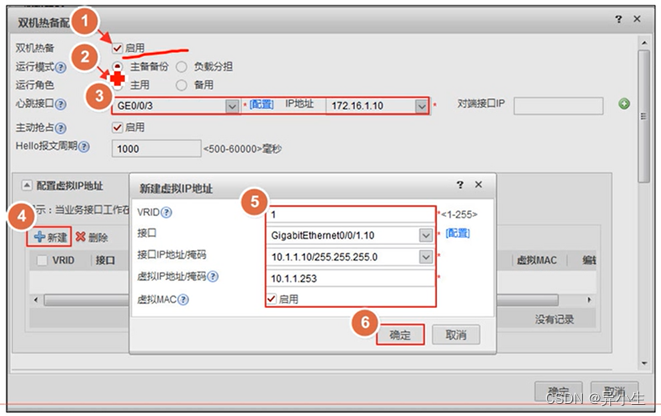

三、新建vrid 2 ,虚拟IP地址为【202.100.1.253】,启用【虚拟MAC】。

检查状态


安全策略:

不能同步路由


双机热备配置思路:
防火墙工作在三层,上下连接交换机(主备方式)
第一步:基本配置(IP ZONE路由)
第二步:配置VRRP及VGMP
主设备:
interface GigabitEthernet0/0/1.10
vlan-type dot1q 10
ip address 10.1.1.10 255.255.255.0
vrrp vird 1 virtual-ip 10.1.1.253 active
vrrp virtual-mac enable
备设备:
interface GigabitEthernet0/0/1.10
vlan-type dot1q 10
ip add 10.1.1.11 255.255.255.0
vrrp vrid virtual-ip 10.1.1.253 standby
vrrp virtual-mac enable
第三步:配置心跳口
hrp interface GigabitEtherne0/0/3
第四步:启动双机热备:
主备配置
hrp enable
第五步:定义双机热备模式
主模式:
hrp active-device(默认设备都是主,可以选敲)
备设备:
hrp standby-device(必须一定要敲)
弟六步:检查配置
HRP_ALFw1jdisplay vrrp
21:37:04 2019/09/19
GigabitEthernet0/0/2 l virtual Router 2
VRRP Group : Active
state : Active
Virtuai Ip :202.100.1.253
Virtual MAc : 0000-5e00-0102
Primary IP :202.100.1.10
Priority Run : 120
Priority config : 100
Active Priority : 120
Preempt : YEs Delay Time : 0
Advertisement Timer : 1
Auth Type : NONE
Check TTL : YES
GigabitEthernet0/0/1.10 l virtual Router 1
VRRP Group : Active
State : Active
Virtual IP : 10.1.1.253
Virtual MAc : 0000-5e00-0101
Primary IP :10.1.1.10
Priority Run : 120
Priority config : 100
Active Priority : 120
Preempt : YES Delay Time : 0
Advertisement Timer : 1
Auth Type : NONE
Check TL : YES
HRP_A[FW1]display hrp group
21:37:17 2022/07/24
Active group status:
Group enabled : Yes
State :active
Priority running 65001 #主备份的优先级
Total VRRP members:2
Hello interval(ms):1000
Preempt enabled : yes # 默认开启抢占功能
Preempt delay(s): 60 # 默认抢占延迟60s,可以修改
Tcp check delay(s):0
Peer group available:1
Peer’s member same:yes
Standby group status:
第七步:放行安全策略
只需要在主设备配置,备设备会同步安全策略
security-policy
rule name trust_untrust
source-zone trust
destination-zone untrust
action permit
第八步:业务流量切换测试
边栏推荐
- [OBS] solve the problem of OBS pushing two RTMP streams + timestamp
- How to enter the specified user method body when debugging in idea?
- 苹果官网罕见打折,iPhone13全系优惠600元;国际象棋机器人弄伤对弈儿童手指;国内Go语言爱好者发起新编程语言|极客头条
- 每日练习------有一组学员的成绩,将它们按降序排列,要增加一个学员的成绩,将它插入成绩序列,并保持降序
- 测试用例千万不能随便,记录由一个测试用例异常引起的思考
- Pointpillars: fast encoders for object detection from point clouds reading notes
- Kotlin - coroutinecontext
- GOM and GEE lander list file encryption tutorial
- Leetcode linked list problem -- 24. Exchange the nodes in the linked list in pairs (learn the linked list with one question and one article)
- Buu brush inscription - WANGDING cup column 2
猜你喜欢

Leetcode linked list problem - 19. Delete the penultimate node of the linked list (learn the linked list with one question and one article)

详细图解b树及C语言实现

Niuke brush questions - MySQL series

测试用例千万不能随便,记录由一个测试用例异常引起的思考

串口通信失败
Monitor MySQL based on MySQL exporter

Buu brush inscription 2

Sign up now: July 29 recommendation system summit 2022

QT Foundation Day 1 (1) QT, GUI (graphical user interface) development

Use Baidu PaddlePaddle easydl to complete garbage classification

随机推荐
【MySQL系列】-索引知多少
【问题篇】将集合[‘‘,‘‘]处理成(‘‘,‘‘)
Leetcode hash table class
Explain the 190 secondary compiler (decoding table) module of SMR laminated hard disk of Western data in detail
Green and sustainable development of data center
Summary of 4 years of software testing experience and interviews with more than 20 companies after job hopping
Error in render: “TypeError: data.slice is not a function“
LeetCode_ Backtracking_ Medium_ 216. Combined sum III
How to create a static object variable of its own class?
SSM整合实例
09_ UE4 advanced_ Enter the next level and reserve the blood volume
Leetcode linked list problem - 19. Delete the penultimate node of the linked list (learn the linked list with one question and one article)
Tinui development history
APaaS低代码平台(一) | 把复杂留给自己,把简单留给用户
[Oracle training] - deploy Ogg known as zero downtime migration
Detailed illustration of B-tree and its implementation in C language
New features of ES6
Daily practice ----- there is a group of students' grades. Arrange them in descending order. To add a student's grade, insert it into the grade sequence and keep the descending order
Remember the idea of solving the problem of invalid bound statement xxxxx once
JDBC的连接