当前位置:网站首页>20、wpf之MVVM命令绑定
20、wpf之MVVM命令绑定
2022-06-25 11:55:00 【komla168】
前言:Command可以有效降低前后端的耦合,有利于代码的管理和可读性。前端控件的Command有时可能只是简单的执行一个函数,比如Button。但是借助事件转Command实现MVVM模式的控件,就需要通过Command将EventArgs中相关信息传给ViewModel去解析操作。总之,因为MVVM的模式,ViewModel中不能轻易拿到View中控件的数据,尤其是事件信息。
明确:WPF数据驱动代替传统事件驱动。
目标:MVVM模式下,可以像MVC一样,既能实现前后端数据的分离,又能像View后台程序一样轻松和View中控件进行数据交互。
笔者这里使用Prism去实现Command,不再自己是造轮子,Prism的版本>=8.0
要想实现目标,少不了两个东西,一个是命令,一个是绑定。绑定是基础,命令是实现目标的手段。
一、无参命令
这个比较简单,一般用来演示基本用法。我们这里用Button来测试,虽然用Button不具有代表性(太特殊了,自带Commad这个属性),但是不影响这种简单操作。
<StackPanel VerticalAlignment="Center">
    <TextBox Width="120" Height="30" Text="{Binding NameText}"></TextBox>
    <Button Width="120" Height="30" Command="{Binding ButtonCommand}">按钮</Button>
</StackPanel>
后台
private DelegateCommand buttonCommand;
public DelegateCommand ButtonCommand =>
    buttonCommand ?? (buttonCommand = new DelegateCommand(BtnCmd));

void BtnCmd() { }
很简单,前端点击按钮后,激活这个命令,然后执行命令中的方法BtnCmd();
二、带参命令
2.1 需求
只有继承了ICommandSource接口的控件才会拥有Command依赖属性,基本上只有ButtonBase和MenuItem继承了ICommandSource,所以像Button、RadioButton、CheckBox都有Command属性,但是我们常见的一些TextBox、ComboBox等就没有Command属性。
2.2 需求逻辑
1、View中有些综合控件的数据及变化在MVVM模式下不能被ViewModel知晓,比如DataGrid、ComBox、DatePicker等控件的鼠标及选中变化的事件。
2、这些控件的事件没办法绑定到ViewModel中,只有通过事件转命令实现MVVM模式;
3、事件中是有EventArgs参数,这个参数很重要,其中带有一些事件的数据信息,而我们想要的就是这个EventArgs带有的数据信息,不然我们触发这个事件干什么啊!
这种才是开发中经常会用到的。
2.3 System.Windows.Controls.Primitives.CommandParameter

这是ButtonBase中的CommandParameter属性,如果是使用Microsoft.Xaml.Behaviors程序集中的Interaction实现的事件转Command,这个CommandParameter是在Microsoft.Xaml.Behaviors命名空间下的,其用法没啥区别。

我们先来用Button中的CommandParameter来测下。
<ComboBox Name="cmb" Width="100" Height="40" HorizontalAlignment="Left">
    <ComboBoxItem Content="一" FontSize="18"/>
    <ComboBoxItem Content="二" FontSize="18"/>
    <ComboBoxItem Content="三" FontSize="18"/>
    <ComboBoxItem Content="四" FontSize="18"/>
    <ComboBoxItem Content="五" FontSize="18"/>
    <ComboBoxItem Content="六" FontSize="18"/>
</ComboBox>
<Button Command="{Binding ButtonCommand}" CommandParameter="{Binding ElementName=cmb, Path=SelectedIndex}"/>
ViewModel
private DelegateCommand<int> buttonCommand;
public DelegateCommand<int> ButtonCommand =>
    buttonCommand ?? (buttonCommand = new DelegateCommand<int>(BtnCmd));

void BtnCmd(int selValue)
{
    MessageBox.Show(selValue.ToString());
}
坑1:

就是说DelegateCommand<T>,这个T不是个object也不是个NUllable,这里就涉及到了数据类型相关知识点了。
问:Int属于Object吗?
答案:不属于

Int是值类型,而Object是引用类型。 把DelegateCommand<T>中的T换成string就没啥问题。
这里修改下,将Int换成Object,就可以了。

这里通过CommandParameter绑定了ComboBox控件的SelectedIndex属性,然后后台需要使用DelegateCommand的泛型函数,这个泛型上面也看到了,需要是Object类型的。最后这个命令执行的函数对应的也需要参数,这里就像事件函数一样了,不同的是,事件函数中一般有两个参数,一个是sender,一个是EventArgs(或其他事件参数),需要对这两个参数进行操作,从里面提取出我们需要的,但这里,我们通过绑定,已经很明确的知道了我们想要的事件参数中的数据是什么,直接操作这个通过绑定传递进来的数据就可以了。一个是在后台去提取需要参数,一个是在前端写好需要的参数并传递给后台。
2.4 Microsoft.Xaml.Behaviors. CommandParameter
使用方法和上面是一样的,这里通过Interaction来实现Command。使用HandyControl中的DatePicker控件演示。
<hc:DatePicker x:Name="startDpEventDate" ShowClearButton="True" Margin="2"
    SelectedDate="{x:Static system:DateTime.Now}"
    Width="230" Height="40"
    hc:InfoElement.TitleWidth="85"
    hc:InfoElement.TitlePlacement="Left"
    hc:InfoElement.Title="开始时间"
    FontSize="18">
    <bh:Interaction.Triggers>
        <bh:EventTrigger EventName="SelectedDateChanged">
            <bh:InvokeCommandAction Command="{Binding StartDatePickerCmd}"
                                    CommandParameter="{Binding ElementName=startDpEventDate, Path=SelectedDate}"/>
        </bh:EventTrigger>
    </bh:Interaction.Triggers>
</hc:DatePicker>
后台和上个差不多,不同的是针对不同控件的不同属性做出的操作。这里绑定的控件是自己(其实还有其他方式,Binding的相关知识,见参考文献3.7中有用到),属性是SelectedDate。
void StartDatePicker(object startTime)
{
    string s = startTime.ToString();
    MessageBox.Show(s);
}
同理,其他控件比如DataGrid,其选中改变事件等都可以通过此方法实现MVVM操作。
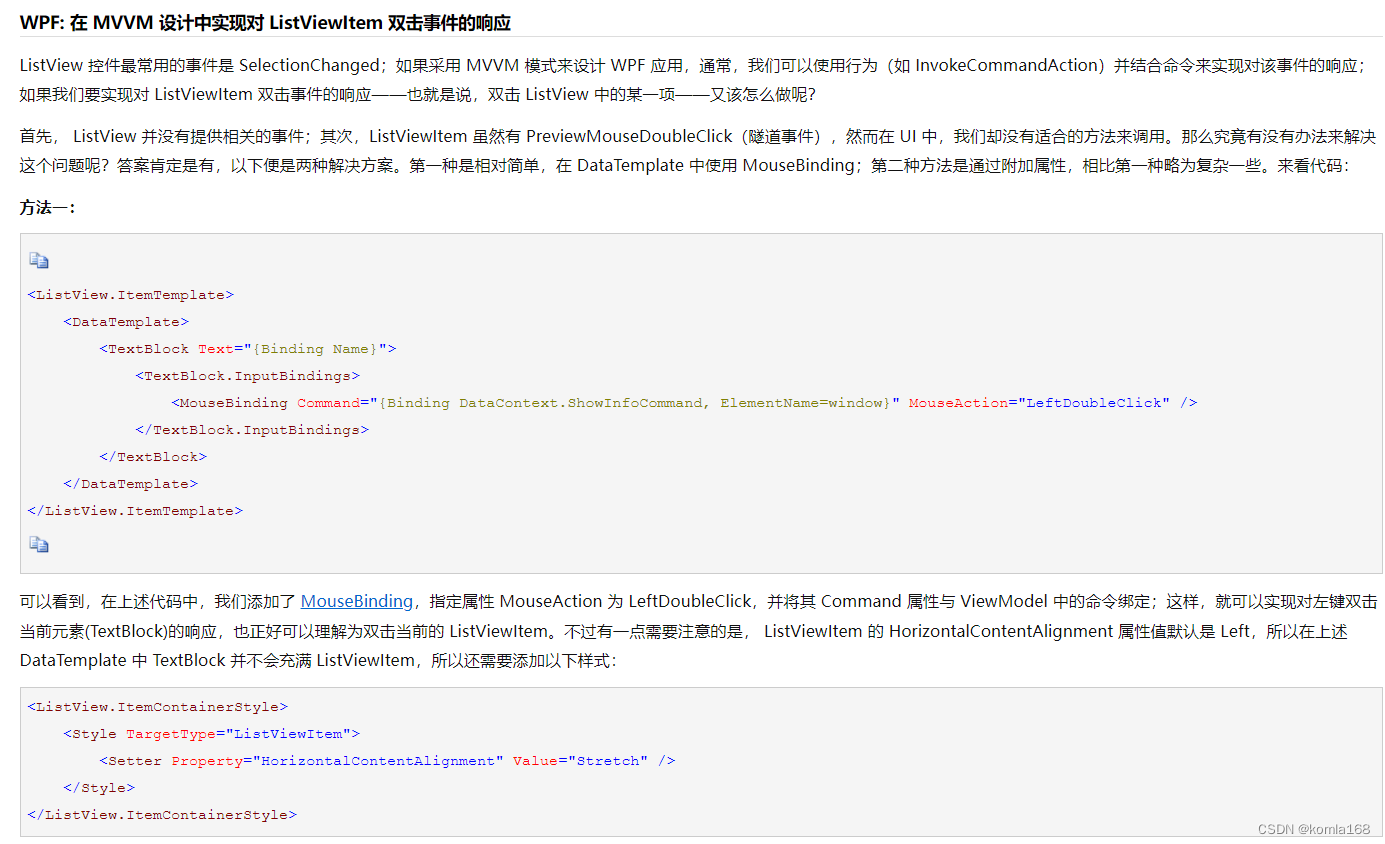
当然,也可以同时写多个命令,见参考文献3.3。同时通过修改列表控件的数据模板,可以实现列表控件的item项的Command功能,见参考文献3.4。
三、引用文献
3.1 Wpf MVVM——命令绑定和消息发送_weixin_44538156的博客-CSDN博客
3.2 自定义InvokeMouseCommandAction类,用于WPF中的鼠标事件到prism:DelegateCommand的绑定_jiuzaizuotian2014的博客-CSDN博客
3.3 MVVM中轻松实现Command绑定(三)任意事件的Command - cw_volcano - 博客园
3.4 WPF: 在 MVVM 设计中实现对 ListViewItem 双击事件的响应 - WPInfo - 博客园
3.5 Prism8.0(二):数据绑定与命令_碎碎念的安静的博客-CSDN博客_prism 属性绑定
3.6 Introduction to Prism | Prism
3.7 wpf 如何将参数通过CommandParameter 传入viewmodel_老程序猿一枚的博客-CSDN博客
边栏推荐
- Xishan technology rushes to the scientific innovation board: it plans to raise 660million yuan. Guoyijun and his wife have 60% of the voting rights
- 剑指 Offer II 091. 粉刷房子 : 状态机 DP 运用题
- Which securities company's account is better and safer to open
- Two ways of redis persistence -- detailed explanation of RDB and AOF
- sklearnex 让你的 sklearn 机器学习模型训练快得飞起?
- How terrible is it not to use error handling in VFP?
- 2020最新最全IT学习线路
- plt. GCA () picture frame and label
- Sentinel integrated Nacos data source
- Cesium draw point line surface
猜你喜欢

Flink deeply understands the graph generation process (source code interpretation)

云原生数据湖以存储、计算、数据管理等能力通过信通院评测认证

架构师为你揭秘在阿里、腾讯、美团工作的区别

Comment TCP gère - t - il les exceptions lors de trois poignées de main et de quatre vagues?

Use of Presto visualization client-yanagishima20.0
Capacity expansion mechanism of Dict Of redis (rehash)

Countdownlatch source code analysis

Nacos installation and use

flutter常用命令及问题

黑马畅购商城---3.商品管理
随机推荐
网络 | traceroute,路由跟踪命令,用于确定 IP 数据包访问目标地址所经过的路径。
Why can't the form be closed? The magic of revealing VFP object references
Openfeign uses
Real software developers will use this method to predict the future
Semaphore source code analysis
Eureka accesses the console and reports an error: whitelabel error page
cnds
confluence7.4.X升级实录
Architects reveal the difference between working in Alibaba, Tencent and meituan
Manually rollback abnormal data
Thirty lines of code prevent VFP forms from running repeatedly, and the function supports parameter transfer
黑马畅购商城---3.商品管理
How to open an account for trading futures Shanghai nickel products online
Sentinel integrated Nacos data source
VFP function to summarize all numeric columns of grid to cursor
Simple use of stream (II)
Detailed explanation of Flink checkpoint specific operation process and summary of error reporting and debugging methods
交易期货沪镍产品网上怎么开户
Black Horse Chang Shopping Mall - - - 3. Gestion des produits de base
A detour taken by a hardware engineer