当前位置:网站首页>Essential Learning for Getting Started with Unity Shader - Transparency Effect
Essential Learning for Getting Started with Unity Shader - Transparency Effect
2022-07-31 14:28:00 【Tomato Ape】
透明效果
1 There are two ways to achieve the transparency effect
透明度测试(Alpha Test)
要么完全透明,要么完全不透明.
实现简单,Essentially a culling mechanism,Pass will not satisfy the condition(Usually less than a certain threshold is used to determine,一般使用clip方法)The fragment discard method to achieve full transparency.These discarded fragments will not be processed any more,也不会对颜色缓冲产生任何影响,The remaining fragments that meet the conditions will continue to be processed in the same way as ordinary opaque objects
透明度混合(Alpha Blending)
A true transparent effect can be obtained,The new color is obtained by blending the transparency of the current fragment as a blend factor with the color values already stored in the color buffer,for a transparent effect.
!!!但是,Mix if desired,You need to turn off deep writing(If you do not turn off depth writing for fragments that require transparency effects,It will directly overwrite the color stored in the color buffer,Transparency cannot be achieved),This makes rendering order very important.

2 透明度测试
Transparency test was usedShader都应该在SubShaderSet the following three labels in the
SubShader
{

	Tags{
     "Queue" = "AlphaTest"  "IgnoreProjector" = "true"    "RenderType" = "TransparentCutout" }

	Pass
	{

		........
	}
}
示例代码
Shader "Shader Learning/08 Alpha Effect/01 Alpha Test"
{

	Properties
	{

		_Color("Color", Color) = (1, 1, 1, 1)
		_MainTex("Main Tex", 2D) = "white"{
    }
		_Cutoff("Alpha Cutoff", Range(0, 1)) = 0.5
	}

	SubShader
	{

		//Transparency tests are usually usedShader都应该在SubShader中设置这三个标签
		Tags{
     "Queue" = "AlphaTest" "IgnoreProjector" = "true" "RenderType" = "TransparentCutout" }

		pass
		{

			Tags{
     "LightMode" = "ForwardBase" }

			CGPROGRAM

			#pragma vertex vert
			#pragma fragment frag

			#include "Lighting.cginc"

			fixed4 _Color;
			sampler2D _MainTex;
			float4 _MainTex_ST;
			fixed _Cutoff;

			struct a2v
			{

				float4 vertex : POSITION;
				float3 normal : NORMAL;
				float4 texcoord : TEXCOORD0;
			};

			struct v2f
			{

				float4 pos : SV_POSITION;
				float3 worldNormal : TEXCOORD0;
				float3 worldPos : TEXCOORD1;
				float2 uv : TEXCOORD2;
			};

			v2f vert(a2v v)
			{

				v2f o;

				o.pos = mul(UNITY_MATRIX_MVP, v.vertex);

				o.worldPos = mul(_Object2World, v.vertex).xyz;

				o.worldNormal = UnityObjectToWorldNormal(v.normal);

				o.uv = TRANSFORM_TEX(v.texcoord, _MainTex);

				return o;
			}

			fixed4 frag(v2f i) : SV_Target
			{

				fixed3 worldNormal = normalize(i.worldNormal);
				fixed3 worldLightDir = normalize(UnityWorldSpaceLightDir(i.worldPos));

				fixed4 texColor = tex2D(_MainTex, i.uv);

				//Conduct a transparency test
				clip(texColor.a - _Cutoff);   //If less than set_Cutoff透明度阈值,The current fragment is discarded
				/* //等同于 if((texColor.a - _Cutoff) < 0.0) { discard } */

				fixed3 albedo = texColor.rgb * _Color.rgb;

				fixed3 ambient = UNITY_LIGHTMODEL_AMBIENT.xyz * albedo;

				fixed3 diffuse = _LightColor0.rgb * albedo * max(0, dot(worldNormal, worldLightDir));

				return fixed4(ambient + diffuse, 1.0);
			}

			ENDCG
		}
	}

	FallBack "Transparent/Cutout/VertexLit"

}
3 透明度混合
Blended with transparencyShader都应该在SubShaderSet the following three labels in the ,Also turn off deep writes,and set the blending mode
SubShader
{

	Tags {
     "Queue" = "Transparent" "IgnoreProjector" = "true" "RenderType" = "Transparent" }

	Pass
	{

		........
		ZWrite Off
		Blend SrcAlpha OneMinusSrcAlpha
		........
	}

}
示例代码
Shader "Shader Learning/08 Alpha Effect/02 Alpha Blend"
{

	Properties
	{

		_Color("Color", Color) = (1, 1, 1, 1)
		_MainTex("Main Tex", 2D) = "white"{
    }
		_AlphaScale("Alpha Scale", Range(0, 1)) = 1
	}

	SubShader
	{

		//Transparency blending is usually usedShader都应在SubShader中设置这三个标签
		Tags{
     "Queue" = "Transparent" "IgnoreProjector" = "true" "RenderType" = "Transparent" }

		Pass
		{

			Tags{
     "LightMode" = "ForwardBase" }

			ZWrite Off  //关闭深度写入,Depth writing should be turned off in both transparency blending
			Blend SrcAlpha OneMinusSrcAlpha   //设置该Pass的混合模式,We will source color(The color produced by this fragment shader)The blending factor is set to SrcAlpha,put target color(已经存在于颜色缓冲中的颜色)The blending factor is set to OneMinusSrcAlpha

			CGPROGRAM

			#pragma vertex vert
			#pragma fragment frag

			#include "Lighting.cginc"

			fixed4 _Color;
			sampler2D _MainTex;
			float4 _MainTex_ST;
			fixed _AlphaScale;

			struct a2v
			{

				float4 vertex : POSITION;
				float3 normal : NORMAL;
				float4 texcoord : TEXCOORD0;
			};

			struct v2f
			{

				float4 pos : SV_POSITION;
				float3 worldNormal : TEXCOORD0;
				float3 worldPos : TEXCOORD1;
				float2 uv : TEXCOORD2;
			};

			v2f vert(a2v v)
			{

				v2f o;

				o.pos = mul(UNITY_MATRIX_MVP, v.vertex);

				o.worldPos = mul(_Object2World, v.vertex).xyz;

				o.worldNormal = UnityObjectToWorldNormal(v.normal);

				o.uv = TRANSFORM_TEX(v.texcoord, _MainTex);

				return o;
			}

			fixed4 frag(v2f i) : SV_Target
			{

				fixed3 worldNormal = normalize(i.worldNormal);
				fixed3 worldLightDir = normalize(UnityWorldSpaceLightDir(i.worldPos));

				fixed4 texColor = tex2D(_MainTex, i.uv);

				fixed3 albedo = texColor.rgb * _Color.rgb;

				fixed3 ambient = UNITY_LIGHTMODEL_AMBIENT.xyz * albedo;

				fixed3 diffuse = _LightColor0.rgb * albedo * max(0, dot(worldNormal, worldLightDir));

				return fixed4(ambient + diffuse, texColor.a * _AlphaScale);  //Returns the transparent channel value that needs to be set,只有使用Blend命令打开混合后,The settings here make sense,否则这些透明度并不会对片元的透明效果有任何影响
			}

			ENDCG
		}
	}

	//FallBack "Transparent/VertexLit"
}
Solve the wrong transparency effect caused when model meshes intersect each other
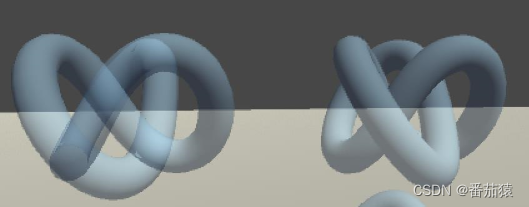
使用两个Pass来渲染模型,第一个Pass开启深度写入,但不输出颜色,Just to write the depth value of this model into the depth buffer;第二个Pass进行正常的透明度混合,由于上一个Pass已经得到了逐像素的正确的深度信息,该PassTransparent rendering can be done according to pixel-level depth ordering.
缺点:多使用一个Pass更消耗性能
Shader "Shader Learning/08 Alpha Effect/03 Alpha Blend Zwrite"
{

	Properties
	{

		_Color("Color", Color) = (1, 1, 1, 1)
		_MainTex("Main Tex", 2D) = "white"{
    }
		_AlphaScale("Alpha Scale", Range(0, 1)) = 1
	}

	SubShader
	{

		Tags{
     "Queue" = "Transparent" "IgnoreProjector" = "true" "RenderType" = "Transparent" }

		Pass  //增加一个Pass,开启深度写入,但不输出颜色,The purpose is only to write the depth value of this model into the depth buffer
		{

			ZWrite On
			ColorMask 0   //ColorMask用于设置颜色通道的写掩码(write mask),如果设为0,则该Pass不写入任何颜色通道,即不会输出任何颜色.
		}

		Pass
		{

			Tags{
     "LightMode" = "ForwardBase" }

			ZWrite Off  //关闭深度写入,Depth writing should be turned off in both transparency blending
			Blend SrcAlpha OneMinusSrcAlpha   //设置该Pass的混合模式,We will source color(The color produced by this fragment shader)The blending factor is set to SrcAlpha,put target color(已经存在于颜色缓冲中的颜色)The blending factor is set to OneMinusSrcAlpha

			CGPROGRAM

			#pragma vertex vert
			#pragma fragment frag

			#include "Lighting.cginc"

			fixed4 _Color;
			sampler2D _MainTex;
			float4 _MainTex_ST;
			fixed _AlphaScale;

			struct a2v
			{

				float4 vertex : POSITION;
				float3 normal : NORMAL;
				float4 texcoord : TEXCOORD0;
			};

			struct v2f
			{

				float4 pos : SV_POSITION;
				float3 worldNormal : TEXCOORD0;
				float3 worldPos : TEXCOORD1;
				float2 uv : TEXCOORD2;
			};

			v2f vert(a2v v)
			{

				v2f o;

				o.pos = mul(UNITY_MATRIX_MVP, v.vertex);

				o.worldPos = mul(_Object2World, v.vertex).xyz;

				o.worldNormal = UnityObjectToWorldNormal(v.normal);

				o.uv = TRANSFORM_TEX(v.texcoord, _MainTex);

				return o;
			}

			fixed4 frag(v2f i) : SV_Target
			{

				fixed3 worldNormal = normalize(i.worldNormal);
				fixed3 worldLightDir = normalize(UnityWorldSpaceLightDir(i.worldPos));

				fixed4 texColor = tex2D(_MainTex, i.uv);

				fixed3 albedo = texColor.rgb * _Color.rgb;

				fixed3 ambient = UNITY_LIGHTMODEL_AMBIENT.xyz * albedo;

				fixed3 diffuse = _LightColor0.rgb * albedo * max(0, dot(worldNormal, worldLightDir));

				return fixed4(ambient + diffuse, texColor.a * _AlphaScale);  //Returns the transparent channel value that needs to be set,只有使用Blend命令打开混合后,The settings here make sense,否则这些透明度并不会对片元的透明效果有任何影响
			}

			ENDCG
		}
	}

	//FallBack "Transparent/VertexLit"
}
4 双面渲染
使用Cullcommand to achieve the effect of double-sided rendering
4.1 透明度测试的双面渲染
在Pass块中直接使用Cull OffCommand to turn off rendering culling,This will render both the front and the back
Shader "Shader Learning/08 Alpha Effect/04 Alpha Test Both Sided"
{

	Properties
	{

		_Color("Color", Color) = (1, 1, 1, 1)
		_MainTex("Main Tex", 2D) = "white"{
    }
		_Cutoff("Alpha Cutoff", Range(0, 1)) = 0.5
	}

	SubShader
	{

		Tags{
     "Queue" = "AlphaTest" "IgnoreProjector" = "true" "RenderType" = "TransparentCutout" }

		pass
		{

			Tags{
     "LightMode" = "ForwardBase" }

			Cull Off  //关闭剔除

			CGPROGRAM

			#pragma vertex vert
			#pragma fragment frag

			#include "Lighting.cginc"

			fixed4 _Color;
			sampler2D _MainTex;
			float4 _MainTex_ST;
			fixed _Cutoff;

			struct a2v
			{

				float4 vertex : POSITION;
				float3 normal : NORMAL;
				float4 texcoord : TEXCOORD0;
			};

			struct v2f
			{

				float4 pos : SV_POSITION;
				float3 worldNormal : TEXCOORD0;
				float3 worldPos : TEXCOORD1;
				float2 uv : TEXCOORD2;
			};

			v2f vert(a2v v)
			{

				v2f o;

				o.pos = mul(UNITY_MATRIX_MVP, v.vertex);

				o.worldPos = mul(_Object2World, v.vertex).xyz;

				o.worldNormal = UnityObjectToWorldNormal(v.normal);

				o.uv = TRANSFORM_TEX(v.texcoord, _MainTex);

				return o;
			}

			fixed4 frag(v2f i) : SV_Target
			{

				fixed3 worldNormal = normalize(i.worldNormal);
				fixed3 worldLightDir = normalize(UnityWorldSpaceLightDir(i.worldPos));

				fixed4 texColor = tex2D(_MainTex, i.uv);

				//Conduct a transparency test
				clip(texColor.a - _Cutoff);   //If less than set_Cutoff透明度阈值,The current fragment is discarded
				/* //等同于 if((texColor.a - _Cutoff) < 0.0) { discard } */

				fixed3 albedo = texColor.rgb * _Color.rgb;

				fixed3 ambient = UNITY_LIGHTMODEL_AMBIENT.xyz * albedo;

				fixed3 diffuse = _LightColor0.rgb * albedo * max(0, dot(worldNormal, worldLightDir));

				return fixed4(ambient + diffuse, 1.0);
			}

			ENDCG
		}
	}

	FallBack "Transparent/Cutout/VertexLit"

}
4.2 透明度混合的双面渲染
Duplex rendering with transparency blending is more complicated,Because transparency blending turns off depth writing,At this time, we cannot guarantee the rendering order of the front and back primitives of the same object,It is possible to get the wrong translucency effect.
解决方法:使用两个Pass,一个Pass只渲染背面(Cull Front),第二个Pass只渲染正面(Cull Back),由于Unityare executed in orderPass的,So we can get the correct rendering.
Shader "Shader Learning/08 Alpha Effect/05 Alpha Blend Both Sided"
{

	Properties
	{

		_Color("Color", Color) = (1, 1, 1, 1)
		_MainTex("Main Tex", 2D) = "white"{
    }
		_AlphaScale("Alpha Scale", Range(0, 1)) = 1
	}

	SubShader
	{

		Tags{
     "Queue" = "Transparent" "IgnoreProjector" = "true" "RenderType" = "Transparent" }

		Pass
		{

			Tags{
     "LightMode" = "ForwardBase" }

			Cull Front   //Front faces are culled to render back faces first

			ZWrite Off  //关闭深度写入,Depth writing should be turned off in both transparency blending
			Blend SrcAlpha OneMinusSrcAlpha   //设置该Pass的混合模式,We will source color(The color produced by this fragment shader)The blending factor is set to SrcAlpha,put target color(已经存在于颜色缓冲中的颜色)The blending factor is set to OneMinusSrcAlpha

			CGPROGRAM

			#pragma vertex vert
			#pragma fragment frag

			#include "Lighting.cginc"

			fixed4 _Color;
			sampler2D _MainTex;
			float4 _MainTex_ST;
			fixed _AlphaScale;

			struct a2v
			{

				float4 vertex : POSITION;
				float3 normal : NORMAL;
				float4 texcoord : TEXCOORD0;
			};

			struct v2f
			{

				float4 pos : SV_POSITION;
				float3 worldNormal : TEXCOORD0;
				float3 worldPos : TEXCOORD1;
				float2 uv : TEXCOORD2;
			};

			v2f vert(a2v v)
			{

				v2f o;

				o.pos = mul(UNITY_MATRIX_MVP, v.vertex);

				o.worldPos = mul(_Object2World, v.vertex).xyz;

				o.worldNormal = UnityObjectToWorldNormal(v.normal);

				o.uv = TRANSFORM_TEX(v.texcoord, _MainTex);

				return o;
			}

			fixed4 frag(v2f i) : SV_Target
			{

				fixed3 worldNormal = normalize(i.worldNormal);
				fixed3 worldLightDir = normalize(UnityWorldSpaceLightDir(i.worldPos));

				fixed4 texColor = tex2D(_MainTex, i.uv);

				fixed3 albedo = texColor.rgb * _Color.rgb;

				fixed3 ambient = UNITY_LIGHTMODEL_AMBIENT.xyz * albedo;

				fixed3 diffuse = _LightColor0.rgb * albedo * max(0, dot(worldNormal, worldLightDir));

				return fixed4(ambient + diffuse, texColor.a * _AlphaScale);  //Returns the transparent channel value that needs to be set,只有使用Blend命令打开混合后,The settings here make sense,否则这些透明度并不会对片元的透明效果有任何影响
			}

			ENDCG
		}

		Pass
		{

			Tags{
     "LightMode" = "ForwardBase" }

			Cull Back   //剔除背面,渲染正面

			ZWrite Off  //关闭深度写入,Depth writing should be turned off in both transparency blending
			Blend SrcAlpha OneMinusSrcAlpha   //设置该Pass的混合模式,We will source color(The color produced by this fragment shader)The blending factor is set to SrcAlpha,put target color(已经存在于颜色缓冲中的颜色)The blending factor is set to OneMinusSrcAlpha

			CGPROGRAM

			#pragma vertex vert
			#pragma fragment frag

			#include "Lighting.cginc"

			fixed4 _Color;
			sampler2D _MainTex;
			float4 _MainTex_ST;
			fixed _AlphaScale;

			struct a2v
			{

				float4 vertex : POSITION;
				float3 normal : NORMAL;
				float4 texcoord : TEXCOORD0;
			};

			struct v2f
			{

				float4 pos : SV_POSITION;
				float3 worldNormal : TEXCOORD0;
				float3 worldPos : TEXCOORD1;
				float2 uv : TEXCOORD2;
			};

			v2f vert(a2v v)
			{

				v2f o;

				o.pos = mul(UNITY_MATRIX_MVP, v.vertex);

				o.worldPos = mul(_Object2World, v.vertex).xyz;

				o.worldNormal = UnityObjectToWorldNormal(v.normal);

				o.uv = TRANSFORM_TEX(v.texcoord, _MainTex);

				return o;
			}

			fixed4 frag(v2f i) : SV_Target
			{

				fixed3 worldNormal = normalize(i.worldNormal);
				fixed3 worldLightDir = normalize(UnityWorldSpaceLightDir(i.worldPos));

				fixed4 texColor = tex2D(_MainTex, i.uv);

				fixed3 albedo = texColor.rgb * _Color.rgb;

				fixed3 ambient = UNITY_LIGHTMODEL_AMBIENT.xyz * albedo;

				fixed3 diffuse = _LightColor0.rgb * albedo * max(0, dot(worldNormal, worldLightDir));

				return fixed4(ambient + diffuse, texColor.a * _AlphaScale);  //Returns the transparent channel value that needs to be set,只有使用Blend命令打开混合后,The settings here make sense,否则这些透明度并不会对片元的透明效果有任何影响
			}

			ENDCG
		}
	}

	//FallBack "Transparent/VertexLit"
}
边栏推荐
- redhat/openssl生成自签ca证书并使用
- Redis 】 【 publish and subscribe message
- Comparison of Optical Motion Capture and UWB Positioning Technology in Multi-agent Cooperative Control Research
- Small test knife: Go reflection helped me convert Excel to Struct
- 已解决(pymysqL连接数据库报错)pymysqL.err.ProgrammingError: (1146,“Table ‘test.students‘ doesn‘t exist“)
- Linux bash: redis-server: 未找到命令
- 自制的数据库安全攻防题,相关靶机自己制作
- AWS implements scheduled tasks - Lambda+EventBridge
- 三角恒等变换公式
- 1-hour live broadcast recruitment order: industry leaders share dry goods, and enterprise registration is open丨qubit · point of view
猜你喜欢

Motion capture system for end-positioning control of flexible manipulators
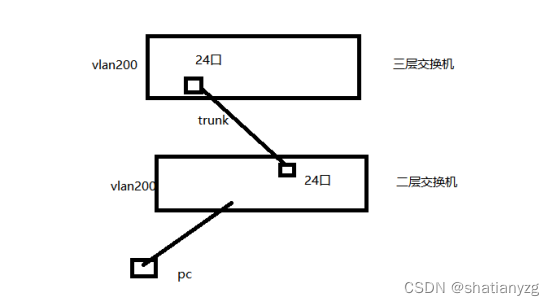
技能大赛训练题:交换机的远程管理
![Miller_Rabin Miller Rabin probability sieve [template]](/img/51/8dcc9f78478debf7d3dcfa6d1a23e3.png)
Miller_Rabin Miller Rabin probability sieve [template]

MySQL has played to such a degree, no wonder the big manufacturers are rushing to ask for it!

OpenShift 4 - 定制 RHACS 安全策略,阻断生产集群使用高风险 Registry
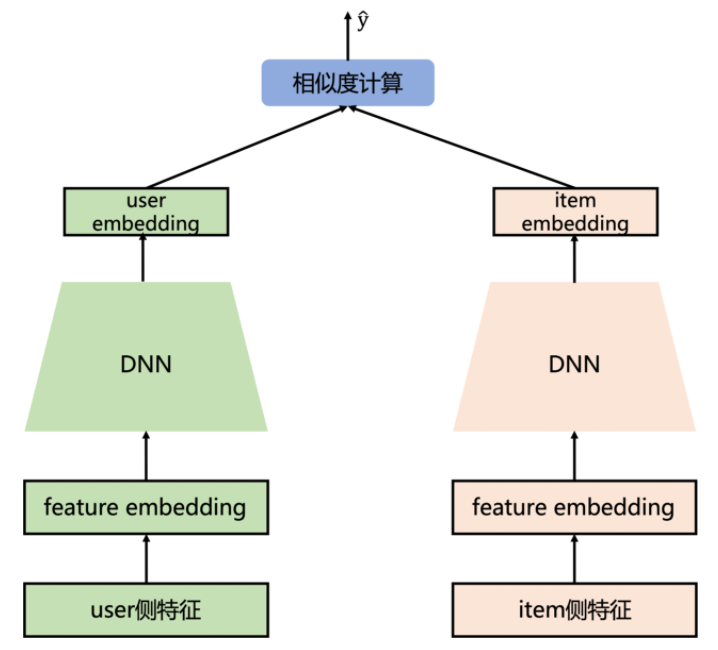
推荐系统-召回阶段-2013:DSSM(双塔模型)【Embedding(语义向量)召回】【微软】
Redis与分布式:主从复制

以后面试官问你 为啥不建议使用Select *,请你大声回答他!

Message queue data storage MySQL table design

Open Inventor 10.12 Major Improvements - Harmony Edition
随机推荐
UnityShader入门学习(二)——渲染流水线
Why do we need to sub-library and sub-table?
Nuget打包并上传教程
Spark学习(2)-Spark环境搭建-Local
MySQL【子查询】
UnityShader入门学习(一)——GPU与Shader
leetcode: 485. Maximum number of consecutive 1s
el-tooltip的使用
Network cable RJ45 interface pins [easy to understand]
线程池的使用二
Uniapp WeChat small application reference standard components
OAuth2:单点登陆客户端
Analysis of the startup source code of hyperf (2) - how the request reaches the controller
Five dimensions to start MySQL optimization
1-hour live broadcast recruitment order: industry leaders share dry goods, and enterprise registration is open丨qubit · point of view
Open Inventor 10.12 Major Improvements - Harmony Edition
Linux bash: redis-server: command not found
Unity Shader入门精要学习——透明效果
Comparison of Optical Motion Capture and UWB Positioning Technology in Multi-agent Cooperative Control Research
I summed up the bad MySQL interview questions