当前位置:网站首页>数据接入平台方案实现(游族网络)
数据接入平台方案实现(游族网络)
2022-06-11 05:36:00 【Adobee Chen】
目录
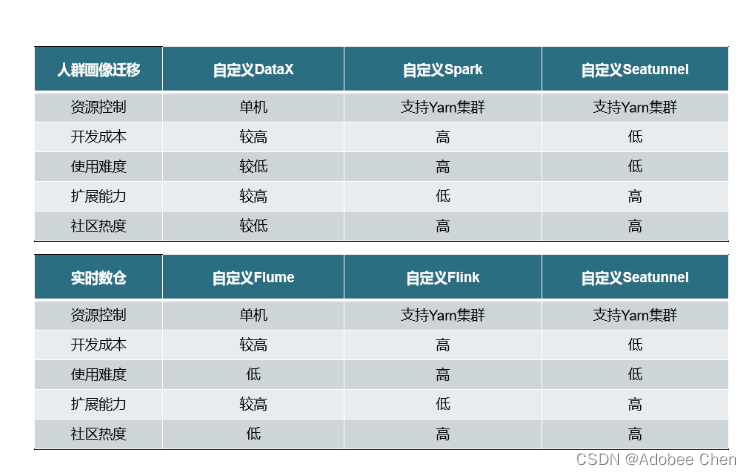
Datax、自定义Flink、自定义SeaTunnel是否满足需求对比
架构

离线功能
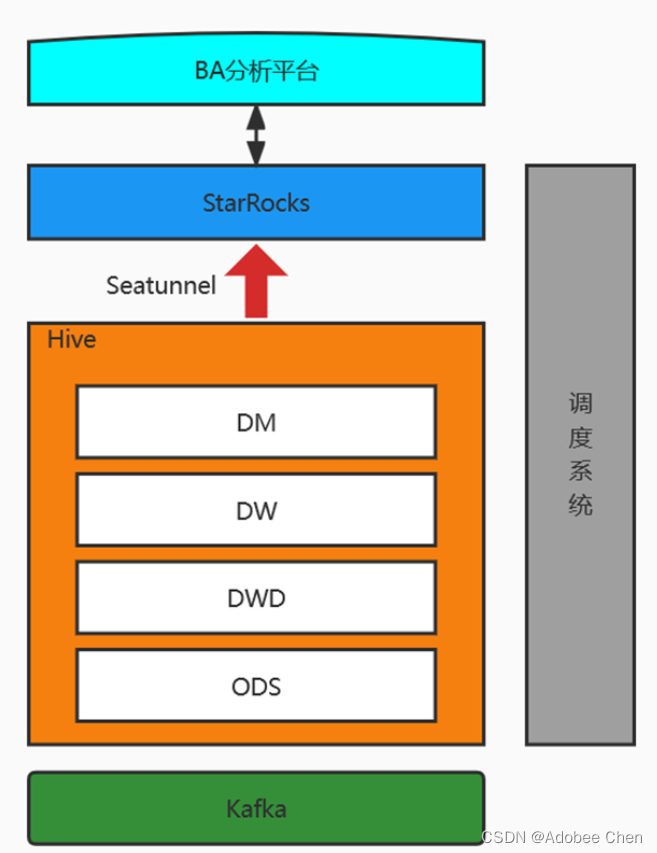
实时功能

Datax、自定义Flink、自定义SeaTunnel是否满足需求对比
自定义 StarRocks sink插件
SeaTunnel架构剖析_Adobee Chen的博客-CSDN博客
批处理需要使用SeaTunnel的Spark引擎自定义StarRock Sink插件。插件需要继承SparkBatchSink的抽象类,在output方法中去定义具体的输出逻辑,封装StarRocks提供的Stream Load导入方式。在这个基础上,我们又增加了预操作、生成Label和Json导入等一些功能。下图描述了插件处理数据的大致流程。

定义好插件之后,通过全类名的方式在配置文件中引用。
com.youzu.seatunnel.sink.StarRocksSink{
   fe_host:"127.0.0.1"
   http_port:"8030"
   database="database"
   table="table"
   user="user"
   password="password"
   headers.format="csv"
}
提交应用
下图是SeaTunnel官方提供的配置和提交应用的方式,需要在磁盘配置文件中定义env、source、transForm、sink的插件配置,然后通过SeaTunnel提供的命令行启动工具提交应用,设置交互模式和配置文件的路径。
bin/start-seatunnel-spark.sh \
  --master local \
  --deploy-mode client \
  --config config/test.conf
env {
spark.sql.catalogImplementation = "hive"
spark.app.name = "seatunnel_hive2sr"
}
source {
hive {
pre_sql="select id,name,age from tmp.student"
result_table_name="source"
}
}
transform {
}
sink {
com.youzu.seatunnel.sink.StarRockSink{
fenodes="127.0.0.1:8030"
user ="user"
password ="password"
columns = "id,name,age"
database = "tmp"
table = "student"
}
}在实际使用过程中,我们发现官方提供的配置和提交应用的方式与我们的调度系统结合时存在一些不方便的地方。一是不方便动态传参,二是用户在使用过程中既需要维护插件配置文件,又需要维护一个启动脚本,不方便用户使用。
待续。。。
边栏推荐
- BERT知识蒸馏
- (15) Infrared communication
- 项目-智慧城市
- es-ik 安装报错
- Common methods of tool class objectutil
- 1. use alicloud object OSS (basic)
- Section I: classification and classification of urban roads
- [project - what are the supporting materials in the annexes? (18 kinds of 2000 word summary)] project plan of innovation and entrepreneurship competition and supporting materials of Challenge Cup entr
- Share an RSA encryption and decryption tool class, including public key encryption, private key decryption, private key encryption, public key decryption, private key signature, public key verificatio
- English digital converter
猜你喜欢

NDK learning notes (V)
![[entry level basics] node basic knowledge summary](/img/91/39aff1ade1f37f54b61a454e32d487.jpg)
[entry level basics] node basic knowledge summary

22、生成括号

微信小程序,购买商品属性自动换行,固定div个数,超出部分自动换行

JVM tuning 6: GC log analysis and constant pool explanation

NDK learning notes (14) create an avi video player using avilib+window

初步了解多任务学习

自定义View之基础篇

如何让灯具智能化,单火、零火智能开关怎么选!

智能门锁为什么会这么火,米家和智汀的智能门锁怎么样呢?
随机推荐
Activity start process record
Getbackgroundaudiomanager controls music playback (dynamic binding of class name)
NDK learning notes (V)
Tencent X5 kernel initialization failed tbsreaderview not support by:***
Wechat applet uploads the data obtained from database 1 to database 2
1. use alicloud object OSS (basic)
49. grouping of acronyms
Wechat applet text built-in component newline character does not newline reason
Aurora im live chat
自定义View基础之Layout
NDK learning notes (13) create an avi video player using avilib+opengl es 2.0
49. 字母异位词分组
Minimize maximum
Traversal of binary tree -- restoring binary tree by two different Traversals
PCB走线到底能承载多大电流
Restoration of binary tree -- number restoration
Solving graph problems with union search set
Customize the layout of view Foundation
[go deep into kotlin] - get to know flow for the first time
NDK learning notes (IV) functions, classes and exceptions of swig