当前位置:网站首页>Implement global double finger long press to return to the desktop
Implement global double finger long press to return to the desktop
2022-06-28 08:45:00 【When it rains at night in Bashan】
Recently made a function , Because our equipment , No function keys , So you need to implement a function , No matter which application on the device , Long press with both fingers , You have to go back Launcher Interface .
Just started to meet this demand , A face of meng , I went to , this … It was all in a App Jump around in the , That's all right. , How to make it , Can't write , Then copy it , A quick search on the Internet , Little information was found , Suddenly thought of , Global gesture returns to the desktop , Go to the Android native global gesture code
Add gestures
///WorkSpaces/LA.UM.9.15/LINUX/android/frameworks/base/services/core/java/com/android/server/wm/SystemGesturesPointerEventListener.java
// Global gesture core code
   @Override
    public void onPointerEvent(MotionEvent event) {

        if (mGestureDetector != null && event.isTouchEvent()) {

            mGestureDetector.onTouchEvent(event);
        }
        switch (event.getActionMasked()) {

            case MotionEvent.ACTION_DOWN:
                mSwipeFireable = true;
                mDebugFireable = true;
                mDownPointers = 0;
                captureDown(event, 0);
                if (mMouseHoveringAtEdge) {

                    mMouseHoveringAtEdge = false;
                    mCallbacks.onMouseLeaveFromEdge();
                }
                mCallbacks.onDown();
                break;
            case MotionEvent.ACTION_POINTER_DOWN:
                captureDown(event, event.getActionIndex());
                if (mDebugFireable) {

                    mDebugFireable = event.getPointerCount() < 5;
                    if (!mDebugFireable) {

                        if (DEBUG) Slog.d(TAG, "Firing debug");
                        mCallbacks.onDebug();
                    }
                }
                break;
            case MotionEvent.ACTION_MOVE:
                if (mSwipeFireable) {

                    final int swipe = detectSwipe(event);
                    mSwipeFireable = swipe == SWIPE_NONE;
                    if (swipe == SWIPE_FROM_TOP) {

                        if (DEBUG) Slog.d(TAG, "Firing onSwipeFromTop");
                        mCallbacks.onSwipeFromTop();
                    } else if (swipe == SWIPE_FROM_BOTTOM) {

                        if (DEBUG) Slog.d(TAG, "Firing onSwipeFromBottom");
                        mCallbacks.onSwipeFromBottom();
                    } else if (swipe == SWIPE_FROM_RIGHT) {

                        if (DEBUG) Slog.d(TAG, "Firing onSwipeFromRight");
                        mCallbacks.onSwipeFromRight();
                    } else if (swipe == SWIPE_FROM_LEFT) {

                        if (DEBUG) Slog.d(TAG, "Firing onSwipeFromLeft");
                        mCallbacks.onSwipeFromLeft();
                    }
                }
                break;
            case MotionEvent.ACTION_HOVER_MOVE:
                if (event.isFromSource(InputDevice.SOURCE_MOUSE)) {

                    if (!mMouseHoveringAtEdge && event.getY() == 0) {

                        mCallbacks.onMouseHoverAtTop();
                        mMouseHoveringAtEdge = true;
                    } else if (!mMouseHoveringAtEdge && event.getY() >= screenHeight - 1) {

                        mCallbacks.onMouseHoverAtBottom();
                        mMouseHoveringAtEdge = true;
                    } else if (mMouseHoveringAtEdge
                            && (event.getY() > 0 && event.getY() < screenHeight - 1)) {

                        mCallbacks.onMouseLeaveFromEdge();
                        mMouseHoveringAtEdge = false;
                    }
                }
                break;
            case MotionEvent.ACTION_UP:
            case MotionEvent.ACTION_CANCEL:
                mSwipeFireable = false;
                mDebugFireable = false;
                mCallbacks.onUpOrCancel();
                break;
            default:
                if (DEBUG) Slog.d(TAG, "Ignoring " + event);
        }
    }
ad locum , We see four callbacks , These are the four common global gestures
 interface Callbacks {

        void onSwipeFromTop();
        void onSwipeFromBottom();
        void onSwipeFromRight();
        void onSwipeFromLeft();
   }
Then we can see their implementation here
//frameworks/base/services/core/java/com/android/server/wm/DisplayPolicy.java
 DisplayPolicy(WindowManagerService service, DisplayContent displayContent) {

      //.................
        mSystemGestures = new SystemGesturesPointerEventListener(mContext, mHandler,
                new SystemGesturesPointerEventListener.Callbacks() {

                    @Override
                    public void onSwipeFromTop() {

                        synchronized (mLock) {

                            if (mStatusBar != null) {

                                requestTransientBars(mStatusBar);
                            }
                        }
                    }

                    @Override
                    public void onSwipeFromBottom() {

                        synchronized (mLock) {

                            if (mNavigationBar != null
                                    && mNavigationBarPosition == NAV_BAR_BOTTOM) {

                                requestTransientBars(mNavigationBar);
                            }
                        }
                    }

                    @Override
                    public void onSwipeFromRight() {

                        final Region excludedRegion = Region.obtain();
                        synchronized (mLock) {

                            mDisplayContent.calculateSystemGestureExclusion(
                                    excludedRegion, null /* outUnrestricted */);
                            final boolean sideAllowed = mNavigationBarAlwaysShowOnSideGesture
                                    || mNavigationBarPosition == NAV_BAR_RIGHT;
                            if (mNavigationBar != null && sideAllowed
                                    && !mSystemGestures.currentGestureStartedInRegion(
                                            excludedRegion)) {

                                requestTransientBars(mNavigationBar);
                            }
                        }
                        excludedRegion.recycle();
                    }

                    @Override
                    public void onSwipeFromLeft() {

                        final Region excludedRegion = Region.obtain();
                        synchronized (mLock) {

                            mDisplayContent.calculateSystemGestureExclusion(
                                    excludedRegion, null /* outUnrestricted */);
                            final boolean sideAllowed = mNavigationBarAlwaysShowOnSideGesture
                                    || mNavigationBarPosition == NAV_BAR_LEFT;
                            if (mNavigationBar != null && sideAllowed
                                    && !mSystemGestures.currentGestureStartedInRegion(
                                            excludedRegion)) {

                                requestTransientBars(mNavigationBar);
                            }
                        }
                        excludedRegion.recycle();
                    }

                    @Override
                    public void onFling(int duration) {

                        if (mService.mPowerManagerInternal != null) {

                            mService.mPowerManagerInternal.powerHint(
                                    PowerHint.INTERACTION, duration);
                        }
                    }


                });
     //...................
    }
Here is the specific implementation of them , So if our requirement is to go up and return to the desktop , Then just in onSwipeFromBottom Just do the return operation . But what we need is a long press with two fingers …
incorrect , We seem to have seen something just now , Look back
///WorkSpaces/LA.UM.9.15/LINUX/android/frameworks/base/services/core/java/com/android/server/wm/SystemGesturesPointerEventListener.java
   @Override
    public void onPointerEvent(MotionEvent event) {

        if (mGestureDetector != null && event.isTouchEvent()) {

            mGestureDetector.onTouchEvent(event);
        }
        //.......................
   }
   // Keep looking down
   public void systemReady() {

        // GestureDetector records statistics about gesture classification events to inform gesture
        // usage trends. SystemGesturesPointerEventListener creates a lot of noise in these
        // statistics because it passes every touch event though a GestureDetector. By creating an
        // anonymous subclass of GestureDetector, these statistics will be recorded with a unique
        // source name that can be filtered.

        // GestureDetector would get a ViewConfiguration instance by context, that may also
        // create a new WindowManagerImpl for the new display, and lock WindowManagerGlobal
        // temporarily in the constructor that would make a deadlock.
        mHandler.post(() -> {

            final int displayId = mContext.getDisplayId();
            final DisplayInfo info = DisplayManagerGlobal.getInstance().getDisplayInfo(displayId);
            if (info == null) {

                // Display already removed, stop here.
                Slog.w(TAG, "Cannot create GestureDetector, display removed:" + displayId);
                return;
            }
            mGestureDetector = new GestureDetector(mContext, new FlingGestureDetector(), mHandler) {

            };
        });
    }

    private final class FlingGestureDetector extends GestureDetector.SimpleOnGestureListener {


        private OverScroller mOverscroller;

        FlingGestureDetector() {

            mOverscroller = new OverScroller(mContext);
        }

        @Override
        public boolean onSingleTapUp(MotionEvent e) {

            if (!mOverscroller.isFinished()) {

                mOverscroller.forceFinished(true);
            }
            return true;
        }
        @Override
        public boolean onFling(MotionEvent down, MotionEvent up,
                float velocityX, float velocityY) {

        //............
            return true;
        }
    }
    ///frameworks/base/core/java/android/view/GestureDetector.java
   public static class SimpleOnGestureListener implements OnGestureListener, OnDoubleTapListener,
            OnContextClickListener {


        public boolean onSingleTapUp(MotionEvent e) {

            return false;
        }

        public void onLongPress(MotionEvent e) {

        }

        public boolean onScroll(MotionEvent e1, MotionEvent e2,
                float distanceX, float distanceY) {

            return false;
        }

        public boolean onFling(MotionEvent e1, MotionEvent e2, float velocityX,
                float velocityY) {

            return false;
        }

        public void onShowPress(MotionEvent e) {

        }

        public boolean onDown(MotionEvent e) {

            return false;
        }

        public boolean onDoubleTap(MotionEvent e) {

            return false;
        }

        public boolean onDoubleTapEvent(MotionEvent e) {

            return false;
        }

        public boolean onSingleTapConfirmed(MotionEvent e) {

            return false;
        }

        public boolean onContextClick(MotionEvent e) {

            return false;
        }
    }
You can see some methods that have been implemented at the bottom, such as stand-alone , Double click and so on for us to use .
brainwave , Then we are GestureDetector To realize the logic of long pressing with two fingers , And then on top FlingGestureDetector Long press with two fingers in the call , In it, you can implement the logic of returning to the desktop , No OK 了 .
to SimpleOnGestureListener Add a two finger long press event , And then in GestureDetector Of onTouchEvent In the method , Do double finger long press event trigger logic , About the following
    private void handlePointerDown(MotionEvent ev, Float focusX) {

        Log.d(TAG, "handlePointerDown");
        mDoubleFingerPressStartMs = SystemClock.elapsedRealtime();
        if (ev.getPointerCount() != 2 || !isDoubleFingerEvent()) {

            return;
        }
        mDownFocusX = focusX;
        if (mCurrentPointerDownEvent != null) {

            mCurrentPointerDownEvent.recycle();
        }
        mCurrentPointerDownEvent = MotionEvent.obtain(ev);
        mHandler.removeMessages(DOUBLE_FINGER_PRESS);
        mHandler.sendEmptyMessageAtTime(DOUBLE_FINGER_PRESS, SystemClock.uptimeMillis() + 1000);
    }

    private boolean isDoubleFingerEvent() {

        return mDoubleFingerPressStartMs - mSingleFingerPressStartMs <= 100;
    }


    private void handlePointerUp(MotionEvent ev) {

        Log.d(TAG, "handlePointerUp");
        if (ev.getPointerCount() != 2 || !isDoubleFingerEvent()) {

            return;
        }
        mHandler.removeMessages(DOUBLE_FINGER_PRESS);
    }
And in the SystemGesturesPointerEventListener Class FlingGestureDetector Here is the added double finger long pressing method :
    @Override
        public boolean onDoubleFingerLongPress(MotionEvent e) {

            if (DEBUG) Slog.d(TAG, "onDoubleFingerLongPress");
            return true;
        }
Compile the package , After brushing in , Long press with both fingers , I found that the log was successfully typed , Next , We need to think about how to get back to the table
Back to the desktop
This is much easier , We home key , perhaps back Key can be returned , however back Key words , If the application enters the secondary page , Then you have to perform two long double finger presses , Does not meet the requirements . So we must consider home event .
Reference resources
 private void sendKey(int keyCode) {

            try {

                int inputSource = KeyEvent.FLAG_FROM_SYSTEM | KeyEvent.FLAG_VIRTUAL_HARD_KEY | InputDevice.SOURCE_KEYBOARD;
                long now = SystemClock.uptimeMillis();
                boolean istrue = InputManager.getInstance().injectInputEvent(
                        new KeyEvent(
                                now, now, KeyEvent.ACTION_DOWN, keyCode, 0, 0,
                                KeyCharacterMap.VIRTUAL_KEYBOARD, 0, 0, inputSource
                        ), InputManager.INJECT_INPUT_EVENT_MODE_WAIT_FOR_FINISH
                );
                boolean isok = InputManager.getInstance().injectInputEvent(
                        new KeyEvent(
                                now, now, KeyEvent.ACTION_UP, keyCode, 0, 0,
                                KeyCharacterMap.VIRTUAL_KEYBOARD, 0, 0, inputSource
                        ), InputManager.INJECT_INPUT_EVENT_MODE_WAIT_FOR_FINISH
                );
            } catch (Exception e) {

                e.printStackTrace();
            }
        }
  // So we can return to the desktop just by calling .
     @Override
        public boolean onDoubleFingerLongPress(MotionEvent e) {

            if (DEBUG) Slog.d(TAG, "onDoubleFingerLongPress");
            sendKey(KeyEvent.KEYCODE_HOME);
            return true;
        }
summary : Framework Code , Or see , Look at what good people write
After reading it , Paint a tiger like a cat , Don't worry , Take your time .
边栏推荐
- Redis02 -- an operation command of five data types for ending redis (it can be learned, reviewed, interviewed and collected for backup)
- Cloudcompare & PCL point cloud SVD decomposition
- 实现全局双指长按返回桌面
- 隐私计算FATE-----离线预测
- 如何抑制SiC MOSFET Crosstalk(串擾)?
- Loss loss function
- 【云原生 | Kubernetes篇】深入了解Pod(六)
- Discussion on the improvement and application of the prepayment system in the management of electricity charge and price
- WasmEdge 0.10.0 发布!全新的插件扩展机制、Socket API 增强、LLVM 14 支持
- 小程序 :遍历list里面的某个数组的值,等同于 for=“list” list.comment里面的某一项
猜你喜欢

与普通探头相比,差分探头有哪些优点
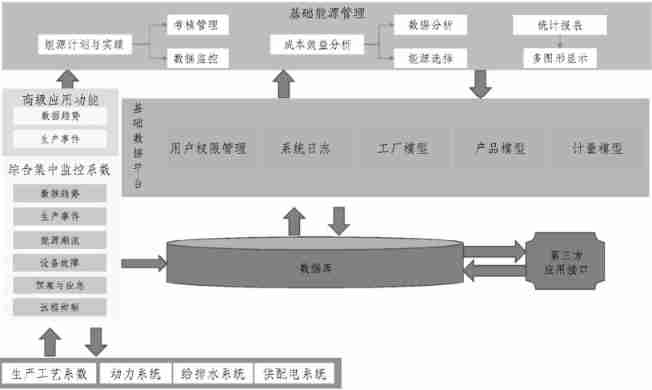
Application of energy management system in iron and steel enterprises

电子元器件销售ERP管理系统哪个比较好?
![Dell r730 server startup error: [xxx] USB 1-1-port4: disabled by hub (EMI?), re-enabling...](/img/90/425965ca4b3df3656ce2a5f4230c4b.jpg)
Dell r730 server startup error: [xxx] USB 1-1-port4: disabled by hub (EMI?), re-enabling...

Mysql8.0 forgot the root password
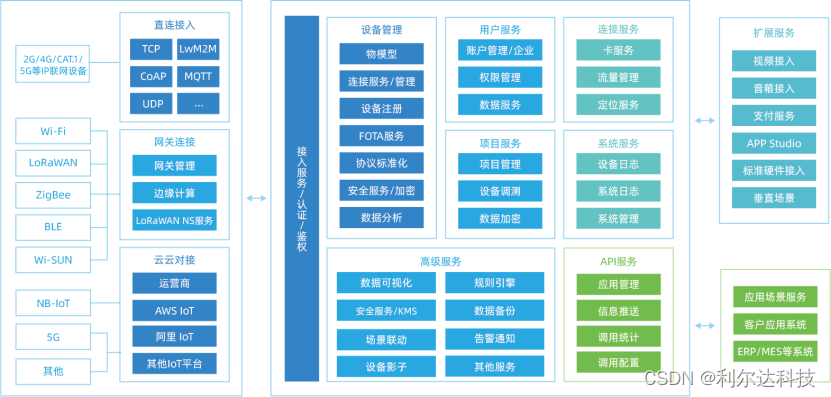
利尔达低代码数据大屏,铲平数据应用开发门槛

Build the first neural network with pytoch and optimize it
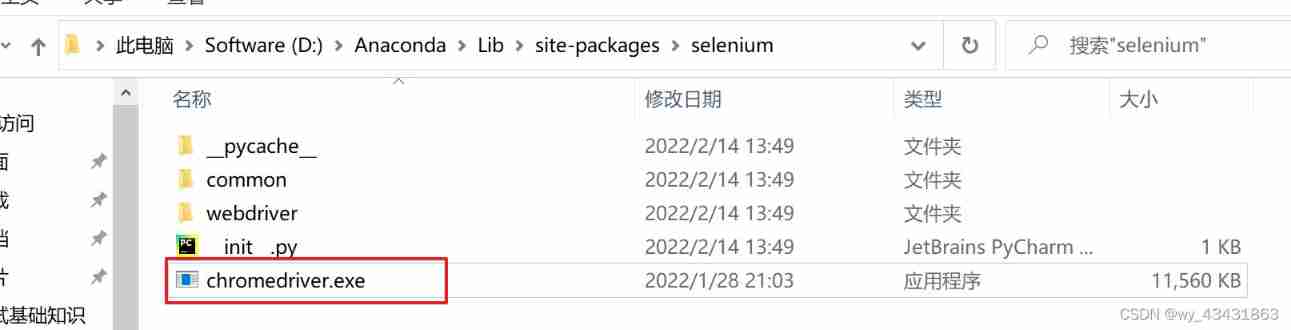
Solution: selenium common. exceptions. WebDriverException: Message: ‘chromedriver‘ execu

Discussion on safety management of centralized maintenance construction site of substation under the mode of operation and maintenance
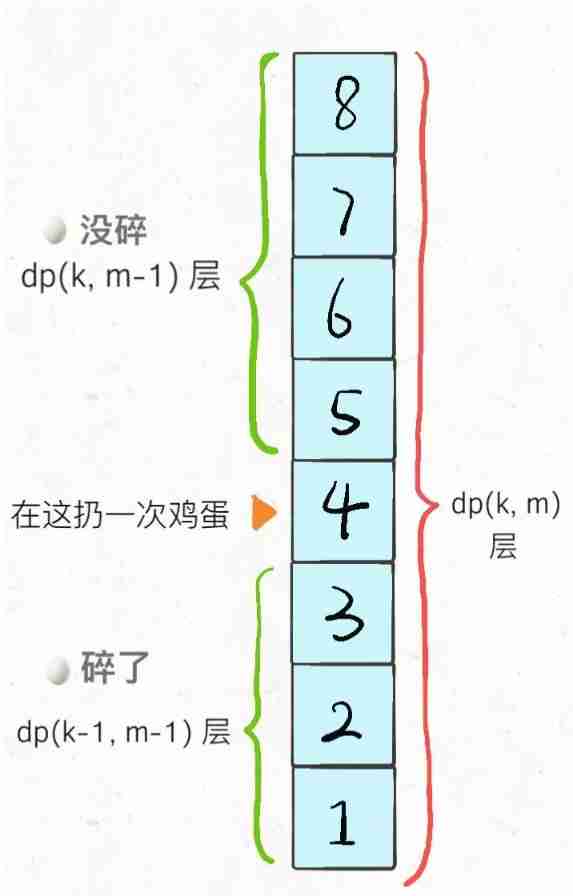
887. egg drop
随机推荐
Tree
Protection range and optimization of motor protector for hoist equipment
Redis02 -- an operation command of five data types for ending redis (it can be learned, reviewed, interviewed and collected for backup)
Trailing Zeroes (II)
duilib 入门基础十二 样式类
【大案例】学成在线网站
RAC enable archive log
[learning notes] search
Webrtc advantages and module splitting
887. egg drop
Kali Notes(1)
【力扣10天SQL入门】Day4 组合查询 & 指定选取
PMP从报考到拿证基本操作,了解PMP必看篇
nuxt3入门
神殿
【无标题】
The 6th smart home Asia 2022 will be held in Shanghai in October
Love analysis released the 2022 love analysis · it operation and maintenance manufacturer panorama report, and an Chao cloud was strongly selected!
Copy & Deepcopy
Almost Union-Find(带权并查集)