当前位置:网站首页>02 Tekton Pipeline
02 Tekton Pipeline
2022-06-11 14:18:00 【华为云】
一 背景
二 Pipeline 步骤
2.1 代码拉取
代码是交付的基石,是后续的所有动作做铺垫的,我们需要创建一个拉取代码的Task。
不过这个Task,我们可以不用自己写,直接用Tekton Hub上别人写好的,地址是:https://hub.tekton.dev/tekton/task/git-clone。这个Task支持的功能比较全,参数也比较多,具体有哪些参数可以到上面的地址进行查看和学习。
其安装方式有两种:kubectl和tkn客户端。
(1)使用kubectl进行安装
$ kubectl apply -f https://raw.githubusercontent.com/tektoncd/catalog/main/task/git-clone/0.5/git-clone.yaml(2)使用tkn客户端进行安装
$ tkn hub install task git-clone查看task详情
$ tkn task list$ kubectl get task git-clone -oyaml创建一个测试taskRun来测试师傅可以正常拉取代码。
cat > git-clone-taskrun.yaml << EOFapiVersion: tekton.dev/v1beta1kind: TaskRunmetadata: name: test-git-clone namespace: defaultspec: workspaces: - name: output emptyDir: {} params: - name: url value: "https://gitee.com/coolops/tekton-install.git" - name: revision value: "master" - name: gitInitImage value: "registry.cn-hangzhou.aliyuncs.com/coolops/tekton-git-init:v0.29" taskRef: name: git-cloneEOF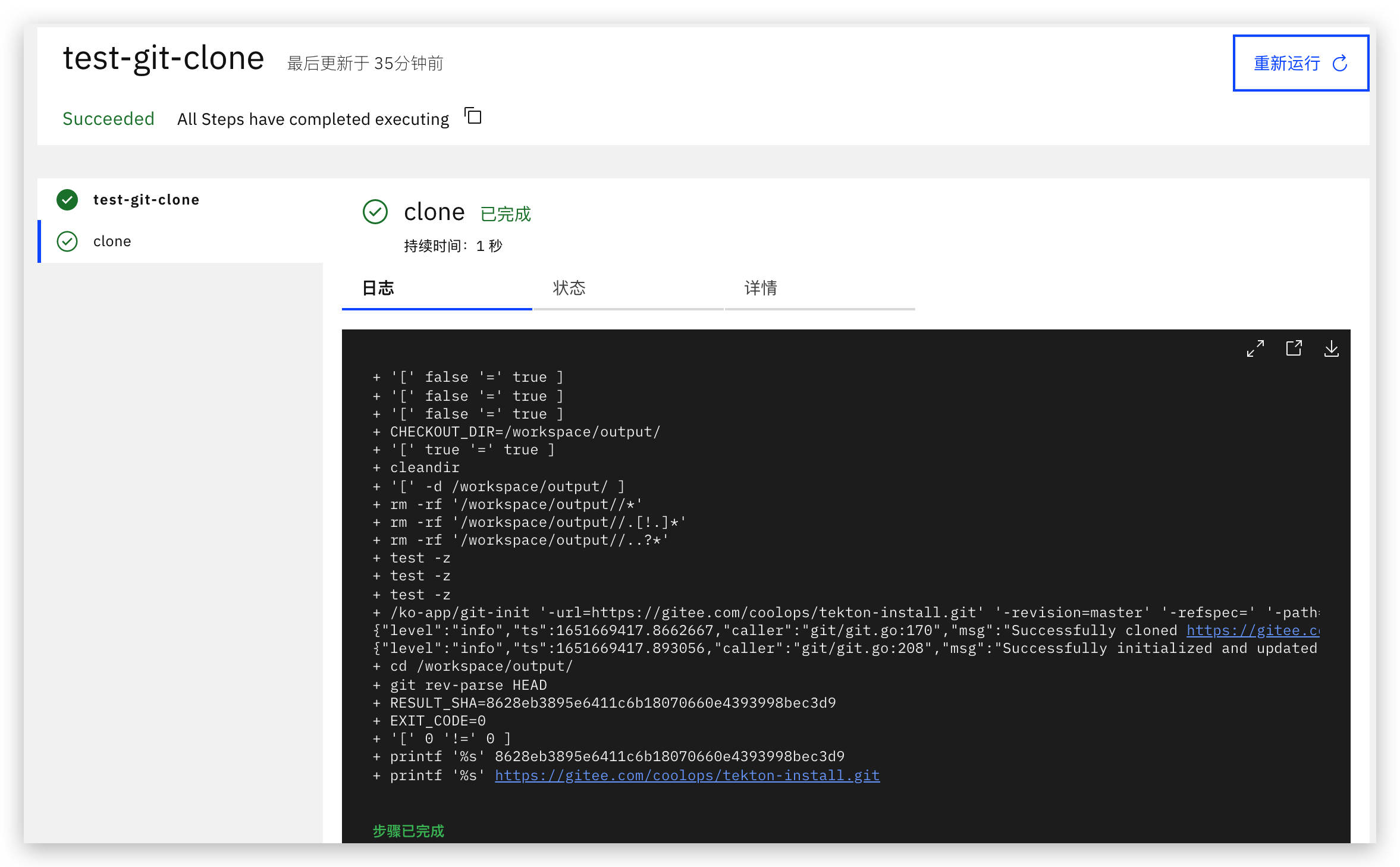
2.2 单元测试
单元测试比较简单,基本就是执行go test ./...命令就行,比如。
> go test ./...ok devops-hello-world 0.313sok devops-hello-world/pkg (cached)所以这个Task,只需要一个Go环境,能执行Go命令即可,如下:
cat > unit-test-task.yaml <<EOFapiVersion: tekton.dev/v1beta1kind: Task metadata: name: unit-testspec: workspaces: - name: source steps: - name: unit-test workingDir: \$(workspaces.source.path) image: golang:1.17.5 env: - name: GOPROXY value: https://goproxy.cn command: ['go'] args: - "test" - "./..."EOF2.3 镜像构建/推送
为什么这里没有单独把应用构建组成一个Task呢?主要是我们在这里采用了多阶段构建,我们可以将应用构建-镜像打包写在一个Dockerfile中,所以这里只需要写一个Task。
cat > docker-build-push.yaml << EOFapiVersion: tekton.dev/v1beta1kind: Task metadata: name: build-push-imagespec: params: - name: pathToDockerfile description: The path to the dockerfile to build (relative to the context) default: Dockerfile - name: imageUrl description: Url of image repository - name: imageTag description: Tag to apply to the built image default: latest workspaces: - name: source - name: dockerconfig mountPath: /kaniko/.docker # config.json 的挂载目录 steps: - name: build-and-push image: registry.cn-hangzhou.aliyuncs.com/coolops/kaniko-executor:v1.5.0 workingDir: \$(workspaces.source.path) command: - /kaniko/executor args: - --dockerfile=\$(params.pathToDockerfile) - --destination=\$(params.imageUrl):\$(params.imageTag) - --context=\$(workspaces.source.path)EOF我们这里采用kaniko进行构建镜像,用这种方式不用挂载docker.sock文件,但是我们需要将docker config保存在/kaniko/.docker目录下。我们可以通过如下命令来创建secret。
kubectl create secret docker-registry dockerhub --docker-server=https://index.docker.io/v1/ --docker-username=xxxxxxxxx --docker-password=xxxxxxxxxxx --dry-run=client -o json | jq -r '.data.".dockerconfigjson"' | base64 -d > /tmp/config.json && kubectl create secret generic docker-config --from-file=/tmp/config.json && rm -f /tmp/config.json因为在镜像推送的时候需要镜像仓库的密钥。
2.4 部署
将kubeconfig创建为secret
$ kubectl create secret generic kubernetes-config --from-file=/root/.kube/config$ kubectl get secretNAME TYPE DATA AGEdefault-token-mcrdh kubernetes.io/service-account-token 3 30hdocker-config Opaque 1 2m48skubernetes-config Opaque 1 6s创建task
cat > deploy-to-k8s.yaml <<EOFapiVersion: tekton.dev/v1alpha1kind: Taskmetadata: name: deploy-to-k8sspec: workspaces: - name: source - name: kubernetesconfig mountPath: /root/.kube params: - name: pathToYamlFile description: The path to the yaml file to deploy within the git source default: deployment.yaml - name: IMAGE - name: TAG steps: - name: run-kubectl image: registry.cn-hangzhou.aliyuncs.com/coolops/kubectl:1.19.16 workingDir: \$(workspaces.source.path) script: | sed -i s#IMAGE#\$(params.IMAGE)#g \$(params.pathToYamlFile) sed -i s#TAG#\$(params.TAG)#g \$(params.pathToYamlFile) kubectl apply -f \$(params.pathToYamlFile)EOF三 整合Pipeline
上面我们已经把每一步整理成了Task,下面就应该进行Pipeline的组合了,然后再声明需要的变量就可以,如下:
cat > pipeline.yaml <<EOFapiVersion: tekton.dev/v1beta1 kind: Pipeline metadata: name: devops-hello-world-pipeline spec: workspaces: # 声明 workspaces - name: go-repo-pvc - name: docker-config - name: kubernetes-config params: - name: git_url - name: revision type: string default: "master" - name: gitInitImage type: string default: "registry.cn-hangzhou.aliyuncs.com/coolops/tekton-git-init:v0.29" - name: pathToDockerfile description: The path to the build context, used by Kaniko - within the workspace default: . - name: imageUrl description: Url of image repository - name: imageTag description: Tag to apply to the built image default: latest tasks: # 添加task到流水线中 - name: clone taskRef: name: git-clone workspaces: - name: output workspace: go-repo-pvc params: - name: url value: \$(params.git_url) - name: revision value: \$(params.revision) - name: gitInitImage value: \$(params.gitInitImage) - name: unit-test workspaces: # 传递 workspaces - name: source workspace: go-repo-pvc taskRef: name: unit-test runAfter: - clone - name: build-push-image params: - name: pathToDockerfile value: \$(params.pathToDockerfile) - name: imageUrl value: \$(params.imageUrl) - name: imageTag value: \$(params.imageTag) taskRef: name: build-push-image runAfter: - unit-test workspaces: # 传递 workspaces - name: source workspace: go-repo-pvc - name: dockerconfig workspace: docker-config - name: deploy-to-k8s taskRef: name: deploy-to-k8s params: - name: pathToYamlFile value: deployment.yaml - name: IMAGE value: \$(params.imageUrl) - name: TAG value: \$(params.imageTag) workspaces: - name: source workspace: go-repo-pvc - name: kubernetesconfig workspace: kubernetes-config runAfter: - build-push-imageEOF运行测试
运行测试就是创建PipelineRun,不过在创建之前,我们先创建需要的认证信息。
cat > auth.yaml <<EOFapiVersion: v1 kind: Secret metadata: name: gitlab-auth annotations: tekton.dev/git-0: https://gitee.com/ # 这里使用的gitee仓库type: kubernetes.io/basic-auth stringData: username: xxxx password: xxxx---apiVersion: v1 kind: ServiceAccount metadata: name: tekton-build-sa secrets: - name: gitlab-auth---apiVersion: rbac.authorization.k8s.io/v1 kind: ClusterRoleBinding metadata: name: tekton-clusterrole-binding roleRef: apiGroup: rbac.authorization.k8s.io kind: ClusterRole name: edit subjects: - kind: ServiceAccount name: tekton-build-sa namespace: default EOF四 PipelineRun测试
cat > pipelinerun.yaml <<EOFapiVersion: tekton.dev/v1beta1kind: PipelineRunmetadata: name: devops-hello-world-pipeline-runspec: pipelineRef: name: devops-hello-world-pipeline params: - name: revision value: master - name: git_url value: https://gitee.com/coolops/devops-hello-world.git - name: imageUrl value: registry.cn-hangzhou.aliyuncs.com/coolops/devops-hello-world - name: imageTag value: latest - name: pathToDockerfile value: Dockerfile workspaces: - name: go-repo-pvc volumeClaimTemplate: spec: accessModes: - ReadWriteOnce storageClassName: openebs-hostpath resources: requests: storage: 1Gi - name: docker-config secret: secretName: docker-config - name: kubernetes-config secret: secretName: kubernetes-config serviceAccountName: tekton-build-sa EOF参考链接
边栏推荐
- 非常值得學習的調度開源庫推薦
- Unsealing easy QF PDA helps enterprises improve ERP management
- Cartoon: interesting "cake cutting" problem
- Three level classification display
- gensim.models word2vec 参数
- Implementation of VGA protocol based on FPGA
- C language learning record 6
- [pyhton crawler] regular expression
- Operating instructions for communication between RS485 (Modbus RTU) industrial RFID reader ck-fr03-a01 and PLC Mitsubishi fx5u
- Lake Shore HR series sensors
猜你喜欢
Question bank and answers of the latest national fire-fighting facility operators (primary fire-fighting facility operators) in 2022

Tp6 whoops based exception takeover (beautiful interface)

2022.2.28 variable length sequence table

Learning notes of yolov3: model structure of yolov3

mysql高级语句
![[pyhton crawler] regular expression](/img/d3/578514b2d19d5f4ed246a33a333d14.jpg)
[pyhton crawler] regular expression

Leetcode 1968. Construct an array whose elements are not equal to the average value of two adjacent elements (yes, finally solved)

. Net C Foundation (6): namespace - scope with name

Chip engineers are too expensive? Your sister
![[public class preview]: mxplayer Ott audio and video transcoding practice and optimization](/img/d8/a367c26b51d9dbaf53bf4fe2a13917.png)
[public class preview]: mxplayer Ott audio and video transcoding practice and optimization
随机推荐
In depth research and analysis report on global and Chinese sanitary safety product market
Alibaba Cloud 3 (Soaring Falcon) x86_64(Py3.7.8) 系统 YUM源
mysql创建表出错1067 - Invalid default value for ‘update_time‘
HMS core shows the latest open capabilities in mwc2022, helping developers build high-quality applications
强大的全文本搜索工具——AnyTXT Searcher
In depth research and analysis report on global and Chinese p-chlorotrifluoromethane Market
MySQL create table error 1067 - invalid default value for 'update_ time‘
Vi LXD deployment of lab server for development records
Invalid bound statement (not found)错误【已解决】
Recommended open source scheduling libraries worth learning
Leetcode 1962. Remove stones to minimize the total amount (should be rounded up)
Work summary: it took a long time to write SQL because of Cartesian product problem (Cartesian product summary attached)
cadence SPB17.4 - allegro - allegro_ free_ viewer
In depth research and analysis report on global and Chinese high purity molybdenum market
【公开课预告】:MXPlayer OTT音视频转码实践和优化
uniapp设置页面跳转效果 - navigateTo切换效果 - 全局animationType动画
VIM secondary replacement
使用cpolar远程办公(1)
Ali talked about the use of strategic mode in the project
gensim. Models word2vec parameter