当前位置:网站首页>openstack实例重启状态就会变成错误处理方法,容器搭建的openstack重启计算节点compute服务方法,开机提示Give root password for maintenance处理方法
openstack实例重启状态就会变成错误处理方法,容器搭建的openstack重启计算节点compute服务方法,开机提示Give root password for maintenance处理方法
2022-06-27 05:40:00 【/*守护她的笑容】
文章目录
实例状态重启就错误处理
报错说明
- 本次故障虚拟机所属底层是通过容器搭建的,所以处理方法和普通搭建的不太一样。
- 有一台虚拟机,关机了,无论是硬重启还是软重启都会如下图错误,并且状态变成错误。
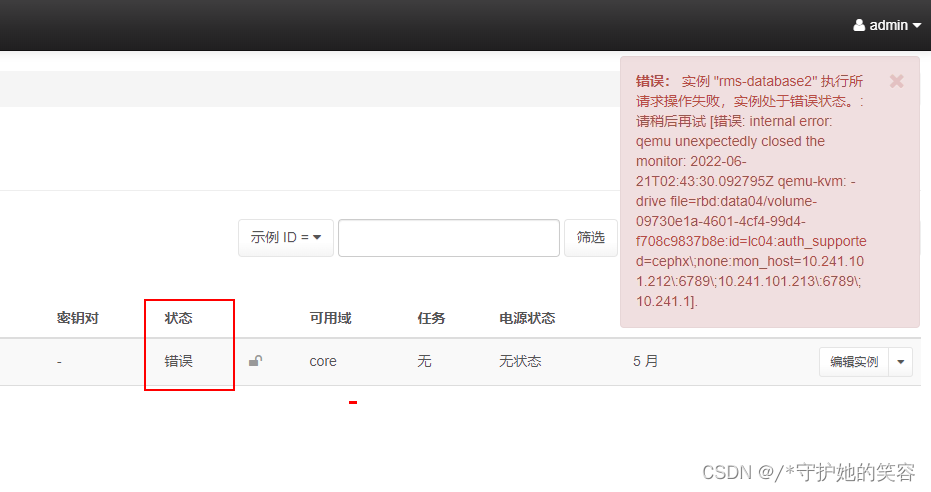
- 根据这个报错呢,是解决不了问题的,需要通过nova日志来分析了。。。
重置错误状态和重启/关闭/启动虚拟机
- 状态错误后去底层重置状态就可以了,我之前文章中有说,不清楚的可以去翻我之前文章看看具体说明。
我这就直接放历史命令,不过多说明。
nova-compute.log日志
nova-compute.log日志说明
nova-compute.log日志是虚拟机实例在启动和运行中产生的日志,日志路径默认为:/var/log/nova/nova-compute.log【容器搭建的就不在这里面,我下面就不是,我会说明查找方法的】nova日志记录在计算节点上的,所以我们要先定位到故障虚拟机的所属物理机,dashboard和novashow都可以看
我这的宿主机在compute30上
所以需要登陆到compute30并定位到日志路径,因为我这是容器搭建的,默认路径下并没有nova目录,我们可以通过find来查找
find / -name *nova*
定位到了
进入刚才定位到的日志
[[email protected] log]# cd /var/lib/docker/volumes/kolla_logs/_data/
[[email protected] _data]# ls
ansible.log  chrony  haproxy  libvirt  neutron  nova  openvswitch  swift
[[email protected] _data]# cd nova/
[[email protected] nova]# ls
nova-compute.log  nova-compute.log.1  nova-compute.log.2.gz  nova-compute.log.3.gz  nova-compute.log.4.gz  nova-compute.log.5.gz  privsep-helper.log
[[email protected] nova]#
记录虚机启动日志
- 虚拟机所属宿主机为compute30,下面日志为compute30的nova日志,
tail -f获取到的 重启虚拟机期间产生的所有日志
前提条件准备
[[email protected] nova]# pwd
/var/log/kolla/nova
[[email protected] nova]# tail -f  nova-api.log
- 回到控制节点,重置虚拟机状态,并重启
这是在控制节点【注意看主机名】【uuid有删除】
[[email protected] ~]# source public-openrc.sh
[[email protected] ~]# nova reset-state --active 19ec09a5-154111-a4bd-636d10794912
[[email protected] ~]# nova reboot 19ec09a5-151b-41-a4bd-636d10794912
- 记录计算节点tail -f新刷的内容
【下面内容关键参数有修改】
#虚拟机所属宿主机为compute30,下面日志为compute30的nova日志,tail -f获取到的 重启虚拟机期间产生的所有日志

[[email protected] nova]# pwd
/var/log/kolla/nova
[[email protected] nova]# tail -f  nova-api.log


2022-06-22 12:01:14.662 6 INFO nova.compute.manager [req-cb3a0f17-bced-414a-a4b5-9bf5b66128a6 2ce6a48d5e7345e5b1c8ba9d3cf99af2 1347c54f15794e178d0398491c31247f - default default] [instance: 19ec09a5-151b-4111-a4bd-636d10794912] Rebooting instance
2022-06-22 12:01:15.272 6 WARNING nova.compute.manager [req-cb3a0f17-bced-414a-a4b5-9bf5b66128a6 2ce6a48d5e7345e5b1c8ba9d3cf99af2 1347c54f15794e178d0398491c31247f - default default] [instance: 19ec09a5-151b-4111-a4bd-636d10794912] trying to reboot a non-running instance: (state: 0 expected: 1)
2022-06-22 12:01:15.361 6 INFO nova.virt.libvirt.driver [-] [instance: 19ec09a5-151b-4111-a4bd-636d10794912] Instance destroyed successfully.
2022-06-22 12:01:15.884 6 INFO os_vif [req-cb3a0f17-bced-414a-a4b5-9bf5b66128a6 2ce6a48d5e7345e5b1c8ba9d3cf99af2 1347c54f15794e178d0398491c31247f - default default] Successfully unplugged vif VIFBridge(active=False,address=fa:16:3e:e7:72:51,bridge_name='qbra0c23034-ea',has_traffic_filtering=True,id=a0c23034-eaf6-459f-986a-757302ea6fbe,network=Network(8e72f232-59be-429e-a5d7-c81c009505ef),plugin='ovs',port_profile=VIFPortProfileOpenVSwitch,preserve_on_delete=True,vif_name='tapa0c23034-ea')
2022-06-22 12:01:15.930 6 INFO nova.virt.libvirt.storage.rbd_utils [req-cb3a0f17-bced-414a-a4b5-9bf5b66128a6 2ce6a48d5e7345e5b1c8ba9d3cf99af2 1347c54f15794e178d0398491c31247f - default default] ==> exists execute begin: call {
    'self': <nova.virt.libvirt.storage.rbd_utils.RBDDriver object at 0x7f8142f1db10>, 'snapshot': None, 'name': u'19ec09a5-151b-4111-a4bd-636d10794912_disk.config', 'pool': None}
2022-06-22 12:01:16.019 6 INFO nova.virt.libvirt.storage.rbd_utils [req-cb3a0f17-bced-414a-a4b5-9bf5b66128a6 2ce6a48d5e7345e5b1c8ba9d3cf99af2 1347c54f15794e178d0398491c31247f - default default] <== exists execute successfully: start at <2022-06-22T04:01:15.931698>, end at <2022-06-22T04:01:16.019874>, consume <0.0882>s, -- return True.
2022-06-22 12:01:25.479 6 INFO os_vif [req-cb3a0f17-bced-414a-a4b5-9bf5b66128a6 2ce6a48d5e7345e5b1c8ba9d3cf99af2 1347c54f15794e178d0398491c31247f - default default] Successfully plugged vif VIFBridge(active=False,address=fa:16:3e:e7:72:51,bridge_name='qbra0c23034-ea',has_traffic_filtering=True,id=a0c23034-eaf6-459f-986a-757302ea6fbe,network=Network(8e72f232-59be-429e-a5d7-c81c009505ef),plugin='ovs',port_profile=VIFPortProfileOpenVSwitch,preserve_on_delete=True,vif_name='tapa0c23034-ea')
2022-06-22 12:01:26.085 6 ERROR nova.virt.libvirt.guest [req-cb3a0f17-bced-414a-a4b5-9bf5b66128a6 2ce6a48d5e7345e5b1c8ba9d3cf99af2 1347c54f15794e178d0398491c31247f - default default] Error launching a defined domain with XML: <domain type='kvm'>
  <name>instance-00000ca5</name>
  <uuid>19ec09a5-151b-4111-a4bd-636d10794912</uuid>
  <metadata>
    <nova:instance xmlns:nova="http://openstack.org/xmlns/libvirt/nova/1.0">
      <nova:package version="0.0.0-1.el7.ceos"/>
      <nova:name>rms-database2</nova:name>
      <nova:creationTime>2022-06-22 04:01:15</nova:creationTime>
      <nova:flavor name="16C-64G-200G">
        <nova:memory>65536</nova:memory>
        <nova:disk>200</nova:disk>
        <nova:swap>0</nova:swap>
        <nova:ephemeral>0</nova:ephemeral>
        <nova:vcpus>16</nova:vcpus>
      </nova:flavor>
      <nova:owner>
        <nova:user uuid="cd7e88be84f14196a468f443b345288c">a652555584dd47fb9678</nova:user>
        <nova:project uuid="22fce3ac5d094a32a652555584dd47fb">JZHZYQYSJK</nova:project>
      </nova:owner>
    </nova:instance>
  </metadata>
  <memory unit='KiB'>67108864</memory>
  <currentMemory unit='KiB'>67108864</currentMemory>
  <vcpu placement='static'>16</vcpu>
  <cputune>
    <shares>16384</shares>
  </cputune>
  <sysinfo type='smbios'>
    <system>
      <entry name='manufacturer'>RDO</entry>
      <entry name='product'>OpenStack Compute</entry>
      <entry name='version'>0.0.0-1.el7.ceos</entry>
      <entry name='serial'>5f8e9ae0-0000-1000-0000-bc16950246e3</entry>
      <entry name='uuid'>19ec09a5-151b-4111-a4bd-636d10794912</entry>
      <entry name='family'>Virtual Machine</entry>
    </system>
  </sysinfo>
  <os>
    <type arch='x86_64' machine='pc-i440fx-rhel7.6.0'>hvm</type>
    <boot dev='hd'/>
    <smbios mode='sysinfo'/>
  </os>
  <features>
    <acpi/>
    <apic/>
  </features>
  <cpu mode='host-model' check='partial'>
    <model fallback='allow'/>
    <topology sockets='16' cores='1' threads='1'/>
  </cpu>
  <clock offset='utc'>
    <timer name='pit' tickpolicy='delay'/>
    <timer name='rtc' tickpolicy='catchup'/>
    <timer name='hpet' present='no'/>
  </clock>
  <on_poweroff>destroy</on_poweroff>
  <on_reboot>restart</on_reboot>
  <on_crash>destroy</on_crash>
  <devices>
    <emulator>/usr/libexec/qemu-kvm</emulator>
    <disk type='network' device='cdrom'>
      <driver name='qemu' type='raw' cache='none'/>
      <auth username='lc01'>
        <secret type='ceph' uuid='7a09d376-d794-499d-ab39-fadcf47b5158'/>
      </auth>
      <source protocol='rbd' name='sys01/19ec09a5-151b-4111-a4bd-636d10794912_disk.config'>
        <host name='1.2.3.200' port='6789'/>
        <host name='1.2.3.201' port='6789'/>
        <host name='1.2.3.202' port='6789'/>
      </source>
      <target dev='hda' bus='ide'/>
      <readonly/>
      <address type='drive' controller='0' bus='0' target='0' unit='0'/>
    </disk>
    <disk type='network' device='disk'>
      <driver name='qemu' type='raw' cache='none'/>
      <auth username='lc04'>
        <secret type='ceph' uuid='15332d26-2f98-441c-b2a9-592b3a31cf17'/>
      </auth>
      <source protocol='rbd' name='data04/volume-09730e1a-4601-4cf4-99d4-f708c9837b8e'>
        <host name='1.2.3.212' port='6789'/>
        <host name='1.2.3.213' port='6789'/>
        <host name='1.2.3.214' port='6789'/>
      </source>
      <target dev='vda' bus='virtio'/>
      <serial>09730e1a-4601-4cf4-99d4-f708c9837b8e</serial>
      <address type='pci' domain='0x0000' bus='0x00' slot='0x04' function='0x0'/>
    </disk>
    <controller type='usb' index='0' model='piix3-uhci'>
      <address type='pci' domain='0x0000' bus='0x00' slot='0x01' function='0x2'/>
    </controller>
    <controller type='pci' index='0' model='pci-root'/>
    <controller type='ide' index='0'>
      <address type='pci' domain='0x0000' bus='0x00' slot='0x01' function='0x1'/>
    </controller>
    <interface type='bridge'>
      <mac address='fa:16:3e:e7:72:51'/>
      <source bridge='qbra0c23034-ea'/>
      <target dev='tapa0c23034-ea'/>
      <model type='virtio'/>
      <address type='pci' domain='0x0000' bus='0x00' slot='0x03' function='0x0'/>
    </interface>
    <serial type='pty'>
      <log file='/var/lib/nova/instances/19ec09a5-151b-4111-a4bd-636d10794912/console.log' append='off'/>
      <target type='isa-serial' port='0'>
        <model name='isa-serial'/>
      </target>
    </serial>
    <console type='pty'>
      <log file='/var/lib/nova/instances/19ec09a5-151b-4111-a4bd-636d10794912/console.log' append='off'/>
      <target type='serial' port='0'/>
    </console>
    <input type='tablet' bus='usb'>
      <address type='usb' bus='0' port='1'/>
    </input>
    <input type='mouse' bus='ps2'/>
    <input type='keyboard' bus='ps2'/>
    <graphics type='vnc' port='-1' autoport='yes' listen='1.2.3.31' keymap='en-us'>
      <listen type='address' address='1.2.3.31'/>
    </graphics>
    <video>
      <model type='cirrus' vram='16384' heads='1' primary='yes'/>
      <address type='pci' domain='0x0000' bus='0x00' slot='0x02' function='0x0'/>
    </video>
    <memballoon model='virtio'>
      <stats period='10'/>
      <address type='pci' domain='0x0000' bus='0x00' slot='0x05' function='0x0'/>
    </memballoon>
  </devices>
</domain>
: libvirtError: internal error: qemu unexpectedly closed the monitor: 2022-06-22T04:01:25.802779Z qemu-kvm: -drive file=rbd:data04/volume-09730e1a-4601-4cf4-99d4-f708c9837b8e:id=lc04:auth_supported=cephx\;none:mon_host=1.2.3.212\:6789\;1.2.3.213\:6789\;1.2.3.214\:6789,file.password-secret=virtio-disk0-secret0,format=raw,if=none,id=drive-virtio-disk0,serial=09730e1a-4601-4cf4-99d4-f708c9837b8e,cache=none: 'serial' is deprecated, please use the corresponding option of '-device' instead
2022-06-22T04:01:25.856097Z qemu-kvm: cannot set up guest memory 'pc.ram': Cannot allocate memory
2022-06-22 12:01:26.086 6 ERROR nova.virt.libvirt.driver [req-cb3a0f17-bced-414a-a4b5-9bf5b66128a6 2ce6a48d5e7345e5b1c8ba9d3cf99af2 1347c54f15794e178d0398491c31247f - default default] [instance: 19ec09a5-151b-4111-a4bd-636d10794912] Failed to start libvirt guest: libvirtError: internal error: qemu unexpectedly closed the monitor: 2022-06-22T04:01:25.802779Z qemu-kvm: -drive file=rbd:data04/volume-09730e1a-4601-4cf4-99d4-f708c9837b8e:id=lc04:auth_supported=cephx\;none:mon_host=1.2.3.212\:6789\;1.2.3.213\:6789\;1.2.3.214\:6789,file.password-secret=virtio-disk0-secret0,format=raw,if=none,id=drive-virtio-disk0,serial=09730e1a-4601-4cf4-99d4-f708c9837b8e,cache=none: 'serial' is deprecated, please use the corresponding option of '-device' instead
2022-06-22T04:01:25.856097Z qemu-kvm: cannot set up guest memory 'pc.ram': Cannot allocate memory
2022-06-22 12:01:28.754 6 INFO os_vif [req-cb3a0f17-bced-414a-a4b5-9bf5b66128a6 2ce6a48d5e7345e5b1c8ba9d3cf99af2 1347c54f15794e178d0398491c31247f - default default] Successfully unplugged vif VIFBridge(active=False,address=fa:16:3e:e7:72:51,bridge_name='qbra0c23034-ea',has_traffic_filtering=True,id=a0c23034-eaf6-459f-986a-757302ea6fbe,network=Network(8e72f232-59be-429e-a5d7-c81c009505ef),plugin='ovs',port_profile=VIFPortProfileOpenVSwitch,preserve_on_delete=True,vif_name='tapa0c23034-ea')
2022-06-22 12:01:28.762 6 ERROR nova.compute.manager [req-cb3a0f17-bced-414a-a4b5-9bf5b66128a6 2ce6a48d5e7345e5b1c8ba9d3cf99af2 1347c54f15794e178d0398491c31247f - default default] [instance: 19ec09a5-151b-4111-a4bd-636d10794912] Cannot reboot instance: internal error: qemu unexpectedly closed the monitor: 2022-06-22T04:01:25.802779Z qemu-kvm: -drive file=rbd:data04/volume-09730e1a-4601-4cf4-99d4-f708c9837b8e:id=lc04:auth_supported=cephx\;none:mon_host=1.2.3.212\:6789\;1.2.3.213\:6789\;1.2.3.214\:6789,file.password-secret=virtio-disk0-secret0,format=raw,if=none,id=drive-virtio-disk0,serial=09730e1a-4601-4cf4-99d4-f708c9837b8e,cache=none: 'serial' is deprecated, please use the corresponding option of '-device' instead
2022-06-22T04:01:25.856097Z qemu-kvm: cannot set up guest memory 'pc.ram': Cannot allocate memory: libvirtError: internal error: qemu unexpectedly closed the monitor: 2022-06-22T04:01:25.802779Z qemu-kvm: -drive file=rbd:data04/volume-09730e1a-4601-4cf4-99d4-f708c9837b8e:id=lc04:auth_supported=cephx\;none:mon_host=1.2.3.212\:6789\;1.2.3.213\:6789\;1.2.3.214\:6789,file.password-secret=virtio-disk0-secret0,format=raw,if=none,id=drive-virtio-disk0,serial=09730e1a-4601-4cf4-99d4-f708c9837b8e,cache=none: 'serial' is deprecated, please use the corresponding option of '-device' instead
2022-06-22T04:01:25.856097Z qemu-kvm: cannot set up guest memory 'pc.ram': Cannot allocate memory
2022-06-22 12:01:29.721 6 INFO nova.compute.manager [req-cb3a0f17-bced-414a-a4b5-9bf5b66128a6 2ce6a48d5e7345e5b1c8ba9d3cf99af2 1347c54f15794e178d0398491c31247f - default default] [instance: 19ec09a5-151b-4111-a4bd-636d10794912] Successfully reverted task state from reboot_started_hard on failure for instance.
2022-06-22 12:01:29.730 6 ERROR oslo_messaging.rpc.server [req-cb3a0f17-bced-414a-a4b5-9bf5b66128a6 2ce6a48d5e7345e5b1c8ba9d3cf99af2 1347c54f15794e178d0398491c31247f - default default] Exception during message handling: libvirtError: internal error: qemu unexpectedly closed the monitor: 2022-06-22T04:01:25.802779Z qemu-kvm: -drive file=rbd:data04/volume-09730e1a-4601-4cf4-99d4-f708c9837b8e:id=lc04:auth_supported=cephx\;none:mon_host=1.2.3.212\:6789\;1.2.3.213\:6789\;1.2.3.214\:6789,file.password-secret=virtio-disk0-secret0,format=raw,if=none,id=drive-virtio-disk0,serial=09730e1a-4601-4cf4-99d4-f708c9837b8e,cache=none: 'serial' is deprecated, please use the corresponding option of '-device' instead
2022-06-22T04:01:25.856097Z qemu-kvm: cannot set up guest memory 'pc.ram': Cannot allocate memory
2022-06-22 12:01:29.730 6 ERROR oslo_messaging.rpc.server Traceback (most recent call last):
2022-06-22 12:01:29.730 6 ERROR oslo_messaging.rpc.server   File "/usr/lib/python2.7/site-packages/oslo_messaging/rpc/server.py", line 160, in _process_incoming
2022-06-22 12:01:29.730 6 ERROR oslo_messaging.rpc.server     res = self.dispatcher.dispatch(message)
2022-06-22 12:01:29.730 6 ERROR oslo_messaging.rpc.server   File "/usr/lib/python2.7/site-packages/oslo_messaging/rpc/dispatcher.py", line 213, in dispatch
2022-06-22 12:01:29.730 6 ERROR oslo_messaging.rpc.server     return self._do_dispatch(endpoint, method, ctxt, args)
2022-06-22 12:01:29.730 6 ERROR oslo_messaging.rpc.server   File "/usr/lib/python2.7/site-packages/oslo_messaging/rpc/dispatcher.py", line 183, in _do_dispatch
2022-06-22 12:01:29.730 6 ERROR oslo_messaging.rpc.server     result = func(ctxt, **new_args)
2022-06-22 12:01:29.730 6 ERROR oslo_messaging.rpc.server   File "/usr/lib/python2.7/site-packages/nova/exception_wrapper.py", line 76, in wrapped
2022-06-22 12:01:29.730 6 ERROR oslo_messaging.rpc.server     function_name, call_dict, binary)
2022-06-22 12:01:29.730 6 ERROR oslo_messaging.rpc.server   File "/usr/lib/python2.7/site-packages/oslo_utils/excutils.py", line 220, in __exit__
2022-06-22 12:01:29.730 6 ERROR oslo_messaging.rpc.server     self.force_reraise()
2022-06-22 12:01:29.730 6 ERROR oslo_messaging.rpc.server   File "/usr/lib/python2.7/site-packages/oslo_utils/excutils.py", line 196, in force_reraise
2022-06-22 12:01:29.730 6 ERROR oslo_messaging.rpc.server     six.reraise(self.type_, self.value, self.tb)
2022-06-22 12:01:29.730 6 ERROR oslo_messaging.rpc.server   File "/usr/lib/python2.7/site-packages/nova/exception_wrapper.py", line 67, in wrapped
2022-06-22 12:01:29.730 6 ERROR oslo_messaging.rpc.server     return f(self, context, *args, **kw)
2022-06-22 12:01:29.730 6 ERROR oslo_messaging.rpc.server   File "/usr/lib/python2.7/site-packages/nova/compute/manager.py", line 190, in decorated_function
2022-06-22 12:01:29.730 6 ERROR oslo_messaging.rpc.server     "Error: %s", e, instance=instance)
2022-06-22 12:01:29.730 6 ERROR oslo_messaging.rpc.server   File "/usr/lib/python2.7/site-packages/oslo_utils/excutils.py", line 220, in __exit__
2022-06-22 12:01:29.730 6 ERROR oslo_messaging.rpc.server     self.force_reraise()
2022-06-22 12:01:29.730 6 ERROR oslo_messaging.rpc.server   File "/usr/lib/python2.7/site-packages/oslo_utils/excutils.py", line 196, in force_reraise
2022-06-22 12:01:29.730 6 ERROR oslo_messaging.rpc.server     six.reraise(self.type_, self.value, self.tb)
2022-06-22 12:01:29.730 6 ERROR oslo_messaging.rpc.server   File "/usr/lib/python2.7/site-packages/nova/compute/manager.py", line 160, in decorated_function
2022-06-22 12:01:29.730 6 ERROR oslo_messaging.rpc.server     return function(self, context, *args, **kwargs)
2022-06-22 12:01:29.730 6 ERROR oslo_messaging.rpc.server   File "/usr/lib/python2.7/site-packages/nova/compute/utils.py", line 880, in decorated_function
2022-06-22 12:01:29.730 6 ERROR oslo_messaging.rpc.server     return function(self, context, *args, **kwargs)
2022-06-22 12:01:29.730 6 ERROR oslo_messaging.rpc.server   File "/usr/lib/python2.7/site-packages/nova/compute/manager.py", line 218, in decorated_function
2022-06-22 12:01:29.730 6 ERROR oslo_messaging.rpc.server     kwargs['instance'], e, sys.exc_info())
2022-06-22 12:01:29.730 6 ERROR oslo_messaging.rpc.server   File "/usr/lib/python2.7/site-packages/oslo_utils/excutils.py", line 220, in __exit__
2022-06-22 12:01:29.730 6 ERROR oslo_messaging.rpc.server     self.force_reraise()
2022-06-22 12:01:29.730 6 ERROR oslo_messaging.rpc.server   File "/usr/lib/python2.7/site-packages/oslo_utils/excutils.py", line 196, in force_reraise
2022-06-22 12:01:29.730 6 ERROR oslo_messaging.rpc.server     six.reraise(self.type_, self.value, self.tb)
2022-06-22 12:01:29.730 6 ERROR oslo_messaging.rpc.server   File "/usr/lib/python2.7/site-packages/nova/compute/manager.py", line 206, in decorated_function
2022-06-22 12:01:29.730 6 ERROR oslo_messaging.rpc.server     return function(self, context, *args, **kwargs)
2022-06-22 12:01:29.730 6 ERROR oslo_messaging.rpc.server   File "/usr/lib/python2.7/site-packages/nova/compute/manager.py", line 3160, in reboot_instance
2022-06-22 12:01:29.730 6 ERROR oslo_messaging.rpc.server     self._set_instance_obj_error_state(context, instance)
2022-06-22 12:01:29.730 6 ERROR oslo_messaging.rpc.server   File "/usr/lib/python2.7/site-packages/oslo_utils/excutils.py", line 220, in __exit__
2022-06-22 12:01:29.730 6 ERROR oslo_messaging.rpc.server     self.force_reraise()
2022-06-22 12:01:29.730 6 ERROR oslo_messaging.rpc.server   File "/usr/lib/python2.7/site-packages/oslo_utils/excutils.py", line 196, in force_reraise
2022-06-22 12:01:29.730 6 ERROR oslo_messaging.rpc.server     six.reraise(self.type_, self.value, self.tb)
2022-06-22 12:01:29.730 6 ERROR oslo_messaging.rpc.server   File "/usr/lib/python2.7/site-packages/nova/compute/manager.py", line 3135, in reboot_instance
2022-06-22 12:01:29.730 6 ERROR oslo_messaging.rpc.server     bad_volumes_callback=bad_volumes_callback)
2022-06-22 12:01:29.730 6 ERROR oslo_messaging.rpc.server   File "/usr/lib/python2.7/site-packages/nova/virt/libvirt/driver.py", line 2506, in reboot
2022-06-22 12:01:29.730 6 ERROR oslo_messaging.rpc.server     block_device_info)
2022-06-22 12:01:29.730 6 ERROR oslo_messaging.rpc.server   File "/usr/lib/python2.7/site-packages/nova/virt/libvirt/driver.py", line 2617, in _hard_reboot
2022-06-22 12:01:29.730 6 ERROR oslo_messaging.rpc.server     vifs_already_plugged=True)
2022-06-22 12:01:29.730 6 ERROR oslo_messaging.rpc.server   File "/usr/lib/python2.7/site-packages/nova/virt/libvirt/driver.py", line 5452, in _create_domain_and_network
2022-06-22 12:01:29.730 6 ERROR oslo_messaging.rpc.server     destroy_disks_on_failure)
2022-06-22 12:01:29.730 6 ERROR oslo_messaging.rpc.server   File "/usr/lib/python2.7/site-packages/oslo_utils/excutils.py", line 220, in __exit__
2022-06-22 12:01:29.730 6 ERROR oslo_messaging.rpc.server     self.force_reraise()
2022-06-22 12:01:29.730 6 ERROR oslo_messaging.rpc.server   File "/usr/lib/python2.7/site-packages/oslo_utils/excutils.py", line 196, in force_reraise
2022-06-22 12:01:29.730 6 ERROR oslo_messaging.rpc.server     six.reraise(self.type_, self.value, self.tb)
2022-06-22 12:01:29.730 6 ERROR oslo_messaging.rpc.server   File "/usr/lib/python2.7/site-packages/nova/virt/libvirt/driver.py", line 5422, in _create_domain_and_network
2022-06-22 12:01:29.730 6 ERROR oslo_messaging.rpc.server     post_xml_callback=post_xml_callback)
2022-06-22 12:01:29.730 6 ERROR oslo_messaging.rpc.server   File "/usr/lib/python2.7/site-packages/nova/virt/libvirt/driver.py", line 5340, in _create_domain
2022-06-22 12:01:29.730 6 ERROR oslo_messaging.rpc.server     guest.launch(pause=pause)
2022-06-22 12:01:29.730 6 ERROR oslo_messaging.rpc.server   File "/usr/lib/python2.7/site-packages/nova/virt/libvirt/guest.py", line 144, in launch
2022-06-22 12:01:29.730 6 ERROR oslo_messaging.rpc.server     self._encoded_xml, errors='ignore')
2022-06-22 12:01:29.730 6 ERROR oslo_messaging.rpc.server   File "/usr/lib/python2.7/site-packages/oslo_utils/excutils.py", line 220, in __exit__
2022-06-22 12:01:29.730 6 ERROR oslo_messaging.rpc.server     self.force_reraise()
2022-06-22 12:01:29.730 6 ERROR oslo_messaging.rpc.server   File "/usr/lib/python2.7/site-packages/oslo_utils/excutils.py", line 196, in force_reraise
2022-06-22 12:01:29.730 6 ERROR oslo_messaging.rpc.server     six.reraise(self.type_, self.value, self.tb)
2022-06-22 12:01:29.730 6 ERROR oslo_messaging.rpc.server   File "/usr/lib/python2.7/site-packages/nova/virt/libvirt/guest.py", line 139, in launch
2022-06-22 12:01:29.730 6 ERROR oslo_messaging.rpc.server     return self._domain.createWithFlags(flags)
2022-06-22 12:01:29.730 6 ERROR oslo_messaging.rpc.server   File "/usr/lib/python2.7/site-packages/eventlet/tpool.py", line 186, in doit
2022-06-22 12:01:29.730 6 ERROR oslo_messaging.rpc.server     result = proxy_call(self._autowrap, f, *args, **kwargs)
2022-06-22 12:01:29.730 6 ERROR oslo_messaging.rpc.server   File "/usr/lib/python2.7/site-packages/eventlet/tpool.py", line 144, in proxy_call
2022-06-22 12:01:29.730 6 ERROR oslo_messaging.rpc.server     rv = execute(f, *args, **kwargs)
2022-06-22 12:01:29.730 6 ERROR oslo_messaging.rpc.server   File "/usr/lib/python2.7/site-packages/eventlet/tpool.py", line 125, in execute
2022-06-22 12:01:29.730 6 ERROR oslo_messaging.rpc.server     six.reraise(c, e, tb)
2022-06-22 12:01:29.730 6 ERROR oslo_messaging.rpc.server   File "/usr/lib/python2.7/site-packages/eventlet/tpool.py", line 83, in tworker
2022-06-22 12:01:29.730 6 ERROR oslo_messaging.rpc.server     rv = meth(*args, **kwargs)
2022-06-22 12:01:29.730 6 ERROR oslo_messaging.rpc.server   File "/usr/lib64/python2.7/site-packages/libvirt.py", line 1110, in createWithFlags
2022-06-22 12:01:29.730 6 ERROR oslo_messaging.rpc.server     if ret == -1: raise libvirtError ('virDomainCreateWithFlags() failed', dom=self)
2022-06-22 12:01:29.730 6 ERROR oslo_messaging.rpc.server libvirtError: internal error: qemu unexpectedly closed the monitor: 2022-06-22T04:01:25.802779Z qemu-kvm: -drive file=rbd:data04/volume-09730e1a-4601-4cf4-99d4-f708c9837b8e:id=lc04:auth_supported=cephx\;none:mon_host=1.2.3.212\:6789\;1.2.3.213\:6789\;1.2.3.214\:6789,file.password-secret=virtio-disk0-secret0,format=raw,if=none,id=drive-virtio-disk0,serial=09730e1a-4601-4cf4-99d4-f708c9837b8e,cache=none: 'serial' is deprecated, please use the corresponding option of '-device' instead
2022-06-22 12:01:29.730 6 ERROR oslo_messaging.rpc.server 2022-06-22T04:01:25.856097Z qemu-kvm: cannot set up guest memory 'pc.ram': Cannot allocate memory
2022-06-22 12:01:29.730 6 ERROR oslo_messaging.rpc.server
2022-06-22 12:01:48.220 6 INFO nova.compute.resource_tracker [req-09754cf7-5d54-4d84-8176-39c9bacb55eb - - - - -] Final resource view: name=compute30 phys_ram=385395MB used_ram=365056MB phys_disk=212582GB used_disk=1900GB total_vcpus=48 used_vcpus=132 pci_stats=[]
日志分析并定位问题
- 上面日志有一条是下面内容,很明显,是内存问题

2022-06-22 12:01:29.730 6 ERROR oslo_messaging.rpc.server 2022-06-22T04:01:25.856097Z qemu-kvm: cannot set up guest memory 'pc.ram': Cannot allocate memory
- 那么就查看下当前宿主机内存
可用只有36G了,但我当前虚拟机是64G的,明显不够用了。。。.
[[email protected] nova]# free -g
              total        used        free      shared  buff/cache   available
Mem:            376         336          36           1           2          36
Swap:             3           2           1
[[email protected] nova]#
- 分析一波:这问题的虚拟机是64G嘛 假设后面宿主机剩余60G,分了一个32G的,那么就还剩30来G,
后来 64g虚拟机业务方关机了,所以就开不起了?- 可是这样也不对劲,关机了64G释放才对。又不是新占用64G
- 那么上面这种内存不够的情况咋能出现的呢,理论上 能分出去 就够用才对。
内存不够处理方法
内存不够处理方法
- 1、将当前虚拟机迁移出去【我这错误的迁移也报错,所以这个不能用】
- 2、将当前宿主机上的正常虚拟机迁移出去【我就是这么做的】
迁移不用我说了吧? dashboard可以图形化操作。
迁移前的内存
[[email protected] ~]# free -g
              total        used        free      shared  buff/cache   available
Mem:            376         336          36           1           2          36
Swap:             3           2           1
[[email protected] ~]#
- 迁移后的内存
[[email protected] ~]# free -g
              total        used        free      shared  buff/cache   available
Mem:            376         272          101           1           2          36
Swap:             3           2           1
[[email protected] ~]#
重启虚拟机
- 上面做完呢,这次不要用reboot了,我们用stop先关机,然后再开机吧
[[email protected] ~]# source public-openrc.sh
[[email protected] ~]# nova reset-state --active 19ec09a5-154111-a4bd-636d10794912
[[email protected] ~]# nova stop 19ec09a5-151b-41-a4bd-636d10794912
[[email protected] ~]# nova start 19ec09a5-151b-41-a4bd-636d10794912
- 上面释放了你重启如果还是同样的问题,需要考虑:
- 是不是数据库数据还没更新,宿主机内存虽然释放了,但数据库依然还记录的是内存不够的数据【数据库一般是6-8小时自动更新】
- 还有,我这还重启了计算节点nova服务的容器,也就是重启计算节点的nova服务,方法继续往下看。
容器搭建的openstack重启计算节点compute服务方法
常规nova服务重启
- 之前有篇文章是说普通故障处理,里面就有nova服务重启的方法
openstack创建实例报错状态错误、dashboard创建云主机报错状态错误、Exceeded maximum number of retries.、No valid host was found - 重启方法如下图

容器nova服务重启
- 我们这么理解容器,一个容器就是一个服务。
我们平常重启nova-compute服务,那么这就重启nova-compute容器
[[email protected] ~]# docker ps -a
CONTAINER ID        IMAGE                                                                      COMMAND                  CREATED             STATUS              PORTS               NAMES
0f14cdcf6f90        1.2.3.32:9980/kolla/centos-binary-neutron-openvswitch-agent:5.0.6.6   "kolla_start"            14 months ago       Up 13 months                            neutron_openvswitch_agent
733b936d9a69        1.2.3.32:9980/kolla/centos-binary-openvswitch-vswitchd:5.0.6.6        "kolla_start"            14 months ago       Up 13 months                            openvswitch_vswitchd
d3dfc7bd9741        1.2.3.32:9980/kolla/centos-binary-openvswitch-db-server:5.0.6.6       "kolla_start"            14 months ago       Up 13 months                            openvswitch_db
cc979a6d2dc3        1.2.3.32:9980/kolla/centos-binary-nova-compute:5.0.6.6                "kolla_start"            14 months ago       Up 4 hours                              nova_compute
2fd8430c10fc        1.2.3.32:9980/kolla/centos-binary-nova-libvirt:5.0.6.6                "kolla_start"            14 months ago       Up 13 months                            nova_libvirt
5317fd6f9dc4        1.2.3.32:9980/kolla/centos-binary-nova-ssh:5.0.6.6                    "kolla_start"            14 months ago       Up 13 months                            nova_ssh
63dc84cd0a08        1.2.3.32:9980/kolla/centos-binary-chrony:5.0.6.6                      "kolla_start"            14 months ago       Up 13 months                            chrony
c502dcb7f5d1        1.2.3.32:9980/kolla/centos-binary-cron:5.0.6.6                        "kolla_start"            14 months ago       Up 13 months                            cron
37f17293ad92        1.2.3.32:9980/kolla/centos-binary-kolla-toolbox:5.0.6.6               "kolla_start"            14 months ago       Up 13 months                            kolla_toolbox
aa0a7798f731        1.2.3.32:9980/kolla/centos-binary-fluentd:5.0.6.6                     "dumb-init --single-…"   14 months ago       Up 13 months                            fluentd
[[email protected] ~]#
- 所以我们这重启
nova_compute容器即可。
[[email protected] ~]# docker restart nova_compute
重启虚拟机
- 上面做完呢,这次不要用reboot了,我们用stop先关机,然后再开机吧
[[email protected] ~]# source public-openrc.sh
[[email protected] ~]# nova reset-state --active 19ec09a5-154111-a4bd-636d10794912
[[email protected] ~]# nova stop 19ec09a5-151b-41-a4bd-636d10794912
[[email protected] ~]# nova start 19ec09a5-151b-41-a4bd-636d10794912
扩展【容器执行virsh list】
- 为了让你更深理解我说的一个容器就是一个服务的概念。
- 常规呢我们直接在计算节点执行
virsh list --all就可以看到当前宿主机上的所有虚拟机了
但是容器的不行,因为宿主机没有nova libvirt服务。
[[email protected] ~]# virsh list
-bash: virsh: command not found
[[email protected] ~]#
- 前面说了virsh是基于libvirt服务的,而容器的这个服务在nova_libvirt容器中,所以我们需要调用该容器执行virsh list即可
[[email protected] ~]# docker exec -it nova_libvirt virsh list
 Id    Name                           State
----------------------------------------------------
 13    instance-00000b9c              running
 25    instance-00000c0a              running
 27    instance-00000c37              running
 29    instance-00000c5a              running
 33    instance-00000cf0              running
 34    instance-00000d0e              running
 40    instance-00000de5              running
 41    instance-00000e08              running
 45    instance-0000144d              running
 51    instance-00000ca5              running

[[email protected] ~]#
- 同理,我们也可以进入到这个容器,再执行virsh list
现在能不能更深层次的理解一个容器就是一个服务了?
[[email protected] ~]# docker exec -it nova_libvirt bash
(nova-libvirt)[[email protected] /]#
(nova-libvirt)[[email protected] /]# virsh list
 Id    Name                           State
----------------------------------------------------
 13    instance-00000b9c              running
 25    instance-00000c0a              running
 27    instance-00000c37              running
 29    instance-00000c5a              running
 33    instance-00000cf0              running
 34    instance-00000d0e              running
 40    instance-00000de5              running
 41    instance-00000e08              running
 45    instance-0000144d              running
 51    instance-00000ca5              running

(nova-libvirt)[[email protected] /]#
开机提示Give root password for maintenance处理方法
提示内容
不用去网上搜方法,这种情况一般就是/etc/fstab中写了啥东西识别不到,解决方法很简单,注释/etc/fstab内容就可以了
处理方法
- 上面界面是可以直接输入root密码回车进入系统的【如果你实在进不去,也可以进入救援模式去注释fstab的内容】

- 我上面已经将绿色的内容注释了,忘截图了,注释后直接
reboot重启就可以正常进入系统了
边栏推荐
- 重映像(STM32)
- Flink生产问题(1.10)
- Neon optimization 1: how to optimize software performance and reduce power consumption?
- Navigation [machine learning]
- Double position relay rxmd2-1mrk001984 dc220v
- 思维的技术:如何破解工作生活中的两难冲突?
- Two position relay hjws-9440
- Chapter 1 Introduction
- Leetcode99 week race record
- Flink production problems (1.10)
猜你喜欢

Reading graph augmentations to learn graph representations (lg2ar)

Cognition - how to fill in 2022 college entrance examination volunteers

Edge loads web pages in IE mode - edge sets ie compatibility

Implementation of easyexcel's function of merging cells with the same content and dynamic title

Web3 has not been implemented yet, web5 suddenly appears!

Leetcode99 week race record

快速排序(非递归)和归并排序

Double position relay rxmd2-1mrk001984 dc220v

Open the door small example to learn ten use case diagrams
Vue学习笔记(五)Vue2页面跳转问题 | vue-router路由概念、分类与使用 | 编程式路由导航 | 路由组件的缓存 | 5种路由导航守卫 | 嵌套路由 | Vue2项目的打包与部署
随机推荐
双位置继电器RXMD2-1MRK001984 DC220V
STM32关闭PWM输出时,让IO输出固定高或低电平的方法。
Edge loads web pages in IE mode - edge sets ie compatibility
资深【软件测试工程师】学习线路和必备知识点
【FPGA】UART串口_V1.1
体验 win10 下 oceanbase 数据库
leetcode299周赛记录
双位置继电器DLS-34A DC0.5A 220VDC
数据库-索引
RTP 发送PS流工具(已经开源)
neo4j community与neo4j desktop冲突
Luogu p2939 [usaco09feb]revamping trails G
【Cocos Creator 3.5.1】坐标的加法
C# netcore中 配置帮助类IConfiguration
leetcode-20. Valid parentheses -js version
Webrtc Series - Network Transport 7 - ice Supplement nominations and ice Modèle
EasyExcel合并相同内容单元格及动态标题功能的实现
Spark 之 Projection
QListWidget中的内容不显示
思维的技术:如何破解工作生活中的两难冲突?