当前位置:网站首页>Spark project Packaging Optimization Practice
Spark project Packaging Optimization Practice
2022-06-24 07:05:00 【Angryshark_ one hundred and twenty-eight】
Problem description
In the use of Scala/Java Conduct Spark Project development process , It often involves project construction, packaging and uploading , Due to project dependency Spark Basic related packages are generally large , If remote development debugging is involved after packaging , It takes a lot more time to pack each time , Therefore, this process needs to be optimized .
Optimization plan
programme 1: One full upload jar package , Subsequent incremental updates class
POM File configuration (Maven)
  <dependencies>
    <dependency>
      <groupId>org.apache.spark</groupId>
      <artifactId>spark-core_2.11</artifactId>
      <version>${spark.version}</version>
    </dependency>

    ........

    <dependency>
      <groupId>junit</groupId>
      <artifactId>junit</artifactId>
      <version>4.4</version>
      <scope>test</scope>
    </dependency>
  </dependencies>

  <!--  Building configuration  -->
  <build>
    <resources>
      <resource>
        <directory>src/main/resources</directory>
      </resource>
    </resources>
    <plugins>
      <plugin>
        <groupId>net.alchim31.maven</groupId>
        <artifactId>scala-maven-plugin</artifactId>
        <version>3.2.2</version>
        <configuration>
          <recompileMode>incremental</recompileMode>
        </configuration>
        <executions>
          <execution>
            <goals>
              <goal>compile</goal>
              <goal>testCompile</goal>
            </goals>
          </execution>
        </executions>
      </plugin>
      <plugin>
        <groupId>org.apache.maven.plugins</groupId>
        <artifactId>maven-assembly-plugin</artifactId>
        <version>2.4.1</version>
        <configuration>
          <!-- get all project dependencies -->
          <descriptorRefs>
            <descriptorRef>jar-with-dependencies</descriptorRef>
          </descriptorRefs>
        </configuration>
        <executions>
          <execution>
            <id>make-assembly</id>
            <!-- bind to the packaging phase -->
            <phase>package</phase>
            <goals>
              <goal>single</goal>
            </goals>
          </execution>
        </executions>
      </plugin>
    </plugins>
  </build>
Package according to the above configuration , You'll get *-1.0-SNAPSHOT.jar and *-1.0-SNAPSHOT-jar-with-dependencies.jar Two jar package , The latter can be performed separately jar package , But because it's packed in a lot of useless dependencies , It leads to even a very simple project , One or two hundred M.
Principle notice :jar The bag is actually just an ordinary rar Compressed package , After decompression, the internal system is composed of related jar Packages and compiled class file 、 Static resource files, etc . in other words , Every time we modify the code and repackage it , Just updated some of them class Or static resource files , Therefore, subsequent updates only need to replace the updated code class File can .
example :
Write a simple sparktest project , After packing, there will be sparktest-1.0-SNAPSHOT.jar and sparktest-1.0-SNAPSHOT-jar-with-dependencies.jar Two jar package .

among sparktest-1.0-SNAPSHOT-jar-with-dependencies.jar Is separately executable jar package , Upload to the server to execute , Use the decompression software to open the jar You can see the directory structure .

among ,App*.class File is the compiled file corresponding to the main code ,

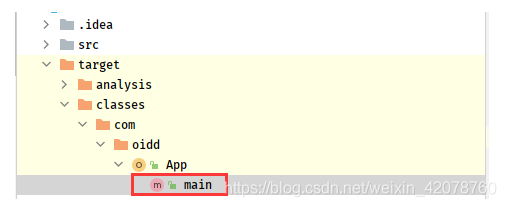
modify App.scala After code , Execute re compile once , stay target/classes Under the directory, you can see the new App*.class
Will update the class file , Upload to server jar The package is under the same directory , Replace it
jar uvf sparktest-1.0-SNAPSHOT-jar-with-dependencies.jar App*.class
notes : If so class The file is not in jar Package root directory , Then create the same directory , Then replace , Such as
jar uvf sparktest-1.0-SNAPSHOT-jar-with-dependencies.jar com/example/App*.class
programme 2: Dependencies are uploaded separately from the project , The project will be updated separately later jar package
POM File configuration (Maven)
<dependencies>
        <dependency>
            <groupId>org.scala-lang</groupId>
            <artifactId>scala-library</artifactId>
            <version>${scala.version}</version>
        </dependency>
        <dependency>
            <groupId>org.apache.spark</groupId>
            <artifactId>spark-core_2.11</artifactId>
            <version>${spark.version}</version>
        </dependency>
        ......
        <dependency>
            <groupId>junit</groupId>
            <artifactId>junit</artifactId>
            <version>4.4</version>
            <scope>test</scope>
        </dependency>
    </dependencies>

    <build>
    <plugins>
        <plugin>
            <groupId>org.apache.maven.plugins</groupId>
            <artifactId>maven-dependency-plugin</artifactId>
            <executions>
                <execution>
                    <id>copy-dependencies</id>
                    <phase>package</phase>
                    <goals>
                        <goal>copy-dependencies</goal>
                    </goals>
                    <configuration>
                        <outputDirectory>target/lib</outputDirectory>
                        <excludeTransitive>false</excludeTransitive>
                        <stripVersion>true</stripVersion>
                    </configuration>
                </execution>
            </executions>
        </plugin>
        <!--scala Packaging plug-in -->
        <plugin>
            <groupId>net.alchim31.maven</groupId>
            <artifactId>scala-maven-plugin</artifactId>
            <version>3.3.1</version>
            <executions>
                <execution>
                    <goals>
                        <goal>compile</goal>
                        <goal>testCompile</goal>
                    </goals>
                    <configuration>
                        <args>
                            <arg>-dependencyfile</arg>
                            <arg>${project.build.directory}/.scala_dependencies</arg>
                        </args>
                    </configuration>
                </execution>
            </executions>
        </plugin>
        <!--java Code packaging plug-in , Don't package dependencies -->
        <plugin>
            <groupId>org.apache.maven.plugins</groupId>
            <artifactId>maven-jar-plugin</artifactId>
            <configuration>
                <archive>
                    <manifest>
                        <!-- <addClasspath>true</addClasspath> -->
                        <mainClass>com.oidd.App</mainClass>
                    </manifest>
                </archive>
            </configuration>
        </plugin>
    </plugins>
After packing , There will be a separate jar Bao He lib Catalog

Upload jar Bao He lib Folder to server , Subsequent updates only need to replace jar Bag can , perform spark-submit when , Just add –jars *\lib*.jar directory .
边栏推荐
- Challenges brought by maker education to teacher development
- 文件系统笔记
- Record -- about the problem of garbled code when JSP foreground passes parameters to the background
- 学生管理系统页面跳转及数据库连接
- MAUI使用Masa blazor组件库
- How to send SMS in groups? What are the reasons for the poor effect of SMS in groups?
- 多传感器融合track fusion
- sql join的使用
- What is the main function of cloud disk? How to restore deleted pictures
- Open source and innovation
猜你喜欢

![[binary tree] - middle order traversal of binary tree](/img/93/442bdbecb123991dbfbd1e5ecc9d64.png)


![[binary number learning] - Introduction to trees](/img/7d/c01bb58bc7ec9c88f857d21ed07a2d.png)
随机推荐
Computing power and intelligence of robot fog
[problem solving] the connection to the server localhost:8080 was referred
The data synchronization tool dataX has officially supported reading and writing tdengine
Another double win! Tencent's three security achievements were selected into the 2021 wechat independent innovation achievements recommendation manual
记录--关于JSP前台传参数到后台出现乱码的问题
Spark累加器和廣播變量
How to send SMS in groups? What are the reasons for the poor effect of SMS in groups?
How to build an app at low cost
Jumping game ii[greedy practice]
潞晨科技获邀加入NVIDIA初创加速计划
If you want to learn programming well, don't recite the code!
浅谈如何运营好小红书账号:利用好长尾词理论
EasyDSS_ The dash version solves the problem that the RTSP source address cannot play the video stream
35 year old crisis? It has become a synonym for programmers
What are the easy-to-use character recognition software? Which are the mobile terminal and PC terminal respectively
How do I reinstall the system? How to install win10 system with USB flash disk?
Accumulateur Spark et variables de diffusion
RealNetworks vs. 微软:早期流媒体行业之争
Virtual file system
JVM调试工具-jmap