当前位置:网站首页>Computer shortcut icon whitening solution
Computer shortcut icon whitening solution
2022-07-30 22:54:00 【catch up】
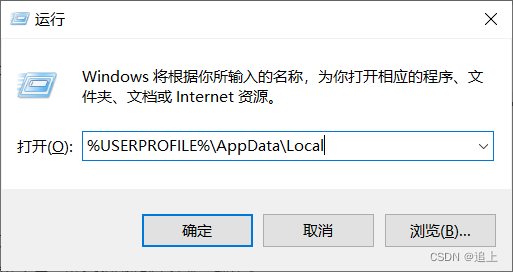
1. Press and hold "win+R" on the keyboard, enter %USERPROFILE%\AppData\Local, enter the Local folder
2. Click "View" and check "Hidden Items"

3. Find the IconCache.db file and delete it
4. Open "Task Manager", click "Processes", find "Windows Explorer", right click "Restart"
边栏推荐
猜你喜欢





随机推荐
Achievements of Science and Technology (31)
MySQL索引常见面试题(2022版)
vulnhub靶机AI-Web-1.0渗透笔记
Gxlcms有声小说系统/小说听书系统源码
The most powerful and most commonly used SQL statements in history
IDEA usage skills
Day016 Classes and Objects
MySQL 8.0.29 set and modify the default password
Py's pdpbox: a detailed introduction to pdpbox, installation, and case application
WSL2设置默认启动用户(debian)
可视化工具Netron介绍
Chapter 8 Intermediate Shell Tools II
2022.7.30
正则表达式语法及使用
Py之pdpbox:pdpbox的简介、安装、案例应用之详细攻略
反转链表-头插反转法
Jetson AGX Orin 平台关于c240000 I2C总线和GMSL ses地址冲突问题
2022.7.27
【云驻共创】HCSD大咖直播–就业指南
设备树的引入与体验