当前位置:网站首页>Vite configuration eslint specification code
Vite configuration eslint specification code
2022-07-26 20:13:00 【Front small white ZYW】
After experiencing the collaborative development of relatively large projects , Code specification has become a thorny problem in team collaborative development . today , Prepare to sort out a copy from the editor -> Specification summary during code writing .
One 、 Uniform code style
It is recommended to use EditorConfig To configure , To standardize different editors , Different editor configurations , Caused by inconsistent code styles .
Project root creation .editorconfig The configuration file
#  Indicates that it is the top layer  EditorConfig  The configuration file
root = true

[*] #  Indicates that all documents are applicable
charset = utf-8 #  Set the file character set to  utf-8
indent_style = space #  shrink
indent_size = 2 #  Indent size
end_of_line = lf #  Controls the type of line breaks (lf | cr | crlf)
trim_trailing_whitespace = true #  Remove any white space characters at the beginning of the line
insert_final_newline = true #  Always insert a new line at the end of the file

[*.py] #  Means only  py The following rules apply to this document
max_line_length = off
trim_trailing_whitespace = false
Pay attention here , If used VSCode Need to download plug-ins EditorConfig VS Code , Other compilers ( WebStorm,IDEA ), Configure directly .
Two 、 Integrate Eslint To configure
install
npm i eslint -D
yarn add eslint --devInitialize configuration , According to the current development environment , The framework and the style of the project determine the configuration items
npx eslint --init
(1): How to use
Eslint, Here we choose the third : Check grammar 、 Identify problems and enforce code style
(2): The type of modularity used in the current project , We choose
Javascript modules
(3): The framework used in the current project ,
Vue.js
(4): Whether to use
Typescript, The environment we built here has not been configuredTS, Skip for now
(5): Operating environment , Here we choose browser

(6): Choose a code style guide , Here we choose the more popular
Airbnb
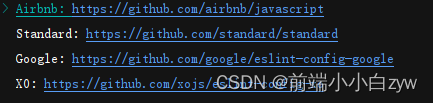
(7): The final choice
Javascriptstyle
(8): Initialization finished , What kind of plug-in is needed for the installation of the video , Here we choose
yarn
(9): add to
ViteAutomatically detect when runningeslintstandardyarn add vite-plugin-eslint --D
import {
       defineConfig } from 'vite'
import vue from '@vitejs/plugin-vue'
import eslintPlugin from 'vite-plugin-eslint'

export default defineConfig({

	 plugins: [
	    vue(),
	    //  Add the following configuration items , In this way, you can check  eslint  standard
	    eslintPlugin({

	      include: ['src/**/*.js', 'src/**/*.vue', 'src/*.js', 'src/*.vue']
	    })
	  ]
})
(10): To configure
eslintrc.jsfileinstall
babelplug-in unityarn add @babel/core @babel/eslint-parser --dev
To configure
EslintBasic configurationmodule.exports = { env: { browser: true, node: true }, extends: [ "eslint:recommended", // Use the recommended eslint 'plugin:vue/vue3-recommended' // Use plug-in support vue3 ], parserOptions: { parser: '@babel/eslint-parser', sourceType: 'module', ecmaVersion: 12, allowImportExportEverywhere: true, // Don't limit eslint Yes import Use location ecmaFeatures: { modules: true, legacyDecorators: true }, requireConfigFile: false // Resolve errors :vue--Parsing error: No Babel config file detected for }, plugins: [ 'vue' ], rules: { ... } }To configure
Eslint rulesThe rules
Here, the corresponding rules can be configured according to the team specifications , Post some of my rules . More configurations can be found on the official website :eslint rules To configure'semi': ['warn', 'never'], // Semicolons are not allowed at the end 'no-console': 'warn', // It is forbidden to appear console 'no-debugger': 'warn', // It is forbidden to appear debugger 'no-duplicate-case': 'warn', // No repetition case 'no-empty': 'warn', // Null statement blocks are prohibited 'no-extra-parens': 'warn', // Unnecessary brackets are forbidden 'no-func-assign': 'warn', // No right Function Statement reassignment 'no-unreachable': 'warn', // It is forbidden to appear [return|throw] Code block after 'no-else-return': 'warn', // prohibit if In the sentence return The sentence is followed by else block 'no-empty-function': 'warn', // Empty function blocks are forbidden 'no-lone-blocks': 'warn', // Disable unnecessary nested blocks 'no-multi-spaces': 'warn', // Multiple spaces are prohibited 'no-redeclare': 'warn', // It is forbidden to declare the same variable more than once 'no-return-assign': 'warn', // Do not use return The assignment statement is used in the statement 'no-return-await': 'warn', // Disable unnecessary [return/await] 'no-self-compare': 'warn', // Prohibit self comparison expressions 'no-useless-catch': 'warn', // Prohibit unnecessary catch Clause 'no-useless-return': 'warn', // Prohibit unnecessary return sentence 'no-mixed-spaces-and-tabs': 'warn', // No spaces and tab The mixed indent of 'no-multiple-empty-lines': 'warn', // No more than one line is allowed 'no-trailing-spaces': 'warn', // No space after the end of a line 'no-useless-call': 'warn', // Prohibit unnecessary .call() and .apply() 'no-var': 'warn', // It is forbidden to appear var use let and const Instead of 'no-delete-var': 'off', // Allow to appear delete Use of variables 'no-shadow': 'off', // Allow variable declarations to have the same name as variables in the outer scope ...
(11): Start project , The test results
You can see , It works perfectly

边栏推荐
猜你喜欢

Use request header authentication to test API interfaces that need authorization

SQL注入

FastTunnel-开源内网穿透框架

本机号码一键登录原理与应用(荣耀典藏版)

【MySQL】 - 索引原理与使用

Record an analysis of a.Net property management background service stuck
SQL injection
使用请求头认证来测试需要授权的 API 接口

go+mysql+redis+vue3简单聊室,第6弹:使用vue3和element-plus调用接口

数组操作增,删,改,查
随机推荐
金融机构导图
Solution to the third game of 2022 Niuke multi school league
three. Two methods of making Earth annotation with JS
u盘损坏怎么恢复原来数据,u盘损坏数据如何恢复
LeetCode_回溯_中等_40.组合总和 II
花1200亿修一条“地铁”,连接4个万亿城市,广东在想啥?
regular expression
Kingbases SQL language reference manual of Jincang database (14. SQL statement: commit to create language)
用 QuestPDF操作生成PDF更快更高效!
Kingbasees SQL language reference manual of Jincang database (19. SQL statement: drop table to load)
this指向-超经典面试题
go+mysql+redis+vue3简单聊室,第5弹:使用消息队列和定时任务同步消息到mysql
银行业概览
URL格式
MySQL subquery usage
Record an analysis of a.Net property management background service stuck
金仓数据库 KingbaseES SQL 语言参考手册 (14. SQL语句:COMMIT 到 CREATE LANGUAGE)
数据库笔记(来自老社)
Zabbix调用api检索方法
计算机网络常见面试题目总结,含答案