当前位置:网站首页>Realize the mutual value transfer between main window and sub window in WPF
Realize the mutual value transfer between main window and sub window in WPF
2022-07-28 13:26:00 【Willard Leozi】
In the use of WPF When , We often use the transfer of values between forms , The following example transfers values from the main window to the sub window , The method of transferring values from the sub window to the main window .
One 、 The main window transfers values to the sub window
The main method of transferring values from the main window to the sub window is to create a variable in the sub window to receive the values of the main window , Then realize the value transmission .
In the main window Xaml Code :
<Grid>
    <TextBox x:Name="tb_message" HorizontalAlignment="Left" Height="35" Margin="232,80,0,0" TextWrapping="Wrap" Text="" VerticalAlignment="Top" Width="360" FontSize="16"/>
    <Button Content=" Pass values to subform " FontSize="20" HorizontalAlignment="Left" Margin="342,179,0,0" VerticalAlignment="Top" Width="124" Height="34" Click="Button_Click"/>
</Grid>
View :

Main window background code :
public partial class MainWindow : Window
{
   public MainWindow()
   {
       InitializeComponent();
   }
   private void Button_Click(object sender, RoutedEventArgs e)
   {
        child_window child_Window = new child_window();
        child_Window.test_str = tb_message.Text;
        child_Window.Show();
        this.Close();
    }
}
Of a child window Xaml Code :
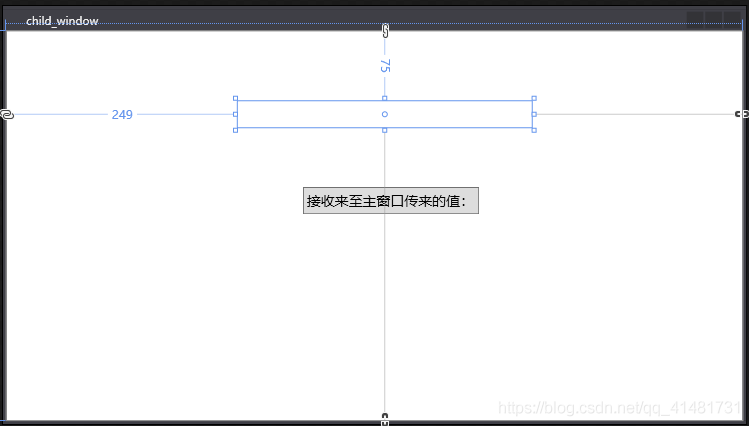
<Grid>
    <TextBlock x:Name="tb_receive" HorizontalAlignment="Left" Margin="249,75,0,0" TextWrapping="Wrap" Text="" VerticalAlignment="Top" Height="29" Width="316"/>
    <Button Content=" Receive the value from the main window :" FontSize="15" HorizontalAlignment="Left" Margin="319,168,0,0" VerticalAlignment="Top" Width="189" Height="29" Click="Button_Click"/>
</Grid>
View :
Sub window background code :
public partial class child_window : Window
{
   public string test_str { get; set; }
   public child_window()
   {
      InitializeComponent();
   }
   private void Button_Click(object sender, RoutedEventArgs e)
   {
      tb_receive.Text = test_str;
   }
}
Demonstration of value transfer effect from main window to sub window :


Two 、 The sub window transfers values to the main window
The transfer of values from the sub form to the main form is mainly executed through delegation .
Of the main form Xaml Code :
<Grid>
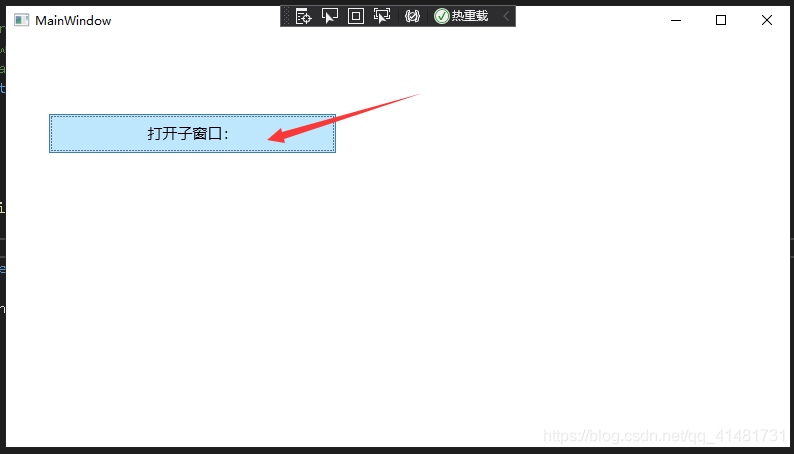
    <Button Content=" Open sub window :" FontSize="15" HorizontalAlignment="Left" Margin="43,78,0,0" VerticalAlignment="Top" Width="287" Height="39" RenderTransformOrigin="0.5,0.5" Click="Button_Click"></Button>
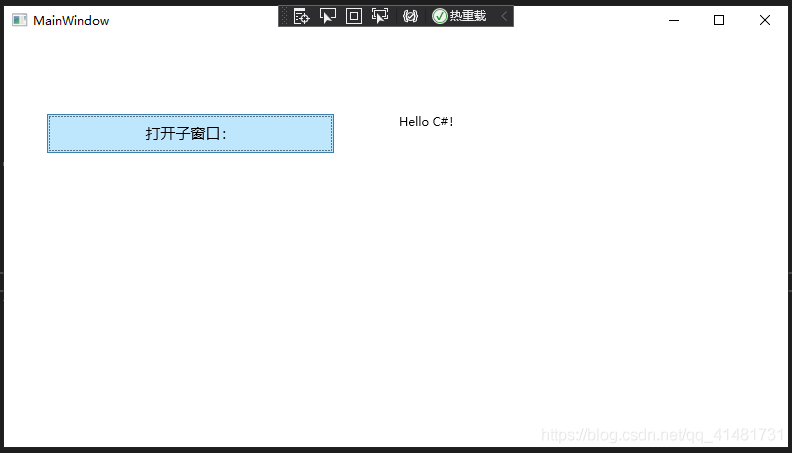
    <TextBlock x:Name="tb_recevie" HorizontalAlignment="Left" Margin="395,78,0,0" TextWrapping="Wrap" Text="" VerticalAlignment="Top" Height="39" Width="349"/>
</Grid>
View :

Main window background code :
public partial class MainWindow : Window
{
   public MainWindow()
   {
      InitializeComponent();
   }
   public void Recevie(string value)
   {
       tb_recevie.Text = value;
   }
    private void Button_Click(object sender, RoutedEventArgs e)
    {
       child_window child_Window = new child_window();
       child_Window.sendMessage = Recevie;
       child_Window.Show();
    }
}
Of a child window Xaml Code :
<Grid>
     <TextBox x:Name="tb_send" HorizontalAlignment="Left" Height="33" Margin="230,101,0,0" TextWrapping="Wrap" Text="TextBox" VerticalAlignment="Top" Width="329"/>
     <Button Content=" Pass values to the main form " FontSize="15" HorizontalAlignment="Left" Margin="317,181,0,0" VerticalAlignment="Top" Width="164" Height="27" Click="Button_Click"/>
</Grid>
View :

Sub window background code :
public partial class child_window : Window
{
   public delegate void SendMessage(string value);
   public SendMessage sendMessage;
   public child_window()
   {
      InitializeComponent();
   }
   private void Button_Click(object sender, RoutedEventArgs e)
   {
      sendMessage(tb_send.Text);
   }
}
Demonstration of value transfer effect from sub window to main window :

边栏推荐
- Protective bearish strategy
- Kotlin learning notes 3 - lambda programming
- 一根筋教育PHP培训 知行合一收热捧
- [embedded C foundation] Part 5: original code / inverse code / complement code
- Definition of option basis
- [FPGA]: AD sampling problem
- How to use databricks for data analysis on tidb cloud | tidb cloud User Guide
- PHP生成随机数(昵称随机生成器)
- How much do you know about JVM memory management
- 黑猫带你学eMMC协议第26篇:eMMC的硬件复位操作(H/W reset)
猜你喜欢

SSH port forwarding (Tunneling Technology)

Shell basic concepts and variables

如何在 TiDB Cloud 上使用 Databricks 进行数据分析 | TiDB Cloud 使用指南

Parent and child of treeselect

LeetCode每日一题(2196. Create Binary Tree From Descriptions)
Shell基础概念和变量

企业数字化本质

How to design a second kill system?
The essence of enterprise Digitalization

Change password, confirm password verification antd
随机推荐
jar包
Stepless dimming colorful RGB mirror light touch chip-dlt8s12a-jericho
Dimming and color matching cool light touch chip-dlt8ma12ts-jericho
管理区解耦架构见过吗?能帮客户搞定大难题的
黑猫带你学eMMC协议第26篇:eMMC的硬件复位操作(H/W reset)
Black cat takes you to learn EMMC protocol chapter 27: what is EMMC's dynamic capacity?
Rust from introduction to mastery 01 introduction
gicv3 spi register
Why neural networks are ineffective?
[embedded C foundation] Part 4: use of operators
FFT海浪模拟
Is jetpack compose completely out of view?
黑猫带你学eMMC协议第24篇:eMMC的总线测试程序详解(CMD19 & CMD14)
Understanding of vite2
UV germicidal lamp chip dlt8p65sa Jericho
Redis —— 基础篇
Complete set of SSM framework online bookstore
Black cat takes you to learn EMMC Protocol Part 24: detailed explanation of EMMC bus test program (cmd19 & cmd14)
I copied the bottom of the liquidated NFT, but was locked by opensea
Rust 从入门到精通01-简介