当前位置:网站首页>多线程的相关知识
多线程的相关知识
2022-07-27 05:21:00 【只羡鸳鸯不羡仙仙】
目录
(2)使用Thread.interrupted()静态方法或者Thread对象的成员方法isInterrupted()
一、进程和线程
1、程序
一系列有组织的文件,封装操作系统的各种API,实现不同的效果,比如qq
2、进程
程序在系统中的一次执行过程,进程是现代操作系统的中资源分配(CPU、内存等关键系统资源)的最小单位
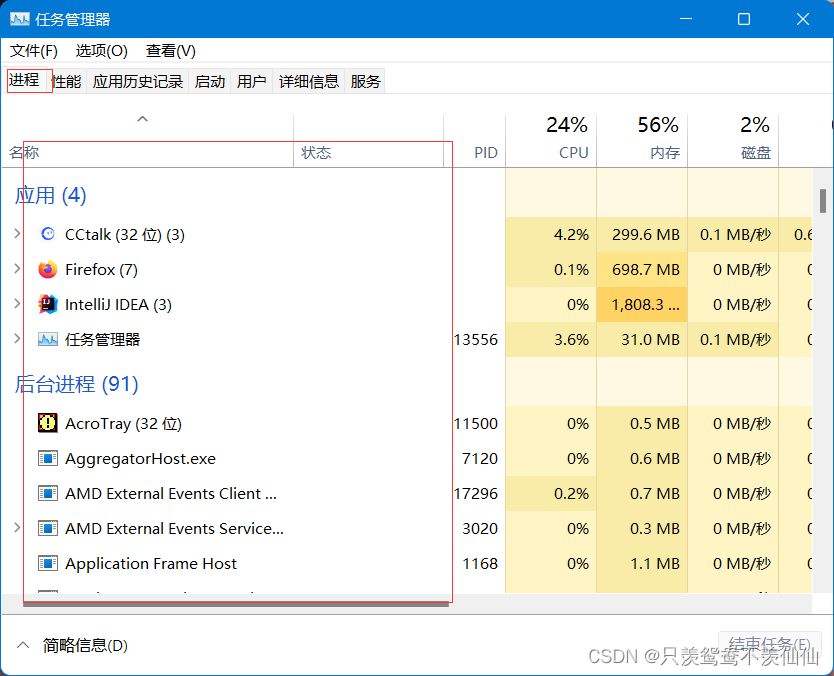
IP地址:唯一在网络上表示一台主机的位置,本机IP:127.0.0.1
通过IP地址找到主机,然后通过端口号找到某一个进程,端口号在操作系统上唯一的定位一个进程
3、线程
现代的操作系统都是多线程操作系统,线程是进程中的一个独立的任务,比如说打开一个qq音乐就是一个进程,播放音乐和下载音乐就是两个线程,同一个进程的所有线程共享进程的资源,线程是操作系统的基本单位。

二、线程的认识
1、线程的示例

 2、并行和并发的区别
并发是指一个处理器同时处理多个任务。
并行是指多个处理器或者是多核的处理器同时处理多个不同的任务。
并发是逻辑上的同时发生(simultaneous),而并行是物理上的同时发生。来个比喻:并发是一个人同时吃三个馒头,而并行是三个人同时吃三个馒头。
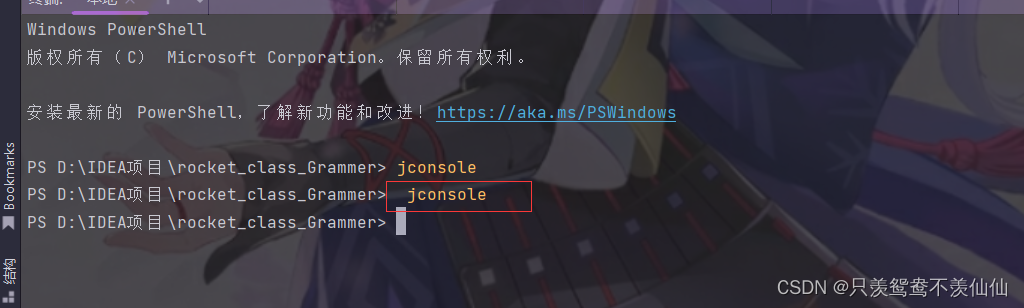
3、通过jconsole命令查看线程


 三、创建线程
1、继承Thread类,覆写run方法
①一个子类继承Thread类
②覆写run方法
③产生当前的子类对象,而后调用start方法启动线程
/**
 * 继承Thread类,覆写run方法
 */
public class ThreadMethod1 extends Thread {
    @Override
    public void run() {
        System.out.println("这是子线程的输出结果~~");
        System.out.println("这是子线程的输出结果~~");
        System.out.println("这是子线程的输出结果~~");
    }

    public static void main(String[] args) {
        //创建线程类的对象
        ThreadMethod1 m1=new ThreadMethod1();
        //启动线程
        m1.start();
        System.out.println("主线程的输出语句~~");
    }
} 

调用start方法启动线程,是由JVM产生操作系统的线程并启动,到底什么时候开始启动,对于我们来说是不可见的,所以在多线程的结果这块来说是多变的。
2、覆写Runnable接口,覆写run方法
①实现Runnable接口
②创建线程的任务对象
③创建线程对象,将任务对象传入线程对象
④启动线程
/**
 * 覆写Runnable接口,覆写run方法
 * 这个实现了Runnable接口的子类,并不是直接的线程对象,只是一个线程的核心工作任务
 * 线程的任务和线程实体的关系
 */
public class RunnableThread  implements Runnable{
    @Override
    public void run() {
        System.out.println("这是Runnable方式实现的子线程任务~~");
    }

    public static void main(String[] args) {
        //创建线程的任务对象
        RunnableThread runnableThread=new RunnableThread();
        //创建线程对象,将任务对象传入线程对象
        Thread thread=new Thread(runnableThread);
        //启动线程
        thread.start();
        System.out.println("主线程的输出语句~~");
    }
}
3、关于前两种的变形写法
匿名内部类继承了Thread类,然后实现了run方法
/**
 * 前两种方法的变形
 */
public class OtherThread {
    public static void main(String[] args) {
        //匿名内部类继承Thread类
        Thread t1=new Thread(){
            @Override
            public void run() {
                System.out.println("匿名内部类继承Thread类~~");
                System.out.println(Thread.currentThread().getName());
            }
        };
        t1.start();
        System.out.println("这是主线程"+Thread.currentThread().getName());
    }
}
使用匿名内部类实现Runnable接口
/**
 * 使用匿名内部类实现Runnable接口
 */
public class OtherThread{
    public static void main(String[] args) {
        Thread thread=new Thread(new Runnable() {
            @Override
            public void run() {
                System.out.println("匿名内部类实现Runnable接口~~");
                System.out.println(Thread.currentThread().getName());
            }
        });
        thread.start();
        System.out.println("这是主线程"+Thread.currentThread().getName());
    }

}
使用Lambda表达式实现Runnable接口
/**
 * 使用Lambda表达式实现Runnable接口~~
 */
public class OtherThread{
    public static void main(String[] args) {
        Thread t1=new Thread(()-> System.out.println("Lambda表达式实现Runnable接口~~"));
        t1.start();
        System.out.println("这是主线程"+Thread.currentThread().getName());
    }
}
4、覆写Callable接口,覆写call方法
5、使用线程池创建线程
6、感受多线程和顺序执行的执行速度差异
执行10亿个数字的累加
顺序执行:先+10亿,再加10亿,最终个都是在主线程中+20亿
并发执行:子线程+10亿,主线程+10亿,最终是主线程和子线程并发的执行+10亿
在理论上来看,并发执行的耗时是顺序执行的一半
package Thread;

/**
 * 顺序(串行)和并发的对比
 */
public class Thread666 {
    public static void main(String[] args) throws InterruptedException {
        serial();
        concurrent();
    }

    private static final long count=10_0000_0000;

    //并发执行+10亿数据操作
    private static void concurrent() throws InterruptedException {
        Long start=System.nanoTime();
        Thread thread=new Thread(()->{
           //子线程进行+10亿操作
           long a=0;
            for (int i = 0; i <count ; i++) {
                a++;
            }
        });
        thread.start();
        //主线程执行+10亿操作
        long b=0;
        for (int i = 0; i < count; i++) {
            b++;
        }
        //等待子线程执行结束
        thread.join();
        long end=System.nanoTime();
        double alltime=(end-start)*1.0/1000/1000;
        System.out.println("并发执行共耗时"+alltime+"ms");
    }
    //串行进行20亿的累加
    private static void serial(){
        long start=System.nanoTime();
        long a=0;
        for (int i = 0; i < count; i++) {
            a++;
        }
        //下面的执行必须要等到上面的执行完毕才可以继续
        long b=0;
        for (int i = 0; i < count; i++) {
            b++;
        }
        long end=System.nanoTime();
        double alltime=(end-start)*1.0/1000/1000;
        System.out.println("顺序执行共耗时"+alltime+"ms");
    }
}

多线程最大的应用场景就是把一个打的任务拆分为多个子任务,多个子线程并发执行,提高系统的处理效率
三、Thread类的常见方法
无论是继承Thread类还是实现Runnable接口,最终启动线程都是调用Thread类的start方法
Thread类就是JVM描述管理线程的类,每个线程都对应唯一的一个Thread对象
1、构造方法

public class NameThread {
    public static void main(String[] args) {
        Thread t1=new Thread();
        Thread t2=new Thread(new Runnable() {
            @Override
            public void run() {
                System.out.println("传入Runnable对象~~");
            }
        });
        Thread t3=new Thread("线程三");
        t3.setName("线程三");
        Thread t4=new Thread(new Runnable() {
            @Override
            public void run() {
                System.out.println("传入Runnable对象~~");
            }
        },"线程四");
    }
}
2、Therad类的核心属性

/**
 * 线程的常用属性
 */
public class propertyTherad {
    public static void main(String[] args) {
        Thread thread=new Thread(new Runnable() {
            @Override
            public void run() {
                for (int i = 0; i <10 ; i++) {
                    System.out.println(Thread.currentThread().getName()+"我还活着~~");
                    try {
                        Thread.sleep(1000);
                    } catch (InterruptedException e) {
                        throw new RuntimeException(e);
                    }
                }
                System.out.println(Thread.currentThread().getName()+"我即将嘎了~~");
            }
        },"测试线程");

        System.out.println(Thread.currentThread().getName()+"ID:"+thread.getId());
        System.out.println("状态:"+Thread.currentThread().getState());
        System.out.println("优先级:"+Thread.currentThread().getPriority());
        System.out.println("是否为后台线程:"+Thread.currentThread().isDaemon());
        System.out.println("是否存活:"+Thread.currentThread().isAlive());
        System.out.println("子线程是否存活:"+thread.isAlive());
        thread.start();
    }
}

3、启动线程用的是Thread类的start方法
查看上述示例即可
4、线程的中断方法
李四一旦进到工作状态,他就会按照行动指南上的步骤去进行工作,不完成是不会结束的。但有时我们 需要增加一些机制,例如老板突然来电话了,说转账的对方是个骗子,需要赶紧停止转账,那张三该如 何通知李四停止呢?这就涉及到我们的中断线程的方式了。
中断一个·正在执行的线程(run还没有执行结束),普通线程会在run方法执行结束后自动停止。
(1)通过共享变量中断线程
/**
 * 通过共享变量中断线程
 */
public class shared_variable {
    private static class MyThread extends Thread {
        //多个线程都会用到的变量加上volatile关键字
        //表示当前变量是否需要停止
        volatile boolean isQuit=false;

        @Override
        public void run() {
            while (!isQuit){
                System.out.println(Thread.currentThread().getName()+"我一直都在~~");
                try {
                    Thread.sleep(1000);
                } catch (InterruptedException e) {
                    throw new RuntimeException(e);
                }
            }
            System.out.println(Thread.currentThread().getName()+"我要没了~~");
        }
    }

    public static void main(String[] args) throws InterruptedException {
        MyThread m1=new MyThread();
        Thread thread=new Thread(m1,"线程一~~");
        System.out.println("我还在哦~~");
        thread.start();
        //让主线程暂停3秒,中断子线程
        Thread.sleep(3000);
        System.out.println("我要走了哦~~");
        m1.isQuit=true;
    }

}
 (2)使用Thread.interrupted()静态方法或者Thread对象的成员方法isInterrupted()
/**
 * 使用Thread.interrupted()静态方法
 */
public class property {
    private static class MyRunnable implements Runnable {

        @Override
        public void run() {
            //静态方法,判断当前线程是否被中断
            while (!Thread.interrupted()) {
                System.out.println(Thread.currentThread().getName() + "别烦我,在打游戏呢~~~");
                try {
                    Thread.sleep(1000);
                } catch (InterruptedException e) {
                    //当线程中断时,会抛出中断异常
                    System.out.println("有个老六在偷家~~~");
                    break;
                }
            }
            System.out.println(Thread.currentThread().getName()+"额,水晶被偷了~~~");
        }
    }

    public static void main(String[] args) throws InterruptedException {
        MyRunnable m1=new MyRunnable();
        Thread thread=new Thread(m1,"线程一~~");
        System.out.println("正在快乐的吃兵线中~~~");
        thread.start();
        //让主线程暂停5秒,中断子线程
        Thread.sleep(5000);
        thread.interrupt();
    }
}
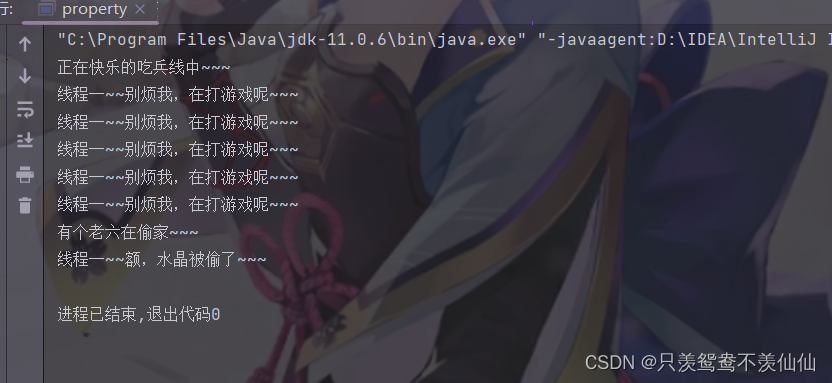
/**
 * Thread对象的成员方法isInterrupted()
 */
public class property {
    private static class MyRunnable implements Runnable {

        @Override
        public void run() {
            //成员方法,判断当前线程是否中断
            while (!Thread.currentThread().isInterrupted()) {
                System.out.println(Thread.currentThread().getName() + "别烦我,在打游戏呢~~~");
                try {
                    Thread.sleep(1000);
                } catch (InterruptedException e) {
                    //当线程中断时,会抛出中断异常
                    System.out.println("有个老六在偷家~~~");
                    break;
                }
            }
            System.out.println(Thread.currentThread().getName()+"额,水晶被偷了~~~");
        }
    }

    public static void main(String[] args) throws InterruptedException {
        MyRunnable m1=new MyRunnable();
        Thread thread=new Thread(m1,"线程一~~");
        System.out.println("正在快乐的吃兵线中~~~");
        thread.start();
        //让主线程暂停5秒,中断子线程
        Thread.sleep(5000);
        thread.interrupt();
    }
}

5、线程收到内置的中断通知方式
thread 收到通知的方式有两种:
① 如果线程因为调用 wait/join/sleep 等方法而阻塞挂起,则以 InterruptedException 异常的形式通 知,清除中断标志
当出现 InterruptedException 的时候, 要不要结束线程取决于 catch 中代码的写法. 可以选择 忽略这个异常, 也可以跳出循环结束线程.

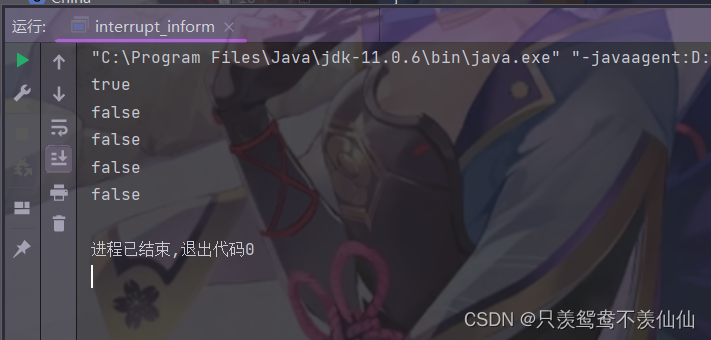
②否则,只是内部的一个中断标志被设置,thread 可以通过
Thread.interrupted() 判断当前线程是否被中断,若中断状态为true,清除中断标志
/**
 *  Thread.interrupted() 判断当前线程是否被中断,若中断状态为true,清除中断标志
 */
public class interrupt_inform {
    private static class MyRUnnable implements Runnable{
        @Override
        public void run() {
            for (int i = 0; i <5 ; i++) {
                System.out.println(Thread.interrupted());
            }
        }
    }

    public static void main(String[] args) {
        MyRUnnable m1=new MyRUnnable();
        Thread thread=new Thread(m1);
        thread.start();
        thread.interrupt();
    }
}
Thread.currentThread().isInterrupted() 判断指定线程是否被中断,不清除中断标志 这种方式通知收到的更及时,即使线程正在 sleep 也可以马上收到。
/**
 *  Thread.currentThread().isInterrupted() 判断指定线程是否被中断
 *  不清除中断标志 这种方式通知收到的更及时,即使线程正在 sleep 也可以马上收到。
 */
public class interrupt_inform {
    private static class MyRUnnable implements Runnable{
        @Override
        public void run() {
            for (int i = 0; i <5 ; i++) {
                System.out.println(Thread.currentThread().isInterrupted());
            }
        }
    }

    public static void main(String[] args) {
        MyRUnnable m1=new MyRUnnable();
        Thread thread=new Thread(m1);
        thread.start();
        thread.interrupt();
    }
}

6、等待一个线程
有时,我们需要等待一个线程完成它的工作后,才能进行自己的下一步工作。例如,张三只有等李四转 账成功,才决定是否存钱,这时我们需要一个方法明确等待线程的结束。
线程对象.join()
在某个线程中调用别的线对象的join方法,意思就是这个线程要等待另外一个线程执行完毕再继续执行本线程的后序代码

/**
 * 线程等待
 */
public class ThreadJoin {
    public static void main(String[] args) throws InterruptedException {
        Thread t1=new Thread(()->{
            System.out.println(Thread.currentThread().getName()+"正在学习javaSE的知识~~");
            try {
                Thread.sleep(1000);
            } catch (InterruptedException e) {
                throw new RuntimeException(e);
            }
        },"javaSE线程~~");
        Thread t2=new Thread(()->{
            System.out.println(Thread.currentThread().getName()+"正在学习数据结构的知识~~");
            try {
                Thread.sleep(1000);
            } catch (InterruptedException e) {
                throw new RuntimeException(e);
            }
        },"数据结构线程~~");

        System.out.println("先学习javaSE~~");
        t1.start();
        t1.join();
        //此时t1线程已经执行结束
        t2.start();
        t2.join();
        //此时t2线程已经执行结束
        System.out.println("开始学习javaweb的知识~~");
    }

}
7、获取正在执行的线程对象

8、休眠当前线程
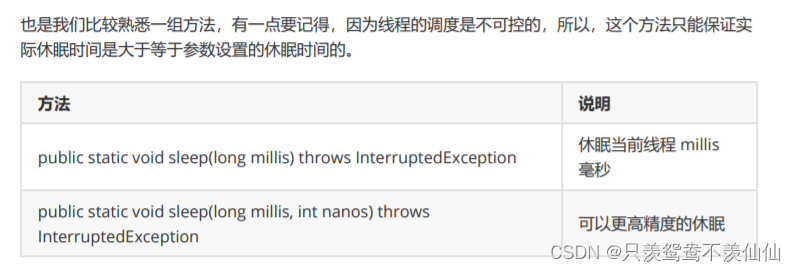
该方法在那个线程调用,就会休眠那个线程
四、线程的所有状态
1、多线程的状态获取
public class Thread_state {
    public static void main(String[] args) {
        for (Thread.State state: Thread.State.values()) {
            System.out.println(state);
        }
    }
}
2、线程状态和状态转移的意义


3、线程的新建,运行和终止状态
/**
 * 线程的新建,运行和终止状态
 */
public class State {
    public static void main(String[] args) {
        //产生一个新的线程对象,该对象默认的状态就是新建状态(NEW)
        Thread t1=new Thread(()->{
            for (int i = 0; i <100000; i++) {

            }
        },"子线程");
        System.out.println(t1.getName()+":"+t1.getState());
        t1.start();
        while (t1.isAlive()){
            System.out.println(t1.getName()+":"+t1.getState());
        }
        System.out.println(t1.getName()+":"+t1.getState());
    }
}
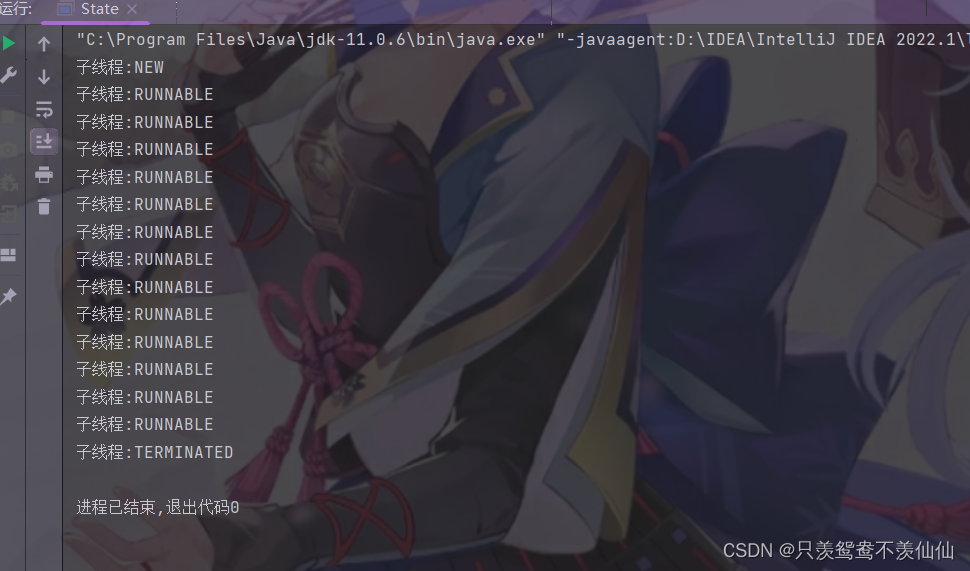
新建线程对象就是new状态
就绪和运行都是Runnable状态
线程的run方法执行完毕,或者抛出异常不正常执行完毕都会进入终止状态
4、三种堵塞状态
/**
 * 三种阻塞状态
 */
public class BlockedState {
    public static void main(String[] args) {
        Object lock=new Object();
        Thread t1=new Thread(()->{
           synchronized (lock){
               while (true){
                   try {
                       //TIME_WAITING 等待时间到了自动唤醒
                       Thread.sleep(1000);
                   } catch (InterruptedException e) {
                       throw new RuntimeException(e);
                   }
               }
           }
        },"t1线程~~");
        t1.start();
        Thread t2=new Thread(()->{
            synchronized (lock){
                //BLOCKED 等待获取锁对象
                System.out.println("哈哈哈哈~~~");
            }
        },"t2线程~~");
        t2.start();
    }
}

此时线程就会卡住,因为t1线程一直在睡觉,此时可以通过jconsole命令查看

超时等待,该线程需要等一段时间之后才恢复执行

该线程等待别的线程释放资源


此时的t1线程还在死等,但是t2线程输出了,t1的状态就是等着别的线程去唤醒
/**
 * 三种阻塞状态
 */
public class BlockedState2 {
    public static void main(String[] args) {
        Object lock=new Object();
        Thread t1=new Thread(()->{
            synchronized (lock){
                    try {
                        //TIME_WAITING 等待时间到了自动唤醒
//                       Thread.sleep(1000);
                        //线程等待
                        lock.wait();
                        System.out.println("t1被唤醒了~~~");
                    } catch (InterruptedException e) {
                        throw new RuntimeException(e);
                    }
                }
        },"t1线程~~");
        t1.start();
        Thread t2=new Thread(()->{
            synchronized (lock){
                //BLOCKED 等待获取锁对象
                System.out.println("哈哈哈哈~~~");
                try {
                    Thread.sleep(1000);
                } catch (InterruptedException e) {
                    throw new RuntimeException(e);
                }
                //唤醒t1线程
                lock.notify();
            }
        },"t2线程~~");
        t2.start();
    }
}
5、从运行态转到就绪态(yield)
/**
 * 从运行态转到就绪态
 */
public class YieldTest {
    public static void main(String[] args) {
        Thread t1=new Thread(()->{
            while (true){
                System.out.println(Thread.currentThread().getName());
            }
        },"线程一~~");
        t1.start();
        Thread t2=new Thread(()->{
            while (true){
                System.out.println(Thread.currentThread().getName());
            }
        },"线程二~~");
        t2.start();
    }
}
此时对于这两个线程来说,他们的输出数量是五五开的
下面调用yield方法后,线程一就会让出CPU进入就绪态,等待被CPU继续调用
/**
 * 从运行态转到就绪态
 */
public class YieldTest {
    public static void main(String[] args) {
        Thread t1=new Thread(()->{
            while (true){
                System.out.println(Thread.currentThread().getName());
                //线程一就会让出CPU进入就绪态,等待被CPU继续调用
                Thread.yield();
            }
        },"线程一~~");
        t1.start();
        Thread t2=new Thread(()->{
            while (true){
                System.out.println(Thread.currentThread().getName());
            }
        },"线程二~~");
        t2.start();
    }
}
对于什么时候让出CPU,又是什么时候再次被CPU调用,这些都是由系统决定
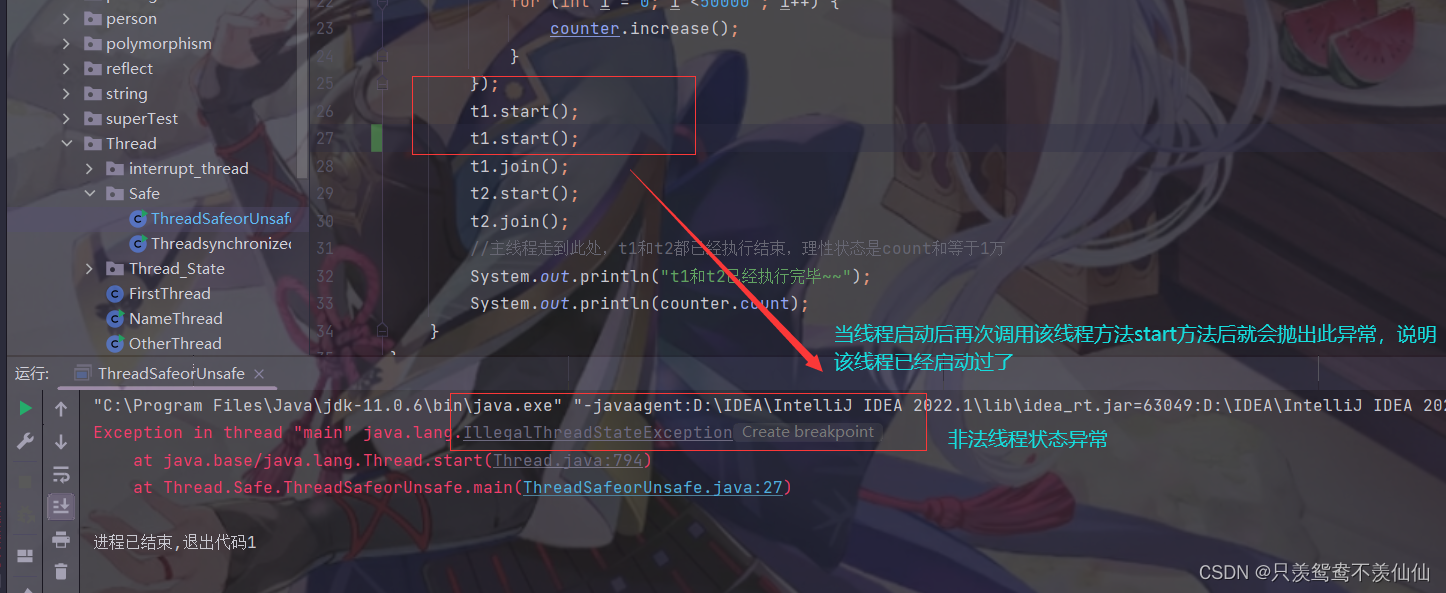
6、线程的重复启动引发的问题
五、相关代码
 https://gitee.com/ren-xiaoxiong/rocket_class_-grammer/tree/master/src/Thread/
边栏推荐
- Remote sensing image recognition - making data sets
- wireshark图形界面抓包
- [5.20 special] MATLAB, I'm confessing to you
- ROS工作空间覆盖
- [song] rebirth of me in py introductory training (10): numpy
- Summary of the use of C # Jason code in TCP communication
- 力扣 110. 平衡二叉树
- Code implementation and introduction of all commonly used sorting
- 所有常用排序的代码实现和介绍
- Dynamic programming for solving problems (1)
猜你喜欢




随机推荐
UnityShader-深度纹理(理解以及遇到的问题)
自动追随跟踪
非真实感渲染(NPR)论文理解及其复现(Unity) - 《Stylized Highlights for Cartoon Rendering and Animation》
Code implementation and introduction of all commonly used sorting
Calculation of Huffman tree, code implementation and proof, graphic interpretation
【动态规划----钢条切割问题】
shell script if嵌套for循环脚本
非重叠矩形中的随机点(力扣每日一题)
One of the usage of operator()
这是我的博客
人月神话阅读笔记
力扣 236. 二叉树的最近公共祖先
1半自动爬虫
Dynamic programming for solving problems (7)
力扣题解 动态规划(4)
ROS分布式通信
哈夫曼树的求法,代码实现及证明,图文解释
遥感影像识别-制作数据集
一张图看懂指针
ROS中的头文件与源文件