当前位置:网站首页>Basic operations of OpenCV image processing
Basic operations of OpenCV image processing
2022-07-29 09:26:00 【I am sixteen years old】
Catalog
One : Operation of reading display pictures
Two : The image processing Pixel operation
3、 ... and : The image processing call OpenCV library Packaging function
3.4 median filtering Visually, it feels like oil painting
4.1 Play the video : In those years , The girl we chased together
One : Operation of reading display pictures
Path selection for reading pictures , Note here window Next \ But in ubuntu Next is / It needs to be corrected when writing code

Read image code :
#include <iostream>
#include <opencv2/opencv.hpp>
using namespace std;
using namespace cv;

int main(int argc, char *argv[])
{
    Mat img = imread("D:/000imageopencv/333.jpg");// Picture path

    imshow("img",img);// display picture

    waitKey(0);// Wait for the button

    return 0;
}
result :

You can zoom in on the picture with the scroll wheel RGB The number , It's not hard to see. , The darker it is RGB The closer the value is 0, The lighter the color RGB The closer the value is 255


Look at the resolution 499 X 355, At the same time, move the mouse to the edge of the picture ( notice x=498,y=334 Bloggers have tried their best to move to the edge , If you don't believe it , Do it yourself , ha-ha ), From this, we can know that the picture is composed of one pixel after another .


Two : The image processing Pixel operation
2.1 Snowflake screen effect
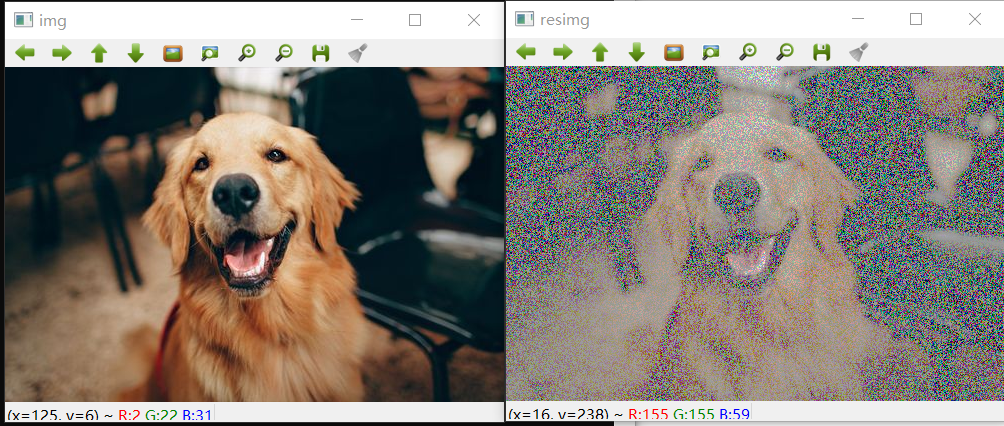
The relevant code is as follows :
#include <iostream>
#include <opencv2/opencv.hpp>
using namespace std;
using namespace cv;

Mat imageprocess(Mat &img)
{
    int row = img.rows;
    int col = img.cols * img.channels();

    for(int i=0;i<row;i++)
    {
        uchar * data = img.ptr<uchar>(i);
        for(int j=0;j<col;j++)
        {
            // Snowflake screen effect
            int q = rand()%col;
            data[q]=155;// Some channels are randomly changed to 155
        }
    }
    return img;
}

int main(int argc, char *argv[])
{
    Mat img = imread("D:/000imageopencv/333.jpg");// Picture path
    imshow("img",img);// display picture

    Mat resimg = imageprocess(img);
    imshow("resimg",resimg);// Display the received picture

    waitKey(0);// Wait for the button
    return 0;
}
2.2 color reversal

The relevant code is as follows :
Mat imageprocess(Mat &img)
{
    int row = img.rows;
    int col = img.cols * img.channels();

    for(int i=0;i<row;i++)
    {
        uchar * data = img.ptr<uchar>(i);
        for(int j=0;j<col;j++)
        {
            // color reversal
            data[j] = data[j] - 50;
        }
    }
    return img;
}
2.3 Dark treatment

The relevant code is as follows :
Mat imageprocess(Mat &img)
{
    int row = img.rows;
    int col = img.cols * img.channels();

    for(int i=0;i<row;i++)
    {
        uchar * data = img.ptr<uchar>(i);
        for(int j=0;j<col;j++)
        {
            // Dark treatment
            data[j] = data[j]/2;
        }
    }
    return img;
}
2.4 Frosted glass effect

The relevant code is as follows :
#include <iostream>
#include <opencv2/opencv.hpp>
using namespace std;
using namespace cv;

// Frosted glass effect
Mat imageGalss(Mat &img)
{
    RNG rng;
    int random = 0;
    int num = 5;
    for(int i=0;i<img.rows -5;i++)
    {
        for(int j=0;j<img.cols -5;j++)
        {
            random = rng.uniform(0,num);
            img.at<Vec3b>(i,j)[0] = img.at<Vec3b>(i+random,j+random)[0];
            img.at<Vec3b>(i,j)[1] = img.at<Vec3b>(i+random,j+random)[1];
            img.at<Vec3b>(i,j)[2] = img.at<Vec3b>(i+random,j+random)[2];
        }
    }
    return img;
}

int main(int argc, char *argv[])
{
    Mat img = imread("D:/000imageopencv/333.jpg");// Picture path
    imshow("img",img);// display picture

    Mat resimg = imageGalss(img);
    imshow("resimg",resimg);// Display the received picture

    waitKey(0);// Wait for the button
    return 0;
}
3、 ... and : The image processing call OpenCV library Packaging function
3.1 Gaussian blur [ It's like The situation that people with myopia don't wear glasses to see things --- Mild myopia ]

The relevant code is as follows :
#include <iostream>
#include <opencv2/opencv.hpp>
using namespace std;
using namespace cv;

int main(int argc, char *argv[])
{
    Mat img = imread("D:/000imageopencv/333.jpg");// Picture path
    imshow("img",img);// display picture

    Mat resimg;
    // Gaussian blur
    cv::GaussianBlur(img,resimg,Size(5,5),0);

    imshow("resimg",resimg);// Display the received picture

    waitKey(0);// Wait for the button
    return 0;
}
3.2 XY Axis blur [ It's like The situation that people with myopia don't wear glasses to see things --- Severe myopia ]

The relevant code is as follows :
#include <iostream>
#include <opencv2/opencv.hpp>
using namespace std;
using namespace cv;

int main(int argc, char *argv[])
{
    Mat img = imread("D:/000imageopencv/333.jpg");// Picture path
    imshow("img",img);// display picture

    Mat resimg;
    //XY Axis blur
    cv::blur(img,resimg,Size(10,10));
    imshow("resimg",resimg);// Display the received picture

    waitKey(0);// Wait for the button
    return 0;
}
3.3 graying

The relevant code is as follows :
#include <iostream>
#include <opencv2/opencv.hpp>
using namespace std;
using namespace cv;

int main(int argc, char *argv[])
{
    Mat img = imread("D:/000imageopencv/333.jpg");// Picture path
    imshow("img",img);// display picture

    Mat resimg;
    // Grayscale processing
    cvtColor(img,resimg,CV_BGR2GRAY);
    imshow("resimg",resimg);// Display the received picture

    waitKey(0);// Wait for the button
    return 0;
}
3.4 median filtering Visually, it feels like oil painting

The relevant code is as follows :
#include <iostream>
#include <opencv2/opencv.hpp>
using namespace std;
using namespace cv;

int main(int argc, char *argv[])
{
    Mat img = imread("D:/000imageopencv/333.jpg");// Picture path
    imshow("img",img);// display picture

    Mat resimg;
    // median filtering
    cv::medianBlur(img,resimg,5);
    imshow("resimg",resimg);// Display the received picture

    waitKey(0);// Wait for the button
    return 0;
}
Four :OpenCV Video operation
4.1 Play the video : In those years , The girl we chased together



#include <iostream>
#include <opencv2/opencv.hpp>
using namespace std;
using namespace cv;

int main(int argc, char *argv[])
{
    Mat frame;
    VideoCapture cap("D:/000000000000000ffmpeg/ In those years , The girl we chased together .mp4");

    while (cap.read(frame))
    {
        imshow("frame",frame);
        waitKey(50);
    }
    return 0;
}
4.2 Use the local camera
Bloggers here won't show their faces anymore !

#include <iostream>
#include <opencv2/opencv.hpp>
using namespace std;
using namespace cv;

int main(int argc, char *argv[])
{
    Mat frame;
    VideoCapture cap(0);

    while (cap.read(frame))
    {
        imshow("frame",frame);
        waitKey(50);
    }
    return 0;
}

边栏推荐
- Evaluation index of machine learning classification model and implementation of sklearn code
- Safety is no longer the only selling point. Test drive "slash youth" Volvo C40
- Use cpolar to publish raspberry pie web pages (improvement of cpolar tunnel)
- Commonly used DOS commands [gradually improved]
- 简述堆和栈的区别
- STM32 application development practice tutorial: getting to know STM32 for the first time
- Summary of pit trampling records and solutions of data warehouse project
- ERROR 1045 (28000): Access denied for user ‘ODBC‘@‘localhost‘ (using password: NO)
- 40余岁的边缘老技术,是未来乏力还是掘地而起?
- 数仓项目踩坑记录与解决方法总结
猜你喜欢


![[machine learning] logistic regression code exercise](/img/dc/203f240e2eb213dbd6173d17e47ec6.jpg)


随机推荐
使用cpolar发布树莓派网页(cpolar隧道的完善)
Evaluation index of machine learning classification model and implementation of sklearn code
The gold content of PMP certificate has been increased again and included in the scope of Beijing work residence permit
(Video + graphics) introduction to machine learning series - Chapter 1 Introduction
How does xjson implement four operations?
网络安全(6)
Reptile practice (10): send daily news
What are the backup and recovery methods of gbase 8s database
远程连接windows版本服务器redis的配置文件设置
How to query express logistics and filter out no information doc No. to delete or copy
MySQL error summary
Webassembly 2022 questionnaire results are fresh
OpenCV入门基础学习
C# 使用RestSharp库实现POST请求
Discussion on the integration of storage and calculation and the calculation in storage
《UnityShader入门精要》总结(2):初级篇
Four types of technical solutions shared by distributed sessions, and their advantages and disadvantages
Quick sorting (quick sorting) (implemented in C language)
不用Swagger,那我用啥?
查看端口占用情况